
局域网服务器属性修改器
是否曾想过与好友一起离线游玩模组版 Minecraft 多人游戏……
但发现搭建服务器实在令人头疼!
既然如此…… 这个模组就是为你准备的。!
如需了解如何在互联网上通过局域网共享世界进行游戏,请向下滚动
用于局域网的 Server.Properties 是一个模组,它会在每个世界文件夹内创建一个 server.properties 文件,并强制你的局域网世界使用该文件中的设置。它还会在 config 文件夹中创建一个 serverGlobalConfig.properties 文件,用于存储全局默认属性……!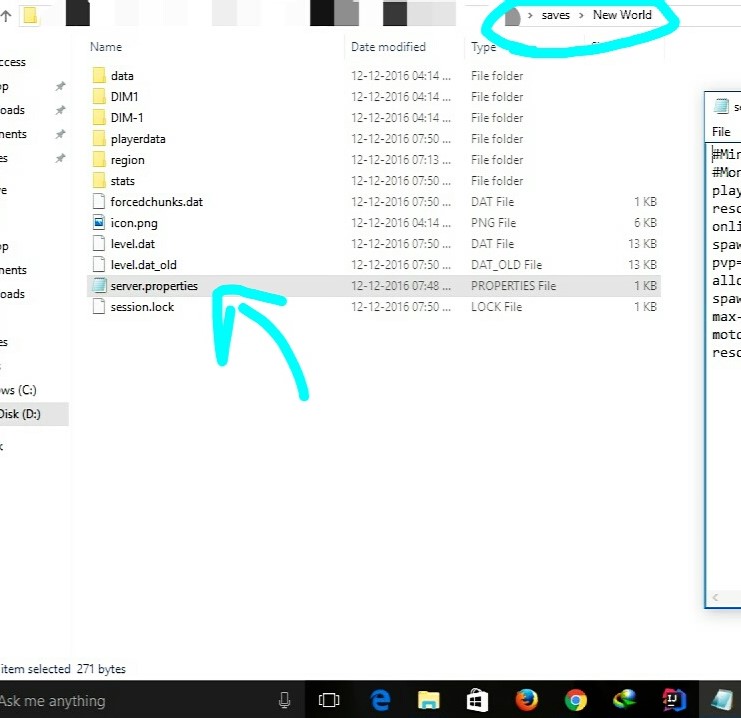
这意味着现在可以为本地世界配置服务器的所有设置了。
不过,它并不提供多人服务器的全部设置……仅提供那些在游戏中无法编辑的实用设置
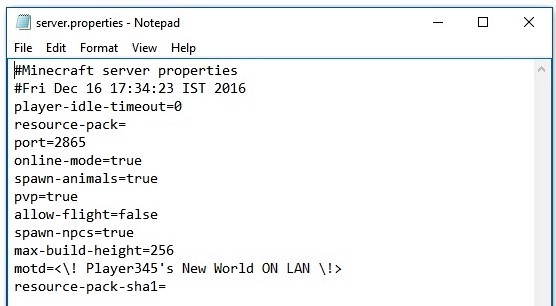
目前,它会创建包含以下选项的 server.properties 文件:--


运行要求:--
- Minecraft 1.8.9+ / Minecraft 1.7.x
- Minecraft Forge
它应能在 1.8.9 之后的所有版本(包括当前的 1.7.x)上运行
……如果你想将世界开放为局域网,并邀请互联网上的好友加入……
借助新的 端口配置 选项,你可以轻松实现这一目标。
让我来解释一下具体操作……
- 为了让互联网上的人能够检测到你的服务器(已开放为局域网),
-
他们必须能够在你服务器运行的端口上与你的服务器通信。
- 为此,你需要告知你的路由器(调制解调器设备)将该端口的所有流量路由到你(本地 IP)。
-
这通过一种称为端口转发的方法来实现
- 通常,端口转发需要手动设置你的路由器,然而
-
有一种被称为UPnP 端口映射
EASY(简单)的方法 - 对此,我推荐使用任何UPnP 端口转发应用程序来将你运行服务器的 PC 的服务器端口进行转发。
- Windows 用户请使用此工具……!(点击此处)
- 在进行端口转发之前,你需要在本地防火墙中为你的端口添加例外规则。
- (仅限一次性操作,针对特定端口号)
- 在 Windows 中进行此操作……请前往防火墙设置 -> 高级防火墙设置 ->
- 并在入站和出站部分中都新建一条规则。
- 每个部分应包含两条新规则,以允许你的端口通过 TCP 和 UDP 协议通行。
- 因此总共会有四条规则。
- 完成端口转发(TCP 和 UDP)后,你所需要做的就是将你的公网 IP提供给你的朋友。
- 在 Google 中搜索“我的 IP”,它将显示你的公网 IP。
- 为了连接到你的服务器,你的朋友需要将你的服务器添加到他们的服务器列表中,服务器地址设置为
-
<你的公网IP>:<服务器端口>
就这样 ...!
完成后,你的朋友将能够通过互联网连接到你的局域网世界 ...!
更新日志
GitHub 重置
重置 GitHub 页面以设置多版本环境,并为改版做准备。
对丢失的 Issues、Forks 以及所有仓库数据表示歉意。
v2.65-1.7.x
- 移植至 Minecraft 1.7.x...!
v2.65
- 添加了版本检查功能。
- 更新了 mcmod.info
- 进行了一些微小的代码优化。
- 模组 ID 更改为 'splan'。
v2.6
- 修复了一个导致端口号忽略所提供设置的错误。
- 现在将端口设置为 0 会使用随机端口。
v2.5
- 修复了非 Windows 操作系统上的文件路径问题。
v2.4
- 添加了全局配置文件,位于名为 "serverGlobalConfig.properties" 的 config 文件夹中。
- 在本地配置文件中添加了选项 "overrideGlobalDefaults",以便在需要时覆盖全局设置。
- 不要忘记将 "overrideGlobalDefaults" 设置为 true,以便使用本地属性文件。
v2.3
- 修复了反射混淆问题。(maxViewDistance 和 maxPlayers 现在可以正常工作!)
- 更新至最新的 MCP Mappings。
v2.2
- 修复了导致首次运行时出现致命错误并显示服务器已满的问题...!
- 为服务器添加了 max-view-distance (将其设置为 任何小于 0 的数字以使用原版 Minecraft 的默认行为)...!
v2.1
- 添加了 MaxPlayers 配置支持...!
- 添加了白名单支持(Reflection)...
- 注意:
- 白名单功能使用的是 Minecraft 服务器生成的 whitelist.json 文件。
- 查看 此处 关于 whitelist.json 文件的配置说明。
- 需手动配置 whitelist.json 文件。
- !...你还需要在其中填入你自己的 UUID 和用户名...!
- 只有当 server.properties 文件中将 white-list 设置为 true 时,才会创建 whitelist.json 文件。
- 首次运行时,若将白名单设置为 true,则白名单功能无法正常工作。
- 在首次将白名单设置为 true 运行后,必须停止服务器并重新启动。
v2
- 端口设置支持 (将端口设置为 0 以使用原版随机端口)(核心模组)
- 错误修复
v1
- 初始版本发布。
安装步骤:--
- 从此处下载 .jar 文件。
- 将其粘贴到您的 mods 文件夹中。
- 完成!
若要应用 server.properties 文件中设置的更改,
...你只需关闭世界并重新打开即可...
... 无需重启 Minecraft ...!
在以下位置查看源代码
< 文档记录完善 :) >
同时请查看 Custom DiscordRPC
它支持自定义 Discord Rich Presence(富文本)
并且你可以使用 JavaScript...!
欢迎在任何整合包中使用此模组。
LAN Server Properties Modifier
Ever thought of playing offline Modded Minecraft Multiplayer with friends...
but realized that setting up a server is really annoying !
Well then... This Mod Is For YOU .!
To know how to play on LAN shared worlds over The Internet please scroll down
Server.Properties for LAN is a mod which creates a server.properties file inside every world folder and forces your LAN World to use the settings in this file. It also creates a serverGlobalConfig.properties file inside the config folder for Global Default properties ...!
This means that all of the settings of a server can now be done for a Local World.
It, however, does not provide all the settings of a Multiplayer Server... ...but only provides the useful ones which are not editable in-game
Currently, it creates the server.properties file with the following options:--
Requirements:--
- Minecraft 1.8.9+/Minecraft 1.7.x
- Minecraft Forge
IT SHOULD WORK ON ALL VERSIONS AFTER 1.8.9(+NOW 1.7.x)
...If you want to Open the world for LAN and invite your friends over the internet to join...
With the new Port Config option, you can do just that.
Let me explain how ...
- For the people over The Internet to be able to detect your Server(Open to LAN),
-
they must be able to communicate with you on the Port on which your Server is running.
- To do this you must tell your Router(Modem thingy) to route all traffic on that Port to you(Local IP).
-
This is done by a method called PORT FORWARDING
- Generally Port Forwarding requires setting up your router manually, however
-
There is an EASY way called UPNP Port Mapping
- For this, I recommend any UPNP Port Forwarding application to forward your server's port to your PC running the server.
- Use this for Windows...!(Click Here)
- Before Forwarding the Port, you need to put an exception for your Port in your local Firewall.
- (One time process only, for a particular port number)
- To do this in Windows... Go to Firewall Settings -> Advanced Firewall Settings ->
- And Create a New Rule in both the Inbound and Outbound Sections.
- Each section should have two new rules to allow your Port via TCP and UDP.
- So there will be a total of four rules.
- After you are done with Port Forwarding(TCP and UDP), all you have to do is give your friends your Public IP.
- Search Google for "My IP" and it will tell you your public IP.
- For your friends to connect to your server, they have to add your server to their Server List with the Server Address as
-
<YourPublicIP>:<ServerPort>
And that is it ...!
Once Done, your friends will be able to connect to your LAN world over The Internet ...!
CHANGE-LOG
GitHub Reset
Reset GitHub page to setup multiversion environment and prepare for revamp.
Appologies for lost Issues, Forks and all repo. data.
v2.65-1.7.x
- Ported to Minecraft 1.7.x...!
v2.65
- Added version check function.
- Updated mcmod.info
- Some minor code optimisations.
- ModID changed to 'splan'.
v2.6
- Fixed a bug causing the port number to ignore provided settings.
- Now setting port to 0 uses a random port.
v2.5
- Fixed file path issue on OSs other than Windows.
v2.4
- Added Global Config file, found in the config folder by the name of "serverGlobalConfig.properties".
- Added option "overrideGlobalDefaults" in local config files to override the global settings when needed.
- DO NOT FORGET to set "overrideGlobalDefaults" to true for the local properties file to be used.
v2.3
- Fixed Reflection Obfuscation issues.(maxViewDistance and maxPlayers work now !)
- Updated to latest MCP Mappings.
v2.2
- Fixed fatal Bug causing Server-Full in first run...!
- Added max-view-distance for servers(Set it to any number below 0 for default minecraft behavior)...!
v2.1
- Added MaxPlayers config support...!
- Added white-list support(Reflection)...
- NOTE :
- The white-list feature works using the whitelist.json file made by Minecraft Servers.
- See the configuration for the whitelist.json file Here.
- The whitelist.json file should be manually configured.
- !...YOU NEED TO PUT YOUR OWN UUID AND USERNAME IN IT TOO...!
- The whitelist.json file is only created if white-list is set to true in the server.properties file.
- On the first run, with white-list set to true, the white-list feature DOES NOT WORK.
- The server must be Stopped and Started again after the first run with white-list set to true.
v2
- Port Setup Support (Set Port to 0 for Vanilla Random Port)(CoreMod)
- Bug Fixes
v1
- Initial release.
Steps To Install:--
- Download the .jar file from here.
- Paste it into your mods folder.
- Done!
To Apply The Changes In Settings Of The server.properties File,
...You Only Have To Close Your World And Open It Again...
... NO NEED TO RESTART MINECRAFT ...!
View Source At
< It Is Well Documented :) >
Also checkout Custom DiscordRPC
It allows custom Discord rich text
and you can use JavaScript...!
Feel free to use this in any mod pack.
下载 Server.Properties for LAN
需要联机服务器吗?
稳定流畅、一键部署,几分钟即可和朋友联机开服
最低仅需 8 元/月 即可畅快联机
下载 Server.Properties for LAN
需要联机服务器吗?
稳定流畅、一键部署,几分钟即可和朋友联机开服
最低仅需 8 元/月 即可畅快联机
下载 Server.Properties for LAN
需要联机服务器吗?
稳定流畅、一键部署,几分钟即可和朋友联机开服
最低仅需 8 元/月 即可畅快联机
下载 Server.Properties for LAN
需要联机服务器吗?
稳定流畅、一键部署,几分钟即可和朋友联机开服
最低仅需 8 元/月 即可畅快联机
下载 Server.Properties for LAN
需要联机服务器吗?
稳定流畅、一键部署,几分钟即可和朋友联机开服
最低仅需 8 元/月 即可畅快联机
下载 Server.Properties for LAN
需要联机服务器吗?
稳定流畅、一键部署,几分钟即可和朋友联机开服
最低仅需 8 元/月 即可畅快联机
下载 Server.Properties for LAN
需要联机服务器吗?
稳定流畅、一键部署,几分钟即可和朋友联机开服
最低仅需 8 元/月 即可畅快联机
下载 Server.Properties for LAN
需要联机服务器吗?
稳定流畅、一键部署,几分钟即可和朋友联机开服
最低仅需 8 元/月 即可畅快联机
下载 Server.Properties for LAN
需要联机服务器吗?
稳定流畅、一键部署,几分钟即可和朋友联机开服
最低仅需 8 元/月 即可畅快联机
v2.65-1.7.x
- 移植至 Minecraft 1.7.x...!
关于这个资源的讨论、问题反馈与使用心得
还没有讨论,来发第一帖吧
你是这个资源的作者?登录后可认领此资源。
相似资源
 模组

一个基于构建器的 Minecraft 配置库!
 模组
? 使用命令保存和加载玩家或他人的背包/套装。
 模组

一款轻量级模组,允许服务器管理员对抗透视作弊者。
 模组
恢复所有账户的游戏聊天访问权限
 模组

通过图形界面控制模组加载。适用于需要可选功能的整合包和服务器,也适合不想手动操作文件而希望直接管理模组的极客用户。
 模组

实体tick优化
评论 0
登录后参与评分
还没有评论,来抢沙发吧