
Server Waypoint
让你的世界探索更轻松。
与社区分享有用的地点,帮助玩家在你的世界中找到方向。
Server Waypoint 提供共享目的地、跨服务器传送、导航和可点击的聊天命令。玩家可以使用原版客户端使用服务器功能。可选的客户端模组增加了游戏内标记、路点管理器以及地图集成。
跨越服务器,更紧密相连
可选的 Velocity 集成允许玩家在连接的服务器上浏览共享路点,并在获准时进行跨服务器传送。无需客户端模组,即可通过可点击的聊天消息实现跨服务器浏览和传送。
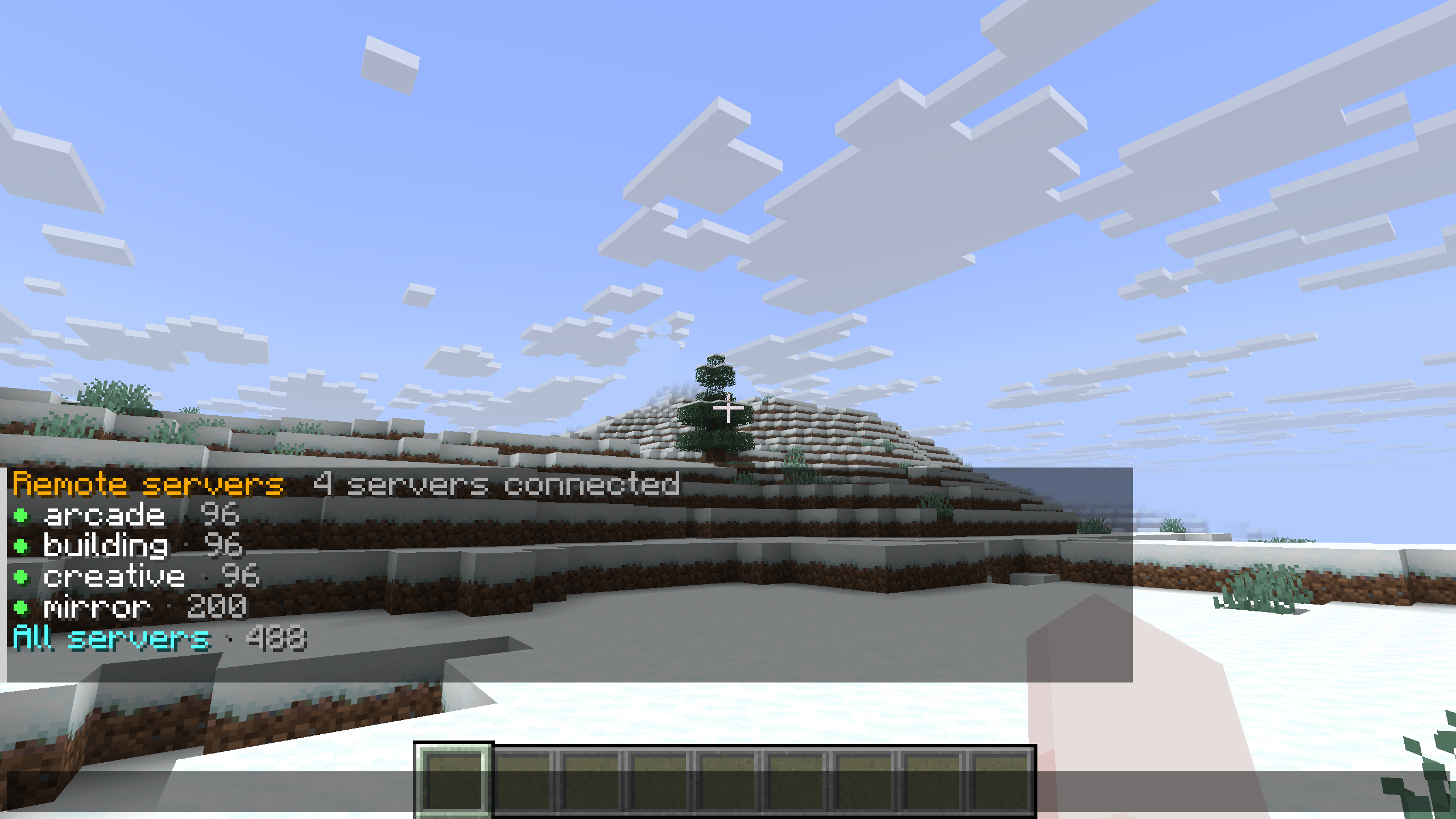
在网络上使用聊天。 运行 /wp remote 以在没有客户端模组的情况下进行浏览。聊天视图列出已连接的服务器及其可用状态指示器和路点数量,并提供 所有服务器 选项以便一起浏览。
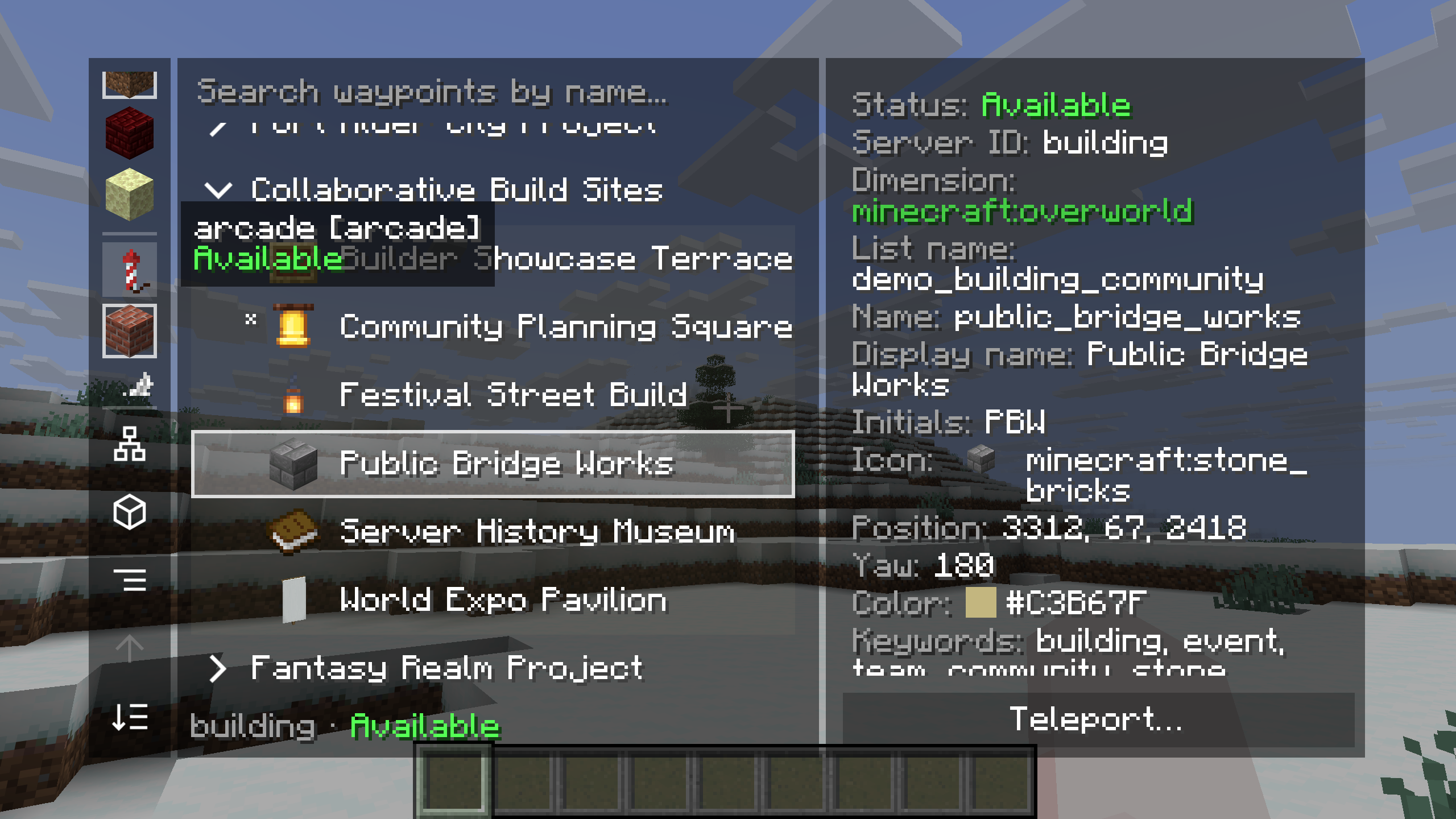
浏览其他服务器的地点。 在客户端管理器中,选择一个远程服务器并浏览其列表。此处,建筑服务器的“协作建造地点”列表包含“公共桥梁工程”。详细信息面板显示服务器的可用性、目的地的属性以及一个 传送 操作。
跨服务器传送遵循服务器的权限设置。要编辑远程路点,请加入拥有该路点的服务器。
按你的方式跟随路线
选择你在旅行中感到舒适的引导方式。带标签的示例显示了所有五种服务器导航方法同时指向 Festival Green。
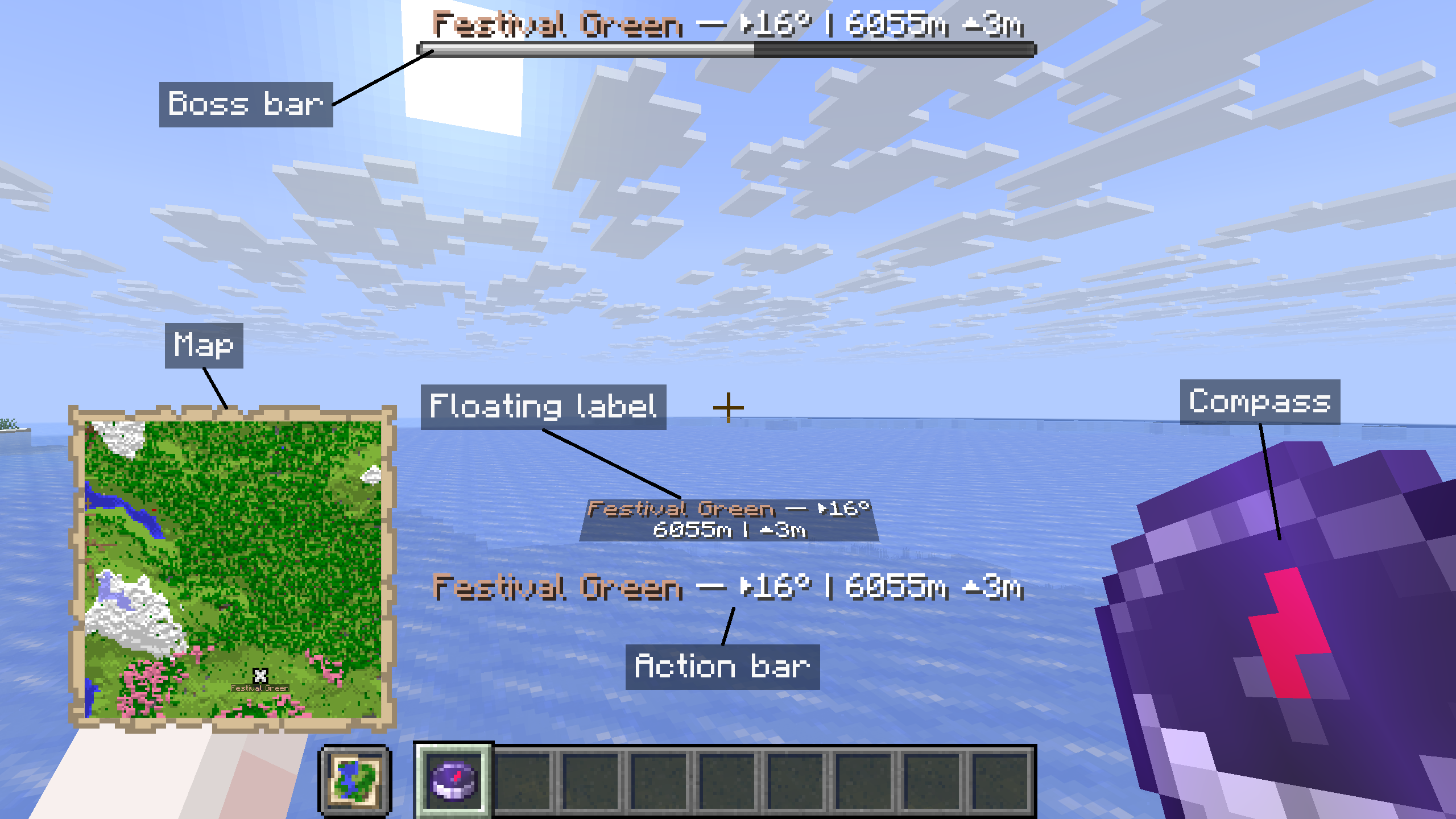
- 指南针和地图: 跟随指南针前往目的地,或在导航地图上找到其标记。
- Boss 栏和动作栏: 在屏幕上保留目的地的名称、方向、距离和高度差。
- 浮动标签: 在世界内查看目的地的引导信息。
使用 /wp navigate 更改你的导航方法或停止导航。所有五种方法均由服务器提供,且无需客户端模组即可工作。
使用可点击的命令进行浏览和管理
从 Minecraft 的聊天界面浏览和管理路点。服务器提供可点击的列表、悬停详情和路点操作,因此玩家可以使用原版客户端立即上手。
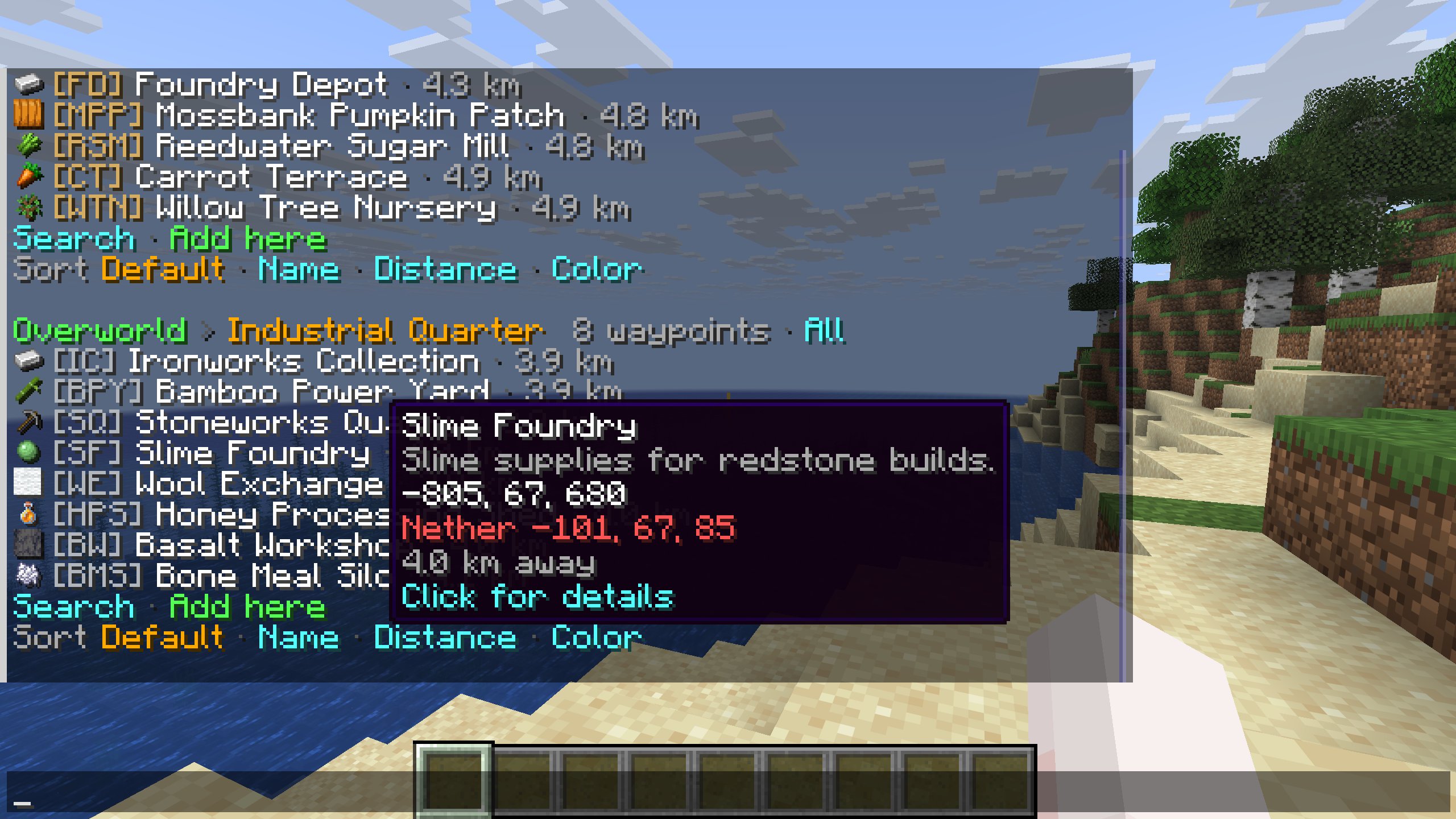
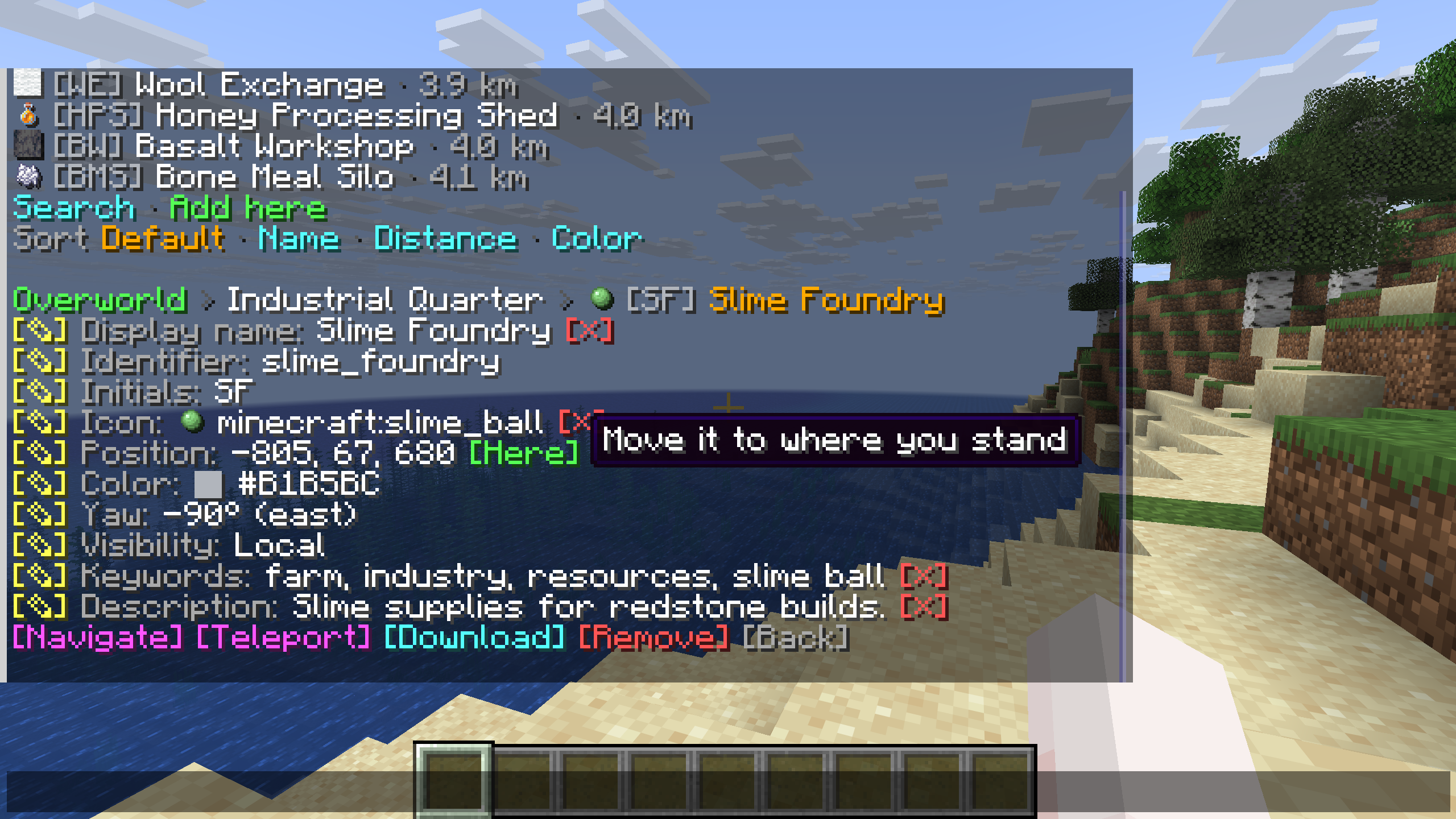
出发前浏览。 打开 /wp 查看按维度列表分组的行路点,其名称旁边带有图标和距离。可以搜索或更改排序顺序,并将鼠标悬停在目的地上以阅读其描述和坐标。示例显示了工业区列表中的“史莱姆工厂”。
在一个地方查看详情和操作。 选择一个路点以查看其属性和可用的编辑控件。详情视图包括导航、传送、下载或删除路点的操作。悬停提示会解释控件,例如 Here(将保存的位置移动到你站立的地方)。
服务器的权限决定了每个玩家可以使用哪些操作。消息遵循每个玩家的 Minecraft 语言设置。
为每个目的地赋予独特风格
共享路点的显示名称和描述支持 JSON 文本组件,因此你可以为每个目的地组合颜色和文本样式。截图展示了客户端模组如何在管理器和游戏内标记中显示这些共享格式。
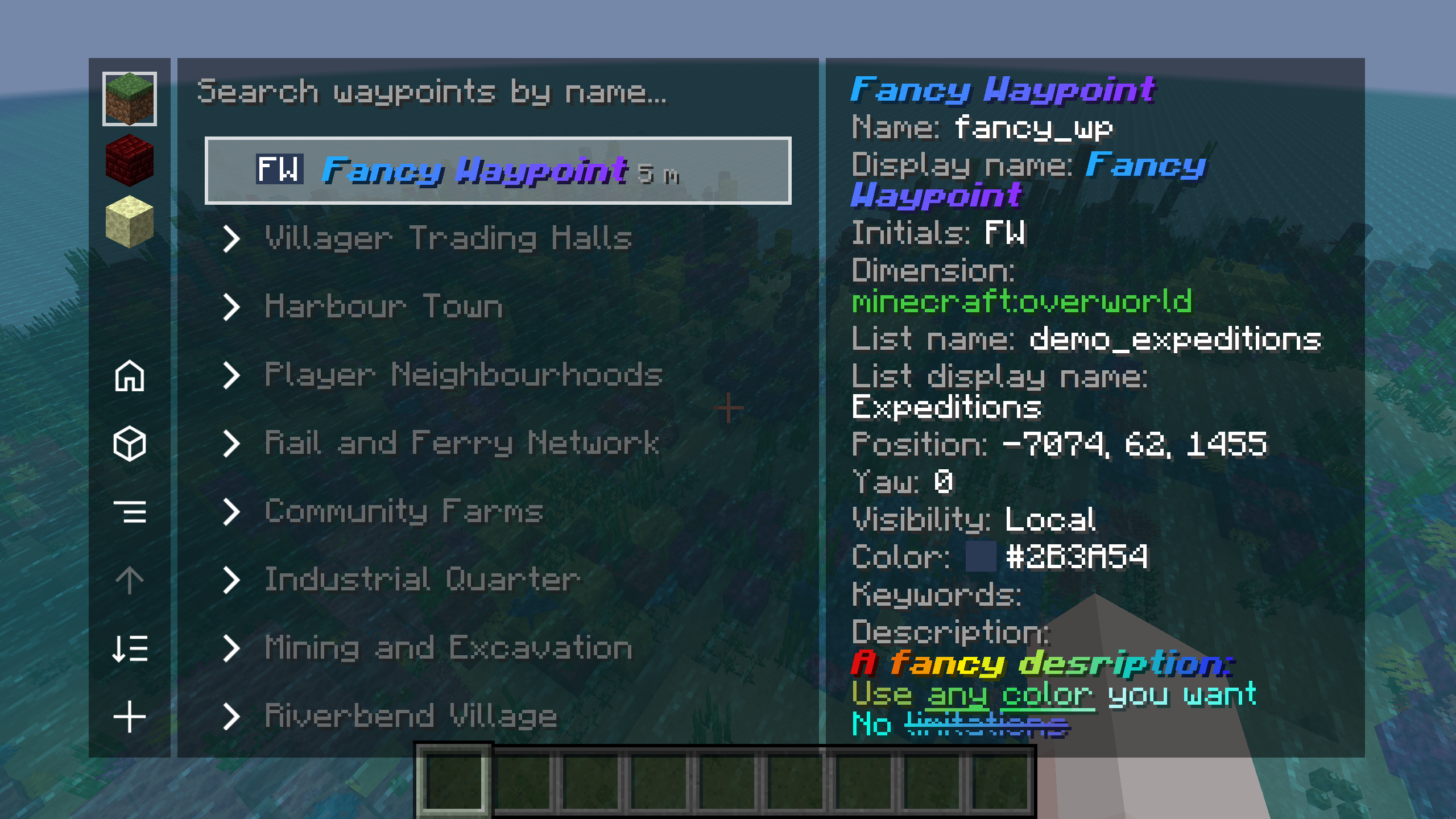
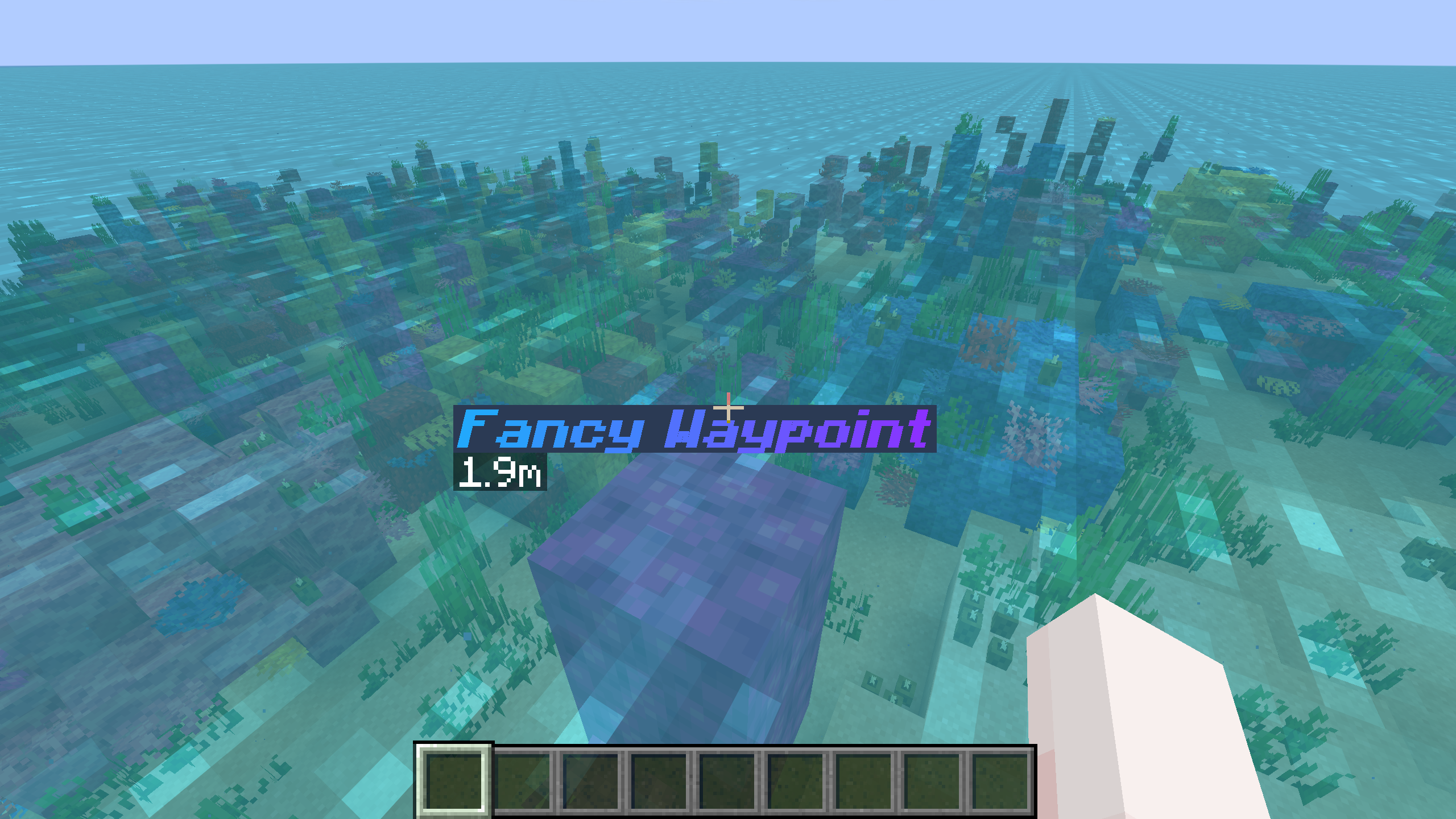
管理器和游戏中均有样式化的名称。 示例使用了 Fancy Waypoint,其显示名称为蓝色到紫色的粗斜体。这种格式会出现在路径点列表、详情面板以及游戏内的标记中。
具有独立格式的描述。 详情面板展示了一个包含多种文本样式的多色描述。你可以使用相同的格式来突出方向或添加关于地点的上下文信息。
用于命令的独立标识符。 样式化的显示名称属于标识为 fancy_wp 的路径点。你可以在通过路径点的编辑控件或 /wp edit 命令编辑显示名称和描述时,保留一个简单的标识符供命令使用。
整个世界,井然有序
客户端管理器将路径点列表和目的地详情整合到一个视图中。选择维度、按名称搜索或展开列表以浏览其中的地点。
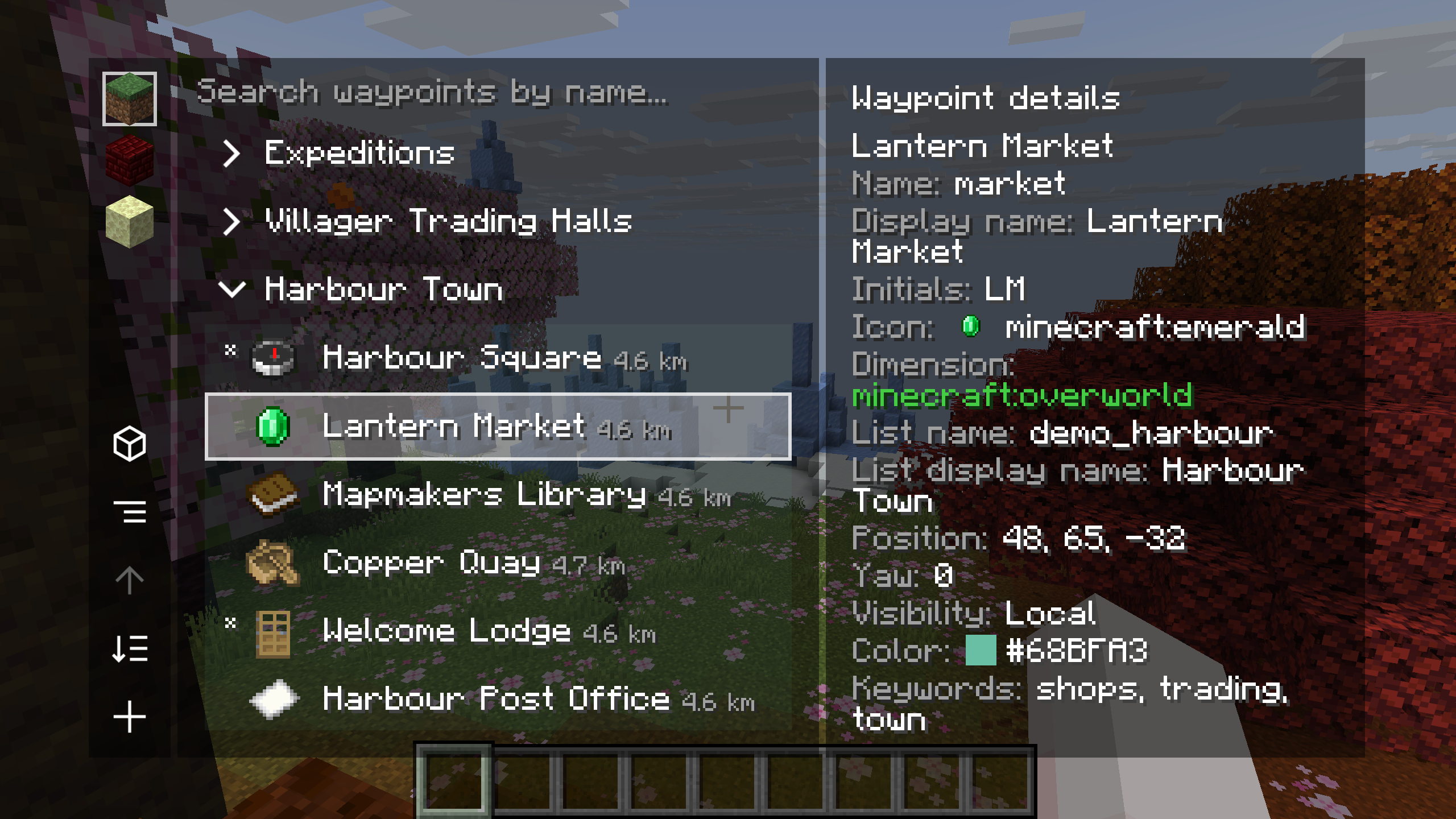
你共享地点的列表。 此处展开了 Harbour Town,选中了 Lantern Market,旁边还有 Harbour Square、Mapmakers Library 和其他目的地。物品图标和距离有助于区分各个条目。详情面板显示了所选路径点的标识符、显示名称、缩写、坐标、可见性、颜色和关键词。
按下 Right Shift 或输入 /wp_gui 打开管理器。悬停在本地路径点上并按 T 即可传送至该点。可用操作(包括编辑、导航和传送)遵循服务器的权限设置。
你的路径点。你最爱用的地图。
配合 Xaero's Minimap 或支持的 VoxelMap-Updated 版本使用共享目的地。示例展示了 Shared Waypoint 在小地图中的显示效果及其在游戏内的标记。
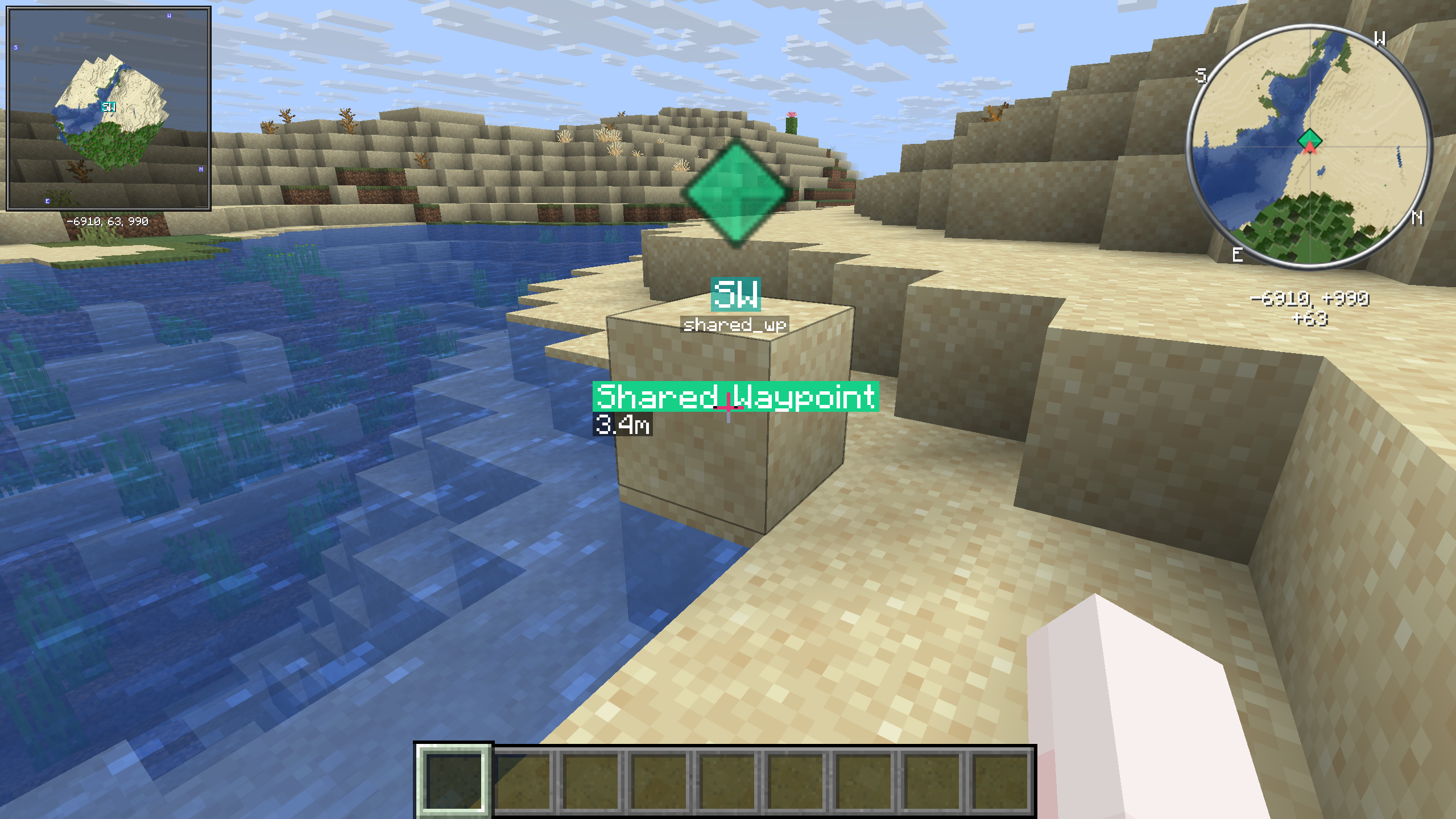
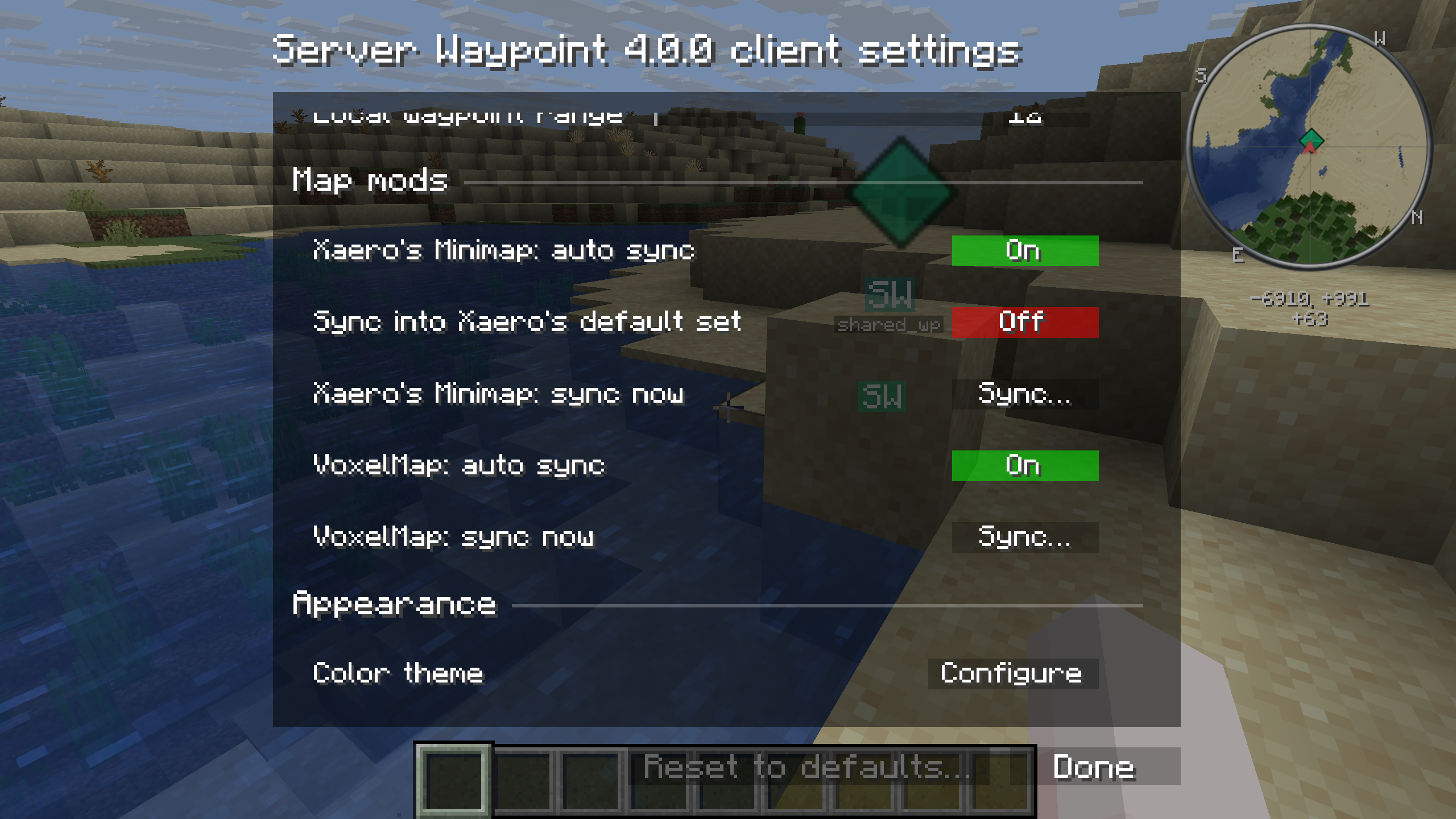
选择同步时机。 在路径点管理器中按下 C 可打开客户端配置界面。客户端设置提供了针对 Xaero 和 VoxelMap 的独立自动同步开关以及手动 Sync 按钮。截图中两者的自动同步均已启用,但向 Xaero 默认集合同步的功能已禁用。
拥有权限时,你也可以上传地图路径点。安装 Xaero's World Map 并与 Xaero's Minimap 一起使用时,它提供了添加和编辑服务器路径点的操作。
探索途中,共享地点一览无余
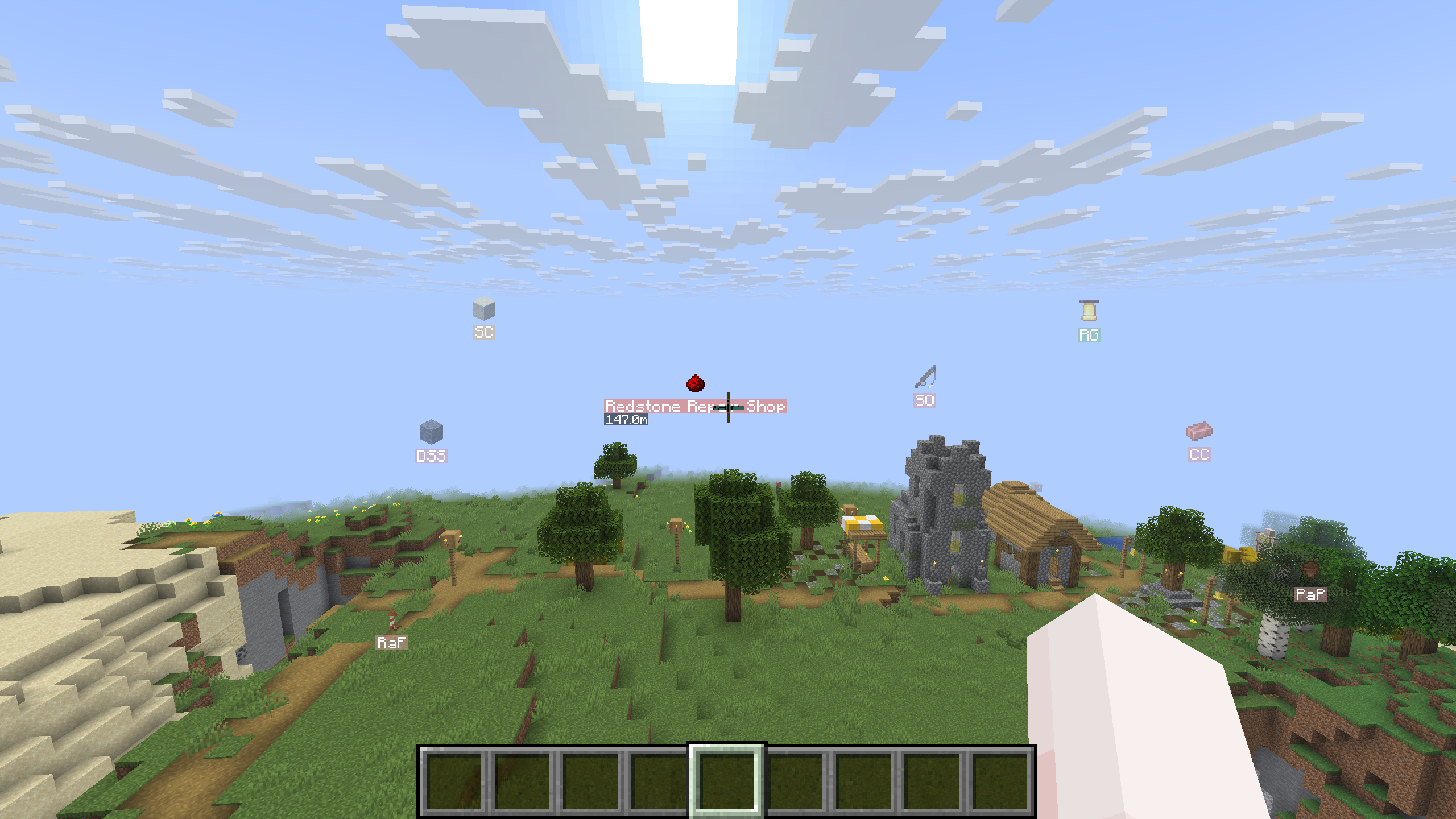
客户端模组会在游戏中以物品图标、颜色和首字母显示路径点。看向某个标记即可查看其显示名称和距离。
按需安装
对于服务器
安装匹配的 Fabric、Forge 或 NeoForge 模组,或 Paper、Folia 或 Purpur 插件。加入后,运行 /wp 浏览路径点并开始使用。
对于联网网络
安装可选的 Velocity 插件,并配置后端服务器以共享路径点。跨服务器支持默认关闭,且需要匹配的版本。代理插件要求 Java 25。
对于客户端标记和管理器
安装客户端模组及其下载页面列出的依赖项。Fabric 需要 Fabric API。你也可以在单人游戏中使用该模组。
迁移 MCDR 路径点
从 MCDReforged (MCDR) 插件 Locations 或 LocationMarker 迁移?请使用 locations2waypoints.py 转换你的 locations.json。它需要 Python 3,无需额外包。
-
备份
locations.json和现有的 Server Waypoint 文件,然后停止服务器。 -
下载脚本,在其文件夹中打开终端并运行:
python3 locations2waypoints.py "/path/to/locations.json"如果没有提供文件参数,脚本会提示你输入路径。
-
查看有关被跳过条目的任何消息。脚本会在源文件旁边创建一个
waypoints/文件夹,并在诸如minecraft$overworld.json的文件中为每个维度生成一个locations列表。它会保留名称和描述,将坐标向下取整至方块位置,并使路径点对所有玩家可见。 -
将生成的 JSON 文件复制到服务器根目录下的相应文件夹中:
服务器平台 路径点文件夹 Fabric config/server_waypoint/waypoints/Forge 或 NeoForge defaultconfigs/server_waypoint/waypoints/Paper, Folia 或 Purpur plugins/ServerWaypoint/waypoints/
如果目标文件已存在,请手动将生成的 locations 列表合并到其 JSON 数组中;如果 locations 已被占用,请选择其他列表名称。替换维度文件会移除其现有的航点列表。转换器不会合并文件,并且拒绝覆盖其已有的输出文件。
5. 启动服务器并运行 /wp list 以浏览导入的列表。航点文件需要重启;/wp reload 不会重新加载它们。
无效的条目和维度内的重复名称将被跳过并附带提示信息。在结束前请保留源文件并检查转换输出结果。
打造值得探索的目的地
社区 Discord | 报告错误
欢迎加入社区、报告问题或协助翻译。消息遵循每位玩家的 Minecraft 语言设置;有关语言覆盖范围,请参阅 翻译贡献者和审核状态。
Server Waypoint
Make your world easier to explore.
Share useful places with your community and help players find their way around your world.
Server Waypoint provides shared destinations, cross-server teleportation, navigation and clickable chat commands. Players can use the server features with a vanilla client. The optional client mod adds in-world markers, a waypoint manager and map integrations.
Across servers, closer together
The optional Velocity integration lets players browse shared waypoints on connected servers and teleport between them when permitted. Cross-server browsing and teleportation are available through clickable chat without the client mod.
Use chat across the network. Run /wp remote to browse without the client mod. The chat view lists connected servers with availability indicators and waypoint counts, with an All servers option for browsing them together.
Browse another server's places. In the client manager, choose a remote server and explore its lists. Here, the building server's Collaborative Build Sites list contains Public Bridge Works. The details panel shows the server's availability, the destination's properties and a Teleport action.
Cross-server teleportation follows the server's permissions. To edit a remote waypoint, join the server that owns it.
Follow the route your way
Choose the guidance that feels comfortable as you travel. The labeled example shows all five server navigation methods pointing to Festival Green at the same time.
- Compass and map: follow the compass toward the destination or find its marker on the navigation map.
- Boss bar and action bar: keep the destination's name, direction, distance and height difference on screen.
- Floating label: see the destination's guidance within the world.
Use /wp navigate to change your navigation methods or stop navigation. All five methods are provided by the server and work without the client mod.
Browse and manage with clickable commands
Browse and manage waypoints from Minecraft's chat. The server provides clickable lists, hover details and waypoint actions, so players can get started with a vanilla client.
Browse before you travel. Open /wp to view waypoints grouped by dimension and list, with icons and distances beside their names. Search or change the sort order, and hover over a destination to read its description and coordinates. The example shows Slime Foundry in the Industrial Quarter list.
Details and actions in one place. Select a waypoint to see its properties and the available edit controls. The detail view includes actions to navigate, teleport, download or remove the waypoint. Hover hints explain controls such as Here, which moves the saved position to where you are standing.
The server's permissions determine which actions each player can use. Messages follow each player's Minecraft language setting.
Give every destination its own style
Shared waypoint display names and descriptions support JSON text components, so you can combine colors and text styles for each destination. The screenshots show how the client mod displays that shared formatting in the manager and in-world markers.
Styled names in the manager and the world. The example uses Fancy Waypoint, with a blue-to-purple display name in bold italics. Its formatting appears in the waypoint list, the details panel and the in-world marker.
Descriptions with their own formatting. The details panel shows a multicolored description with several text styles. You can use the same format to highlight directions or add context about a place.
A separate identifier for commands. The styled display name belongs to the waypoint identified as fancy_wp. You can keep a simple identifier for commands while editing the display name and description through the waypoint's edit controls or /wp edit.
Learn about identifiers and display names
A whole world, neatly organized
The client manager brings waypoint lists and destination details into one view. Choose a dimension, search by name or expand a list to browse its places.
Lists for the places you share. Harbour Town is expanded here, with Lantern Market selected alongside Harbour Square, Mapmakers Library and other destinations. Item icons and distances help distinguish entries. The details panel shows the selected waypoint's identifier, display name, initials, coordinates, visibility, color and keywords.
Open the manager with Right Shift or /wp_gui. Hover over a local waypoint and press T to teleport to it. Available actions, including editing, navigation and teleportation, follow the server's permissions.
Your waypoints. Your favorite map.
Use shared destinations with Xaero's Minimap or supported VoxelMap-Updated builds. The example shows Shared Waypoint in both minimaps alongside its in-world markers.
Choose when to sync. Press C in the waypoint manager to open the client configuration screen. Client settings provide separate automatic synchronization toggles and manual Sync buttons for Xaero and VoxelMap. The screenshot has automatic sync enabled for both, while syncing into Xaero's default set is disabled.
You can also upload map waypoints when you have permission. Xaero's World Map offers actions for adding and editing server waypoints when installed alongside Xaero's Minimap.
Check map and version compatibility
Shared places, visible as you explore
The client mod shows waypoints in the world with item icons, colors and initials. Look toward a marker to see its display name and distance.
Install it your way
For a server
Install the matching Fabric, Forge or NeoForge mod, or the Paper, Folia or Purpur plugin. Once you join, run /wp to browse waypoints and get started.
For a connected network
Install the optional Velocity plugin and configure the backend servers to share waypoints. Cross-server support is off by default and requires matching versions. The proxy plugin requires Java 25.
For client markers and the manager
Install the client mod with the dependencies listed for your download. Fabric requires Fabric API. You can also use the mod in singleplayer.
Migrate your MCDR waypoints
Moving from the MCDReforged (MCDR) plugins Locations or LocationMarker? Use locations2waypoints.py to convert your locations.json. It requires Python 3 with no extra packages.
-
Back up
locations.jsonand your existing Server Waypoint files, then stop the server. -
Download the script, open a terminal in its folder and run:
python3 locations2waypoints.py "/path/to/locations.json"Without a file argument, the script prompts you for the path.
-
Review any messages about skipped entries. The script creates a
waypoints/folder beside your source file, with alocationslist for each dimension in files such asminecraft$overworld.json. It keeps names and descriptions, rounds coordinates down to block positions and makes the waypoints shared with all players. -
Copy the generated JSON files into the appropriate folder under your server root:
Server platform Waypoint folder Fabric config/server_waypoint/waypoints/Forge or NeoForge defaultconfigs/server_waypoint/waypoints/Paper, Folia or Purpur plugins/ServerWaypoint/waypoints/If a destination file already exists, manually merge the generated
locationslist into its JSON array; choose another list name iflocationsis already taken. Replacing a dimension file removes its existing waypoint lists. The converter does not merge files and refuses to overwrite its own existing output files. -
Start the server and run
/wp listto browse the imported lists. Waypoint files require a restart;/wp reloaddoes not reload them.
Invalid entries and duplicate names within a dimension are skipped with a message. Keep your source file and review the conversion output before finishing.
Build somewhere worth finding
Community Discord | Report a bug
You're welcome to join the community, report an issue or help translate. Messages follow each player's Minecraft language setting; see the translation credits and review status for language coverage.

下载 Server Waypoint
需要联机服务器吗?
稳定流畅、一键部署,几分钟即可和朋友联机开服
最低仅需 8 元/月 即可畅快联机
下载 Server Waypoint
需要联机服务器吗?
稳定流畅、一键部署,几分钟即可和朋友联机开服
最低仅需 8 元/月 即可畅快联机
下载 Server Waypoint
需要联机服务器吗?
稳定流畅、一键部署,几分钟即可和朋友联机开服
最低仅需 8 元/月 即可畅快联机
下载 Server Waypoint
需要联机服务器吗?
稳定流畅、一键部署,几分钟即可和朋友联机开服
最低仅需 8 元/月 即可畅快联机
下载 Server Waypoint
需要联机服务器吗?
稳定流畅、一键部署,几分钟即可和朋友联机开服
最低仅需 8 元/月 即可畅快联机
下载 Server Waypoint
下载 Server Waypoint
下载 Server Waypoint
需要联机服务器吗?
稳定流畅、一键部署,几分钟即可和朋友联机开服
最低仅需 8 元/月 即可畅快联机
下载 Server Waypoint
下载 Server Waypoint
更新日志
Server Waypoint 4.0.1
此补丁版本专注于提升服务器性能,并使与 Xaero's Minimap 和 VoxelMap 的路点同步更加可靠。
改进
- 减少了玩家在加入游戏、切换维度或权限被更新时因命令相关的暂停。现有的命令选项和补全建议仍然可用。
- 降低了导航罗盘和地图对服务器的负载,特别是在进行物品栏交互或在拥有大量活跃容器(containers)的服务器上。
- 在搜索大型路点集合和显示命令补全建议时,减少了内存占用。
- 当玩家重生或切换维度时,Xaero's Minimap 会避免不必要的路点刷新。
错误修复
- 修复了在未发生任何路点变更的情况下重新连接后,部分服务器端路点可能无法在 Xaero's Minimap 或 VoxelMap 中显示的问题。你不再需要使用 立即同步(Sync now)来让它们重新出现。
- 自动地图同步现在会等待地图模组加载当前世界后再进行。
- 修复了在 Paper 和 Folia 上,导航物品会被放置到空的 Bundle(聚珍瓶/收纳袋)中的问题。
导航物品变更
- 已经存储在 Bundle(聚珍瓶/收纳袋)、潜影盒或其他容器内的导航物品将保留原位。将它们放入 Bundle 或打开的潜影盒中仍然会被阻止。
- Paper 和 Folia 不再在漏斗或其他自动化容器传输过程中检查导航物品。
- Fabric、Forge 和 NeoForge 不再反复扫描悦灵(allays)和掉落物。向悦灵提供导航物品的行为仍然被阻止,掉落的导航物品仍会被移除。
更新说明
- 兼容 4.0.0 版本的客户端、服务器以及 Velocity 代理。请更新客户端模组以修复地图同步问题,并更新服务器端模组或插件以获得服务器端的改进。
关于这个资源的讨论、问题反馈与使用心得
还没有讨论,来发第一帖吧
你是这个资源的作者?登录后可认领此资源。
相似资源
 模组

显示你正在注视的方块的信息。(适用于 Minecraft 1.16+ 的 Hwyla/Waila 分支)
 模组

查看物品与配方
 模组
在游戏画面角落显示附近世界地形、玩家、生物和实体的地图。可创建路径点,帮助你找到标记过的位置。
 模组
使用 JavaScript 编辑配方、添加自定义物品、编写世界事件!
 模组
AE2:一款流行的自动化与存储模组
 模组
添加区块认领和玩家组队功能,并与 Xaero's Minimap 和 World Map 集成
评论 0
登录后参与评分
还没有评论,来抢沙发吧