
一个简单的设置管理器库,实现了 YACL 以轻松为 Mod Menu 生成配置界面。
如果你想使用此模组为你的模组生成配置菜单,我建议联系我,因为随着模组的更新,我可能不会保持此页面及时更新。
注意:此模组本身没有任何功能。它是供其他模组使用的库。
特性:
- 简单快捷的设置
- 易于实现
- 方便访问设置项
- 内置配置文件生成,以便在客户端重启之间保存设置
- 内置染色(chroma)管理器,用于跨文件同步染色功能
- 支持几乎所有 YACL 字段
设置:
将模组添加为依赖项:
在 build.gradle 中
repositories {
    maven { url = "https://api.modrinth.com/maven" }
    maven {
        name = "Terraformers"
        url = "https://maven.terraformersmc.com/"}
    maven {
        name 'Xander Maven'
        url 'https://maven.isxander.dev/releases'}
}

dependencies {
    modImplementation("maven.modrinth:settingsmanagerlib:${project.modmenu_version}")
    modImplementation("com.terraformersmc:modmenu:${project.modmenu_version}")
    modImplementation "dev.isxander:yet-another-config-lib:${project.yacl_version}"
}
在 gradle.properties 中
settingsmanagerlib_version=LATEST_VERSION_NUMBER (例如 1.0.0+1.21.11)
modmenu_version=LATEST_VERSION_NUMBER (例如 15.0.0)
yacl_version=LATEST_VERSION_NUMBER (例如 3.7.1+1.21.6-fabric)
在 fabric.mod.json 中
"entrypoints": {
"modmenu": [ "com.example.mod.ModMenuAPI" ]
}
然后创建一个新的类 ModMenuAPI
public class ModMenuAPI implements ModMenuApi {
	 @Override
	 public ConfigScreenFactory<?> getModConfigScreenFactory() {
			return parentScreen -> ExampleModClient.settings.getConfig(parentScreen);
	 }
}
初始化模组:
在 ExampleModClient 中
public static Settings settings;

@Override
public void onInitializeClient() {
	 settings = new Settings().setup("Example Mod", "examplemod");
	 settings.loadFromFile();
}
添加设置项:
注意:支持字符串、布尔值、整数、浮点数、颜色以及自定义枚举。
标准字符串/整数/浮点数
在 ExampleModClient 中
@Override
public void onInitializeClient() {
	 settings.add(String settingId, String page, String group, String/int/float defaultValue, String settingName, String description)

	 settings.add("guiName", "Visual Settings", "Overlay", "Default Gui Name", "Gui Scale", "This text will appear as a tooltip when you click on the option.");
}
整数/浮点数滑块
在 ExampleModClient 中
@Override
public void onInitializeClient() {
	 settings.addSlider(String settingId, String page, String group, int/float defaultValue, String settingName, String description, int/float min, int/float max, int/float step)

	 settings.add("guiScale", "Visual Settings", "Overlay", 1.0f, "Gui Scale", "This text will appear as a tooltip when you click on the option.", 0.5f, 5.0f, 0.1f);
}
布尔值
在 ExampleModClient 中
@Override
public void onInitializeClient() {
	 settings.addSlider(String settingId, String page, String group, boolean defaultValue, String settingName, String description, BooleanFormat valueFormat)

	 settings.add("doRenderGui", "Visual Settings", "Overlay", true, "Render Gui", "This text will appear as a tooltip when you click on the option.", BooleanFormat.ONOFF);
}
BooleanFormat - 布尔值的显示格式:
BooleanFormat.ONOFF- “开”或“关”BooleanFormat.TRUEFALSE- “真”或“假”BooleanFormat.YESNO- “是”或“否”BooleanFormat.TICKBOX- 一个勾选框,选中或未选中状态
颜色
在 ExampleModClient 中
@Override
public void onInitializeClient() {
	 settings.addColor(String settingId, String page, String group, int defaultValue, String settingName, String description)

	 settings.addColor("guiBackgroundColor", "Visual Settings", "Overlay", net.minecraft.util.Colors.GRAY, "Gui Background Color", "This text will appear as a tooltip when you click on the option.");
}
自定义枚举
文档即将推出。请联系获取详情请注意,设置项的值在重启客户端后会自动持久化,但你仍然需要将它们添加到配置菜单中,这可以通过在 onInitializeClient() 内部创建配置菜单来实现。
访问值:
获取设置项的值:
要获取设置项的值,请使用以下方法,其中 typeInstance 是一个与你正在获取的设置项值类型相同的值。请参阅下面的示例了解具体实现。注意,settings.get() 的第二个参数无关紧要;只要其类型与返回类型相同即可。
ExampleModClient.settings.get("settingId", typeInstance);

ExampleModClient.settings.get("doRenderGui", true); // 返回布尔值
ExampleModClient.settings.get("guiBackgroundColor", net.minecraft.util.Colors.GRAY); // 返回颜色
ExampleModClient.settings.get("guiScale", 1.0f); // 返回浮点数
ExampleModClient.settings.get("guiName", "Default Gui Name"); // 返回字符串
ExampleModClient.settings.get("guiSliderMin", 1); // 返回整数
设置设置项的值:
默认情况下,设置项的值会被设置为其默认值,除非用户进行了更改。要手动设置设置项的值,请使用以下方法。
ExampleModClient.settings.set("settingId", newValue);

ExampleModClient.settings.set("doRenderGui", false); // 布尔值示例
页面/分组:
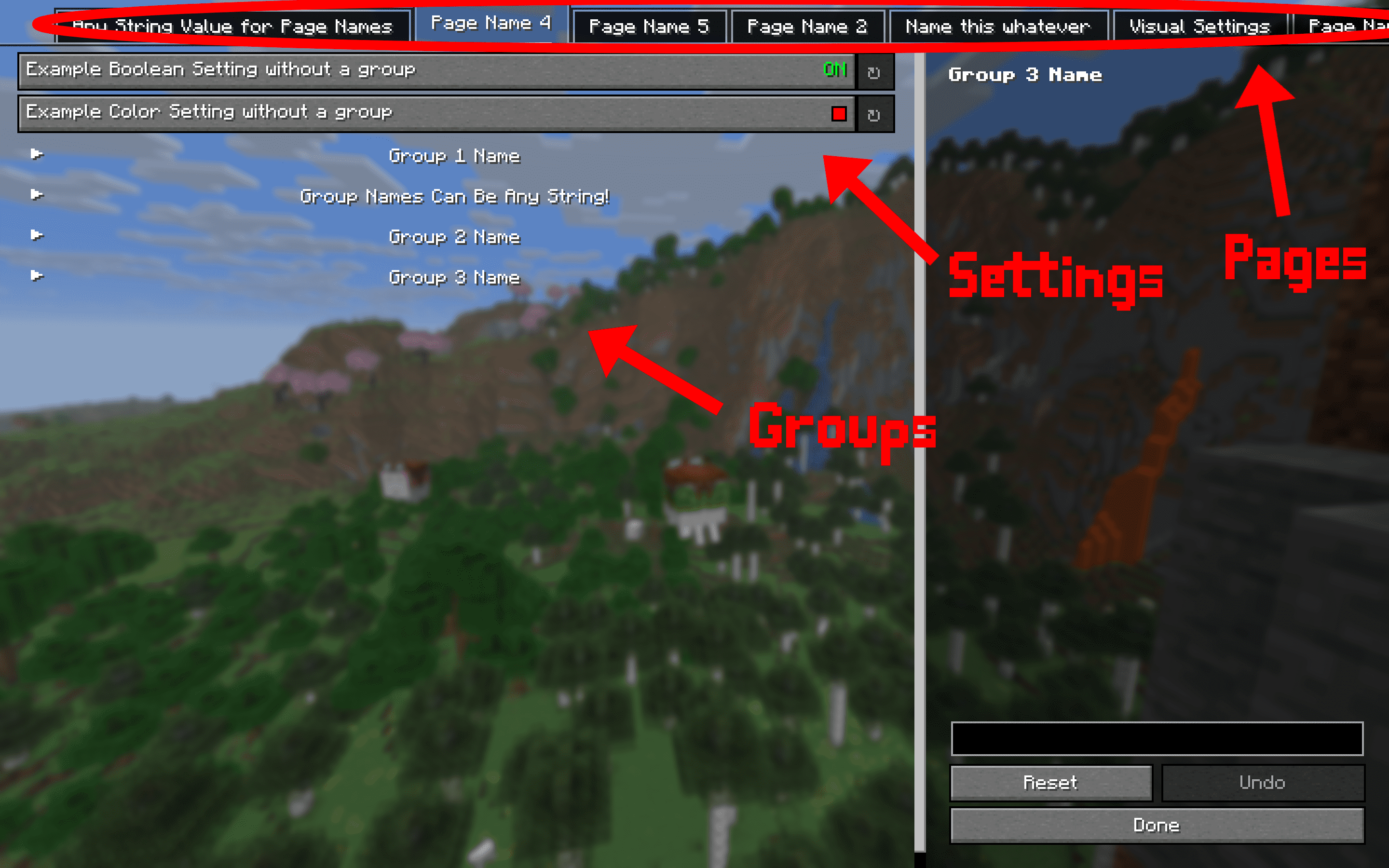
设置按页面和分组进行组织。请参考下图作为示例。页面是顶部的栏,每次只能打开一个页面。分组是可折叠的设置集合。每个页面上可以有无限数量的分组和无限数量的设置。每个设置都必须属于某个页面,但不一定需要分组。若要像下图中那样创建没有分组的设置,请将分组设置为 "" 或 "none"。
依赖项:
此模组需要其他多个模组才能正常运行。
- YACL
- Mod Menu
- Fabric API
A simple settings manager library, which implements YACL to easily generate config screens for Mod Menu.
If you would like to use this mod to generate config menus for your own mod, I recommend contacting me, as I may not keep this page updated as the mod updates.
NOTE: This mod does nothing by itself. It is a library for other mods.
Features:
- Easy and quick setup
- Easy implementation
- Easy access to settings
- Built-in config file generation to save settings between client restarts
- Built-in chroma manager to sync chroma features across files
- Supports nearly all YACL fields
Setup:
Add the mod as a dependency:
in build.gradle
repositories {
    maven { url = "https://api.modrinth.com/maven" }
    maven {
        name = "Terraformers"
        url = "https://maven.terraformersmc.com/"}
    maven {
        name 'Xander Maven'
        url 'https://maven.isxander.dev/releases'}
}

dependencies {
    modImplementation("maven.modrinth:settingsmanagerlib:${project.modmenu_version}")
    modImplementation("com.terraformersmc:modmenu:${project.modmenu_version}")
    modImplementation "dev.isxander:yet-another-config-lib:${project.yacl_version}"
}
in gradle.properties
settingsmanagerlib_version=LATEST_VERSION_NUMBER (e.g. 1.0.0+1.21.11)
modmenu_version=LATEST_VERSION_NUMBER (e.g. 15.0.0)
yacl_version=LATEST_VERSION_NUMBER (e.g. 3.7.1+1.21.6-fabric)
in fabric.mod.json
"entrypoints": {
"modmenu": [ "com.example.mod.ModMenuAPI" ]
}
Then create a new class ModMenuAPI
public class ModMenuAPI implements ModMenuApi {
	 @Override
	 public ConfigScreenFactory<?> getModConfigScreenFactory() {
			return parentScreen -> ExampleModClient.settings.getConfig(parentScreen);
	 }
}
Set up the mod:
in ExampleModClient
public static Settings settings;

@Override
public void onInitializeClient() {
	 settings = new Settings().setup("Example Mod", "examplemod");
	 settings.loadFromFile();
}
To add a setting:
Note: supports Strings, Booleans, Integers, Floats, Colors, and custom Enums.
Standard Strings/Integers/Floats
in ExampleModClient
@Override
public void onInitializeClient() {
	 settings.add(String settingId, String page, String group, String/int/float defaultValue, String settingName, String description)

	 settings.add("guiName", "Visual Settings", "Overlay", "Default Gui Name", "Gui Scale", "This text will appear as a tooltip when you click on the option.");
}
Integer/Float Sliders
in ExampleModClient
@Override
public void onInitializeClient() {
	 settings.addSlider(String settingId, String page, String group, int/float defaultValue, String settingName, String description, int/float min, int/float max, int/float step)

	 settings.add("guiScale", "Visual Settings", "Overlay", 1.0f, "Gui Scale", "This text will appear as a tooltip when you click on the option.", 0.5f, 5.0f, 0.1f);
}
Booleans
in ExampleModClient
@Override
public void onInitializeClient() {
	 settings.addSlider(String settingId, String page, String group, boolean defaultValue, String settingName, String description, BooleanFormat valueFormat)

	 settings.add("doRenderGui", "Visual Settings", "Overlay", true, "Render Gui", "This text will appear as a tooltip when you click on the option.", BooleanFormat.ONOFF);
}
BooleanFormat - the displayed value of the boolean:
BooleanFormat.ONOFF- "On" or "Off"BooleanFormat.TRUEFALSE- "True" or "False"BooleanFormat.YESNO- "Yes" or "No"BooleanFormat.TICKBOX- A box that is either checked or unchecked
Colors
in ExampleModClient
@Override
public void onInitializeClient() {
	 settings.addColor(String settingId, String page, String group, int defaultValue, String settingName, String description)

	 settings.addColor("guiBackgroundColor", "Visual Settings", "Overlay", net.minecraft.util.Colors.GRAY, "Gui Background Color", "This text will appear as a tooltip when you click on the option.");
}
Custom Enum
Documentation coming soon. Contact for detailsNote that the value of settings automatically persist after restarting the client, however, you still need to add them to the config menu, which can be accomplished by creating the config menu inside onInitializeClient()
Accessing Values:
Getting The Value of a Setting:
To get the value of a setting, use the following where typeInstance is a value with the same type as the value of the setting you are getting. Refer to the examples below for implementations. Note that the second parameter of settings.get() is irrelevant; only its type needs to be the same as the return type.
ExampleModClient.settings.get("settingId", typeInstance);

ExampleModClient.settings.get("doRenderGui", true); //to return a boolean
ExampleModClient.settings.get("guiBackgroundColor", net.minecraft.util.Colors.GRAY); //to return a color
ExampleModClient.settings.get("guiScale", 1.0f); //to return a float
ExampleModClient.settings.get("guiName", "Default Gui Name"); //to return a string
ExampleModClient.settings.get("guiSliderMin", 1); //to return an integer
Setting the Value of a Setting:
By default, the value of a setting is set to its default value, unless the user changes it. To manually set the value of a setting, use the following.
ExampleModClient.settings.set("settingId", newValue);

ExampleModClient.settings.set("doRenderGui", false); //example with a boolean
Pages/Groups:
Settings are organized by pages and groups. Refer to the image below for an example. The page is the bar at the top, and you can open one page at a time. A group is a collapsible collection of settings. You can have unlimited groups and unlimited settings on each page. Each setting must have a page, but does not require a group. To create a setting without a group as shown in the image below, set the group to "" or "none".
Dependencies:
This mod requires multiple other mods in order to function.
- YACL
- Mod Menu
- Fabric API
下载 SettingsManagerLib
下载 SettingsManagerLib
需要联机服务器吗?
稳定流畅、一键部署,几分钟即可和朋友联机开服
最低仅需 8 元/月 即可畅快联机
下载 SettingsManagerLib
需要联机服务器吗?
稳定流畅、一键部署,几分钟即可和朋友联机开服
最低仅需 8 元/月 即可畅快联机
下载 SettingsManagerLib
需要联机服务器吗?
稳定流畅、一键部署,几分钟即可和朋友联机开服
最低仅需 8 元/月 即可畅快联机
下载 SettingsManagerLib
需要联机服务器吗?
稳定流畅、一键部署,几分钟即可和朋友联机开服
最低仅需 8 元/月 即可畅快联机
下载 SettingsManagerLib
需要联机服务器吗?
稳定流畅、一键部署,几分钟即可和朋友联机开服
最低仅需 8 元/月 即可畅快联机
下载 SettingsManagerLib
需要联机服务器吗?
稳定流畅、一键部署,几分钟即可和朋友联机开服
最低仅需 8 元/月 即可畅快联机
下载 SettingsManagerLib
需要联机服务器吗?
稳定流畅、一键部署,几分钟即可和朋友联机开服
最低仅需 8 元/月 即可畅快联机
下载 SettingsManagerLib
需要联机服务器吗?
稳定流畅、一键部署,几分钟即可和朋友联机开服
最低仅需 8 元/月 即可畅快联机
下载 SettingsManagerLib
需要联机服务器吗?
稳定流畅、一键部署,几分钟即可和朋友联机开服
最低仅需 8 元/月 即可畅快联机
更新至 26.3
关于这个资源的讨论、问题反馈与使用心得
还没有讨论,来发第一帖吧
你是这个资源的作者?登录后可认领此资源。
相似资源
 模组

一个用于收集生物掉落物的多区块模组。
 模组

显示你正在注视的方块的信息。(适用于 Minecraft 1.16+ 的 Hwyla/Waila 分支)
 模组

查看物品与配方
 模组

原版世界生成优化模组
 模组
在游戏画面角落显示附近世界地形、玩家、生物和实体的地图。可创建路径点,帮助你找到标记过的位置。
 模组
使用 JavaScript 编辑配方、添加自定义物品、编写世界事件!
评论 0
登录后参与评分
还没有评论,来抢沙发吧