
警告:ALPHA 版本。在普通存档中使用应该是安全的,但以防万一请做好备份。API 仍可能发生变更。
SFM-Flow 是一个完全现代化、从头为 NeoForge 1.21.1 构建的可视化流程图自动化模组。它允许你使用交互式图形流程图画布、专用线缆、模块化卡片和物理网络节点来设计、协调和执行复杂的物流例程。
核心特性
1. 交互式逻辑画布与菜单
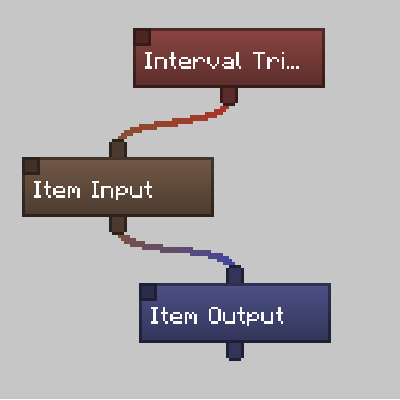
- 标准化紧凑节点:画布上的节点始终保持紧凑状态,以最大化工作区可见性。可自定义的渐变色编码有助于你一目了然地组织活跃例程。
- 上下文右键菜单:右键单击任何节点会打开一个简洁的下拉菜单,用于重命名组件、编辑设置、更改节点颜色、复制或删除节点。
- 对称居中设置覆盖层:双击节点会打开居中的模态面板。主画布会变暗,突出显示你当前的配置任务(例如在间隔触发器上设置周期,或在物品输入端管理过滤器)。
2. 物理网络组件
使用广泛的各种物理方块构建你的物流基础设施:
- 机器库存管理器:网络的中央计算机。它托管流程图逻辑,扫描相邻线缆,并编译你的指令。
- 网络线缆(标准型与强化型):系统的导电路由介质。强化变体具有防爆功能,可在危险环境中保护你的连接。
- 观测者线缆:电气静默、单向的方块更新监视器,可在不发出标准红石信号的情况下检测相邻状态变化。
- 红石网络发射器与接收器:独立的多面模拟红石信号管理器,能够通过你的流程图指令直接处理
0到15的等级。 - 物品与流体舱口:真空与弹出式舱口,可在 3x3x3 空间内吸取地面物品,将物品实体弹射到世界中,或处理世界中的流体方块。
- 卡片集群(标准型与高级型):模块化子机箱插槽,允许你插入最多 9 张(标准型)或 18 张(高级型)执行卡片(如真空、弹出和红石卡片),以在特定面上运行代理操作。
3. 对称 3D 方块预览与插槽布局
- 可旋转 3D 预览:配置物品或流体传输时,使用鼠标旋转并环绕查看目标库存的 3D 预览图。左击三个可见面中的任意一个以切换侧面访问权限。
- 主题化插槽配置器:Shift+左击 3D 方块面以打开自定义布局,精确显示该侧面的插槽配置方式。插槽采用主题化设计,匹配熔炉、制造台、酿造台、投掷器、分发器或漏斗的样式(比例为 50%),让你能够使用霓虹绿色(活跃)和红色(非活跃)高亮来逐插槽切换访问权限。
幕后机制:性能与可靠性
SFM-Flow 经过工程优化,以防止服务器 Tick 尖峰和卡顿:
- 异步规划内核:逻辑评估在专用的守护线程池上离线处理,确保主 Minecraft Tick 循环不受负担。
- 1ms 协作时间预算:离线操作被分解为小的 1ms 切片,以安全地协调网络任务。
- O(1) 无垃圾回收遍历:物理网络映射通过原始 ID 数组和空间区块分组进行管理,消除不必要的对象分配和垃圾回收器开销。
- 物理断路器:如果流程图进入无限循环,执行内核会在超过 1000 个节点的评估阈值时自动跳闸,干净地终止运行并记录诊断细节以供调试。
- 网络优化规则:同步数据包经过优化,仅在独立的鼠标释放或滚轮动作时传输,从而消除在主动拖动滑块期间的数据包泛滥。
附加模组开发者 API (dta.sfmflow.api)
SFM-Flow 旨在为附加模组创作者提供完全解耦、可扩展的架构:
- 流畅组件构建器:使用清晰、可链式的
FlowComponentBuilder在sfmflow:flow_component_type注册表中注册自定义组件。 - 动态能力:避免硬编码集成。使用
FlowCapabilityRegistry注册可扩展的能力路径和执行回调,以支持自定义物品、流体、能量或化学传输类型。 - 端侧安全插件系统:利用
ISFMFlowPlugin和ISFMFlowClientPlugin端点,安全地将视觉展示规则与服务器端逻辑隔离开来,避免类加载问题。 - 原版 UI 适配器:将标准 Minecraft 控件包装在
ApiWidgetAdapter中,以协调拖动偏移量并保持正确的鼠标点击焦点。
WARNING: ALPHA RELEASE. SHOULD BE SAFE TO USE IN NORMAL SAVE, BUT MAKE BACKUPS JUST IN CASE. API CHANGES ARE STILL LIKELY.
SFM-Flow is a complete, modernized visual flowchart automation mod built from the ground up for NeoForge 1.21.1. It allows you to design, coordinate, and execute complex logistical routines using an interactive graphical flowchart canvas, specialized cables, modular cards, and physical network nodes.
Core Features
1. Interactive Logic Canvas & Menus
- Standardized Compact Nodes: Canvas nodes are kept permanently compact to maximize workspace visibility. Customizable gradient color-coding helps you organize active routines at a glance.
- Contextual Right-Click Menus: Right-clicking any node opens a clean dropdown to rename the component, edit settings, change the node's color, copy, or delete it.
- Symmetrically Centered Settings Overlays: Double-clicking nodes opens a centered modal panel. The main canvas is dimmed, highlighting your active configuration tasks (e.g. setting periods on an Interval Trigger or managing filters on an Item Input).
2. Physical Network Components
Build out your logistical infrastructure using a wide array of physical blocks:
- Machine Inventory Manager: The core computer of the network. It hosts the flowchart logic, scans adjacent cables, and compiles your commands.
- Network Cables (Standard & Hardened): The conductive routing medium of your system. Hardened variants are blast-resistant to protect your connections in hazardous environments.
- Observer Cables: Electrically silent, directional block-update monitors that detect adjacent state changes without emitting standard redstone signals.
- Redstone Network Emitter & Receiver: Independent, multi-sided analog redstone signal managers capable of handling levels from
0to15directly through your flowchart instructions. - Item & Fluid Hatches: Vacuum and ejection hatches that suction ground items in a 3x3x3 space, eject item entities into the world, or handle in-world fluid blocks.
- Card Clusters (Standard & Advanced): Modular sub-chassis slots that let you insert up to 9 (Standard) or 18 (Advanced) execution cards (like vacuum, ejection, and redstone cards) to run proxy actions over specific faces.
3. Symmetrical 3D Block Previews & Slot Layouts
- Orbitable 3D Preview: When configuring item or fluid transfers, rotate and orbit a 3D preview of the targeted inventory using your mouse. Left-click any of the three visible faces to toggle side access.
- Themed Slot Configurator: Shift-Left-click a 3D block face to open a custom layout showing exactly how slots are configured for that side. Slots are themed to match furnaces, crafters, brewing stands, droppers, dispensers, or hoppers at 50% scale, letting you toggle slot-by-slot access using neon green (active) and red (inactive) highlights.
Under the Hood: Performance & Reliability
SFM-Flow has been engineered to prevent server tick spikes and lag:
- Asynchronous Planning Kernel: Logic evaluations are processed off-thread on dedicated daemon thread pools, keeping the main Minecraft tick loop unburdened.
- 1ms Cooperative Time Budget: Off-thread operations are broken down into small, 1ms slices to safely coordinate network tasks.
- O(1) Garbage-Free Traversals: Physical network maps are managed through primitive ID arrays and spatial chunk grouping, eliminating unnecessary object allocation and Garbage Collector overhead.
- Physical Circuit Breaker: If a flowchart enters an infinite loop, the execution kernel automatically trips once it exceeds a 1000-node evaluation threshold, cleanly terminating the run and logging diagnostic details for debugging.
- Network Optimization Rules: Synchronization packets are optimized to transmit only on distinct mouse releases or scroll wheel actions, eliminating packet flooding during active slider dragging.
Addon Developer API (dta.sfmflow.api)
SFM-Flow is designed with a fully decoupled, extensible architecture for addon creators:
- Fluent Component Builders: Register custom components in the
sfmflow:flow_component_typeregistry using the clean, chainableFlowComponentBuilder. - Dynamic Capabilities: Avoid hardcoded integrations. Use
FlowCapabilityRegistryto register extensible capability pathways and execution callbacks for custom items, fluids, energy, or chemical transfer types. - Side-Safe Plugin System: Leverage the
ISFMFlowPluginandISFMFlowClientPluginendpoints to safely isolate visual presentation rules from server-side logic, avoiding classloading complications. - Vanilla UI Adapters: Wrap standard Minecraft controls in
ApiWidgetAdapterto coordinate dragging offsets and preserve correct mouse click focus.
下载 SFM-Flow
需要联机服务器吗?
稳定流畅、一键部署,几分钟即可和朋友联机开服
最低仅需 8 元/月 即可畅快联机
下载 SFM-Flow
需要联机服务器吗?
稳定流畅、一键部署,几分钟即可和朋友联机开服
最低仅需 8 元/月 即可畅快联机
下载 SFM-Flow
需要联机服务器吗?
稳定流畅、一键部署,几分钟即可和朋友联机开服
最低仅需 8 元/月 即可畅快联机
下载 SFM-Flow
需要联机服务器吗?
稳定流畅、一键部署,几分钟即可和朋友联机开服
最低仅需 8 元/月 即可畅快联机
下载 SFM-Flow
需要联机服务器吗?
稳定流畅、一键部署,几分钟即可和朋友联机开服
最低仅需 8 元/月 即可畅快联机
下载 SFM-Flow
下载 SFM-Flow
下载 SFM-Flow
下载 SFM-Flow
下载 SFM-Flow
这应该能修复专用服务器上的崩溃问题。
(0.5.22.alpha)
[新增]
-
新增了一个安全于专用服务器端的数据包路由注册表,用于处理客户端的网络通信。这可以防止服务器环境加载仅适用于客户端的渲染类,并避免专用服务器启动时崩溃。
-
新增了程序磁盘(Program Disk)实用道具,允许玩家在不同机器库存管理器之间克隆整个流程图布局和变量。
-
新增了交互式覆盖确认界面,在将配置粘贴到已包含布局节点的管理器之前会询问玩家。
-
为程序磁盘(Program Disk)添加了形状合成配方和创造模式标签页注册。
-
为机器库存管理器新增了区块所有权与访问控制系统。放置后,区块会被注册给放置者作为所有者。
-
在管理器界面中新增了“访问设置”按钮和权限模态框,使所有者能够在仅所有者、仅限团队(使用记分板队伍)和公开访问模式之间切换。
-
新增了本地化键以及向未经授权的玩家尝试访问私有管理器时显示的红色浮动警告提示。
-
新增了对拥有 2 级及以上权限的服务端操作员的二次使用覆盖功能,允许其绕过锁定节点的管理员权限。
[更改]
-
标准化了所有物品列表变量(物品、流体、能量、红石和标志更新器),以多态方式解析它们的区块目标。
-
将所有面向客户端的网络数据包处理安全地重新路由至仅客户端的引导阶段。
-
更新了机器库存管理器区块的交互处理器,以支持使用程序磁盘进行复制和粘贴。
-
现在根据分配的访问级别限制区块交互。
-
微调了滑动抽屉标签的垂直文本坐标偏移量,以改善布局对齐。
关于这个资源的讨论、问题反馈与使用心得
还没有讨论,来发第一帖吧
你是这个资源的作者?登录后可认领此资源。
相似资源
 模组

一个用于收集生物掉落物的多区块模组。
 模组
AE2:一款流行的自动化与存储模组
 模组

基于 GTCEu 1.12.2 的现代 GregTech
 模组

让你能够在世界中的任何位置定位结构。
 模组
高科技机械、强大的能量生成、炫酷的小工具以及更多内容。现已登陆 Modrinth!
 模组

更聪明地交易,随处存储,并用奇妙的原版增强机制打造更好的体验。
评论 0
登录后参与评分
还没有评论,来抢沙发吧