

Shifty Hotbar
一个完全客户端的工具模组,实现了快捷栏移位功能,灵感源自《星露谷物语》(Stardew Valley)。
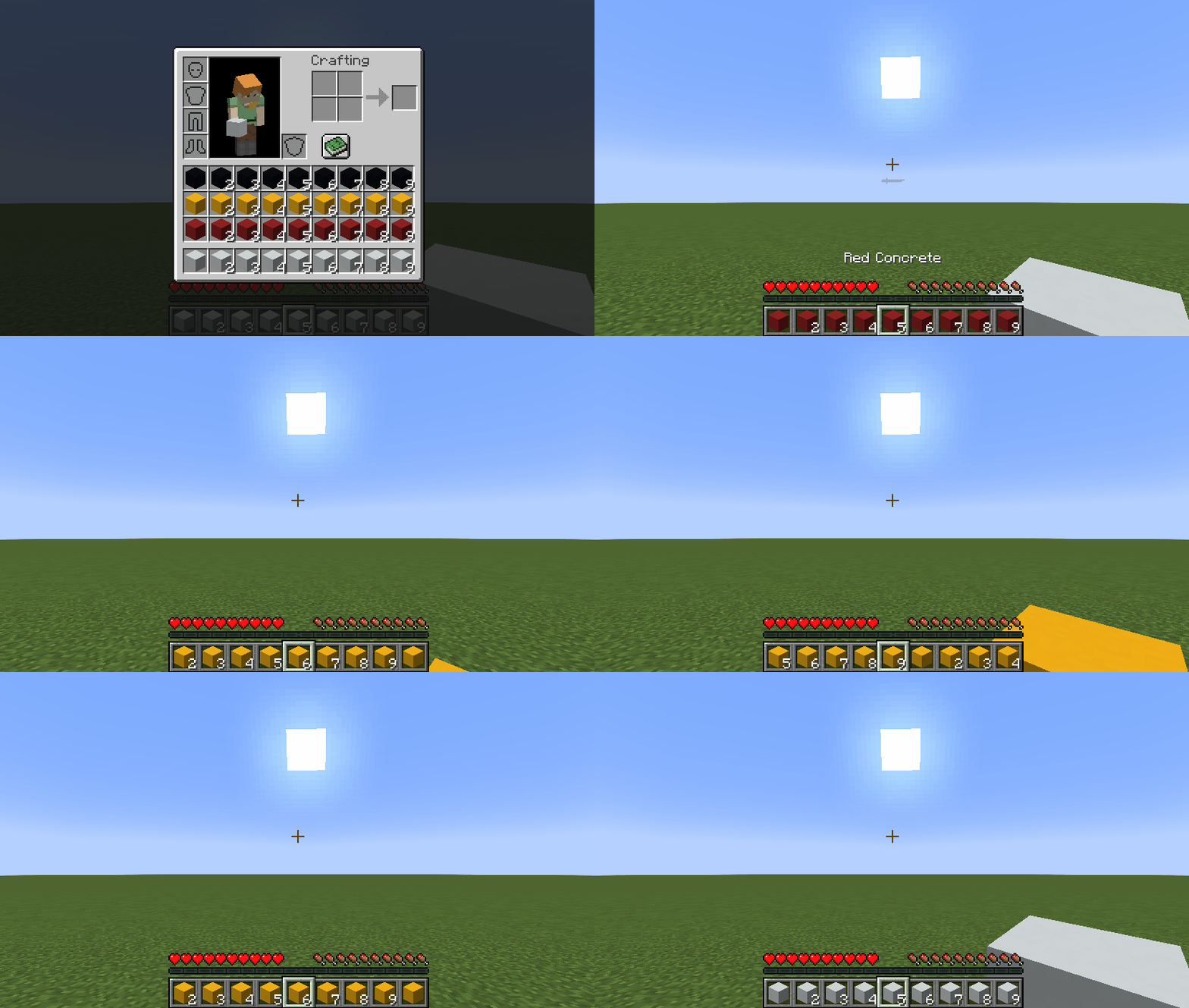
我知道市面上已有类似模组,但没有一个完全符合我的需求。因此,我制作了这个终极版本,涵盖了此类模组可能提供的所有功能:
- 你可以向两个方向移动物品栏行 (默认使用
上箭头和下箭头) - 你可以向两个方向移动物品栏列 (默认使用
右箭头和左箭头) - 你可以向两个方向移动快捷栏中的槽位
- 你可以向两个方向移动选中列中的所有槽位
- 按住
修饰键(默认为左 Alt) 时,你可以通过鼠标滚轮移动行、列和槽位 - 按住
修饰键(默认为左 Alt) 时,你可以通过快捷栏热键(1...9)快速跳转到某一行、某一列或某个槽位
按键绑定
按键绑定可以像原版一样进行配置:
- 进入
选项... - 选择
控制... - 然后选择
按键绑定... - 向下滚动到
Shifty Hotbar部分
| 名称 | 描述 | 默认值 |
|---|---|---|
Row modifier |
按下此键后,允许你通过鼠标滚轮/热键(1...9)来移动行,而不是选择槽位 |
Left Alt |
Previous row |
移动物品栏中的所有行,使物品栏中最顶部的行变为快捷栏 | Down Arrow |
Next row |
移动物品栏中的所有行,使快捷栏上方的那一行变为快捷栏 | Up Arrow |
Row-in-column modifier |
按下此键后,允许你通过鼠标滚轮移动选中列中的槽位,而不是选择槽位 | |
Previous row-in-column |
移动选中列中的所有槽位,使物品栏中最顶部的槽位变为快捷栏槽位 | |
Next row-in-column |
移动选中列中的所有槽位,使快捷栏槽位上方的那个槽位变为快捷栏槽位 | |
Column modifier |
按下此键后,允许你通过鼠标滚轮/热键(1...9)来移动列,而不是选择槽位 |
|
Previous column |
移动物品栏中的所有列,使你选中槽位的前一个槽位变为选中槽位 | Left Arrow |
Next column |
移动物品栏中的所有列,使你选中槽位的后一个槽位变为选中槽位 | Right Arrow |
Column-in-row modifier |
按下此键后,允许你通过鼠标滚轮移动快捷栏中的槽位,而不是选择槽位 | |
Previous column-in-row |
移动快捷栏中的所有槽位,使你选中槽位的前一个槽位变为选中槽位 | |
Next column-in-row |
移动快捷栏中的所有槽位,使你选中槽位的后一个槽位变为选中槽位 |
配置
如果你安装了 Cloth Config,则可以自定义模组的行为。配置文件通常位于 ./config/shifty_hotbar.json,默认内容如下:
{
  "invertRowScroll": false,
  "invertColumnScroll": false
}
| 名称 | 描述 | 默认值 |
|---|---|---|
invertRowScroll |
当按下 row 或 row-in-column 修饰键时,反转鼠标滚轮方向 |
false |
invertColumnScroll |
当按下 column 或 column-in-row 修饰键时,反转鼠标滚轮方向 |
false |
你可以直接在配置文件中编辑这些值,或通过 ModMenu 进行修改。
安装
要求:
- Minecraft
>=1.14.x - Fabric Loader
>=0.7.0 - Fabric API
>=0.25.0
你可以从以下位置下载模组:
- GitHub Releases (推荐)
- Modrinth
- CurseForge
- GitHub Actions (这些构建版本可能不稳定,但代表了开发的最新状态)
从源代码构建
要求:
- JDK
17
Linux/MacOS
git clone https://github.com/Kir-Antipov/shifty-hotbar.git
cd shifty-hotbar

chmod +x ./gradlew
./gradlew build
cd build/libs
Windows
git clone https://github.com/Kir-Antipov/shifty-hotbar.git
cd shifty-hotbar

gradlew build
cd build/libs
Shifty Hotbar
A fully client-side utility mod that implements the hotbar shifting ability, inspired by Stardew Valley.
I know that there are mods like this in the wild, but none of them did suit me whatsoever. Therefore, I made the ultimate version that consists of every feature a mod like this can possibly provide:
- You can shift inventory rows in both directions (
Up ArrowandDown Arrowby default) - You can shift inventory columns in both directions (
Right ArrowandLeft Arrowby default) - You can shift slots in your hotbar in both directions
- You can shift slots in the selected column in both directions
- You can shift rows, columns and slots via mouse scroll while pressing a
modifierkey (Left Altby default) - You can quickly shift to a row, a column, or a slot via hotbar hotkeys (
1...9) while pressing amodifierkey (Left Altby default)
Key Binds
Key binds can be configured just like vanilla ones:
- Go to
Options... - Select
Controls... - Then choose
Key Binds... - Scroll down to the
Shifty Hotbarsection
| Name | Description | Default |
|---|---|---|
Row modifier |
When pressed, it allows you to shift rows instead of choosing a slot via mouse scroll/hotkeys (1...9) |
Left Alt |
Previous row |
Shifts all rows in your inventory so that the topmost row in your inventory becomes the hotbar | Down Arrow |
Next row |
Shifts all rows in your inventory so that the row above your hotbar becomes the hotbar | Up Arrow |
Row-in-column modifier |
When pressed, it allows you to shift slots in the selected column instead of choosing one via mouse scroll | |
Previous row-in-column |
Shifts all slots in the selected column so that the topmost slot in your inventory becomes the hotbar slot | |
Next row-in-column |
Shifts all slots in the selected column so that the slot above your hotbar slot becomes the hotbar slot | |
Column modifier |
When pressed, it allows you to shift columns instead of choosing a slot via mouse scroll/hotkeys (1...9) |
|
Previous column |
Shifts all columns in your inventory so that the slot before your selected slot becomes the selected slot | Left Arrow |
Next column |
Shifts all columns in your inventory so that the slot after your selected slot becomes the selected slot | Right Arrow |
Column-in-row modifier |
When pressed, it allows you to shift slots in the hotbar instead of choosing one via mouse scroll | |
Previous column-in-row |
Shifts all slots in your hotbar so that the slot before your selected slot becomes the selected slot | |
Next column-in-row |
Shifts all slots in your hotbar so that the slot after your selected slot becomes the selected slot |
Config
If you have Cloth Config installed, you can customize the behavior of the mod. A config is usually located at ./config/shifty_hotbar.json and by default looks like this:
{
  "invertRowScroll": false,
  "invertColumnScroll": false
}
| Name | Description | Default value |
|---|---|---|
invertRowScroll |
Inverts mouse scroll when row or row-in-column modifier is pressed |
false |
invertColumnScroll |
Inverts mouse scroll when column or column-in-row modifier is pressed |
false |
You can edit any of these values directly in the config file or via ModMenu.
Installation
Requirements:
- Minecraft
>=1.14.x - Fabric Loader
>=0.7.0 - Fabric API
>=0.25.0
You can download the mod from:
- GitHub Releases (recommended)
- Modrinth
- CurseForge
- GitHub Actions (these builds may be unstable, but they represent the actual state of the development)
Building from sources
Requirements:
- JDK
17
Linux/MacOS
git clone https://github.com/Kir-Antipov/shifty-hotbar.git
cd shifty-hotbar

chmod +x ./gradlew
./gradlew build
cd build/libs
Windows
git clone https://github.com/Kir-Antipov/shifty-hotbar.git
cd shifty-hotbar

gradlew build
cd build/libs

下载 Shifty Hotbar
需要联机服务器吗?
稳定流畅、一键部署,几分钟即可和朋友联机开服
最低仅需 8 元/月 即可畅快联机
下载 Shifty Hotbar
需要联机服务器吗?
稳定流畅、一键部署,几分钟即可和朋友联机开服
最低仅需 8 元/月 即可畅快联机
下载 Shifty Hotbar
需要联机服务器吗?
稳定流畅、一键部署,几分钟即可和朋友联机开服
最低仅需 8 元/月 即可畅快联机
下载 Shifty Hotbar
下载 Shifty Hotbar
需要联机服务器吗?
稳定流畅、一键部署,几分钟即可和朋友联机开服
最低仅需 8 元/月 即可畅快联机
下载 Shifty Hotbar
需要联机服务器吗?
稳定流畅、一键部署,几分钟即可和朋友联机开服
最低仅需 8 元/月 即可畅快联机
下载 Shifty Hotbar
需要联机服务器吗?
稳定流畅、一键部署,几分钟即可和朋友联机开服
最低仅需 8 元/月 即可畅快联机
下载 Shifty Hotbar
下载 Shifty Hotbar
需要联机服务器吗?
稳定流畅、一键部署,几分钟即可和朋友联机开服
最低仅需 8 元/月 即可畅快联机
下载 Shifty Hotbar
需要联机服务器吗?
稳定流畅、一键部署,几分钟即可和朋友联机开服
最低仅需 8 元/月 即可畅快联机
特性:
- 支持 Minecraft 1.20.x
关于这个资源的讨论、问题反馈与使用心得
还没有讨论,来发第一帖吧
你是这个资源的作者?登录后可认领此资源。
相似资源
 模组

显示你正在注视的方块的信息。(适用于 Minecraft 1.16+ 的 Hwyla/Waila 分支)
 模组
在游戏画面角落显示附近世界地形、玩家、生物和实体的地图。可创建路径点,帮助你找到标记过的位置。
 模组

查看物品与配方
 模组
使用 JavaScript 编辑配方、添加自定义物品、编写世界事件!
 模组
AE2:一款流行的自动化与存储模组
 模组
那是什么?一个 Waila/Hwyla 的分支。
评论 0
登录后参与评分
还没有评论,来抢沙发吧