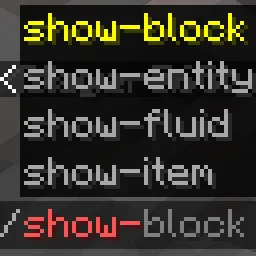
Show Everything (Forge 移植版)
MinersLab/show-everything 的 Forge 移植版本。
在聊天栏中显示物品、方块、流体和实体,并附带悬停详情。命令逻辑在服务端运行,模组声明远程客户端为可选依赖,因此未安装此模组的原版/Forge 客户端仍可加入服务器。
安装了此模组的客户端可获得增强的 /show-item 渲染功能,用于处理超大型物品 NBT 数据。未安装该模组的客户端将收到安全的缩短版悬停提示,从而防止因 Minecraft 聊天数据包字符串长度限制而导致玩家被踢出服务器。
命令
所有命令均可由普通玩家使用。
| 命令 | 描述 |
|---|---|
/show-item |
显示主手物品,若主手为空则显示副手物品。 |
/show-block |
显示 15 格内你正注视的方块。若无视线目标,则显示你当前位置的方块。 |
/show-block <x> <y> <z> |
显示指定坐标位置的方块。 |
/show-fluid |
显示 15 格内你正注视的流体。若无视线目标,则显示你当前位置的流体。 |
/show-fluid <x> <y> <z> |
显示指定坐标位置的流体/方块。 |
/show-entity |
显示 15 格内你正注视的实体。若无视线目标,则显示你自己。 |
/show-entity <selector> |
显示选定的实体。 |
系统也注册了不带连字符的别名,例如 /showitem 和 /showblock。
客户端按键绑定(自 v1.0.5 起)
安装客户端模组后,可设置一个可选的按键绑定(可在“控制”中自定义,默认为 H),用于在聊天栏中显示光标下的物品。该功能适用于任何显示物品悬停提示的界面——包括容器界面、其他模组的 GUI 以及 JEI/REI/EMI 等物品列表覆盖层,但要求服务端已安装此模组。聊天输出内容与 /show-item 完全一致。
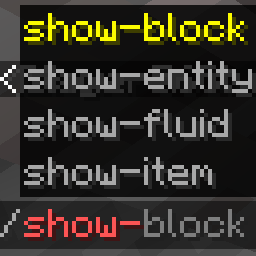
Show Everything (Forge Port)
Forge port of MinersLab/show-everything.
Show items, blocks, fluids, and entities in chat with hover details. The command logic runs on the server, and the mod declares remote clients as optional, so vanilla/Forge clients without this mod can still join.
Clients that also install this mod get enhanced /show-item rendering for very large item NBT. Clients without the mod receive a safe shortened hover instead, so oversized NBT cannot kick players through Minecraft's chat packet string limit.
Commands
All commands are available to normal players.
| Command | Description |
|---|---|
/show-item |
Shows the item in your main hand, or offhand if the main hand is empty. |
/show-block |
Shows the block you are looking at within 15 blocks. Falls back to your current position. |
/show-block <x> <y> <z> |
Shows the block at a specific position. |
/show-fluid |
Shows the fluid you are looking at within 15 blocks. Falls back to your current position. |
/show-fluid <x> <y> <z> |
Shows the fluid/block at a specific position. |
/show-entity |
Shows the entity you are looking at within 15 blocks. Falls back to yourself. |
/show-entity <selector> |
Shows a selected entity. |
Aliases without hyphens are also registered, such as /showitem and /showblock.
Client keybind (since v1.0.5)
With the client mod installed, an optional keybind (customizable in Controls, default H) shows the item under the cursor in chat. It works in any screen where an item tooltip is displayed — container screens, other mods' GUIs, and item-list overlays such as JEI/REI/EMI — and requires the server to run the mod. The chat output is identical to /show-item.
下载 Show Everything (Forge port)
下载 Show Everything (Forge port)
下载 Show Everything (Forge port)
下载 Show Everything (Forge port)
下载 Show Everything (Forge port)
下载 Show Everything (Forge port)
下载 Show Everything (Forge port)
下载 Show Everything (Forge port)
下载 Show Everything (Forge port)
下载 Show Everything (Forge port)
客户端按键绑定
安装该客户端模组后,会提供一个可选的按键绑定(可在“控制”设置中自定义,默认为 H),用于在聊天栏中显示鼠标悬停的物品。该功能适用于任何显示物品提示信息的界面——包括容器界面、其他模组的 GUI 以及像 JEI/REI/EMI 这样的物品列表覆盖层——且服务器端也必须运行此模组。聊天输出的内容与 /show-item 命令完全一致。
关于这个资源的讨论、问题反馈与使用心得
还没有讨论,来发第一帖吧
你是这个资源的作者?登录后可认领此资源。
相似资源
 模组

显示你正在注视的方块的信息。(适用于 Minecraft 1.16+ 的 Hwyla/Waila 分支)
 模组
在游戏画面角落显示附近世界地形、玩家、生物和实体的地图。可创建路径点,帮助你找到标记过的位置。
 模组

查看物品与配方
 模组
使用 JavaScript 编辑配方、添加自定义物品、编写世界事件!
 模组
AE2:一款流行的自动化与存储模组
 模组
那是什么?一个 Waila/Hwyla 的分支。
评论 0
登录后参与评分
还没有评论,来抢沙发吧