




描述
本模组允许你为潜影盒添加物品标签,使你的存储系统更加井然有序,库存管理也变得更加轻松。
支持多种显示模式——你可以选择将潜影盒以平面模式显示,并自由选择以 3D 或等距模式展示标签。
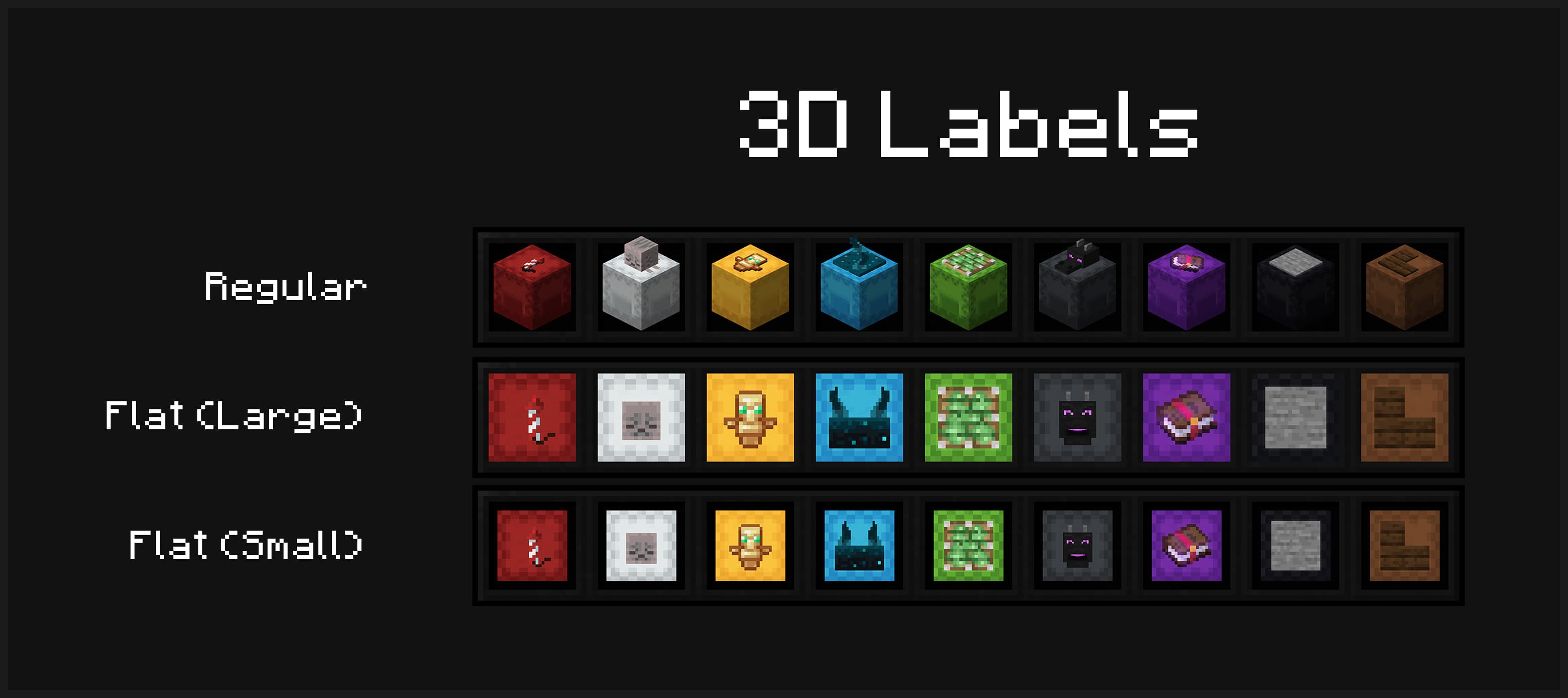
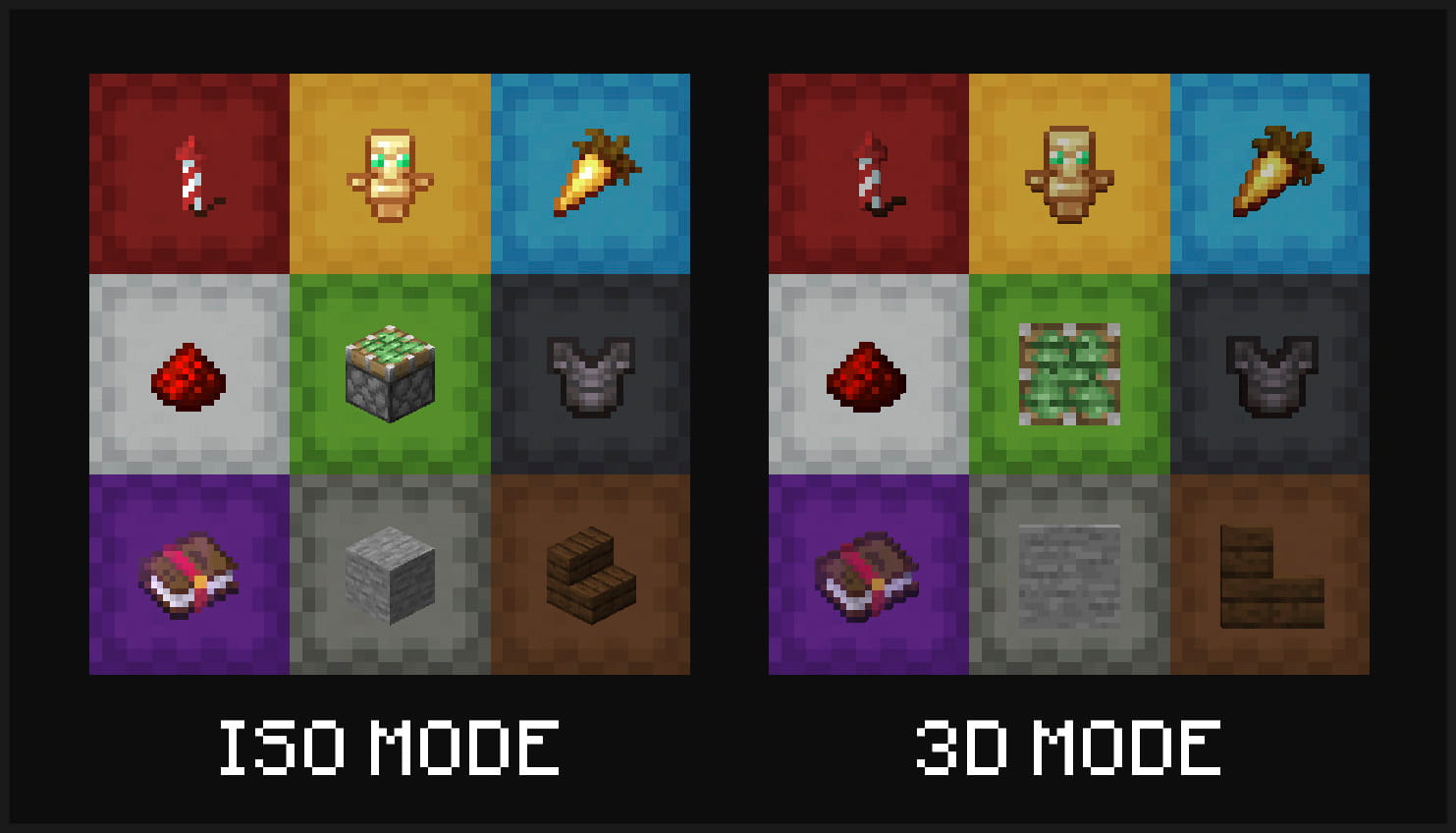
在 GUI 中以任意模式展示带有标签的潜影盒。标签可以以 3D 或等距模式显示,潜影盒也可以以普通或平面(大/小)模式呈现。
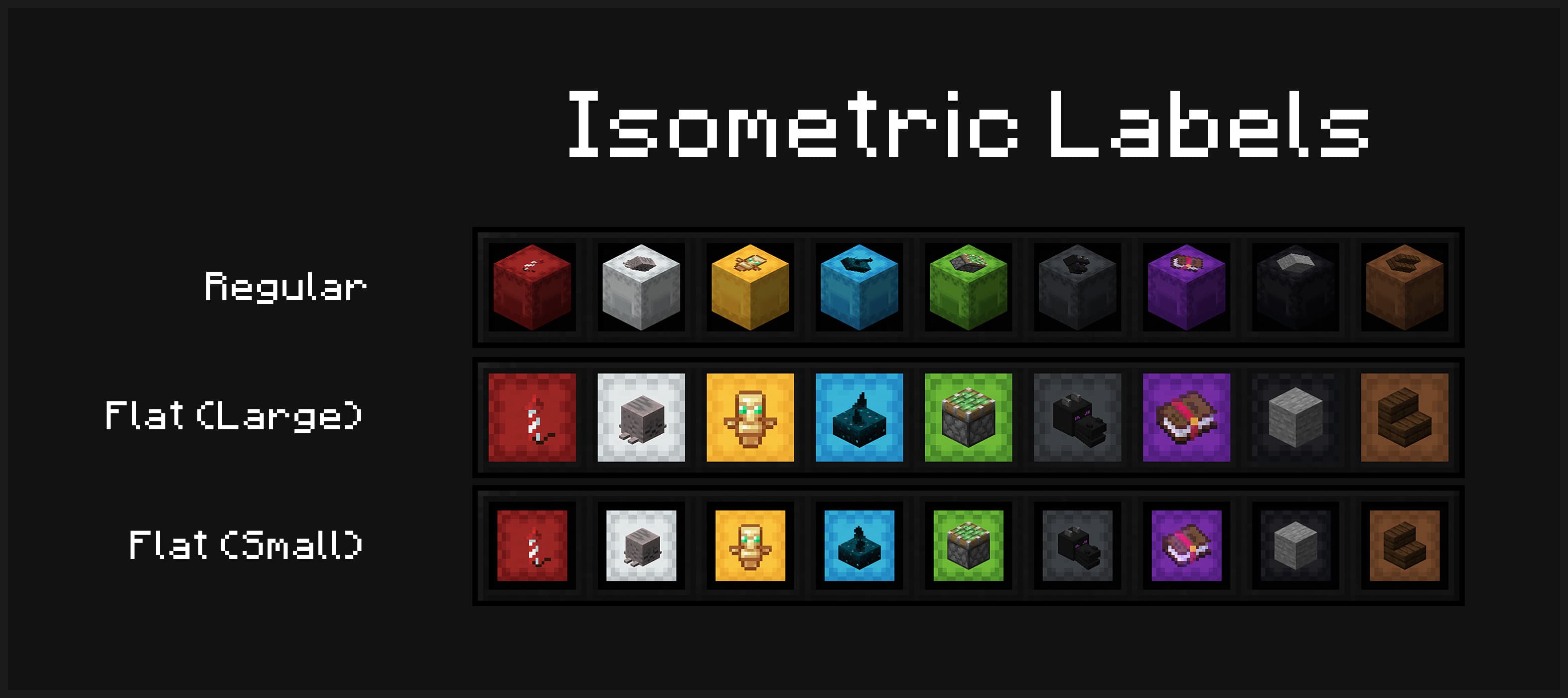
已放置的潜影盒上的物品标签也可以选择在等距或 3D 模式下显示
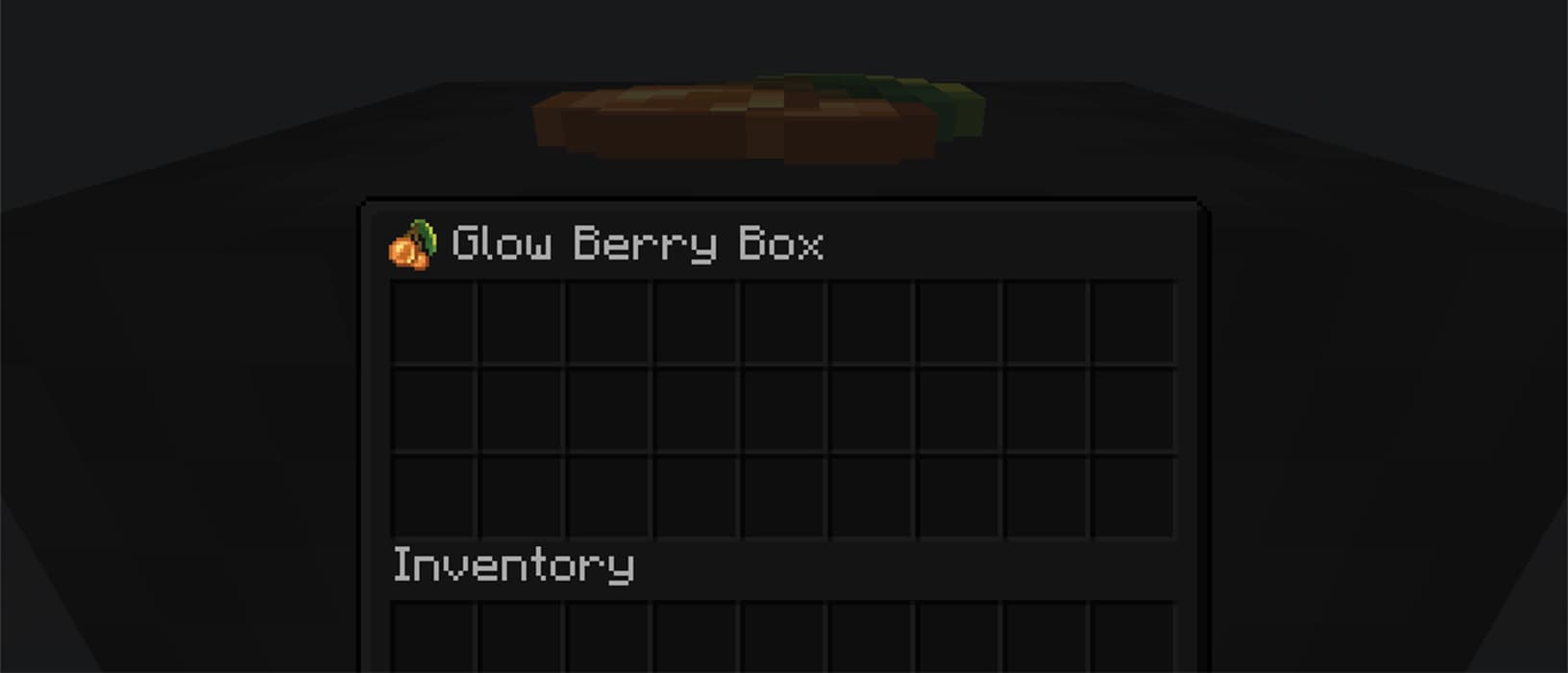
可选地,从潜影盒内部查看你的标签
安装与配置
- 下载对应 Minecraft 版本的模组,并将其放入
.minecraft的mods文件夹中 - 若要在多人游戏中使用此模组,还必须在服务端安装
- 要按喜好配置模组,你可以使用命令
/shulker-box-labels config在游戏中打开配置界面- 如果你使用的是 Fabric,你也可以安装 Mod Menu 并从那里打开它
- NeoForge 用户也可以从集成的模组菜单中打开它
使用方法
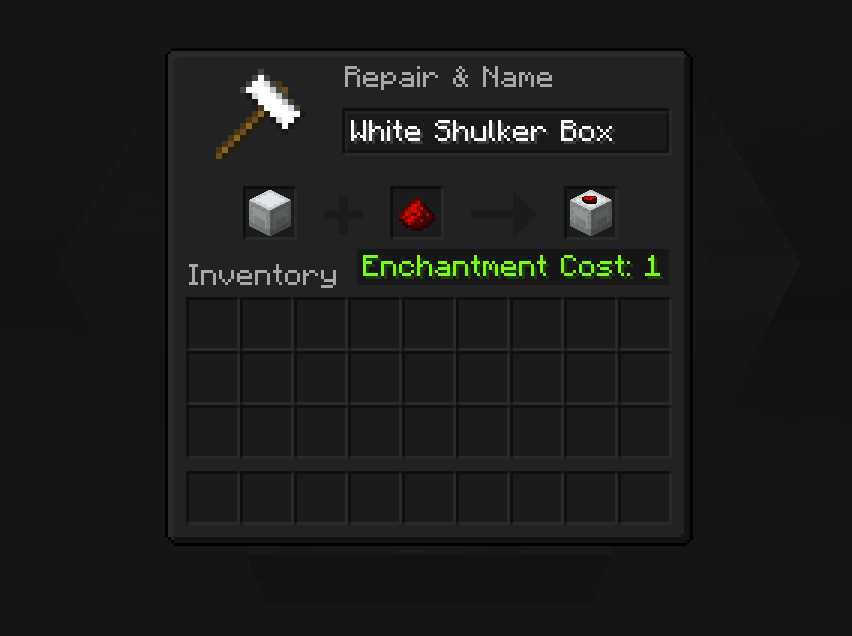
要应用标签,只需将潜影盒放在铁砧的第一个槽位,将标签物品放在第二个槽位即可。这将消耗一级经验值。你也可以同时修改潜影盒的名称。
铁砧预览
不兼容的模组
-
Better Block Entities
- 你需要在配置文件中禁用潜影盒的优化功能
-
Peek
- 该模组添加了类似的标签功能,建议完全移除该模组
Description
This mod allows you to add item labels to your shulker boxes, making your storage more organized and inventory management much easier.
Multiple display modes are supported - you can have your shulker boxes displayed in flat mode, and choose to display labels in either 3D or isometric mode.
Display your labeled shulker boxes in the GUI in any mode. Labels can be shown in 3D or isometric mode, and shulker boxes can appear in regular or flat (large/small) mode
Item labels on placed shulker boxes can also either display in isometric or 3D mode
Optionally view your label from inside your shulker box
Installation & Configuration
- Download the mod for your Minecraft version and place it into your .minecraft's
modsfolder - In order to use this mod in multiplayer, it must also be installed server-side
- To configure the mod to your liking, you can use the command
/shulker-box-labels configto open the config screen in-game- If you are playing on Fabric, you can alternatively install Mod Menu and open it from there
- NeoForge users can also open it from the integrated mod menu
Usage
To apply a label, simply place your shulker box in the first anvil slot and the label item in the second slot. This costs one experience level. You can also modify the name of your shulker box at the same time.
Anvil Preview
Incompatible Mods
-
Better Block Entities
- You need to disable the optimization of shulker boxes in your config
-
Peek
- This mods add similar label functionality, so it is recommended to fully remove this mod

下载 Shulker Box Labels
下载 Shulker Box Labels
需要联机服务器吗?
稳定流畅、一键部署,几分钟即可和朋友联机开服
最低仅需 8 元/月 即可畅快联机
下载 Shulker Box Labels
需要联机服务器吗?
稳定流畅、一键部署,几分钟即可和朋友联机开服
最低仅需 8 元/月 即可畅快联机
下载 Shulker Box Labels
下载 Shulker Box Labels
需要联机服务器吗?
稳定流畅、一键部署,几分钟即可和朋友联机开服
最低仅需 8 元/月 即可畅快联机
下载 Shulker Box Labels
下载 Shulker Box Labels
需要联机服务器吗?
稳定流畅、一键部署,几分钟即可和朋友联机开服
最低仅需 8 元/月 即可畅快联机
下载 Shulker Box Labels
下载 Shulker Box Labels
需要联机服务器吗?
稳定流畅、一键部署,几分钟即可和朋友联机开服
最低仅需 8 元/月 即可畅快联机
下载 Shulker Box Labels
需要联机服务器吗?
稳定流畅、一键部署,几分钟即可和朋友联机开服
最低仅需 8 元/月 即可畅快联机
- 修复了一个因 DataFixer 问题导致 Minecraft 结构模板放置静默失败的错误(#16)。
- 修复了容器图标显示耗时过长从而导致容器标题偏移的错误。
- 移除了通过 jar-in-jar 方式包含的
fabric-api,现在将其作为外部依赖项。 - 将版本号提升至下一个次版本。
关于这个资源的讨论、问题反馈与使用心得
还没有讨论,来发第一帖吧
你是这个资源的作者?登录后可认领此资源。
相似资源
 模组

显示你正在注视的方块的信息。(适用于 Minecraft 1.16+ 的 Hwyla/Waila 分支)
 模组
在游戏画面角落显示附近世界地形、玩家、生物和实体的地图。可创建路径点,帮助你找到标记过的位置。
 模组

查看物品与配方
 模组
使用 JavaScript 编辑配方、添加自定义物品、编写世界事件!
 模组
AE2:一款流行的自动化与存储模组
 模组
那是什么?一个 Waila/Hwyla 的分支。
评论 0
登录后参与评分
还没有评论,来抢沙发吧