
此模组允许你在背包中悬停于潜影盒上方并按下 shift 键时,预览其内部物品。
支持 Fabric 和 Forge
在 Fabric 上:
需要安装 Fabric Loader 和 Fabric API。
建议安装 Mod Menu(非必需),以便在游戏中进行配置。
功能:
紧凑预览
悬停在物品上时按下 shift(默认按键)。
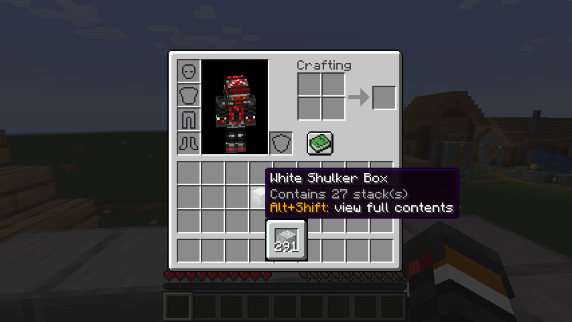
完整预览
悬停在物品上时按下 alt+shift(默认按键),以显示其完整内容,其中每个堆叠的物品都会正确显示在对应的槽位中。
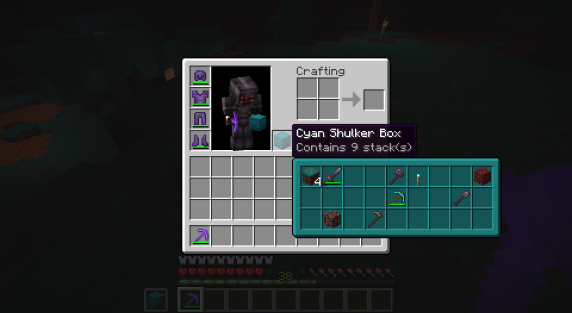
其他容器
通过创造模式下按住 control + 鼠标右键 拾取的容器(如箱子、熔炉、 barrels 等)也支持预览功能。
同时兼容大多数模组添加的容器。
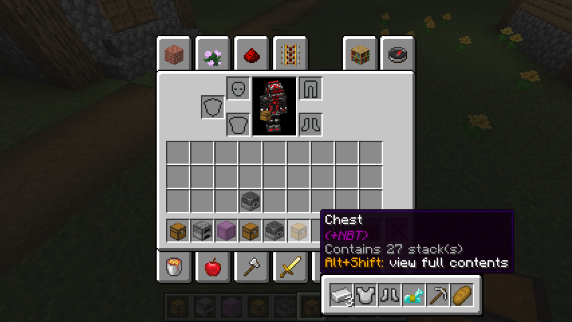
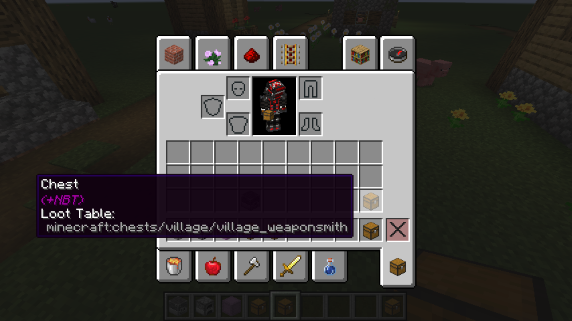
战利品表
如果悬停的物品关联了战利品表,则会在提示框中显示该战利品表的名称。
此选项默认处于禁用状态。
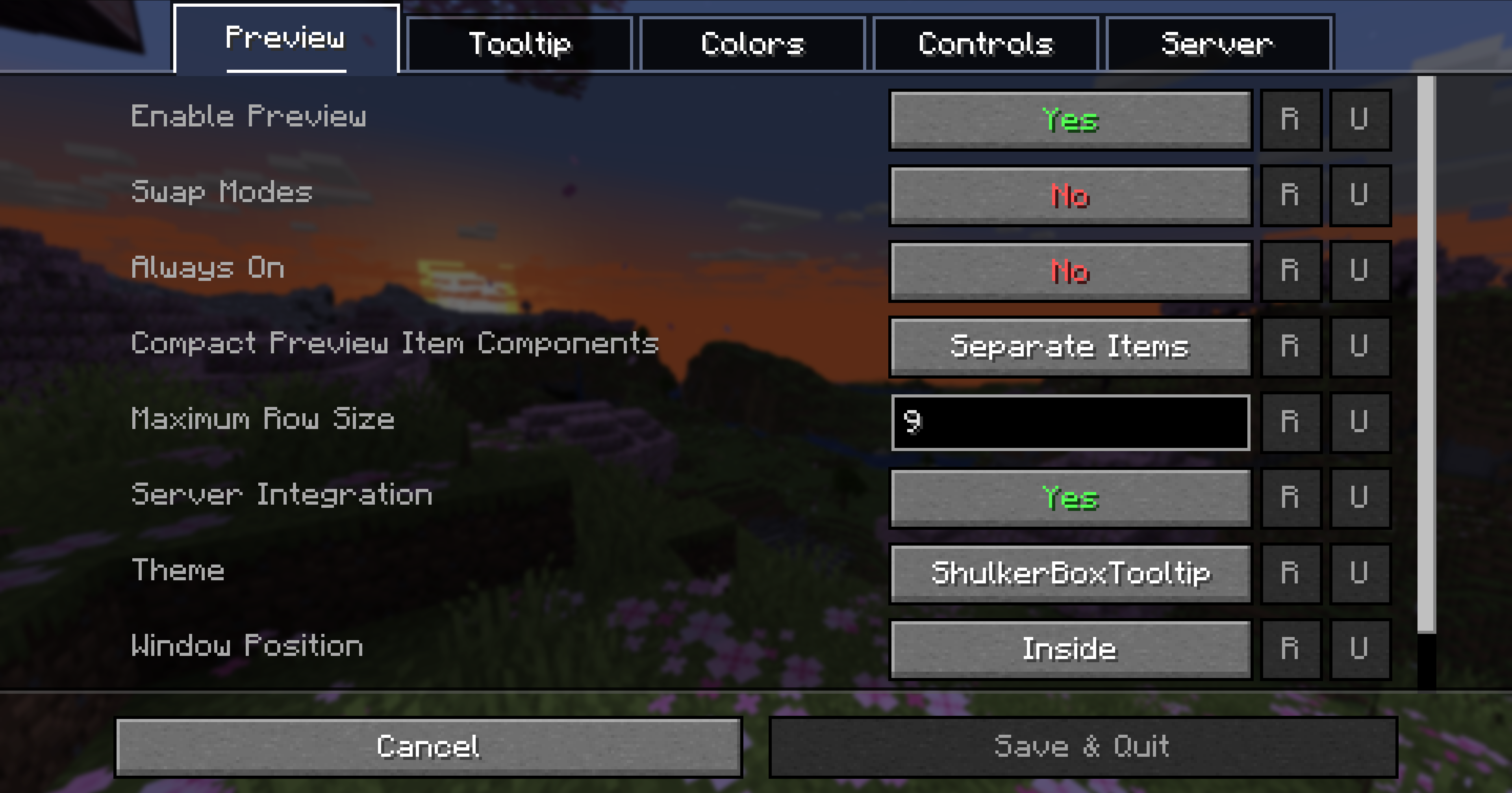
可配置性
模组的大部分功能均可通过配置菜单进行调整。要访问配置菜单,请在 Mod Menu 中选择 ShulkerBoxTooltip,然后点击齿轮图标。
有关各选项的详细信息,请参阅游戏内文档或 维基页面。配置文件位于 <minecraft 文件夹>/config/shulkerboxtooltip.json5。
颜色!
预览窗口的颜色会根据潜影盒的颜色自动变化,你可以在配置中禁用此效果。
服务器端支持
模组还可以安装在服务器端(可选),以提供额外功能,例如末影箱预览。
This mod allows you to see a preview window of a shulker box contents when hovering above it in an inventory by pressing shift.
Supports both Fabric and Forge
On Fabric:
Fabric Loader and Fabric API are required
Mod Menu is recommended (but not required) for in-game configuration
Features:
Compact Preview
Press shift (by default) while hovering an item.
Full Preview
Press alt+shift (by default) while hovering an item to shows its full contents where each contained stack is displayed in the correct slot.
Other Containers
The preview also works with items obtained in creative mode using control + pick block such as chests, furnaces, barrels, etc...
Works with most modded containers as well.
Loot Tables
The name of the loot table is displayed in the tooltip if the hovered item as one.
This option is disabled by default.
Configurability
Most aspects of the mod can be configured through the config menu. To access it, in the mod menu select ShulkerBoxTooltip and then click on the gear icon.
See the in game documentation or the wiki for info about each option. The config file can be found at <minecraft folder>/config/shulkerboxtooltip.json5
Colors!
The color of the preview window changes depending on the color of the shulker box, you can disable it in config.
Server support
The mod can also be installed server-side (optional) to provide extra features such as ender chest preview.

下载 Shulker Box Tooltip
需要联机服务器吗?
稳定流畅、一键部署,几分钟即可和朋友联机开服
最低仅需 8 元/月 即可畅快联机
下载 Shulker Box Tooltip
下载 Shulker Box Tooltip
需要联机服务器吗?
稳定流畅、一键部署,几分钟即可和朋友联机开服
最低仅需 8 元/月 即可畅快联机
下载 Shulker Box Tooltip
下载 Shulker Box Tooltip
需要联机服务器吗?
稳定流畅、一键部署,几分钟即可和朋友联机开服
最低仅需 8 元/月 即可畅快联机
下载 Shulker Box Tooltip
需要联机服务器吗?
稳定流畅、一键部署,几分钟即可和朋友联机开服
最低仅需 8 元/月 即可畅快联机
下载 Shulker Box Tooltip
需要联机服务器吗?
稳定流畅、一键部署,几分钟即可和朋友联机开服
最低仅需 8 元/月 即可畅快联机
下载 Shulker Box Tooltip
下载 Shulker Box Tooltip
需要联机服务器吗?
稳定流畅、一键部署,几分钟即可和朋友联机开服
最低仅需 8 元/月 即可畅快联机
下载 Shulker Box Tooltip
5.4.3+26.3:
- 由 Q2297045667 更新了简体中文本地化 (#265)
- 修复了在启用服务器集成时,在末影箱内移动或整理物品时出现的卡顿问题 (#264)
关于这个资源的讨论、问题反馈与使用心得
还没有讨论,来发第一帖吧
你是这个资源的作者?登录后可认领此资源。
相似资源
 模组

显示你正在注视的方块的信息。(适用于 Minecraft 1.16+ 的 Hwyla/Waila 分支)
 模组
在游戏画面角落显示附近世界地形、玩家、生物和实体的地图。可创建路径点,帮助你找到标记过的位置。
 模组
使用 JavaScript 编辑配方、添加自定义物品、编写世界事件!
 模组

查看物品与配方
 模组
AE2:一款流行的自动化与存储模组
 模组
那是什么?一个 Waila/Hwyla 的分支。
评论 0
登录后参与评分
还没有评论,来抢沙发吧