
Simple Craft Editor ?️
一款用于 Minecraft 合成配方的游戏内编辑器。禁用配方、调整现有配方,或即时创建全新配方——无需数据包,无需重启。更改立即生效。
✨ 功能特性
- 禁用任何配方 — 关闭原版或模组配方。它们将无法再被合成(并在执行
/reload后从配方查看器的列表中消失),且你可以随时恢复它们。 - 编辑现有配方 — 通过可视化编辑器修改原料、结果、输出数量、烹饪时间和经验值。
- 创建新配方 — 支持形状合成与无形状合成、熔炼、 blast(烧制)、烟熏、营火烹饪、切石机以及锻造台升级。
- 物品标签作为原料 — 可以使用整个标签(如“任意木板”)代替单个物品。槽位会显示该标签实际包含的物品,依次展示。
- 数据作为配方的一部分 — 配方可以要求放入网格中的物品携带特定数据,因此它只识别名为 "Pepito" 的箱子,而不是任意箱子。结果也可以携带数据:保留原料的数据、将结果槽中的数据烘焙进去,或两者兼有。
- 铁砧修复规则 — 告诉铁砧什么能修复什么。给任意物品指定其专属的修复材料,或移除其原有的修复材料。这些规则会像其他配方一样显示在 JEI、EMI 和 REI 中。
- Create Mod 支持 — 构建 Create 的任何机器配方:混合、粉碎、压制、锯切、批量清洗等,以及机械工作台的大网格和多步骤配方序列。包含产出概率、热量需求和流体数量。
- Cobblemon 支持 — 营火锅的配方,包括调味规则:玩家可以向锅中添加哪些物品标签,以及成菜会从中标记哪七种属性之一。酿造台同样支持。
- Farmer's Delight 和 The Twilight Forest — 支持切菜板和烹饪锅;支持解除合成表、晾干以及修复权杖。
- 你的配方随 Minecraft 版本迁移 — 将世界或实例升级、降级或跨多个版本移动时,你编辑、创建和禁用的配方都会随之迁移。
- 流体支持 — Create 的机器以毫桶(millibucket)计量流体,编辑器也如此。从配方查看器拖入流体或输入其 ID(包括标签)。
- 原始 JSON 回退 — 可视化编辑器未覆盖的任何配方类型仍可作为原始 JSON 进行编辑,因此没有任何限制。
- 与 JEI、EMI 和 REI 兼容 — 直接从配方查看器将物品和流体拖拽到编辑器槽位,或悬停在物品上并按下快捷键跳转到其配方。再次按下可浏览制作该物品的所有配方。
- 实时同步 — 对服务器上的所有人即时应用更改,并在重启后持久保存。运行
/reload刷新配方查看器的显示内容。 - 仅限操作员 — 只有操作员(或在开启作弊的单人游戏中)才能编辑,普通玩家无法篡改整合包。
注意: 由脚本模组创建的配方无法在此编辑。这些脚本会在加载整合包时重写其配方,因此任何在此做出的更改都会被覆盖——编辑器会明确提示这一点,而不是让你创建一个不会持久的更改。请修改脚本本身。来自数据包、游戏和其他模组的配方正常工作。
? 使用方法
- 按 K 打开编辑器(仅限操作员)。该按键可在控制设置中重新绑定。
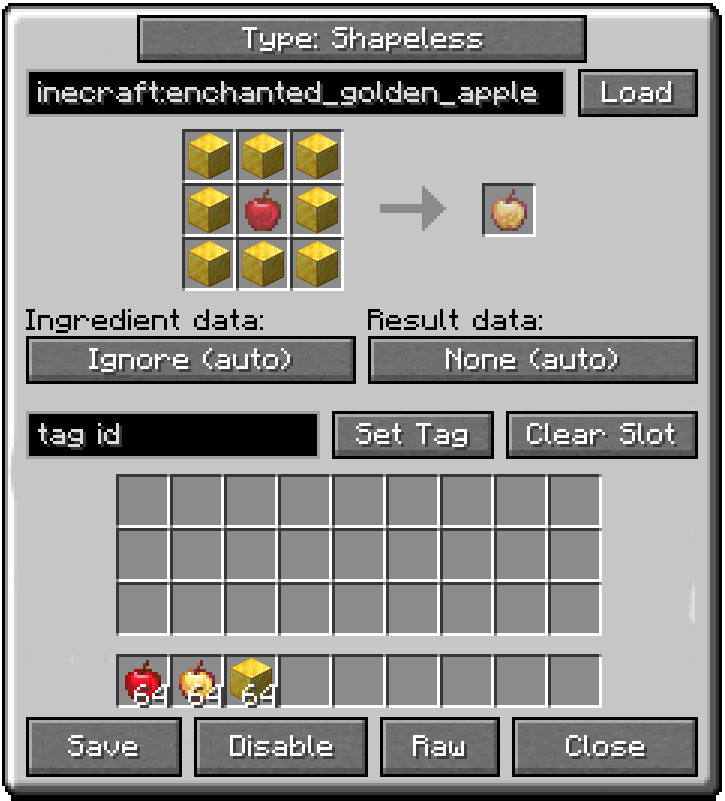
- 在那里你可以开始一个新配方、管理已禁用和自定义的配方,或打开铁砧规则以设定修复关系。
- 当配方查看器打开时,在 JEI、EMI 或 REI 中悬停任意物品并按 K 直接跳转到其配方。如果存在多个制作该物品的配方,再次按 K 可逐一浏览。
- 在有配方但尚未制作的物品上方按住 Shift 并按 K 以开始制作该物品的新配方。
? 兼容性
需要 Architectury API。其他均为可选:安装则编辑器自动适配,不安装则无任何影响。
| 配方查看器 | JEI, EMI, REI |
| 支持的配方类型 | Create, Cobblemon, Farmer's Delight, The Twilight Forest |
| 已知兼容共存 | KubeJS, CraftTweaker, Polymorph, FastSuite, FastWorkbench, FastFurnace, Fast Recipe Search, Sophisticated Backpacks |
? 本地化
提供英语和西班牙语——西班牙、阿根廷、智利、厄瓜多尔、墨西哥、乌拉圭和委内瑞拉。
? 链接
由 MateoF024 制作。可自由包含在任何模组整合包中,无论是公开还是私有,无需事先征得同意——详情请参阅许可证。
Simple Craft Editor ?️
An in-game editor for Minecraft crafting recipes. Disable recipes, tweak existing ones, or build brand-new ones on the fly — no datapacks, no restarts. Changes take effect immediately.
✨ Features
- Disable any recipe — switch off vanilla or modded recipes. They can no longer be crafted (and leave the recipe viewer's list after a
/reload), and you can restore them whenever you like. - Edit existing recipes — change ingredients, results, output counts, cooking time and experience, all from a visual editor.
- Create new recipes — shaped and shapeless crafting, smelting, blasting, smoking, campfire cooking, stonecutting, and smithing table upgrades.
- Item tags as ingredients — use a whole tag (like "any plank") in place of a single item. The slot shows what the tag actually holds, one item after another.
- Data as part of the recipe — a recipe can require the data on the items you place in the grid, so it works with the chest actually named "Pepito" and not with any chest. The result can carry data too: keep what the ingredients had, bake in what you put in the result slot, or both.
- Anvil repair rules — tell the anvil what mends what. Give any item its own repair material, or take away the one it came with. The rules show up in JEI, EMI and REI like any other recipe.
- Create Mod support — build any of Create's machine recipes: mixing, crushing, pressing, sawing, bulk washing and the rest, plus the Mechanical Crafter's big grid and multi-step recipe sequences. Output chances, heat requirements and fluid amounts included.
- Cobblemon support — the campfire pot's recipes, with the seasoning rules: which item tag a player may add to the pot, and which of the seven properties the finished dish takes from it. The brewing stand too.
- Farmer's Delight and The Twilight Forest — the cutting board and the cooking pot; the uncrafting table, drying, and repairing a scepter.
- Your recipes move between Minecraft versions — take a world or an instance up a version, back down, or several at once, and your edited, created and disabled recipes come with it.
- Fluids — Create's machines take fluids by the millibucket, so the editor does too. Drag a fluid in from the recipe viewer or type its id, tags included.
- Raw JSON fallback — any recipe type the visual editor doesn't cover can still be edited as raw JSON, so nothing is off-limits.
- Works with JEI, EMI and REI — drag items and fluids straight from the recipe viewer onto the editor slots, or hover an item and press a key to jump to its recipe. Press again to step through every recipe that makes it.
- Live and synced — edits apply instantly for everyone on the server and persist across restarts. Run
/reloadto refresh what the recipe viewer shows. - Operator-only — only operators (or single-player with cheats) can edit, so regular players can't tamper with the pack.
Note: recipes created by script mods can't be edited. Those scripts rewrite their recipes every time the pack loads, so any change made here would be undone — the editor says so rather than letting you make one that won't last. Change the script instead. Recipes from datapacks, from the game and from other mods work as normal.
? How to Use
- Press K to open the editor (operators only). The key can be rebound in Controls.
- From there you can start a new recipe, manage your disabled and custom recipes, or open Anvil rules to say what mends what.
- While a recipe viewer is open, hover any item in JEI, EMI or REI and press K to jump straight to its recipe. If more than one recipe makes it, press K again to step through them.
- Hold Shift and press K over an item that has no recipe to start one that makes it.
? Compatibility
Requires Architectury API. Everything else is optional: install it and the editor picks it up, leave it out and nothing changes.
| Recipe viewers | JEI, EMI, REI |
| Recipe types | Create, Cobblemon, Farmer's Delight, The Twilight Forest |
| Known to work beside | KubeJS, CraftTweaker, Polymorph, FastSuite, FastWorkbench, FastFurnace, Fast Recipe Search, Sophisticated Backpacks |
? Localization
Available in English and Spanish — Spain, Argentina, Chile, Ecuador, Mexico, Uruguay and Venezuela.
? Links
Created by MateoF024. Free to include in any modpack, public or private, without asking — see the licence for the rest.

下载 Simple Craft Editor
下载 Simple Craft Editor
下载 Simple Craft Editor
下载 Simple Craft Editor
下载 Simple Craft Editor
下载 Simple Craft Editor
下载 Simple Craft Editor
下载 Simple Craft Editor
下载 Simple Craft Editor
下载 Simple Craft Editor
版本 1.3.1
已修复
- 源自使用小写字母的模组的形状合成配方在游戏每次启动时都会出错。
关于这个资源的讨论、问题反馈与使用心得
还没有讨论,来发第一帖吧
你是这个资源的作者?登录后可认领此资源。
相似资源
 模组

显示你正在注视的方块的信息。(适用于 Minecraft 1.16+ 的 Hwyla/Waila 分支)
 模组
使用 JavaScript 编辑配方、添加自定义物品、编写世界事件!
 模组

查看物品与配方
 模组
在游戏画面角落显示附近世界地形、玩家、生物和实体的地图。可创建路径点,帮助你找到标记过的位置。
 模组
AE2:一款流行的自动化与存储模组
 模组
那是什么?一个 Waila/Hwyla 的分支。
评论 0
登录后参与评分
还没有评论,来抢沙发吧