
Minecraft Info Display
一款简单且可自定义的模组,可以在 HUD 上显示一些有用的信息,类似于 Lunar Client 中的功能。
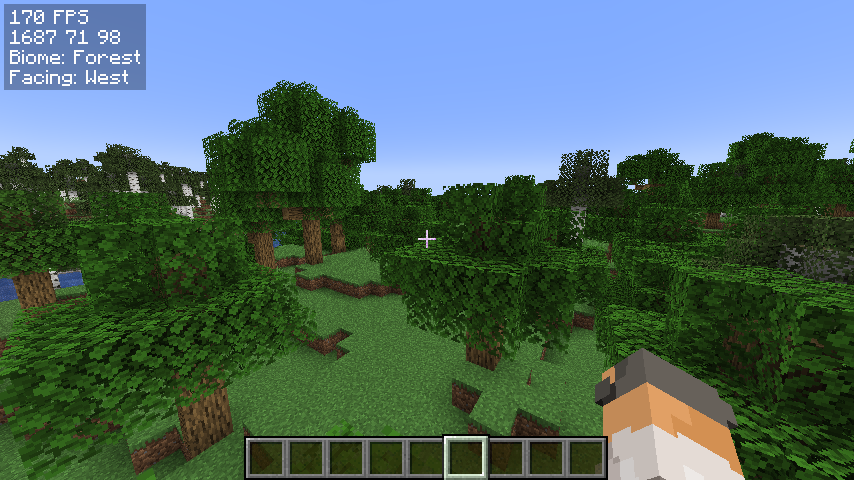
我刚开始接触 Fabric 模组开发,因此如果你有任何建议或发现任何 bug,请在 Discord 上私信我:@jamicah,或在 GitHub 上提交 issue。
功能
信息显示:
- FPS
- 坐标
- 生物群系
- 朝向方向
- 实时时间
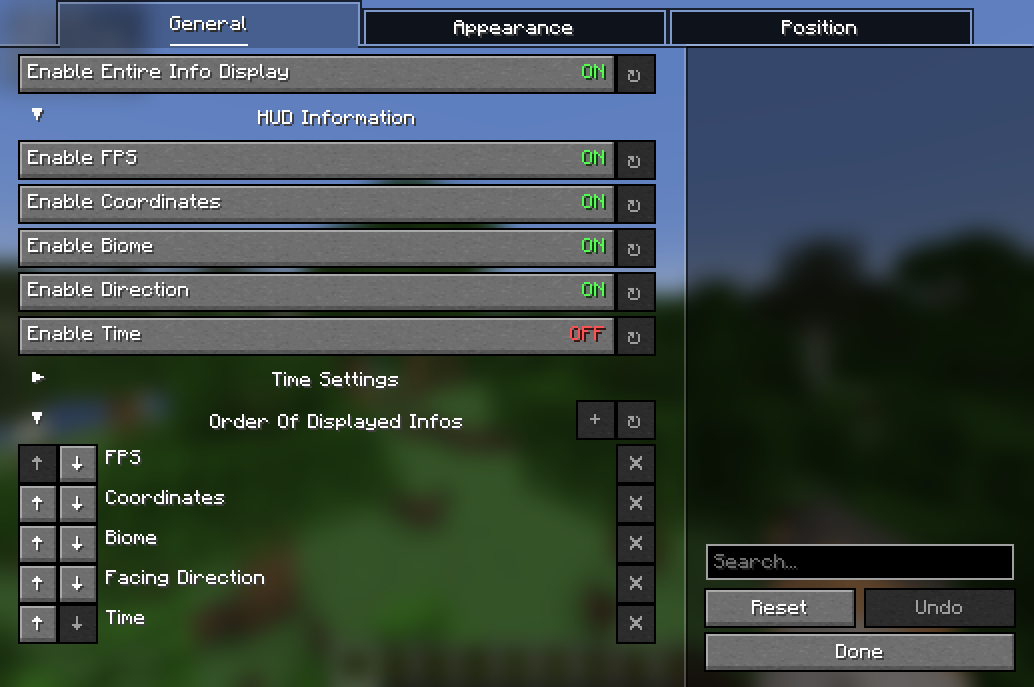
使用快捷键或在配置菜单中切换全部开启/关闭。
自定义:
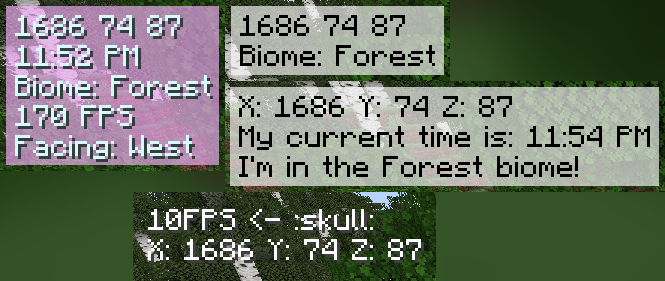
- 更改显示顺序
- 更改 HUD 的(绝对)位置
- 更改文本颜色
- 更改背景颜色
- 自定义 HUD 文本
- 以及更多!
待办事项:
- 更多的自定义选项
- 更多的显示信息
- 相对 HUD 位置
依赖项
安装方法
使用方法
通过以下方式打开配置菜单:
- 运行命令
/infodisplay - 通过 Mod Menu 打开
- 在控制菜单中为其设置快捷键
贡献
欢迎在 GitHub 上提交 issue 或 pull request!
如何为新语言添加本地化支持:
- 在
src/main/resources/assets/coords_mod/lang/中创建新文件 - 将其命名为
xx_XX.json,其中xx_XX是语言代码(例如en_us表示英语(美国),de_de表示德语(德国)) - 将
en_us.json的内容复制到新文件中 - 将冒号右侧的值翻译成新语言
- 创建 pull request
Minecraft Info Display
A simple, yet customizable, mod that can display some useful infos on the hud, similar to the one in Lunar Client.
I am very new to fabric modding, so if you have suggestions or find any bugs, DM me on Discord: @jamicah or open an issue on GitHub.
Features
Info Display:
- FPS
- Coordinates
- Biome
- Facing Direction
- Real Time
Toggle all of them on/off using a keybind or in the config menu.
Customization:
- Change the display order
- Change the (absolute) position of the HUD
- Change the color of the text
- Change the background color
- Customize the HUD text
- and more!
TODO:
- more customization options
- more info to display
- relative HUD position
Requirements
- Fabric API
- YetAnotherConfigLib
- Mod Menu (optional)
How to install
- Download the latest release on modrinth or from the releases page
- Put the downloaded jar file into your mods folder
- Launch the game
How to use
Open the configuration menu by either:
- running the command
/infodisplay - opening it using Mod Menu
- setting a keybind for it in the controls menu
Contribute
Feel free to open an issue or a pull request on GitHub!
How to add localization for a new language:
- Create a new file in
src/main/resources/assets/coords_mod/lang/ - Name it
xx_XX.json, wherexx_XXis the language code (e.g.en_usfor English (US),de_defor German (DE)) - Copy the contents of
en_us.jsoninto the new file - Translate the values on the right side of the colons into the new language
- Create a pull request
下载 Simple Info Display
需要联机服务器吗?
稳定流畅、一键部署,几分钟即可和朋友联机开服
最低仅需 8 元/月 即可畅快联机
下载 Simple Info Display
下载 Simple Info Display
下载 Simple Info Display
需要联机服务器吗?
稳定流畅、一键部署,几分钟即可和朋友联机开服
最低仅需 8 元/月 即可畅快联机
下载 Simple Info Display
需要联机服务器吗?
稳定流畅、一键部署,几分钟即可和朋友联机开服
最低仅需 8 元/月 即可畅快联机
下载 Simple Info Display
下载 Simple Info Display
下载 Simple Info Display
下载 Simple Info Display
已添加对最新版本 26.2 的支持
关于这个资源的讨论、问题反馈与使用心得
还没有讨论,来发第一帖吧
你是这个资源的作者?登录后可认领此资源。
相似资源
 模组

显示你正在注视的方块的信息。(适用于 Minecraft 1.16+ 的 Hwyla/Waila 分支)
 模组
在游戏画面角落显示附近世界地形、玩家、生物和实体的地图。可创建路径点,帮助你找到标记过的位置。
 模组
使用 JavaScript 编辑配方、添加自定义物品、编写世界事件!
 模组

查看物品与配方
 模组
AE2:一款流行的自动化与存储模组
 模组
那是什么?一个 Waila/Hwyla 的分支。
评论 0
登录后参与评分
还没有评论,来抢沙发吧