
包含更多传输 HUD 的新模组:
鞘翅 HUD
信息
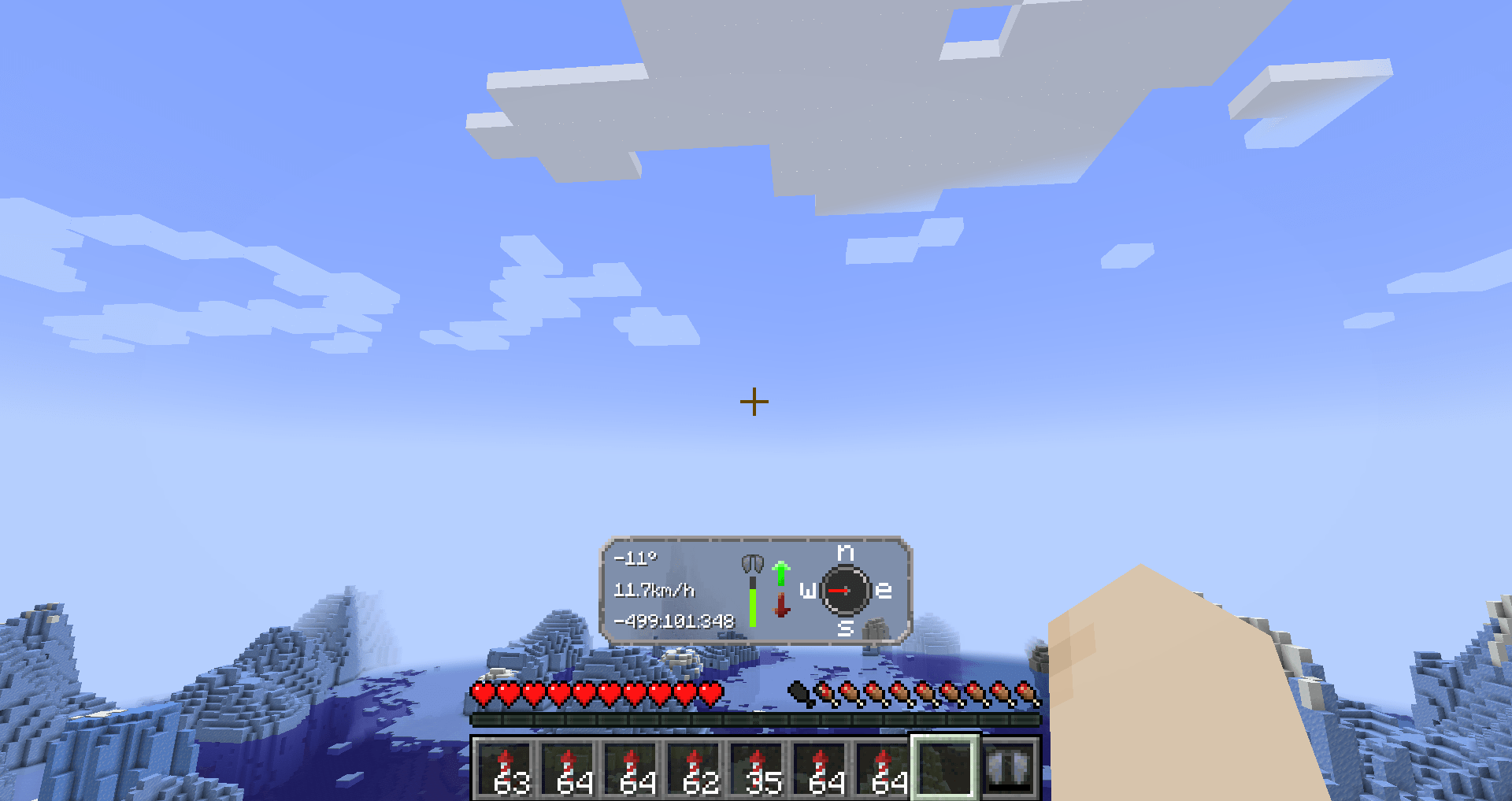
Elytra Hud 为使用鞘翅飞行提供了一种全新的方式。 它在飞行时在屏幕上显示重要信息。 在长途飞行中使用此模组,以获得最佳的旅程体验。
HUD 功能
左侧
我们有三个文本字段,按顺序分别是:
- 你的 俯仰角。
- 速度(km/h)
- 坐标(将根据数字位数自动缩放)
中间
中间显示的是你的鞘翅状态。
在其右侧是上下箭头。 如果你正在向上飞,它会亮起;向下飞时同理。
右侧
右侧有一个指南针。这不是普通的指南针,因为它始终指向你前进的方向。
配置
此模组需要 YetAnotherConfigLib 和 modmenu。
要能够编辑配置,你需要安装上述模组。
配置选项
它们在配置菜单中按顺序排列。
- HUD 可见性 — 如果你想关闭 HUD 的可见性
- HUD 延迟 — HUD 出现所需的时间。
- 鞘翅状态 — 你可以选择在 HUD 中关闭鞘翅耐久度显示
- 鞘翅坐标 — 如果你愿意,可以禁用 HUD 中的坐标显示
- 速度单位 — 提供 km/h(默认)、m/s 或 mph 可选
寻找服务器?
使用 BisectHosting 并在使用代码 Lukas 结账时为新客户节省 25%。 感谢您的支持——这有助于我开发此模组以及我制作的其他模组! #ad
如何下载?
通过启动器(推荐)
- 下载 Modrinth launcher(更用户友好)或 Prism launcher(选项更多,但对新手来说较难使用)
- 为你想要的 Minecraft 版本创建配置文件,并确保它是 Fabric。首先检查模组是否与该版本兼容。
- 你可以在启动器中下载该模组 4. (Modrinth launcher)在你的配置文件右上角,点击“Add content”并搜索“Simple Elytra Hud”,然后点击“install”。 5. (Prism launcher)点击“edit”进入配置文件,然后选择“Mods”,接着点击“Download mods”。在 Modrinth 标签页下输入“Simple Elytra Hud”。勾选以进行下载,然后点击确认。 6. 你需要 modmenu 和 YetAnotherConfigLib。用同样的方式下载它们!
- 现在你可以启动配置文件并享受游戏了!
不使用启动器
- 你可以在 Modrinth 或 Github 上下载此模组
- 你还需要下载 Fabric API
- 你还需要 Mod Menu 和 YetAnotherConfigLib(低于 1.6 的版本使用且可选 cloth config)
- 你还需要 fabric,这将自动为你创建一个配置文件
- 将模组放入 %appdata%/.minecraft/mods
- 现在你可以玩 Minecraft 了
开源
我几乎所有的模组都是开源的,并且采用 MIT 许可证。 请随意以任何方式使用。 如果你想帮助开发,请查看 GitHub!
如果你发现了 bug,请在此处报告 here!
灵感与致谢
- 此模组受 Boat HUD 启发
- 由 Lukasabbe 编码
- Lemonixi 制作了图形
- Smurre 提出了想法
感谢大家下载此模组!
New mod with alot more transports hud:s at
Elytra hud
Information
Elytra Hud add in a new way to fly with your elytra. It adds important information on the screen while flying. Use this mod for your long flights to get the most out of the trip
HUD:s features
Left side
We have three text fields, in order they are
- Your pitch angle.
- Speed in km/h
- Coordinates (Will scale to how many numbers that are up)
Middle
In the middle, you have the status of your Elytra.
To the right of that you have up and down arrows. If you are flying up, it will light upp; that's the same for going down.
Right side
On the right side you have a compass. This is not a normal compass, because it will always point towards the direction you are going
Config
The mod requires YetAnotherConfigLib and modmenu.
To be able to edit the config, you need thees mods.
Config Options
They are in order in the config menu.
- Hud's visibility — If you want to turn of the HUD's visibility
- Hud's delay — The time it takes for the hud to appear.
- Elytra status — You can turn of the damage level for elytra in the HUD
- Elyta coordinates — If you want, you can disable coordinates in the HUD
- Speed measurement — There is km/h (default), m/s or mph available
Looking for a server?
Get BisectHosting and save 25% off for new customers using code Lukas at checkout. Thanks for your support — it helps me develop this and other mods I make! #ad
How to download?
With launcher (recommended)
- Download Modrinth launcher (more user-friendly) or Prism launcher (A lot more options but harder to use for someone new)
- Create a profile for the minecraft version you want and make sure its fabric. Check so the mod has compatibility with that version first.
- You can download the mod in the launcher 4. (Modrinth launcher) In your profile in the right corner, press "Add content" and search up "Simple Elytra Hud" and press "install." 5. (Prism launcher) Go in to the profile by pressing "edit" and then you want and press "Mods" and then "Download mods". Under the Modrinth tab write "Simple Elytra Hud". Mark for download and then press confirm. 6. You need modmenu and YetAnotherConfigLib. Download it in the same way!
- Now you can start your profile and enjoy!
Without launcher
- You can download the mod here on Modrinth or Github
- You also need to download Fabric API
- You also need Mod Menu and YetAnotherConfigLib (Versions bellow and 1.6 use and its optional cloth config)
- You also need fabric and this will automatically create a profile for you
- Put the mods in %appdata%/.minecraft/mods
- Now you can play Minecraft
Open source
Nearly all my mods are opensource and under MIT. Feel free to use however you want. If you want to help the development, check out the GitHub!
If you found a bug, please report it here!
Inspiration and credit
- The mod is inspired by Boat HUD
- Lukasabbe has coded
- Lemonixi made the graphics.
- Smurre came up with the idea
Thank you all for downloading the mod!
下载 Simple Elytra Hud
下载 Simple Elytra Hud
下载 Simple Elytra Hud
下载 Simple Elytra Hud
下载 Simple Elytra Hud
需要联机服务器吗?
稳定流畅、一键部署,几分钟即可和朋友联机开服
最低仅需 8 元/月 即可畅快联机
下载 Simple Elytra Hud
下载 Simple Elytra Hud
下载 Simple Elytra Hud
下载 Simple Elytra Hud
需要联机服务器吗?
稳定流畅、一键部署,几分钟即可和朋友联机开服
最低仅需 8 元/月 即可畅快联机
下载 Simple Elytra Hud

关于这个资源的讨论、问题反馈与使用心得
还没有讨论,来发第一帖吧
你是这个资源的作者?登录后可认领此资源。
相似资源
 模组

显示你正在注视的方块的信息。(适用于 Minecraft 1.16+ 的 Hwyla/Waila 分支)
 模组
使用 JavaScript 编辑配方、添加自定义物品、编写世界事件!
 模组

查看物品与配方
 模组
在游戏画面角落显示附近世界地形、玩家、生物和实体的地图。可创建路径点,帮助你找到标记过的位置。
 模组
AE2:一款流行的自动化与存储模组
 模组
那是什么?一个 Waila/Hwyla 的分支。
评论 0
登录后参与评分
还没有评论,来抢沙发吧