Simple HUD
Simple HUD 是一款轻量级、完全可定制的抬头显示(HUD)模组,适用于 Minecraft 1.21.11 (Fabric),将你真正需要的信息直接呈现在屏幕上——无需 F3 调试菜单的杂乱干扰。
无论你是速通玩家、正在建造巨型结构、探索遥远坐标,还是仅仅在生存模式中游玩并想一眼看清自己的位置,Simple HUD 都能满足你的需求。
它是做什么的?
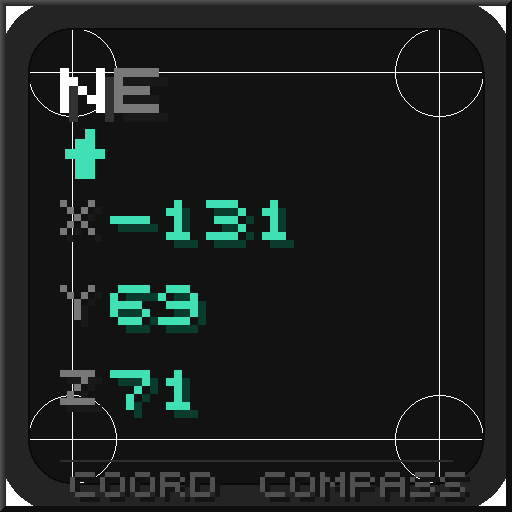
Simple HUD 会在你的游戏画面上渲染一个简洁的小型文本叠加层。默认情况下,它会在左上角显示你当前的坐标和指南针方向,就像你在服务器 HUD 或迷你地图模组中看到的画面一样——但它是完全独立的,除了 Fabric API 和 Cloth Config 之外没有任何依赖项。
叠加层的每个元素都是可选的。不想要 FPS?关掉它。只关心洞穴探险时的 Y 轴高度?只显示那个。想要两行显示,上面是方向下面是坐标?没问题。该模组不会妨碍你,让你可以精确配置自己想看到的内容。
功能
坐标显示
实时显示你的 X、Y 和 Z 位置。你可以配置显示的小数位数(0 表示干净的整数,最多 2 位用于精确定位),无论你是定位特定方块还是在崎岖地形中导航,都非常有用。
指南针方向
显示你当前面对的方向。提供四种样式供选择:
短格式 — N, NE, E, SE, S, SW, W, NW
长格式 — North, Northeast, East 等
角度制 — 0° 到 359°,旋转时实时更新
短格式 + 角度制 — SE (135°) — 两者兼得
生物群系显示
显示你当前所在的生物群系名称,并自动美化(例如 minecraft:dark_forest 变为 Dark Forest)。
维度显示
显示你当前所在的维度——主世界、下界或末地——在使用添加自定义维度的模组时非常有用。
FPS 计数器
清晰直观的每秒帧数读数,始终实时更新。
自定义格式字符串
对于高级用户:禁用各个开关,使用占位符编写自己的格式字符串。构建单行布局、多行布局,随意重新排列元素——模组只会渲染你提供的任何内容。
可用占位符:
占位符输出%dir%短方向 (SE)%dirlong%长方向 (Southeast)%deg%角度 (135)%x%X 坐标%y%Y 坐标%z%Z 坐标%biome%当前生物群系名称%dim%当前维度%fps%当前 FPS%n%换行符(用于多行布局)
示例:
%dir% (%deg%°)%n%X: %x% Y: %y% Z: %z%%n%%biome%
结果是一个三行的 HUD,分别显示方向、完整坐标和生物群系名称。
外观与位置
HUD 的外观所有内容均可配置:
位置 — 6 个锚点:左上、上中、右上、左下、下中、右下
偏移量 — 微调 X 和 Y 位置的像素值,以便与其他 HUD 元素完美契合
缩放比例 — 将整个叠加层的大小从 50% 调整到 300%
文字颜色 — 全 RGB 颜色选择器
文字阴影 — 开启/关闭经典的 Minecraft 投影效果
粗体文本 — 使整个叠加层变粗
背景 — 文本后面可选的深色背景矩形(默认禁用),支持配置颜色和透明度
Simple HUD
Simple HUD is a lightweight, fully customizable heads-up display mod for Minecraft 1.21.11 (Fabric) that puts all the information you actually need right on your screen — without the clutter of the F3 debug menu.
Whether you're speedrunning, building massive structures, exploring far-out coordinates, or just playing survival and want to know where you are at a glance, Simple HUD has you covered.
What does it do?
Simple HUD renders a small, clean text overlay directly on your game screen. By default it shows your current coordinates and compass direction in the top-left corner, exactly like the image you'd see in a server's HUD or a minimap mod — but fully standalone, with zero dependencies beyond Fabric API and Cloth Config.
Every single element of the overlay is optional. Don't want FPS? Turn it off. Only care about Y level for caving? Show just that. Want a two-line display with direction on top and coords below? Done. The mod gets out of your way and lets you configure exactly what you want to see.
Features
Coordinate Display
Shows your X, Y, and Z position in real time. You can configure how many decimal places are shown (0 for clean integers, up to 2 for precise positioning), making it equally useful whether you're locating a specific block or navigating rough terrain.
Compass Direction
Displays the direction you're currently facing. Choose from four styles:
Short — N, NE, E, SE, S, SW, W, NW
Long — North, Northeast, East, etc.
Degrees — 0° through 359°, updates live as you rotate
Short + Degrees — SE (135°) — the best of both worlds
Biome Display
Shows the name of the biome you're currently standing in, prettified automatically (so minecraft:dark_forest becomes Dark Forest).
Dimension Display
Shows which dimension you're in — Overworld, Nether, or End — useful when using mods that add custom dimensions.
FPS Counter
A clean, no-nonsense frames-per-second readout, always up to date.
Custom Format String
For power users: disable the individual toggles and write your own format string using placeholders. Build a single-line layout, a multi-line layout, rearrange elements however you like — the mod just renders whatever you give it.
Available placeholders:
PlaceholderOutput%dir%Short direction (SE)%dirlong%Long direction (Southeast)%deg%Degrees (135)%x%X coordinate%y%Y coordinate%z%Z coordinate%biome%Current biome name%dim%Current dimension%fps%Current FPS%n%Line break (for multi-line layouts)
Example:
%dir% (%deg%°)%n%X: %x% Y: %y% Z: %z%%n%%biome%
Results in a three-line HUD showing direction, full coordinates, and biome name.
Appearance & Positioning
Everything about how the HUD looks is configurable:
Position — 6 anchor points: top-left, top-center, top-right, bottom-left, bottom-center, bottom-right
Offset — Fine-tune X and Y position in pixels to fit perfectly around other HUD elements
Scale — Resize the entire overlay from 50% to 300%
Text color — Full RGB color picker
Text shadow — Toggle the classic Minecraft drop shadow on/off
Bold text — Make the entire overlay bold
Background — Optional dark background rectangle behind the text (disabled by default) with configurable color and opacity

 模组

 模组
 模组
 模组

 模组
 模组
评论 0
登录后参与评分
还没有评论,来抢沙发吧