
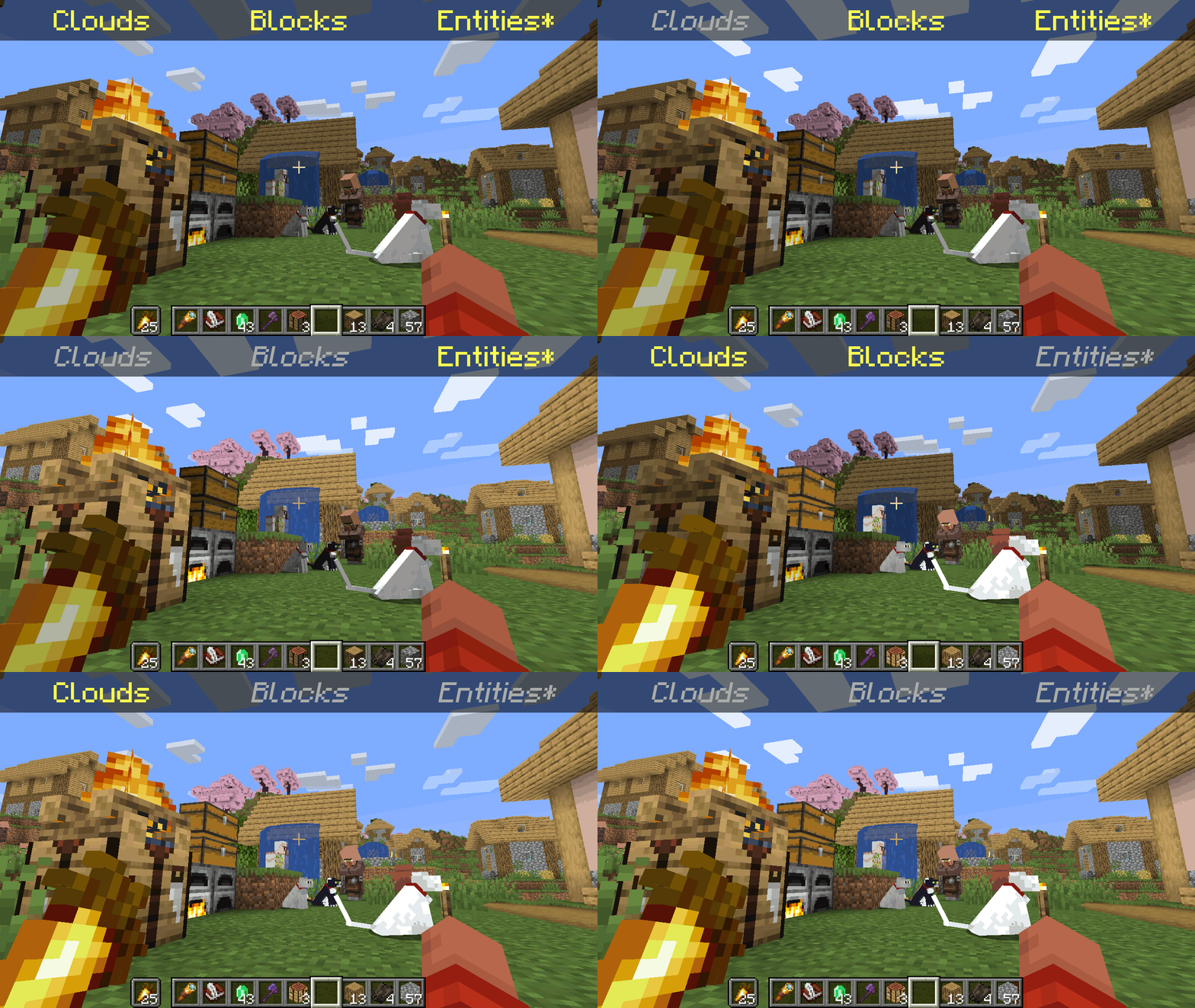
*澄清:实体阴影现已稳定,且不会影响物品栏和屏幕内游戏界面。
Simply No Shading 是一款基于 Fabric 的 [修改器] (模组),用于 Minecraft [客户端]。如上图所示,该模组移除了游戏中对象(如方块、云朵和实体)侧面或面部的变暗效果(也称为 [阴影])。
兼容性
Simply No Shading 为 BedrockIfy 和 Sodium 提供了主动兼容支持。一些提供或替换内容的模组可能也能正常工作,例如 Enhanced Block Entities (EBE),其中实体方块像普通方块一样运作,并在切换阴影时受到相应影响。那些替换渲染机制的模组很可能不兼容;例外情况有主动支持的模组,例如 Sodium。一个不兼容的例子是光影,通常使用 Iris 加载,它们可能不会导致游戏崩溃,但在应用时会使得此模组失效。
类似解决方案
Simply No Shading 并非移除阴影的唯一尝试,还有其他解决方案,例如:
- Flat Lighting 是一款简单的 Fabric 模组,可为方块实现相同的效果并支持 Sodium。
- internal-shaders,虽然未列出,但是一款简单的光影模组,可移除方块和实体的阴影。
- Lightingless 是一款简单的光影,可移除方块和实体的阴影。
- OptiFine 通过内部着色器实现的旧版光照。通过将
Options > Video Settings > Shaders... > (internal) > Old Lighting设置为ON来实现。 - New Lighting 1.18+ (Internal Shaders without Optifine)。此资源包通过将方块模型上的
shade标志设置为false(OFF) 来实现类似的效果。
功能
Simply No Shading 支持以下类别以切换阴影:
- Blocks — 包括方块、液体以及 EBE 的实体方块
- Clouds — 包括云朵
- Entities (
≥7.4.0) — 包括世界中的普通实体和实体方块 - 已弃用 实验性内置资源包中的实体 — 包括实体方块、实体,以及提示框(弹出窗口,例如完成 [成就])和物品栏或图形用户界面 (GUI) 中的方块、实体方块、实体和项目
配置
Simply No Shading 拥有一个配置界面,可通过以下方式访问:
- 按键映射。默认未绑定,可在
Options > Controls > Keys > Simply No Shading > Open Config Screen中进行绑定 - Mod Menu。
Mods > Simply No Shading > Configure...
Simply No Shading 将其配置存储为格式化后的 JSON 文件,位于 <your minecraft folder>/config/simply-no-shading.json。
版本
Simply No Shading 遵循语义化版本控制。该模组旨在在支持的 Minecraft 版本间保持相同的功能。给定版本号 X.Y.Z,其中:
X在发生破坏性更改时变更,例如配置格式的重大变更。Y在添加或更改功能(非破坏性)时变更。Z用于修复错误和兼容性问题,且在支持的 Minecraft 版本间可能不一致。
目标版本目前正在重新考虑中。模组版本 8.x 可能仅针对游戏的最新版本进行维护。7.x 仍将继续维护以进行错误修复和翻译工作。
Simply No Shading 旨在为最新的小版本更新到主要发布版本提供支持,以及一些愚人节快照版本。支持最新主要版本的所有小版本。最新的快照版本在下一次主要发布之前也会获得临时支持。以下是所有受支持的版本:
| # | 模组版本 | Minecraft 版本 |
|---|---|---|
| 1 | 7.6.4 |
1.14.4 |
| 2 | 7.6.4 |
1.15.2 |
| 3 | 7.6.4 |
20w14infinite |
| 4 | 7.6.4 |
1.16.5 |
| 5 | 7.6.4 |
1.17.1 |
| 6 | 7.6.4 |
1.18.2 |
| 7 | 7.6.4 |
22w13oneblockatatime |
| 8 | 7.6.4 |
1.19.4 |
| 9 | 7.6.4 |
23w13a_or_b |
| 10 | 7.6.4 |
1.20.1 |
| 11 | 7.6.4 |
24w14potato |
| 12 | 7.6.4 |
1.20.6 |
| 13 | 7.6.4 |
1.21 |
| 14 | 7.6.4 |
1.21.1 |
| 15 | 7.6.4 |
25w14craftmine |
| 16 | 7.6.6 |
1.21.10 |
| 17 | 8.0.0-alpha.5 |
1.21.11 |
| 18 | 8.0.0-alpha.6 |
26.1.2 |
| 19 | 8.0.0-alpha.5 |
26.2 |
*Clarification that Entity shading is now stable and DOES NOT affect the inventory and in-game screens.
Simply No Shading is a Fabric-based modification (mod) for the Minecraft client. This mod removes the darkening on sides or faces (also known as shading) to in-game objects such as blocks, clouds, and entities as illustrated above.
Compatibility
Simply No Shading provides active compatibility for BedrockIfy and Sodium. Some mods that provide or replace stuff may work such as Enhanced Block Entities (EBE), where block entities act like blocks and are affected as such when toggling shading. Some mods that replace rendering are most likely incompatible; exceptions have active support such as Sodium, for example. One example of incompatibility is shaders, usually applied using Iris, as they may not crash the game but would just render this mod ineffective when they are applied.
Similar Solutions
Simply No Shading is not the only effort to removing shading, there are other solutions such as:
- Flat Lighting is a simple Fabric mod that achieves the same results for blocks and supports Sodium.
- internal-shaders, though unlisted, is a simple Iris shader that removes shading on blocks and entities.
- Lightingless is a simple shader that removes shading on blocks and entities.
- OptiFine's old lighting through the internal shader. Achieved by turning
Options > Video Settings > Shaders... > (internal) > Old LightingtoON. - New Lighting 1.18+ (Internal Shaders without Optifine). This resource pack achieves the similar results by setting the
shadeflag on block models tofalse(OFF).
Features
Simply No Shading supports the following categories for toggling shading:
- Blocks — this includes blocks, liquids, and EBE's block entities
- Clouds — this includes clouds
- Entities (
≥7.4.0) — this includes normal entities and block entities in the world - Deprecated Experimental Entities Built-in Resource Pack — this includes block entities, entities, and blocks, block entities, entities, and items in toasts (pop-ups, e.g. completing an advancement) and inventories and or Graphical User Interfaces (GUIs)
Configuration
Simply No Shading has a configuration screen and it's accessible through:
- a key mapping. It's unbound by default and can be bound at
Options > Controls > Keys > Simply No Shading > Open Config Screen - Mod Menu.
Mods > Simply No Shading > Configure...
Simply No Shading stores its configuration as a formatted JSON file at <your minecraft folder>/config/simply-no-shading.json.
Versions
Simply No Shading follows semantic versioning. This mod aims to maintain the same feature across supported Minecraft versions. Given the version X.Y.Z where:
Xchanges when breaking changes occur, such as with breaking config format changes.Ychanges when features are added or changed (non-breaking).Zchanges for bug and compatibility fixes and may not stay consistent across supported Minecraft versions.
Target versions is currently being reconsidered. Mod version 8.x will likely only be maintained for the newest versions of the game. 7.x will still remain maintained for bug-fixing and translations.
Simply No Shading aims to provide support for the latest minor updates to major releases along with some April Fool's snapshots. All minor releases for the latest major version are supported. The latest snapshot versions also get temporary support before the next major release. Following are all those versions:
| # | Mod Version | Minecraft Version |
|---|---|---|
| 1 | 7.6.4 |
1.14.4 |
| 2 | 7.6.4 |
1.15.2 |
| 3 | 7.6.4 |
20w14infinite |
| 4 | 7.6.4 |
1.16.5 |
| 5 | 7.6.4 |
1.17.1 |
| 6 | 7.6.4 |
1.18.2 |
| 7 | 7.6.4 |
22w13oneblockatatime |
| 8 | 7.6.4 |
1.19.4 |
| 9 | 7.6.4 |
23w13a_or_b |
| 10 | 7.6.4 |
1.20.1 |
| 11 | 7.6.4 |
24w14potato |
| 12 | 7.6.4 |
1.20.6 |
| 13 | 7.6.4 |
1.21 |
| 14 | 7.6.4 |
1.21.1 |
| 15 | 7.6.4 |
25w14craftmine |
| 16 | 7.6.6 |
1.21.10 |
| 17 | 8.0.0-alpha.5 |
1.21.11 |
| 18 | 8.0.0-alpha.6 |
26.1.2 |
| 19 | 8.0.0-alpha.5 |
26.2 |

下载 Simply No Shading
需要联机服务器吗?
稳定流畅、一键部署,几分钟即可和朋友联机开服
最低仅需 8 元/月 即可畅快联机
下载 Simply No Shading
下载 Simply No Shading
需要联机服务器吗?
稳定流畅、一键部署,几分钟即可和朋友联机开服
最低仅需 8 元/月 即可畅快联机
下载 Simply No Shading
需要联机服务器吗?
稳定流畅、一键部署,几分钟即可和朋友联机开服
最低仅需 8 元/月 即可畅快联机
下载 Simply No Shading
需要联机服务器吗?
稳定流畅、一键部署,几分钟即可和朋友联机开服
最低仅需 8 元/月 即可畅快联机
下载 Simply No Shading
需要联机服务器吗?
稳定流畅、一键部署,几分钟即可和朋友联机开服
最低仅需 8 元/月 即可畅快联机
下载 Simply No Shading
需要联机服务器吗?
稳定流畅、一键部署,几分钟即可和朋友联机开服
最低仅需 8 元/月 即可畅快联机
下载 Simply No Shading
需要联机服务器吗?
稳定流畅、一键部署,几分钟即可和朋友联机开服
最低仅需 8 元/月 即可畅快联机
下载 Simply No Shading
需要联机服务器吗?
稳定流畅、一键部署,几分钟即可和朋友联机开服
最低仅需 8 元/月 即可畅快联机
下载 Simply No Shading
需要联机服务器吗?
稳定流畅、一键部署,几分钟即可和朋友联机开服
最低仅需 8 元/月 即可畅快联机
新增
- 支持 Minecraft 26.3
- 新的翻译字符串
resourcePack.simply-no-shading.no-entity-shading.nameresourcePack.simply-no-shading.no-entity-shading.description
更改
- 兼容性模式配置按钮改为宽幅样式
- “阴影实体”选项的实现
- 现在切换内置资源包
simply-no-shading:no-entity-shading,类似于原版的 高对比度 资源包。 - 可以作为资源包切换,或通过配置界面切换
- 现在切换内置资源包
关于这个资源的讨论、问题反馈与使用心得
还没有讨论,来发第一帖吧
你是这个资源的作者?登录后可认领此资源。
相似资源
 模组

显示你正在注视的方块的信息。(适用于 Minecraft 1.16+ 的 Hwyla/Waila 分支)
 模组
在游戏画面角落显示附近世界地形、玩家、生物和实体的地图。可创建路径点,帮助你找到标记过的位置。
 模组

查看物品与配方
 模组
使用 JavaScript 编辑配方、添加自定义物品、编写世界事件!
 模组
AE2:一款流行的自动化与存储模组
 模组
那是什么?一个 Waila/Hwyla 的分支。
评论 0
登录后参与评分
还没有评论,来抢沙发吧