SpawnerLoader9000 (SL9K)
即使你远离刷怪笼,也能加载它。
为什么需要这个模组?
当你想要将刷怪笼农场迁移到远离原位置的地方时,这个模组特别有用!
我制作这个模组的灵感来源于 Scarecrows' Territory 模组,它并不兼容原版 Minecraft。
如何使用?
首先,你需要合成该方块。
合成配方
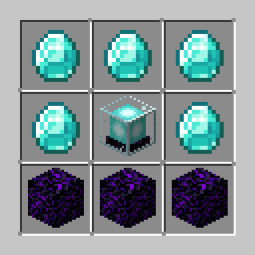
(如果你觉得合成配方太昂贵,可以在 Github 上提出建议!)
然后呢?
只需将该方块放置在刷怪笼上方,见证奇迹的发生吧!
额外功能!
该方块还可以加载周围 3x3 区块的区域,以防止生成的实体立即卸载。
• 此功能仅在该方块本身位于刷怪笼上方,且在其 5x5 区块半径内没有其他该方块存在时才有效。
注意!
请记住,此功能默认是关闭的,但你可以通过右键点击该方块并点击中间的物品来启用它。(别忘了点击 GUI 右下角的“应用”按钮!)(加载 3x3 区块区域需要一些时间)
兼容性
这个模组应该与所有模组兼容(至少我是这么认为的),如果发现任何模组不兼容的问题,请随时提交 Github Issue。
原版客户端兼容性
如果你安装了可选的服务端模组 Polymer,这个模组支持原版客户端!(非常感谢 PATBOX 及其贡献者‼️‼️)
教程!(所有内容均在服务端操作)
-
下载 Polymer 并将其安装到你的服务器 'mods' 文件夹中。
-
运行 Minecraft Server 以生成 Polymer 配置文件。
-
进入 config/polymer 目录
-
打开 auto-host.json
-
并将 "enabled" 和 "required"(<- 这个是可选的)的值更改为 true。
配置文件现在应该看起来像这样:

最后,保存配置文件并重启你的服务器!
你也可以在客户端安装 Polymer,以获得更好的整体体验!
SpawnerLoader9000 (SL9K)
Loads your spawner even when you're far away.
Why?
This is specifically useful for spawner farms when you want to move them far away from the spawner!
I got the motivation to create this mod because the mod Scarecrows' Territory, isn't Vanilla compatible.
How do I use it?
First, you need to craft the block.
Crafting Recipe

(you can make a suggestion in Github if you think that the recipe is very expensive!)
Then, what?
Just place the block on top of a mob spawner and watch the magic happen!
Extras!
The block can also load a 3x3 chunk area around itself so the spawned entities dont unload immediately.
• This feature only works if the block itself is above a spawner and theres no presence of itself in a 5x5 chunk radius.
Note!
Remember that this feature is automatically turned off but, you can enable it by right clicking the block and clicking the item in the middle. (Don't forget to click apply in the bottom right corner of the GUI!) (takes a while to actually load the 3x3 chunk area)
Compatibility
This mod should be compatible with all mods (atleast I think it is), feel free to make a Github Issue if there's any mod incompatibility issue.
Vanilla client compatibility
This mod supports Vanilla clients if you install the optional server-side mod, Polymer! (HUGE THANKS TO PATBOX AND ITS CONTRIBUTORS‼️‼️)
Tutorial! (all of this is on the server-side)
-
Download Polymer and install it in your server 'mods' folder.
-
Run the Minecraft Server to generate Polymer configs.
-
Go to config/polymer
-
Open auto-host.json
-
And change the value of "enabled" and "required" (<- this one is optional) to true.
The config file should now look like this:

Lastly, save the config and restart your server!
You can also install Polymer in the client-side for an overall better experience!
评论 0
登录后参与评分
还没有评论,来抢沙发吧
