Smart FPS Booster
一款客户端 Minecraft 性能优化模组,可动态管理选定的视频与性能设置、提供实时性能监控,并支持自定义优化配置文件。
CubeWright AI 即将推出——描述你的模组创意,将其转化为可构建的 Minecraft 项目。
Smart FPS Booster 不修改 Minecraft 引擎,也不保证特定的帧率提升。性能结果取决于硬件配置、已安装的模组以及游戏设置。
快捷键
| 按键 |
操作 |
| F8 |
打开性能仪表盘 |
| F9 |
切换动态优化 |
| F10 |
循环切换配置文件 |
为什么选择 Smart FPS Booster?
Minecraft 的性能调优通常需要手动配置,并根据游戏场景频繁调整。Smart FPS Booster 通过以下方式简化了这一过程:
- 应用预设的优化配置文件
- 动态调整受支持的客户端设置(可选)
- 显示实时性能数据
- 与流行的优化模组集成
目标是稳定性能、减少卡顿并简化配置,特别是在低端或中端系统上。
适用人群
- 在低端或中端 PC 和笔记本电脑上玩游戏的玩家
- 偏好一致帧时间表现的 PvP 玩家
- 经历帧率下降或卡顿的玩家
- 希望自动化客户端性能管理的任何人
功能
优化配置文件
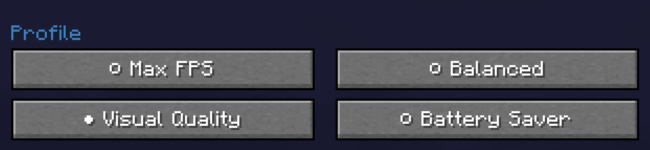
包含四个可配置的配置文件:
- Max FPS – 优先采用面向性能的设置
- Balanced – 视觉效果与性能的默认混合
- Quality – 更高的视觉设置配合适度优化
- Battery Saver – 降低笔记本 GPU/CPU 负载
配置文件仅修改受支持的客户端视频和性能设置。
实时性能仪表盘
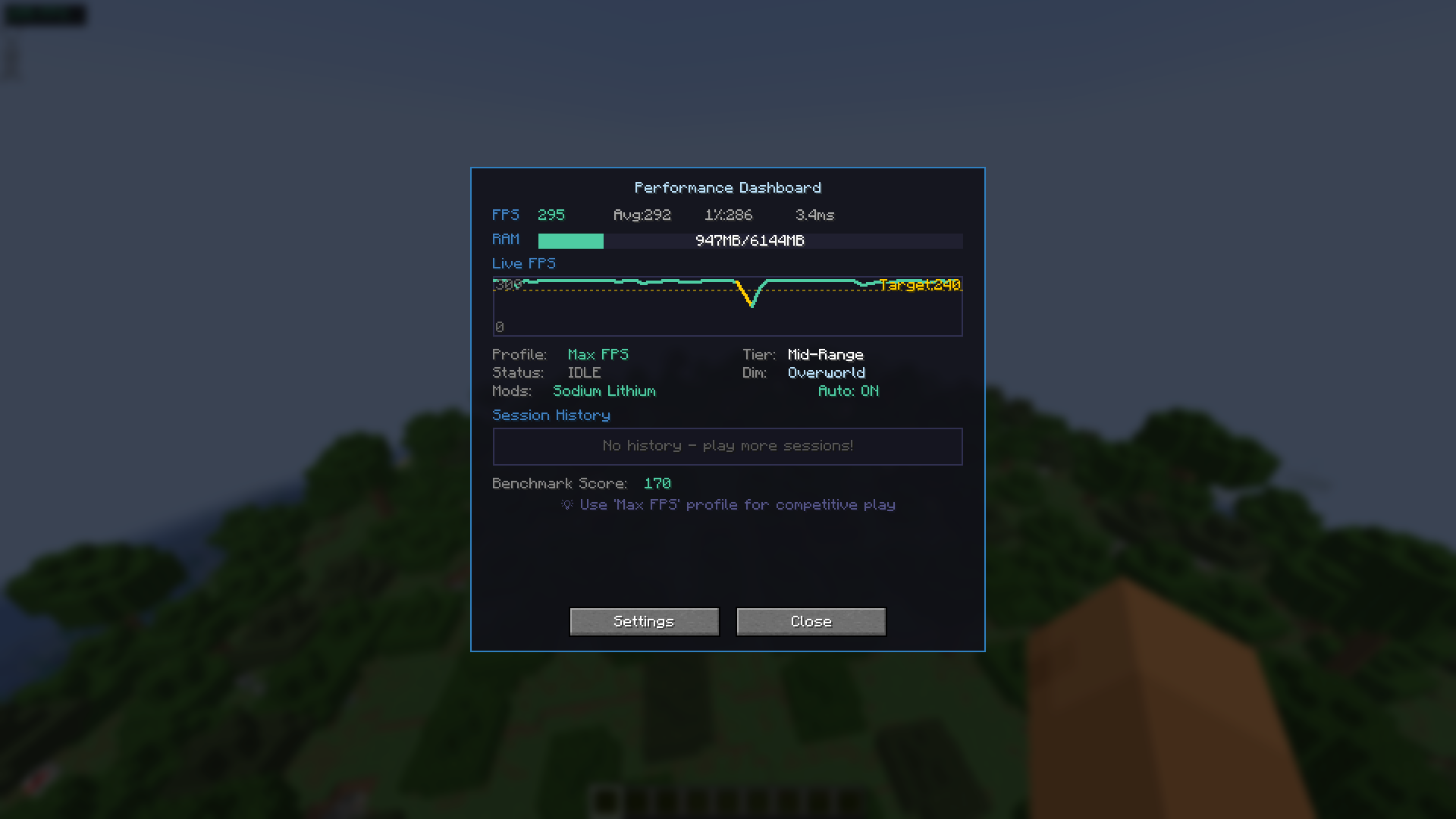
可通过 F8 访问:
- 当前 FPS 显示
- FPS 历史图表(最近 60 秒)
- 内存使用指示器
- 会话历史记录(最多 10 个会话)
- 硬件等级估算
- 内置基准测试工具
动态优化(可选)
启用后,模组可根据以下情况调整选定设置:
- 玩家移动
- 战斗情况
- 高视觉负荷场景(粒子效果、爆炸、大型农场)
- 当前维度(主世界 / 下界 / 末地)
所有更改均在正常的 Minecraft 客户端配置选项范围内。
设置锁定
你可以防止模组更改特定设置:
这允许在保留你偏好的视觉配置的同时进行优化。
卡顿尖峰指示器
当检测到突然的帧率下降时,可选的视觉警报(短暂的红色屏幕闪烁)。
此功能仅提供信息,不影响游戏机制。
模组兼容性
Smart FPS Booster 在使用以下模组时会检测并自适应行为:
- Sodium
- Lithium
- Iris Shaders
- Mod Menu
当这些模组存在时,兼容性是自动的。
安装
- 安装 Fabric Loader
- 安装 Fabric API
- 将模组
.jar 文件放入 mods 文件夹
- 启动游戏
重要说明
- 仅限客户端
- 在服务器上安全使用
- 不绕过硬件限制
- 不保证帧率提升
- 旨在辅助配置和性能监控
许可证
MIT License
开发者
由 devxkamlesh 创建
源代码、问题追踪器和捐赠链接可在项目页面找到。
Smart FPS Booster
A client-side Minecraft performance utility mod that dynamically manages selected video and performance settings, provides real-time performance monitoring, and offers configurable optimization profiles.
CubeWright AI is coming soon—describe your mod idea and turn it into a buildable Minecraft project.
Smart FPS Booster does not modify Minecraft’s engine and does not guarantee specific FPS increases. Performance results depend on hardware, installed mods, and game settings.
Keybinds
| Key |
Action |
| F8 |
Open performance dashboard |
| F9 |
Toggle dynamic optimization |
| F10 |
Cycle profiles |
Why Smart FPS Booster?
Minecraft performance tuning often requires manual configuration and frequent adjustments depending on gameplay situations. Smart FPS Booster simplifies this process by:
- Applying predefined optimization profiles
- Dynamically adjusting supported client settings (optional)
- Displaying live performance data
- Integrating with popular optimization mods
The goal is to stabilize performance, reduce stuttering, and simplify configuration, especially on low-end or mid-range systems.
Intended For
- Players on low-end or mid-range PCs and laptops
- PvP players who prefer consistent frame timing
- Players experiencing FPS drops or stuttering
- Anyone who wants automated client-side performance management
Features
Optimization Profiles
Four configurable profiles are included:
- Max FPS – prioritizes performance-oriented settings
- Balanced – default mix of visuals and performance
- Quality – higher visual settings with moderate optimization
- Battery Saver – reduces GPU/CPU load for laptops
Profiles modify only supported client-side video and performance settings.
Live Performance Dashboard
Accessible via F8:
- Current FPS display
- FPS history graph (last 60 seconds)
- Memory usage indicator
- Session history (up to 10 sessions)
- Hardware tier estimation
- Built-in benchmark tool
Dynamic Optimization (Optional)
When enabled, the mod can adjust selected settings based on:
- Player movement
- Combat situations
- Heavy visual scenes (particles, explosions, large farms)
- Current dimension (Overworld / Nether / End)
All changes remain within normal Minecraft client configuration options.
Setting Locks
You may prevent the mod from changing specific settings:
- Render Distance
- Graphics Mode
This allows optimization while preserving your preferred visual configuration.
Lag Spike Indicator
Optional visual alert when a sudden FPS drop is detected (brief red screen flash).
This is informational only and does not affect gameplay mechanics.
Mod Compatibility
Smart FPS Booster detects and adapts behavior when used with:
- Sodium
- Lithium
- Iris Shaders
- Mod Menu
Compatibility is automatic when these mods are present.
Installation
- Install Fabric Loader
- Install Fabric API
- Place the mod
.jar into the mods folder
- Launch the game
Important Notes
- Client-side only
- Safe to use on servers
- Does not bypass hardware limitations
- Does not guarantee FPS improvements
- Designed to assist configuration and performance monitoring
License
MIT License
Developer
Created by devxkamlesh
Source code, issue tracker, and donation links are available on the project page.


 模组
 模组

 模组

 模组
 模组

 模组
评论 0
登录后参与评分
还没有评论,来抢沙发吧