智能按键提示
从 1.1.2 版本起需要 OneEngoughLib
此模组提供了一套灵活且动态的按键提示系统,以及用于自定义按键修改的扩展功能。
它改善了整体的玩家体验,并有助于简化按键管理。
使用方法
对于普通玩家而言,只需安装即可游玩——无需任何设置。
对于开发者来说,有四种方式在游戏中添加新的按键提示:
- 目标模组主动集成 Smart Key Prompts。
- 使用 KubeJS 调用本模组提供的 API。
- 通过 数据包 添加支持(存在一定限制;请参阅 数据包扩展指南)。
- 直接通过本模组内置的适配功能添加。
主要功能
本模组会在适当的时间选择性显示相关的按键提示。
它为模组或整合包开发者提供了灵活的 API,以显示基于上下文的按键提示。
// 显示一个已注册的现有按键绑定。
show(String group, String desc);

// 显示一个完全自定义的按键提示。
custom(String group, String key, String desc);

// 在别名下显示一个已注册的现有按键绑定。
alias(String group, String desc, String alias);
只需在特定条件下(例如客户端刻事件期间)调用这些方法,即可显示上下文相关的按键提示。
有关详细的实现示例,请参见下文。
还支持基于数据包的提示,尽管其条件逻辑和语法有限——更适合简单的用例。
更多信息请参阅 数据包扩展指南。
输出示例:
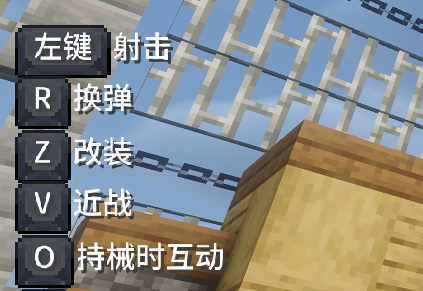
每个方法的 group 参数代表一个按键提示组 ID。
例如,本模组在与 JEI 集成时使用 "jei_skp" 作为组 ID,该组默认处于禁用状态。
你可以通过配置文件中的组 ID 自由启用或禁用任何组。
当屏幕上显示按键提示时,按下 Ctrl 键(默认:K)+ 鼠标左键 将直接打开对应的按键绑定菜单——无需在整个列表中搜索。
示例:
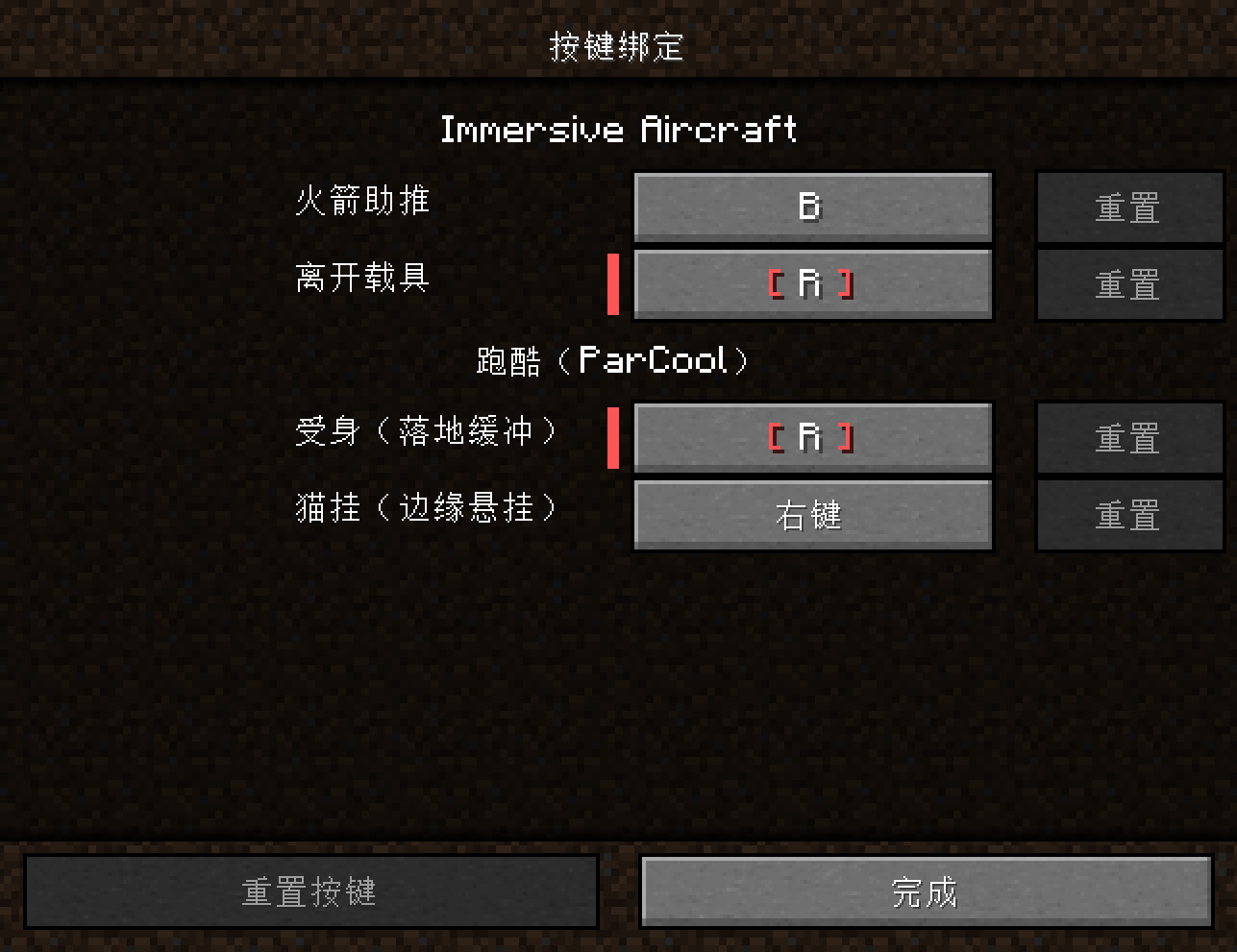
请注意,此快捷方式仅适用于链接到已注册按键绑定的提示(show、alias),
而不适用于完全自定义的提示(custom)。
此外,你可以以编程方式触发特定按键绑定的配置界面:
ConfigAction.modifyKey(List<String> keyDescList);
按住 Ctrl 键可锁定当前的按键提示,使其暂时保持显示。
最后,Ctrl 键 + 鼠标右键 切换 HUD 的可见性和位置。
按住 Ctrl 键时,可以使用鼠标滚轮调整 HUD 的大小。
灵活的提示系统
"key" 和 "desc" 字段指的是语言文件中的条目。
例如,在 Minecraft 的默认语言文件 \assets\minecraft\lang\en_us.json 中:
{
  "key.keyboard.f11": "F11",
  "key.keyboard.left.shift": "Left Shift",
  "key.mouse.left": "Left Button"
}
以及在 TaCZ 的语言文件 \assets\tacz\lang\zh_cn.json 中:
{
  "key.tacz.fire_select.desc": "Fire Mode",
  "key.tacz.inspect.desc": "Inspect",
  "key.tacz.interact.desc": "Interact while armed"
}
模组中的使用示例:
@SubscribeEvent
public static void tick(TickEvent.ClientTickEvent event) {
    if (!ModList.get().isLoaded("immersive_aircraft")) return;
    Player player = Minecraft.getInstance().player;
    if (player == null || Minecraft.getInstance().screen != null) return;
    String vehicle = Utils.getVehicleType(player);
    if (vehicle != null && vehicle.startsWith("immersive_aircraft:")) {
        SmartKeyPrompts.custom(modid, Utils.getKeyByDesc("key.inventory"), "immersive_aircraft.slot.upgrade");
        SmartKeyPrompts.show(modid, "key.immersive_aircraft.dismount");
        String keyUse = Utils.getKeyByDesc("key.immersive_aircraft.fallback_use");
        SmartKeyPrompts.custom(modid, Objects.equals(keyUse, "key.keyboard.unknown") ? "key.mouse.right" : keyUse, "item.immersive_aircraft.item.weapon");
        if (vehicle.equals("immersive_aircraft:biplane")) {
            SmartKeyPrompts.custom(modid, Utils.getKeyByDesc("key.jump"), "item.immersive_aircraft.engine");
        }
    }
}
在 KubeJS 中的用法:
ClientEvents.tick(event => {
    let player = event.player;
    if (["key.left", "key.right", "key.forward", "key.back"].map(desc => SKP$KeyUtils.isKeyPressedOfDesc(desc)).includes(true)) {
        SKP$PromptUtils.show("parcool", "key.parcool.Dodge");
    }
    if (!player.onGround() && !player.isInWater()) {
        SKP$PromptUtils.show("parcool", "key.parcool.Breakfall");
        SKP$PromptUtils.show("parcool", "key.parcool.ClingToCliff");
    }
    if (player.isSprinting()) {
        SKP$PromptUtils.show("parcool", "key.parcool.FastRun");
    }
    if (SKP$KeyUtils.isKeyPressedOfDesc("key.parcool.FastRun")) {
        SKP$PromptUtils.show("parcool", SKP$KeyUtils.getKeyByDesc("key.parcool.Dodge"));
        SKP$PromptUtils.custom("parcool", SKP$KeyUtils.getKeyByDesc("key.sneak"), "parcool.action.CatLeap");
    }
});
对于组合键,你可以使用:
SmartKeyPrompts.custom(modid, "key.keyboard.left.shift+key.mouse.left", "Transfer items in bulk");
基于数据包的配置示例(请参阅 指南):
{
  "modid": "tacz_skp",
  "vars": {
    "modLoaded": "isModLoaded('tacz')",
    "hasTaczGun": "mainHandItem == 'tacz:modern_kinetic_gun'",
    "isNotInVehicle": "!isInVehicle()"
  },
  "entries": [
    {
      "when": {
        "modLoaded": "true",
        "hasTaczGun": "true",
        "isNotInVehicle": "true"
      },
      "then": [
        "show('tacz_skp', 'key.tacz.shoot.desc')",
        "show('tacz_skp', 'key.tacz.zoom.desc')",
        "show('tacz_skp', 'key.tacz.reload.desc')"
      ]
    }
  ]
}
扩展示例:当准星指向实体时,在准星下方显示交互提示。
@SubscribeEvent
public static void tick(TickEvent.ClientTickEvent event) {
    if (!ModList.get().isLoaded(modid)) return;
    if (PlayerUtils.getTargetedEntityType() == "minecraft:pig") {
        PromptUtils.addDesc("key.pig.feed").forKey("key.mouse.right").withCustom(true).atPosition("crosshair").toGroup(modid);
    }
}
"custom" 和 "position" 均可自定义。
"custom" 标志决定提示是否出现在过滤后的按键绑定菜单中,
而 "position" 控制提示的显示位置(固定不变,不受 HUD 重定位影响)。
Smart Key Prompts 还提供了多种实用方法——例如按键检测和实体指向——以简化模组开发。
灵活禁用
按住控制键(默认:K)时,提示将变为锁定状态,并显示其完整标识符(group:desc)。
在 KubeJS 中,您可以动态启用或禁用提示:
SKP$PromptUtils.disablePromptByGroup(String group)
SKP$PromptUtils.enablePromptByGroup(String group)
SKP$PromptUtils.disablePromptByDesc(String desc)
SKP$PromptUtils.enablePromptByDesc(String desc)
SKP$PromptUtils.disablePrompt(String group, String desc)
SKP$PromptUtils.enablePrompt(String group, String desc)
您还可以禁用或重新启用特定的按键绑定:
SKP$KeyUtils.isKeyDisabled(String desc)
SKP$KeyUtils.getDisabledKeyMappingList()
SKP$KeyUtils.disableKeyMapping(String desc)
SKP$KeyUtils.disableKeyMapping(List<String> list)
SKP$KeyUtils.disableAllKeyMapping()
SKP$KeyUtils.enableKeyMapping(String desc)
SKP$KeyUtils.enableKeyMapping(List<String> list)
SKP$KeyUtils.enableAllKeyMapping()
例如,调用 disableKeyMapping("key.jump") 会阻止玩家跳跃。
其他信息
如果您希望此模组支持另一个模组,欢迎联系。
您也可以直接向仓库提交新的按键提示组。
推荐配套模组: KeyBindJS
计划中的功能:
- 更多的提示位置(例如跟随鼠标)。
- 支持双击和长按按键。
- HUD 视觉效果改进。
- 可能移植到更多 Minecraft 版本。
有关支持的模组完整列表,请参阅官方文档。
Smart Key Prompts
Need OneEngoughLib from 1.1.2 on!
This mod provides a flexible and dynamic key prompt system, along with extended features for customizable key modification.
It improves the overall player experience and helps streamline key management.
How to Use
For regular players, simply install and play—no setup required.
For developers, there are four ways to add new key prompts in-game:
- The target mod actively integrates with Smart Key Prompts.
- Use KubeJS to call the API provided by this mod.
- Add support via datapacks (with certain limitations; see the Datapack Extension Guide).
- Added directly through built-in adaptation within this mod.
Main Features
This mod selectively displays relevant key prompts at appropriate times.
It provides flexible APIs for mod or modpack developers to show context-based key hints.
// Display an existing registered keybinding.
show(String group, String desc);

// Display a fully custom key prompt.
custom(String group, String key, String desc);

// Display an existing registered keybinding under an alias.
alias(String group, String desc, String alias);
Simply call these methods under certain conditions (e.g., during the client tick event) to display contextual key prompts.
For detailed implementation examples, see below.
Datapack-based prompts are also supported, though with limited condition logic and syntax—best suited for simpler use cases.
See Datapack Extension Guide for more information.
Example output:
Each method’s group parameter represents a key prompt group ID.
For example, this mod uses "jei_skp" as the group ID when integrating with JEI, which is disabled by default.
You can freely enable or disable any group in the configuration file using its group ID.
When key prompts are visible on screen, pressing Control Key (default: K) + Left Click will open the corresponding keybinding menu directly—no need to search through the full list.
Example:
Note that this shortcut only works for prompts linked to registered keybindings (show, alias),
and not for fully custom prompts (custom).
Additionally, you can programmatically trigger the configuration interface for specific keybindings:
ConfigAction.modifyKey(List<String> keyDescList);
Holding the control key locks the current key prompts, making them persist temporarily.
Lastly, Control Key + Right Click toggles HUD visibility and position.
While holding Control, you can use the mouse wheel to adjust the HUD size.
Flexible Prompting System
The "key" and "desc" fields refer to entries in the language files.
For example, in Minecraft’s default language file \assets\minecraft\lang\en_us.json:
{
  "key.keyboard.f11": "F11",
  "key.keyboard.left.shift": "Left Shift",
  "key.mouse.left": "Left Button"
}
And in TaCZ’s language file \assets\tacz\lang\zh_cn.json:
{
  "key.tacz.fire_select.desc": "Fire Mode",
  "key.tacz.inspect.desc": "Inspect",
  "key.tacz.interact.desc": "Interact while armed"
}
Example usage in a mod:
@SubscribeEvent
public static void tick(TickEvent.ClientTickEvent event) {
    if (!ModList.get().isLoaded("immersive_aircraft")) return;
    Player player = Minecraft.getInstance().player;
    if (player == null || Minecraft.getInstance().screen != null) return;
    String vehicle = Utils.getVehicleType(player);
    if (vehicle != null && vehicle.startsWith("immersive_aircraft:")) {
        SmartKeyPrompts.custom(modid, Utils.getKeyByDesc("key.inventory"), "immersive_aircraft.slot.upgrade");
        SmartKeyPrompts.show(modid, "key.immersive_aircraft.dismount");
        String keyUse = Utils.getKeyByDesc("key.immersive_aircraft.fallback_use");
        SmartKeyPrompts.custom(modid, Objects.equals(keyUse, "key.keyboard.unknown") ? "key.mouse.right" : keyUse, "item.immersive_aircraft.item.weapon");
        if (vehicle.equals("immersive_aircraft:biplane")) {
            SmartKeyPrompts.custom(modid, Utils.getKeyByDesc("key.jump"), "item.immersive_aircraft.engine");
        }
    }
}
Usage in KubeJS:
ClientEvents.tick(event => {
    let player = event.player;
    if (["key.left", "key.right", "key.forward", "key.back"].map(desc => SKP$KeyUtils.isKeyPressedOfDesc(desc)).includes(true)) {
        SKP$PromptUtils.show("parcool", "key.parcool.Dodge");
    }
    if (!player.onGround() && !player.isInWater()) {
        SKP$PromptUtils.show("parcool", "key.parcool.Breakfall");
        SKP$PromptUtils.show("parcool", "key.parcool.ClingToCliff");
    }
    if (player.isSprinting()) {
        SKP$PromptUtils.show("parcool", "key.parcool.FastRun");
    }
    if (SKP$KeyUtils.isKeyPressedOfDesc("key.parcool.FastRun")) {
        SKP$PromptUtils.show("parcool", SKP$KeyUtils.getKeyByDesc("key.parcool.Dodge"));
        SKP$PromptUtils.custom("parcool", SKP$KeyUtils.getKeyByDesc("key.sneak"), "parcool.action.CatLeap");
    }
});
For combination keys, you can use:
SmartKeyPrompts.custom(modid, "key.keyboard.left.shift+key.mouse.left", "Transfer items in bulk");
Datapack-based configuration example (see the guide):
{
  "modid": "tacz_skp",
  "vars": {
    "modLoaded": "isModLoaded('tacz')",
    "hasTaczGun": "mainHandItem == 'tacz:modern_kinetic_gun'",
    "isNotInVehicle": "!isInVehicle()"
  },
  "entries": [
    {
      "when": {
        "modLoaded": "true",
        "hasTaczGun": "true",
        "isNotInVehicle": "true"
      },
      "then": [
        "show('tacz_skp', 'key.tacz.shoot.desc')",
        "show('tacz_skp', 'key.tacz.zoom.desc')",
        "show('tacz_skp', 'key.tacz.reload.desc')"
      ]
    }
  ]
}
Extended example: show interaction prompts below the crosshair when targeting an entity.
@SubscribeEvent
public static void tick(TickEvent.ClientTickEvent event) {
    if (!ModList.get().isLoaded(modid)) return;
    if (PlayerUtils.getTargetedEntityType() == "minecraft:pig") {
        PromptUtils.addDesc("key.pig.feed").forKey("key.mouse.right").withCustom(true).atPosition("crosshair").toGroup(modid);
    }
}
Both "custom" and "position" can be customized.
The "custom" flag determines whether the prompt appears in the filtered keybinding menu,
and "position" controls where the prompt is displayed (fixed, unaffected by HUD repositioning).
Smart Key Prompts also provides various utility methods—such as key detection and entity targeting—to simplify mod development.
Flexible Disabling
When holding the control key (default: K), prompts become locked, and their full identifiers (group:desc) are displayed.
In KubeJS, you can enable or disable prompts dynamically:
SKP$PromptUtils.disablePromptByGroup(String group)
SKP$PromptUtils.enablePromptByGroup(String group)
SKP$PromptUtils.disablePromptByDesc(String desc)
SKP$PromptUtils.enablePromptByDesc(String desc)
SKP$PromptUtils.disablePrompt(String group, String desc)
SKP$PromptUtils.enablePrompt(String group, String desc)
You can also disable or re-enable specific keybindings:
SKP$KeyUtils.isKeyDisabled(String desc)
SKP$KeyUtils.getDisabledKeyMappingList()
SKP$KeyUtils.disableKeyMapping(String desc)
SKP$KeyUtils.disableKeyMapping(List<String> list)
SKP$KeyUtils.disableAllKeyMapping()
SKP$KeyUtils.enableKeyMapping(String desc)
SKP$KeyUtils.enableKeyMapping(List<String> list)
SKP$KeyUtils.enableAllKeyMapping()
For example, calling disableKeyMapping("key.jump") prevents the player from jumping.
Other Information
If you’d like this mod to support another mod, feel free to reach out.
You can also submit new key prompt groups directly to the repository.
Recommended companion mod: KeyBindJS
Planned features:
- More prompt positions (e.g., follow mouse).
- Support for double-tap and long-press keys.
- HUD visual improvements.
- Potential backports to more Minecraft versions.
See the full list of supported mods in the official documentation.


 模组

 模组
 模组

 模组
 模组
 模组
评论 0
登录后参与评分
还没有评论,来抢沙发吧