
Snake Player

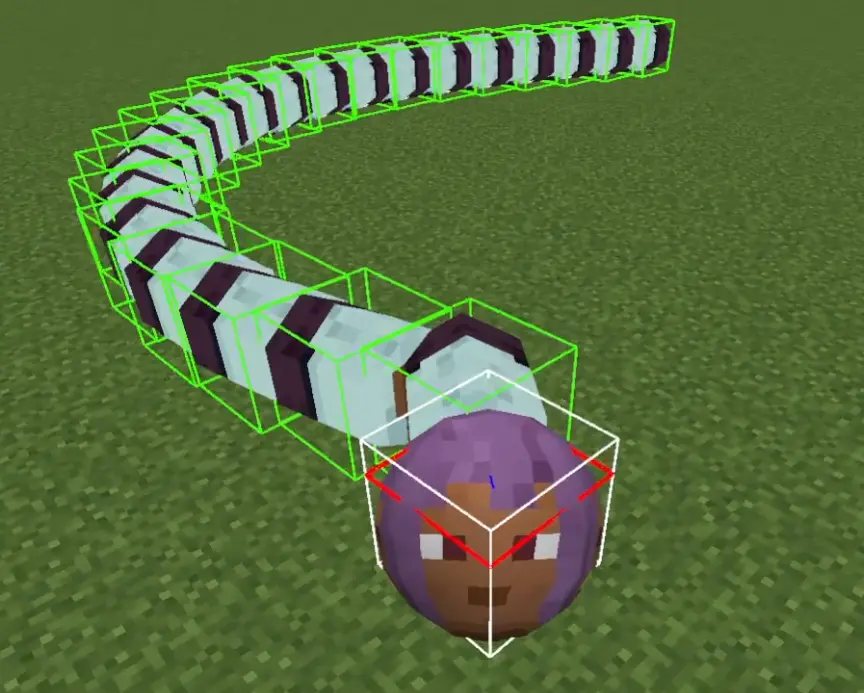
允许玩家变成蛇的模组。
玩家蛇的长度会根据经验等级(XpLevel)变化。
身体节段数量为 XpLevel+1。
0. 玩家 NBT
| NBT 键名 | 类型 | 用途 |
|---|---|---|
IsSnake |
Boolean | 指示玩家是否处于“蛇形态”。 |
SnakeHeadSize |
Float | 存储玩家在蛇形态下的头部大小。 |
SnakeBodySegmentSize |
Float | 表示玩家在蛇形态下身体节段的大小。 |
SnakeDamage |
Float | 实体接触到玩家身体节段时受到的伤害 |
SnakeSpeed |
Float | 决定玩家在蛇形态下的自动移动速度。 |
1. 命令
1.0. 原版命令
你可以使用原版命令来修改经验值。
/experience set @s 100 levels
1.1. /snake <targets> <dataparameter_key> <value>
-
targets:指定要应用命令的玩家。
-
DataParameter_key:指定要修改的属性。以下键名可用:
-
isSnake:布尔值(true 或 false),用于确定目标玩家是否应处于“蛇形态”。
-
headSize:蛇头的大小(浮点数,范围:0.1 - 10.0)。
-
bodySegmentSize:每个身体节段的大小(浮点数,范围:0.1 - 10.0)。
-
damage:蛇身体节段造成的伤害(浮点数,范围:>= 0)。
-
speed:蛇的移动速度(浮点数,范围:0.0 - 0.75)。
效果:调整目标玩家对应的属性。
每个属性都有特定的有效范围,尝试设置超出这些范围的数值将导致错误。
1.2./snake config <action> [parameters]
配置允许玩家在重生时避开其他玩家已存在的位置。
通过将以 cx 和 cz 为中心、一边长为 L 的矩形区域划分为大小为 r 的网格,来寻找重生位置。
- set:允许修改与蛇系统相关的配置设置。
- spread <true|false>
启用或禁用扩散功能。
true:启用扩散。
false:禁用扩散(默认重生)。
- spread_pos <cx> <cz>
设置扩散位置的中心坐标。
cx:X 坐标(双精度浮点数)
cz:Z 坐标(双精度浮点数)
- spread_Range <L> 设置蛇扩散的最大范围。
L:(双精度浮点数,范围:0.1 - 10000.0)
- spread_minimum_distance <r> 设置扩散实体之间的最小距离。
r:(双精度浮点数,范围:0.1 - 100.0)
- segment_experience <exp> 设置节段的经验球数量。
segment_experience:(整数 : 0 -)
- get <key>:检索当前配置设置的值。
Snake Player
MOD that allows the player to become a snake.
The length of the player snake changes according to XpLevel.
The number of segments is XpLevel+1.
0. player NBT
| NBT Key | Type | Purpose |
|---|---|---|
IsSnake |
Boolean | Indicates whether the player is in "snake mode." |
SnakeHeadSize |
Float | Stores the size of the player's head in snake mode. |
SnakeBodySegmentSize |
Float | Represents the size of the player's body segments in snake mode. |
SnakeDamage |
Float | Damage an entity suffers when it comes into contact with a player segment |
SnakeSpeed |
Float | Determines the automatic movement speed of the player in snake mode. |
1. Command
1.0. vanilla
You can use vanilla commands to modify the experience.
/experience set @s 100 levels
1.1. /snake <targets> <dataparameter_key> <value>
-
targets: Specifies the player(s) to apply the command to.
-
DataParameter_key: Specifies which attribute to modify. The following keys are available:
-
isSnake: A boolean (true or false) that determines whether the targeted player(s) should be in "snake mode."
-
headSize: The size of the snake's head (float, range: 0.1 - 10.0).
-
bodySegmentSize: The size of each body segment (float, range: 0.1 - 10.0).
-
damage: The damage dealt by the snake's body segments (float, range: >= 0).
-
speed: The movement speed of the snake (float, range: 0.0 - 0.75).
Effect: Adjusts the corresponding attribute for the targeted players.
Each attribute has specific valid ranges, and attempting to set a value outside these ranges will result in an error.
1.2./snake config <action> [parameters]
Configuration to allow players to respawn avoiding other player positions already present.
Find the respawn position by partitioning the rectangular region with one side L centered at cx and cz into a grid with size r.
- set: Allows modifying configuration settings related to the snake system.
- spread <true|false>
Enables or disables the spread functionality.
true: Enables spreading.
false: Disables spreading (default spawning).
- spread_pos <cx> <cz>
Sets the spread position's center coordinates.
cx: X-coordinate (double)
cz: Z-coordinate (double)
- spread_Range <L> Sets the maximum range within which the snake spreads.
L: (double, range: 0.1 - 10000.0)
- spread_minimum_distance <r> Sets the minimum distance between spread entities.
r: (double, range: 0.1 - 100.0)
- segment_experience <exp> Sets the segment's experience orb.
segment_experience: (int : 0 -)
- get <key>: Retrieves the current value of a configuration setting.

下载 SnakePlayer
需要联机服务器吗?
稳定流畅、一键部署,几分钟即可和朋友联机开服
最低仅需 8 元/月 即可畅快联机
下载 SnakePlayer
下载 SnakePlayer
需要联机服务器吗?
稳定流畅、一键部署,几分钟即可和朋友联机开服
最低仅需 8 元/月 即可畅快联机
下载 SnakePlayer
下载 SnakePlayer
需要联机服务器吗?
稳定流畅、一键部署,几分钟即可和朋友联机开服
最低仅需 8 元/月 即可畅快联机
下载 SnakePlayer
下载 SnakePlayer
需要联机服务器吗?
稳定流畅、一键部署,几分钟即可和朋友联机开服
最低仅需 8 元/月 即可畅快联机
下载 SnakePlayer
需要联机服务器吗?
稳定流畅、一键部署,几分钟即可和朋友联机开服
最低仅需 8 元/月 即可畅快联机
下载 SnakePlayer
需要联机服务器吗?
稳定流畅、一键部署,几分钟即可和朋友联机开服
最低仅需 8 元/月 即可畅快联机
下载 SnakePlayer
需要联机服务器吗?
稳定流畅、一键部署,几分钟即可和朋友联机开服
最低仅需 8 元/月 即可畅快联机
新增
- Minecraft 26.3 移植:
- 使用 MultiLoader-Template 26.3 移植至 Minecraft 26.3。
- 连接式身体网格渲染:
- 将蛇身渲染统一为无缝连续的连接管状网格(
ConnectedBodyRenderer)。
- 将蛇身渲染统一为无缝连续的连接管状网格(
- 身体部位碰撞箱渲染(F3 + B):
- 在 Fabric 和 NeoForge 上,为第三人称和第一人称视角下的所有蛇身节段(
PlayerPart)添加了 F3 + B 碰撞箱渲染。
- 在 Fabric 和 NeoForge 上,为第三人称和第一人称视角下的所有蛇身节段(
修复
- 头部球体光照:
- 通过修正多边形顶点缠绕顺序为逆时针(CCW,面向正面),修复了玩家头部(球体)光照/阴影反向的问题。
- 身体节段光照:
- 修正表面法线和多边形缠绕顺序,确保所有身体部位的光照方向一致。
关于这个资源的讨论、问题反馈与使用心得
还没有讨论,来发第一帖吧
你是这个资源的作者?登录后可认领此资源。
相似资源
 模组

显示你正在注视的方块的信息。(适用于 Minecraft 1.16+ 的 Hwyla/Waila 分支)
 模组

查看物品与配方
 模组
在游戏画面角落显示附近世界地形、玩家、生物和实体的地图。可创建路径点,帮助你找到标记过的位置。
 模组
使用 JavaScript 编辑配方、添加自定义物品、编写世界事件!
 模组
添加区块认领和玩家组队功能,并与 Xaero's Minimap 和 World Map 集成
 模组
AE2:一款流行的自动化与存储模组
评论 0
登录后参与评分
还没有评论,来抢沙发吧