
声音剔除
将其视为实体剔除,但针对你的音频引擎。
如果你曾建造过大规模的奶牛养殖场、养鸡场、铁傀儡农场、村民交易大厅或自动化的 Create 模组工厂,你就会知道这个问题:由于 Minecraft 耗尽了其内部的声音通道,导致震耳欲聋的重复噪音和音频卡顿。
Sound Culling 在客户端完全解决了这个问题。它会在拥挤的区域动态降低音量或丢弃冗余的声音,保持音频清晰且无延迟。
Sound Culling 仅更改客户端的音频播放。它不会改变实体、方块、游戏玩法机制或服务器行为,也不需要安装在服务器上。
功能特性
- 自适应音频引擎: 当整体声音事件率飙升时,自动调整抑制强度。
- 音量阻尼: 尽可能平滑地降低过大的声音音量,而不是突然静音。
- 视线方向优先: 你正在积极注视或与之交互的声音保持可听且清晰。
- 循环管理: 持续监控活动的循环声音(矿车、传送门、机械装置)并逐渐淡出它们。
- 玩家反馈保护: 战斗、伤害、工具损坏和界面声音受到普通剔除的保护。
- 游戏内配置: 实时事件图、现场声音检查器、空间网格调优和会话指标。
- 声音规则: 对任何声音 ID 或模组命名空间进行一键白名单、黑名单或优先级调整。
- 零开销: 采用并发空间桶和零分配热路径构建。
- 多加载器一致性: Fabric、Forge 和 NeoForge 拥有完全相同的 2.1.0 引擎和 GUI。
注意:音乐、UI 声音以及已经超出 Minecraft 可听范围的声音会自动被绕过。
整合包兼容性
Sound Culling 是 100% 客户端端的,旨在适应任何整合包:
- 优化模组: 与 Sodium、Embeddium、Iris、Oculus、Entity Culling、FerriteCore 和 ImmediatelyFast 完全兼容。
- 音频模组: 可与 Sound Physics Remastered、Presence Footsteps 和 Auditory 共存(动态阻尼保留了混响和脚步声反馈)。
- 科技与自动化: 推荐用于包含 Create、Mekanism、Applied Energistics 2 或 Industrial Foregoing 的整合包,其中机械装置会产生密集的声音集群。
配置
通过 Mod Menu (Fabric) 或原生的 Mods -> Config 按钮 (Forge / NeoForge) 打开设置屏幕:
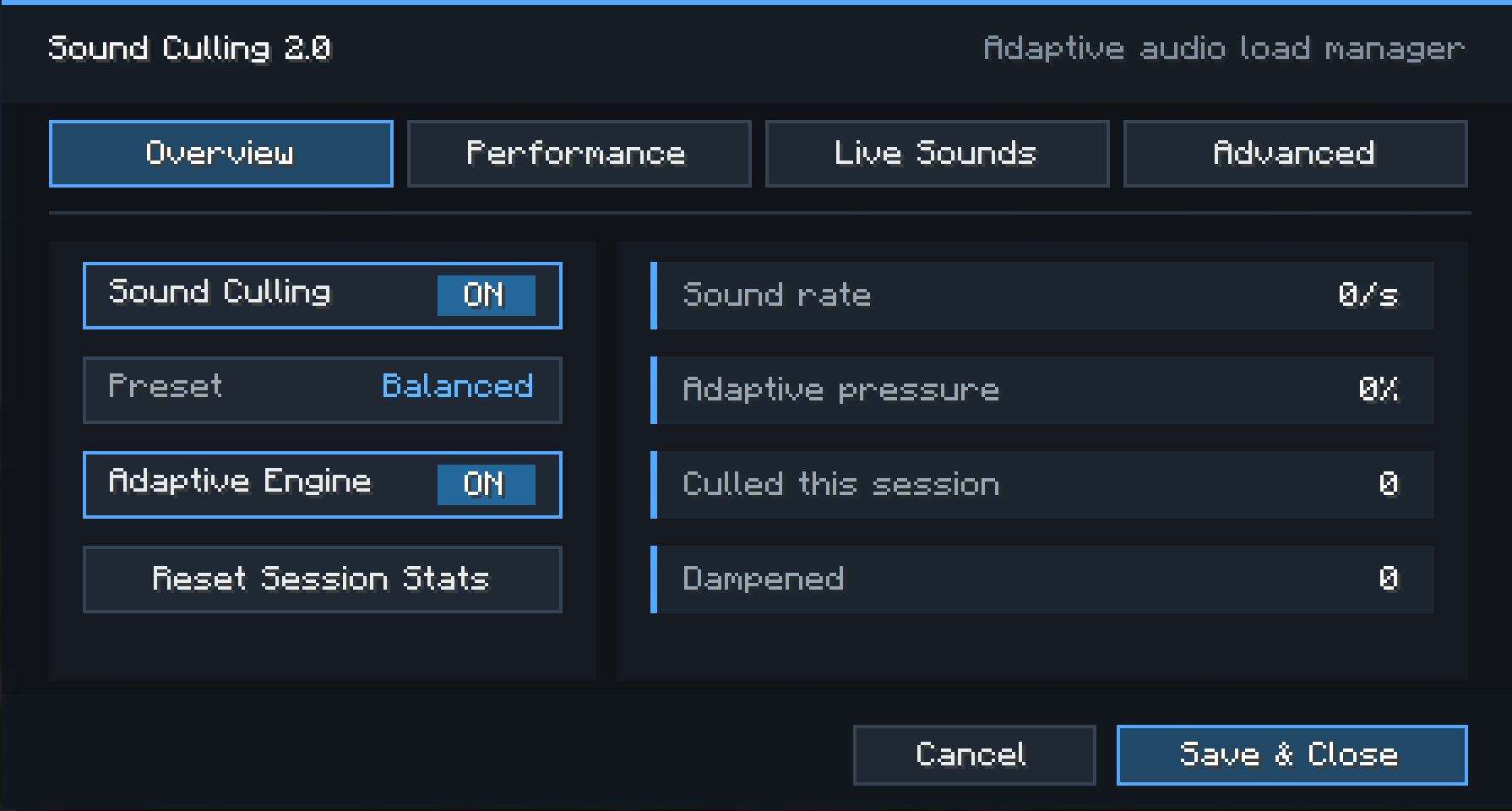
- 概览: 主开关、预设选择器和实时会话统计(已剔除和已阻尼的数量)。
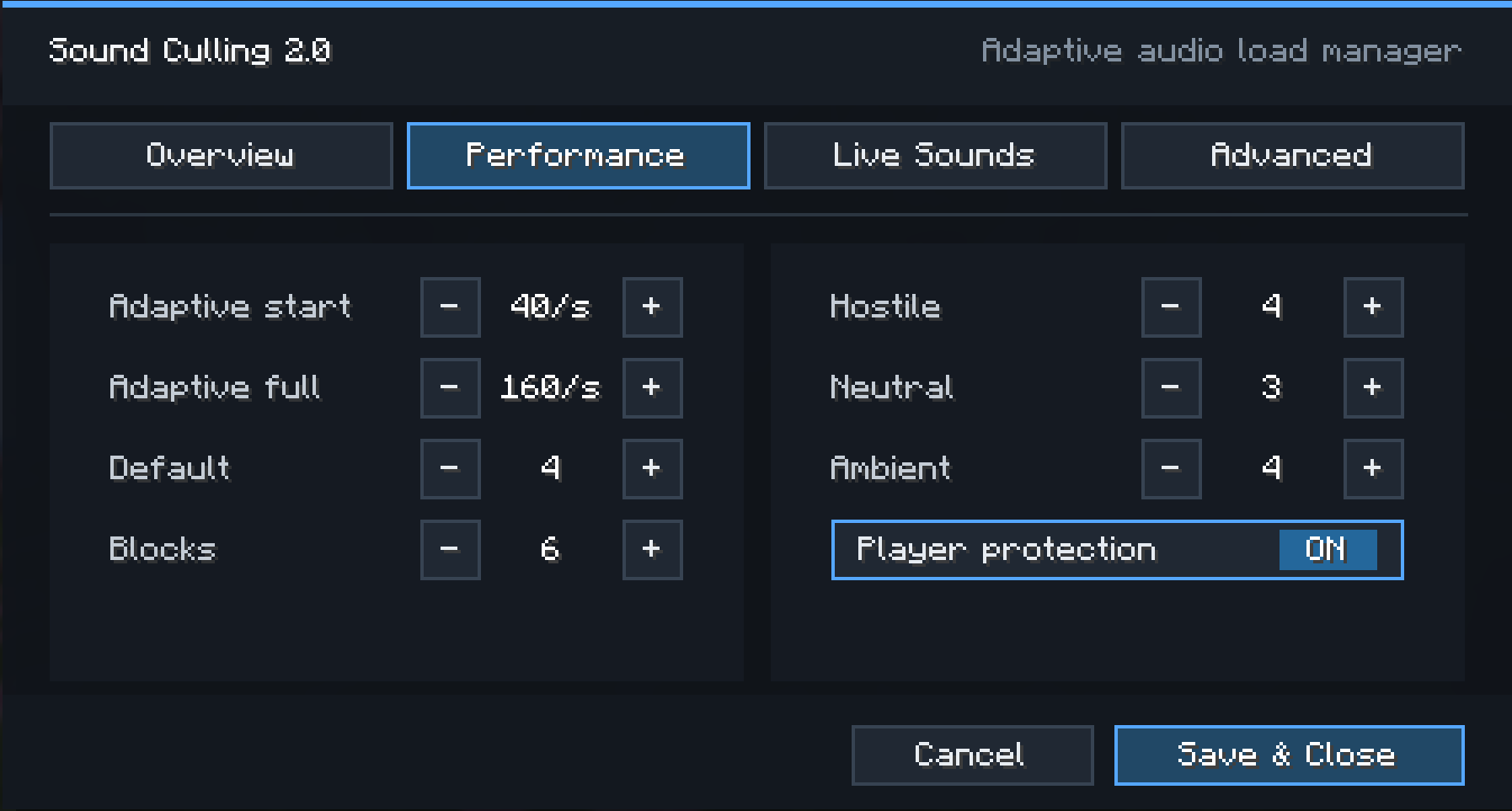
- 性能: 自适应负载阈值和类别限制(生物、方块、环境等)。
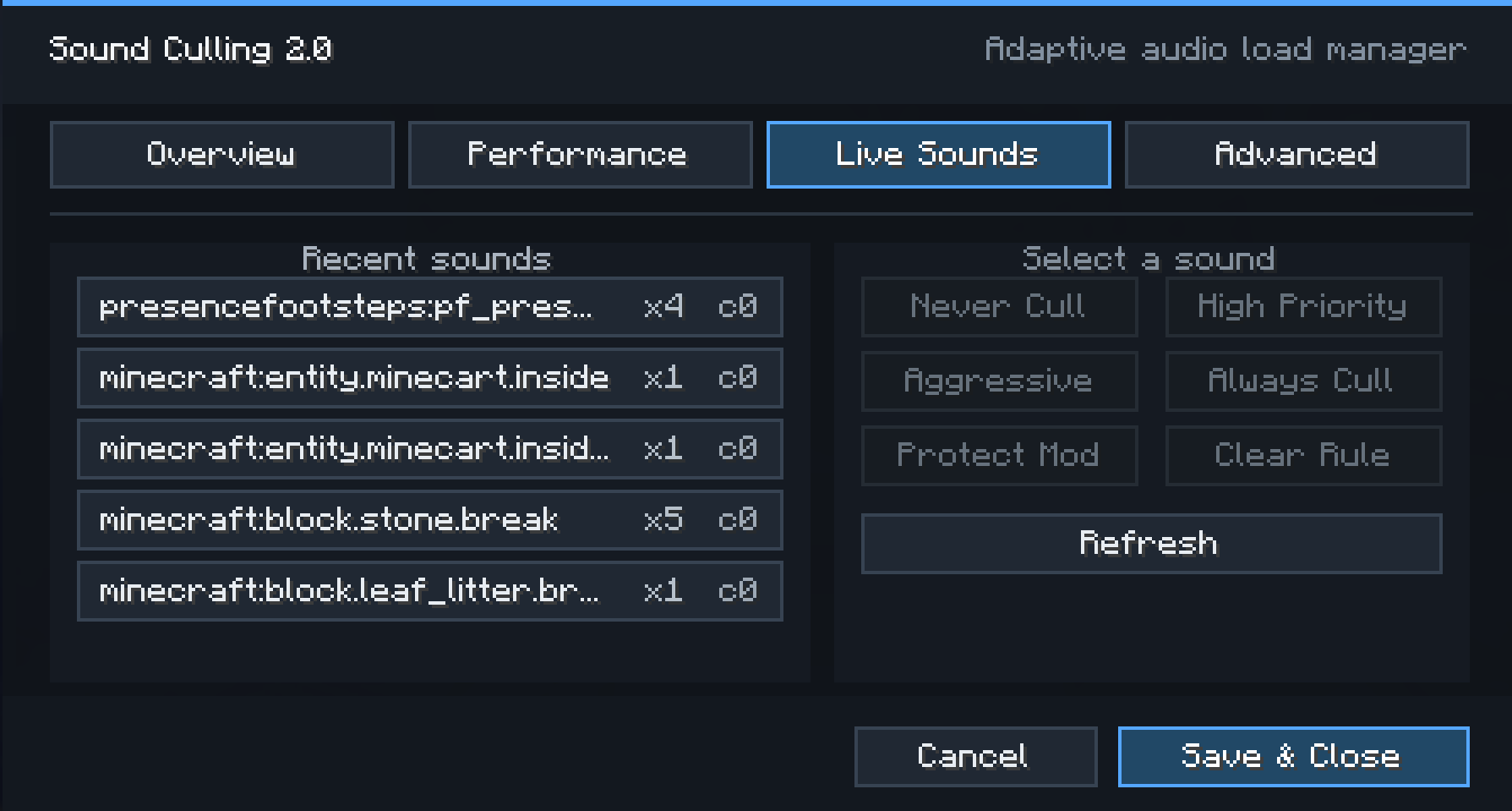
- 现场声音: 最近播放声音的实时列表,支持一键分配规则。
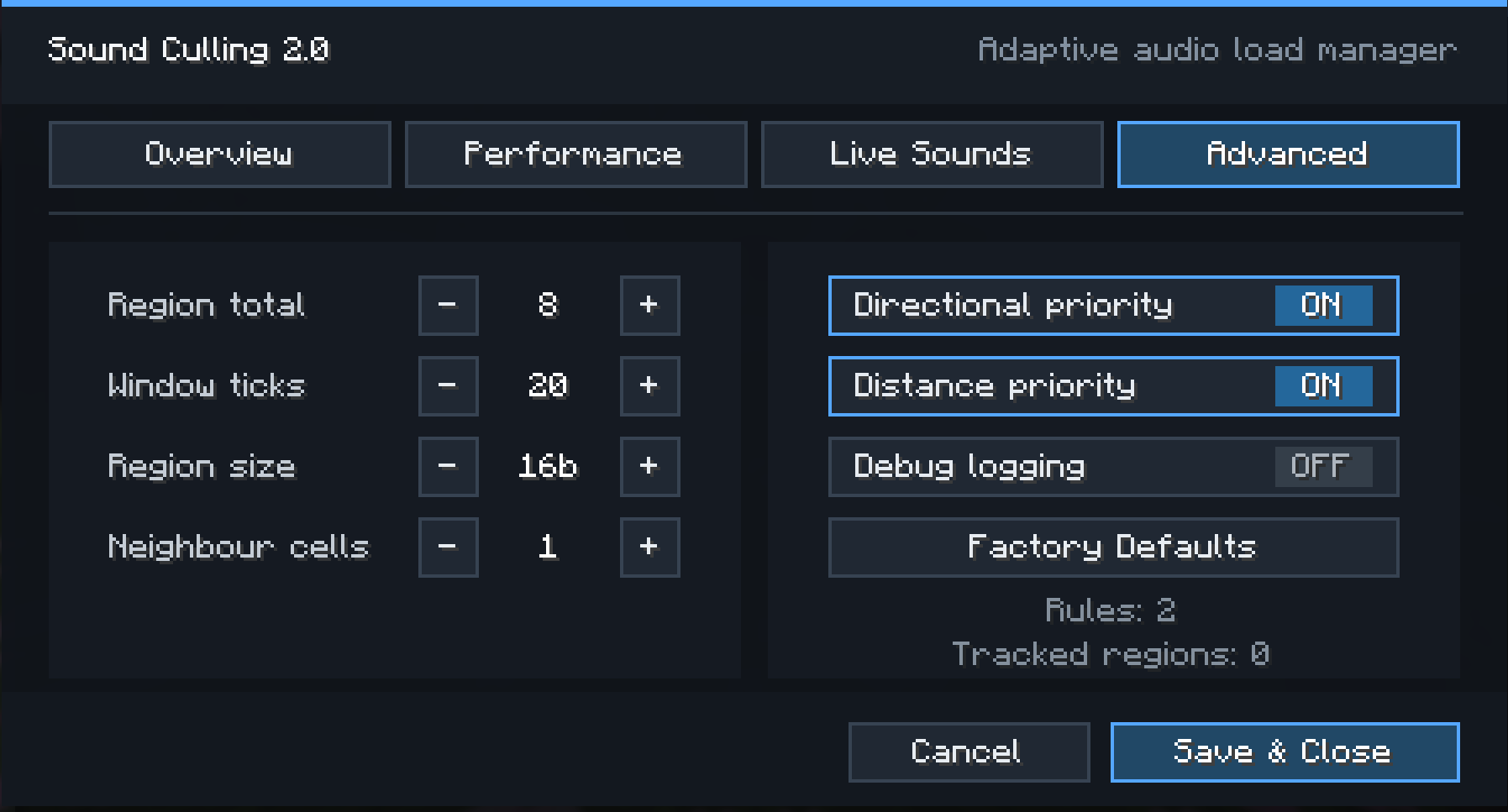
- 高级: 空间跟踪半径、单元格大小、视线方向优先级和调试日志。
配置屏幕不会暂停单人世界,允许你实时观察音频统计数据和调整。使用“保存并关闭”以保存更改。
配置文件位置:
config/soundculling.json
预设
| 预设 | 目的 |
|---|---|
Vanilla+ (subtle) |
保留自然的原版环境音;仅在极端农场刷屏或卡顿机器时才介入。 |
Balanced (balanced) |
推荐的默认值。平滑地降低拥挤区域的音量,同时保持游戏的活力。 |
Quiet Base (farming) |
针对重度自动化进行调整。激进地降低牲畜和机械装置的音量,同时保持战斗音效清晰。 |
Performance (performance) |
为低端 PC 和重型整合包最大化 CPU 和声音通道的节省。 |
Custom (custom) |
每当手动调整限制或阈值时自动启用。 |
声音规则
规则允许你保护关键声音、调整优先级或完全静默不需要的音频。在“现场声音”选项卡中选择任何声音即可创建规则,而无需编辑 JSON 文件:
| 规则动作 | 效果 |
|---|---|
NEVER_CULL |
完全豁免该声音的剔除决策。 |
CRITICAL |
在负载下应用最高优先级乘数。 |
HIGH |
当区域限制接近容量时提高播放优先级。 |
NORMAL |
标准动态优先级计算。 |
AGGRESSIVE |
降低优先级;比正常情况更早剔除或阻尼。 |
ALWAYS_CULL |
阻止播放并将活动循环淡入静音。 |
模式支持命名空间和 * 通配符:
minecraft:block.piston.*
bettercombat:*
presencefootsteps:*
客户端命令
Sound Culling 包括不需要服务器操作员权限的客户端命令:
/soundculling
/soundculling toggle
/soundculling preset <subtle|balanced|farming|performance>
/soundculling limit <1-50>
/soundculling total <1-100>
/soundculling reset
- 运行
/soundculling命令可查看当前事件速率、自适应压力及会话统计信息。 /soundculling reset命令将清除会话计数器和最近的声音历史记录,但不会重置滚动速率缓冲区。
安装
- 确保你的 Minecraft 版本已安装 Fabric Loader(含 Fabric API)、NeoForge 或 Minecraft Forge。
- 下载与你所用加载器及 Minecraft 版本匹配的 Sound Culling 2.1.0 文件。
- 将下载的
.jar文件放入你 Minecraft 实例的mods文件夹中。 - (仅限 Fabric)如果你想从主菜单直接访问配置 GUI,请安装 Mod Menu。
整合包
Sound Culling 为客户端模组,开源且采用 MIT 许可证授权。你可以自由将其包含在任何 CurseForge、Modrinth 或私人整合包中。
问题与错误报告
请在 GitHub Issues 上报告错误或音频故障,并提供以下信息:
- Minecraft、加载器以及 Sound Culling 的版本号。
- 你的操作系统及声音设置(如相关)。
- 日志文件(
logs/latest.log或崩溃报告)。
Sound Culling
Think of it as Entity Culling, but for your audio engine.
If you have ever built a massive cow breeder, chicken farm, iron farm, villager trading hall, or automated Create mod factory, you know the issue: deafening repetitive noise and audio stutter caused by Minecraft exhausting its internal sound channels.
Sound Culling solves this completely on the client side. It dynamically dampens volume or drops redundant sounds in crowded areas, keeping your audio clean and lag-free.
Sound Culling only changes client audio playback. It does not alter entities, blocks, gameplay mechanics, or server behavior, and it does not need to be installed on servers.
Features
- Adaptive Audio Engine: Automatically scales suppression pressure when the overall sound event rate spikes.
- Volume Dampening: Smoothly lowers excessive sound volume instead of abruptly muting sounds whenever possible.
- Look Direction Priority: Sounds you are actively looking at or interacting with stay audible and clear.
- Loop Management: Continuously monitors active looping sounds (minecarts, portals, machinery) and fades them gradually.
- Player Feedback Protection: Combat, damage, tool breaking, and interface sounds are protected from ordinary culling.
- In-Game Configuration: Real-time event graphs, live sound inspector, spatial grid tuning, and session metrics.
- Sound Rules: One-click whitelist, blacklist, or priority adjustment for any sound ID or mod namespace.
- Zero Overhead: Built with concurrent spatial buckets and zero-allocation hot paths.
- Multi-Loader Parity: The exact same 2.1.0 engine and GUI across Fabric, Forge, and NeoForge.
Note: Music, UI sounds, and sounds already outside Minecraft's audible range are automatically bypassed.
Modpack Compatibility
Sound Culling is 100% client-side and designed to fit into any modpack:
- Optimization: Fully compatible with Sodium, Embeddium, Iris, Oculus, Entity Culling, FerriteCore, and ImmediatelyFast.
- Audio Mods: Works alongside Sound Physics Remastered, Presence Footsteps, and Auditory (dynamic dampening preserves reverb and footstep feedback).
- Tech and Automation: Recommended for packs with Create, Mekanism, Applied Energistics 2, or Industrial Foregoing where machinery creates dense sound clusters.
Configuration
Open the settings screen via Mod Menu (Fabric) or the native Mods -> Config button (Forge / NeoForge):
- Overview: Master toggle, preset selector, and live session stats (culled and dampened counts).
- Performance: Adaptive load thresholds and category limits (mobs, blocks, ambient, etc.).
- Live Sounds: Real-time list of recently played sounds with one-click rule assignment.
- Advanced: Spatial tracking radius, cell sizes, look-direction priorities, and debug logging.
The configuration screen does not pause single-player worlds, allowing you to observe audio statistics and adjustments in real time. Use Save & Close to save changes.
Configuration file location:
config/soundculling.json
Presets
| Preset | Purpose |
|---|---|
Vanilla+ (subtle) |
Preserves natural vanilla ambience; only steps in during extreme farm spam or lag machines. |
Balanced (balanced) |
The recommended default. Smoothly quiets crowded areas while keeping the game lively. |
Quiet Base (farming) |
Tuned for heavy automation. Aggressively dampens livestock and machinery while keeping combat crisp. |
Performance (performance) |
Maximizes CPU and audio channel savings for low-end PCs and heavy modpacks. |
Custom (custom) |
Automatically engaged whenever manual adjustments are made to limits or thresholds. |
Sound Rules
Rules allow you to protect critical sounds, adjust priority, or silence unwanted audio completely. Select any sound in the Live Sounds tab to create rules without editing the JSON file:
| Rule Action | Effect |
|---|---|
NEVER_CULL |
Completely exempts the sound from culling decisions. |
CRITICAL |
Applies the highest priority multiplier under load. |
HIGH |
Raises playback priority when regional limits are near capacity. |
NORMAL |
Standard dynamic priority calculation. |
AGGRESSIVE |
Lowers priority; culls or dampens earlier than normal. |
ALWAYS_CULL |
Blocks playback and fades active loops to silence. |
Patterns support namespaces and * wildcards:
minecraft:block.piston.*
bettercombat:*
presencefootsteps:*
Client Commands
Sound Culling includes client-side commands that require no server operator permissions:
/soundculling
/soundculling toggle
/soundculling preset <subtle|balanced|farming|performance>
/soundculling limit <1-50>
/soundculling total <1-100>
/soundculling reset
- Running
/soundcullingdisplays current event rates, adaptive pressure, and session statistics. /soundculling resetclears session counters and recent sound history without resetting rolling rate buffers.
Installation
- Make sure you have Fabric Loader (with Fabric API), NeoForge, or Minecraft Forge installed for your Minecraft version.
- Download the matching Sound Culling 2.1.0 file for your loader and Minecraft version.
- Place the downloaded
.jarfile into your Minecraft instance'smodsfolder. - (Fabric only) Install Mod Menu if you want to access the configuration GUI directly from the title screen.
Modpacks
Sound Culling is client-side, open-source, and licensed under the MIT License. You are free to include it in any CurseForge, Modrinth, or private modpack.
Issues and Bug Reports
Report bugs or audio glitches on GitHub Issues with:
- Minecraft, Loader, and Sound Culling version.
- Your operating system and sound setup (if relevant).
- Logs (
logs/latest.logor crash reports).

下载 Sound Culling
下载 Sound Culling
下载 Sound Culling
下载 Sound Culling
下载 Sound Culling
下载 Sound Culling
需要联机服务器吗?
稳定流畅、一键部署,几分钟即可和朋友联机开服
最低仅需 8 元/月 即可畅快联机
下载 Sound Culling
下载 Sound Culling
下载 Sound Culling
需要联机服务器吗?
稳定流畅、一键部署,几分钟即可和朋友联机开服
最低仅需 8 元/月 即可畅快联机
下载 Sound Culling
暂无更新日志
关于这个资源的讨论、问题反馈与使用心得
还没有讨论,来发第一帖吧
你是这个资源的作者?登录后可认领此资源。
相似资源
 模组
缓冲的原始输入和线程化的事件轮询
 模组

显示你正在注视的方块的信息。(适用于 Minecraft 1.16+ 的 Hwyla/Waila 分支)
 模组

原版世界生成优化模组
 模组
在游戏画面角落显示附近世界地形、玩家、生物和实体的地图。可创建路径点,帮助你找到标记过的位置。
 模组

查看物品与配方
 模组
使用 JavaScript 编辑配方、添加自定义物品、编写世界事件!
评论 0
登录后参与评分
还没有评论,来抢沙发吧