? SoundPulse
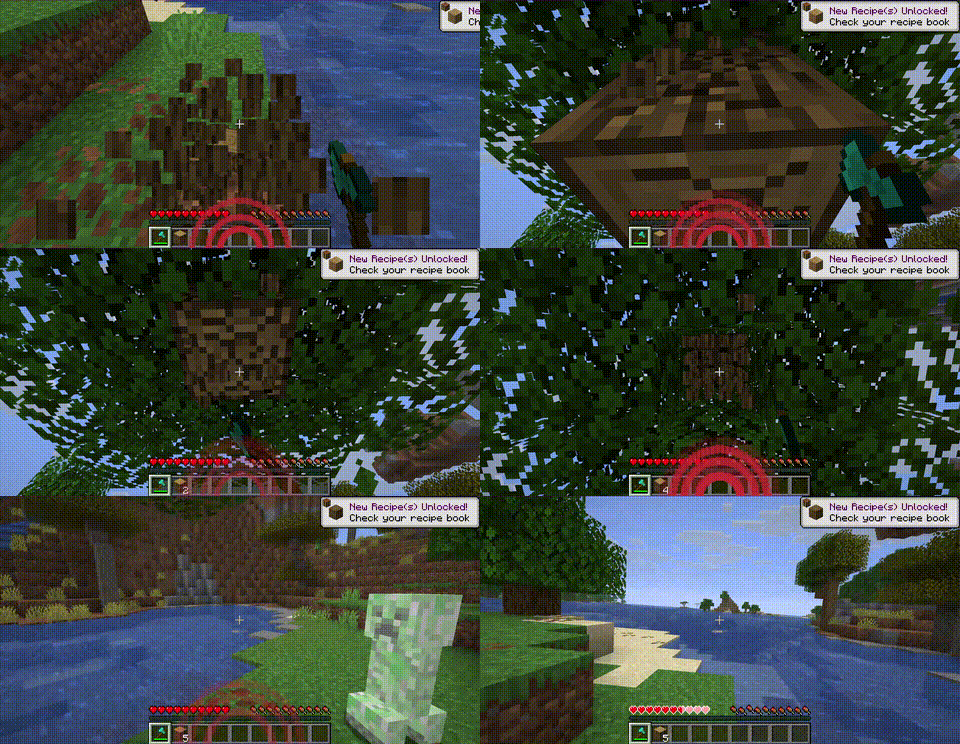
SoundPulse 是一款轻量级、高性能的 Minecraft Fabric 26.1.x 客户端工具模组。它将以极简的方向性波纹形式在游戏 HUD 上可视化游戏内声音,在不增加原版字幕杂乱感的同时,提供战术优势并增强空间感知能力。
无论你是正在播放自己的音乐、存在听力障碍,还是仅仅想要一种更简洁的方式来追踪威胁,SoundPulse 都能提供一种时尚且现代的解决方案。
✨ 主要功能
? 8 向方向追踪
SoundPulse 不仅告诉你有声音发生——它还精确显示声音来源的方向。HUD 会显示指向 8 个特定方向的弧形波纹图标:
? 基于距离的缩放
波纹的视觉强度会根据声源的距离进行自适应调整:
- 近距离: 粗犷、具有攻击性的线条表示即时威胁
- 远距离: 纤细、微妙的线条表示远处的背景噪音
⚠️ 关键威胁警报(频闪效果)
再也不必被苦力怕偷袭。高优先级声音(如苦力怕嘶嘶声或 TNT 引燃声)会在 HUD 对应方向触发快速的红色频闪/闪光效果。
?️ 智能过滤与预设
为了保持屏幕整洁,SoundPulse 默认仅启用 Hostile(敌对) 类声音。你可以根据游玩风格轻松切换其他类别(Blocks 方块、Players 玩家、Ambient 环境、Music 音乐、Weather 天气、Neutral 中立、Voice 语音)。
? 类别颜色
每个声音类别都有独特的颜色:
| Category |
Color |
| Hostile |
Red |
| Blocks |
Orange |
| Ambient |
Green |
| Players |
Blue |
| Music |
Purple |
| Weather |
Cyan |
| Neutral |
Yellow |
| Voice |
Gray |
? 命令
SoundPulse 支持完全的游戏内配置。你所做的所有更改都会立即保存到配置文件中。
| Command |
Description |
/soundpulse toggle |
启用或禁用整个模组 |
/soundpulse config |
在聊天栏中查看当前设置和已启用的类别 |
/soundpulse category <name> <true/false> |
开启或关闭整个声音类别 |
/soundpulse color <category> <hex> |
更改特定类别的波纹颜色 |
/soundpulse ignore add <id> |
将特定声音添加到忽略列表 |
/soundpulse ignore remove <id> |
从忽略列表中移除声音 |
/soundpulse ignore list |
列出所有被忽略的声音 |
⚙️ 配置
设置保存在 config/soundpulse.json 中:
{
  "enabled": true,
  "maxOpacity": 0.65,
  "enabledCategories": ["HOSTILE"],
  "categoryColors": {},
  "ignoredSounds": []
}
默认情况下仅启用 HOSTILE 类别。使用 /soundpulse category 启用其他类别。
? 许可证
MIT © Cukkoo
? SoundPulse
SoundPulse is a lightweight, high-performance client-side utility mod for Minecraft Fabric 26.1.x. It visualizes in-game sounds as minimalist, directional waves on your HUD, providing a tactical edge and enhanced spatial awareness without the clutter of vanilla subtitles.
Whether you are playing with your own music, have hearing difficulties, or simply want a cleaner way to track threats, SoundPulse delivers a sleek, modern solution.
✨ Key Features
? 8-Way Directional Tracking
SoundPulse doesn't just tell you a sound happened — it shows you exactly where it came from. The HUD displays curved wave icons pointing to 8 specific directions:
- Front, Back, Left, Right
- Front-Right, Front-Left, Back-Right, Back-Left
? Distance-Based Scaling
The visual intensity of the waves adapts to the proximity of the sound source:
- Near: Thick, aggressive lines for immediate threats
- Far: Thin, subtle lines for distant background noises
⚠️ Critical Threat Alerts (Strobe Effect)
Never get blindsided by a Creeper again. High-priority sounds like Creeper hissing or TNT priming trigger a rapid red strobe/flash effect on the corresponding direction of the HUD.
?️ Smart Filtering & Presets
To keep your screen clean, SoundPulse starts with Hostile sounds enabled by default. You can easily toggle other categories (Blocks, Players, Ambient, Music, Weather, Neutral, Voice) to suit your playstyle.
? Category Colors
Each sound category has a distinct color:
| Category |
Color |
| Hostile |
Red |
| Blocks |
Orange |
| Ambient |
Green |
| Players |
Blue |
| Music |
Purple |
| Weather |
Cyan |
| Neutral |
Yellow |
| Voice |
Gray |
? Commands
SoundPulse is fully configurable in-game. Every change you make is instantly saved to your configuration file.
| Command |
Description |
/soundpulse toggle |
Enable or disable the mod entirely |
/soundpulse config |
View your current settings and active categories in chat |
/soundpulse category <name> <true/false> |
Toggle entire sound categories on or off |
/soundpulse color <category> <hex> |
Change the wave color for a specific category |
/soundpulse ignore add <id> |
Add a specific sound to the ignore list |
/soundpulse ignore remove <id> |
Remove a sound from the ignore list |
/soundpulse ignore list |
List all ignored sounds |
⚙️ Configuration
Settings are saved to config/soundpulse.json:
{
  "enabled": true,
  "maxOpacity": 0.65,
  "enabledCategories": ["HOSTILE"],
  "categoryColors": {},
  "ignoredSounds": []
}
Only the HOSTILE category is enabled by default. Use /soundpulse category to enable others.
? License
MIT © Cukkoo


 模组

 模组
 模组

 模组
 模组
 模组
评论 0
登录后参与评分
还没有评论,来抢沙发吧