
Spatial Tools Compatible 让你能够轻松地在整个建筑中移动、复制、预览、旋转、翻转、粘贴和替换方块!
无论是迁移基地、复制机器设置、分享蓝图,还是调整复杂的模组结构,此模组都能提供强大、可预测且安全使用的工具。它既可以作为独立的结构工具使用,但在技术整合包中尤其有用,因为普通的复制粘贴工具往往无法正常工作。内置支持 AE2、GTCEu、Mekanism、FramedBlocks、Sophisticated Storage、Curios、Project Red、LaserIO、Flux Networks、Extended AE 等模组!它旨在不仅保留你建筑的形状,还保留使其正常运作的重要细节。
模组功能
Spatial Tools Compatible 是一款专注于以清晰可控的方式复制、切割、预览、变换和粘贴结构的结构工具模组。
它适用于:
- 将建筑移动到新的位置
- 旋转或翻转现有建筑
- 复制机器、电缆、管道、装饰方块和技术设置
- 保存可重复使用的结构
- 与其他玩家分享建筑
- 处理需要比简单方块复制更多数据的模组方块
该模组独立运行效果良好。可选集成会在安装支持的模组后扩展其功能。
主要工具
便携式空间存储
一种用于移动结构的便携工具。
它会捕获选定区域,将其从世界中移除并存储,然后允许你在其他地方粘贴。它会保存关于结构的所有数据、所有机器设置、库存,你的所有资源都保持安全!
- 选择两个角来捕获结构
- 右键点击将结构从世界中切除
- 它会将其存储以便稍后放置
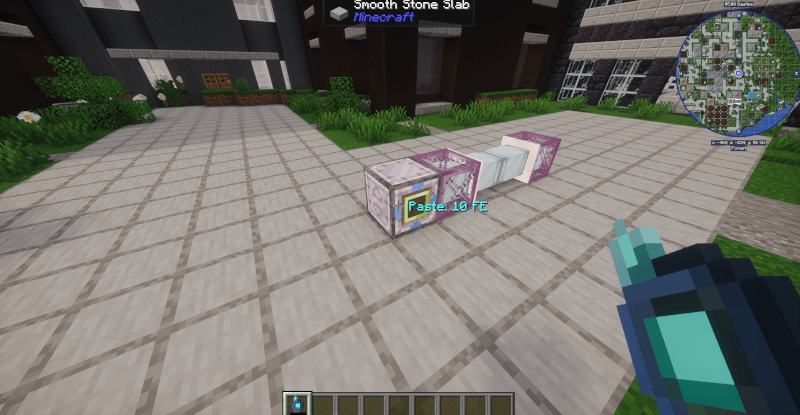
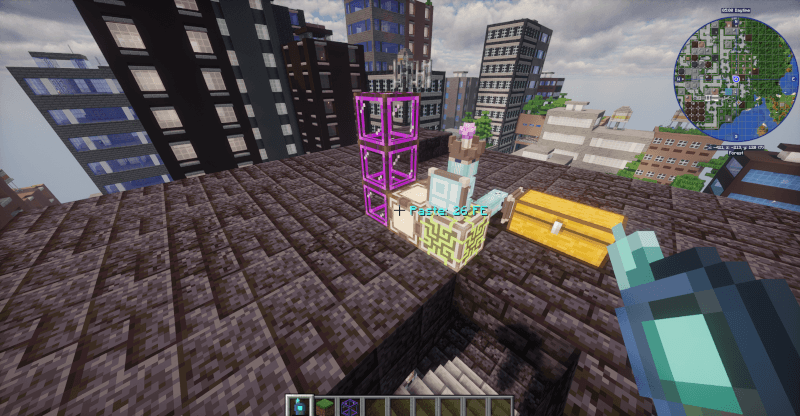
- 在粘贴前你会看到预览
- 它会在放置前检查碰撞,这样你就不会丢失任何方块!
- 在菜单中,你还可以在粘贴前旋转和翻转结构
当你想要迁移建筑时,这是理想的选择。
便携式空间克隆器
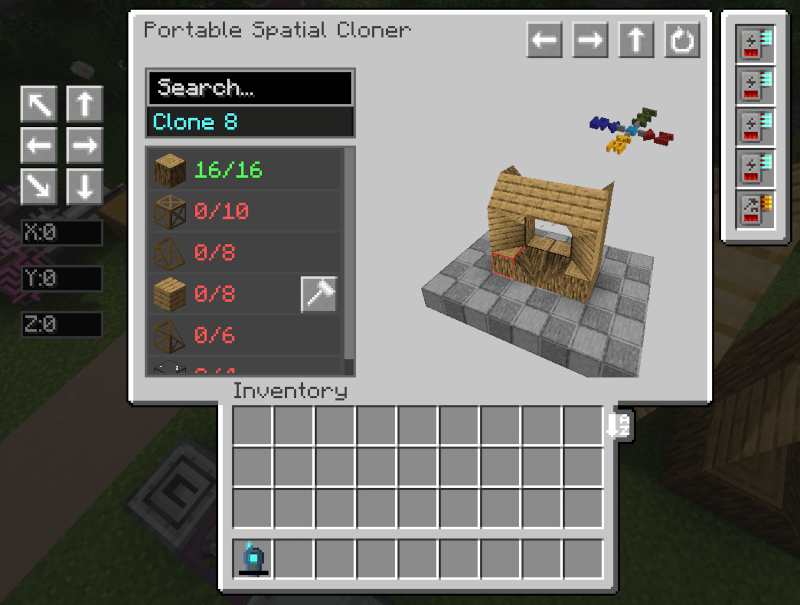
一种基于复制的工具版本,会保留原始结构不变。它也会尽可能多地保存关于结构的数据,例如机器升级、机器设置或电缆连接。在粘贴时,它会恢复这些数据,这样你就不需要在之后进行手动设置了!
- 复制结构而不移除原始结构
- 当缺少某些方块时支持部分放置
- 跟踪所需材料
- 可以同时保存多个建筑
- 可以将结构导出为文件,供与他人分享!
- 在可用时可以使用 AE2 存储和自动合成
- 还可以从任何其他存储系统中提取材料,例如 Sophisticated Storage 的存储控制器,甚至是普通的原版箱子
这对于可重复使用的蓝图、重复的机器设置、基地模块以及在世界或玩家之间分享建筑非常有用。
便携式空间替换器
一种一次性替换大量方组的工具。
它会通过所有相同类型的连接方块进行泛洪填充,并在一次点击中将它们交换为选定的目标方块。如果你改变主意,它支持撤销操作!
- 在一次操作中替换整个连接的方组
- 可配置的半径和连接模式
- 支持严格的方块状态匹配
- 不会触碰内部有物品的方块
- 从库存或 AE2 存储中提取材料,并退款被移除的方块
- 支持撤销以恢复到之前的状态
这对于批量更换大型 Greg 电缆、管道或线圈非常棒。
预览与变换工作流
两种工具在放置前都支持完整的预览工作流。
你可以在将建筑提交到世界之前进行调整:
- 世界中的实时预览
- GUI 内的 3D 预览
- 水平/垂直翻转
- 旋转
- 带有实时预览的放置偏移量
这使得精确地将大型或复杂结构放置在你想要的位置变得容易得多。
多结构管理
克隆器不限于单个临时剪贴板。
你可以:
- 同时存储多个结构
- 搜索和命名已保存的结构
- 将结构导出为文件
- 从文件导入结构
这将工具变成了一个可重复使用的蓝图系统,而不仅仅是一个简单的复制粘贴物品。
内置模组兼容性
Spatial Tools Compatible 包含对通常会被通用建筑工具破坏的模组方块和系统的特殊处理。
目标是尽可能保留结构的实际行为和配置。
AE2
- 支持 AE2 电缆总线(Cable Buses)和电缆部件
- 保存部件设置和升级
- 具有 AE2 存储集成
- 具有 AE2 自动合成功能支持
GTCEu
- 保存机器设置
- 保存总线/舱口设置
- 保存管道及其覆盖物,包括它们的连接和设置
- 粘贴后为你连接所有管道和电缆
Mekanism
- 机器升级和设置
FramedBlocks
- 对装饰方块的适当支持
- 正确复制装饰方块
- 正确粘贴装饰方块
- 列出装饰方块的需求
Sophisticated Storage
- 在粘贴时可以从库存中的 Sophisticated Storage 容器中提取材料
Curios
- 在 Curios 槽位中搜索工具和材料
LaserIO
- 保存节点连接设置
- 粘贴后恢复连接
Flux Networks
- 保存网络设置,如优先级、浪涌模式和传输限制
- 粘贴后恢复网络分配
Extended AE
- 保存无线连接器和集线器连接数据
- 粘贴后重新链接连接
Project Red
- 对多部分方块的适当支持
- 正确复制和粘贴它们
生存模式与创造模式使用
这些工具在生存模式和创造模式中都能合理地运作。
- 在生存模式下,放置需要消耗材料
- 在创造模式下,限制会被绕过
- 特殊且不可破坏的方块仅在创造模式下可复制
这使得该模组既能适应正常的游戏玩法,也能满足创意建造的需求!
说明
- 使用此模组不需要 AE2
- AE2 集成是可选的
- 兼容性取决于涉及的方块和系统
- 该模组专门设计用于处理许多通用建造工具无法应对的复杂模组结构
- 能量升级可以在配置文件中修改
- 默认的能量升级物品:ae2:energy_card
- 对于那些担心大型结构会导致存档损坏的人来说,你无需担心!所有数据都保存在服务器数据中,而不是物品的 NBT 中。
图片
Spatial Tools Compatible lets you move, copy, preview, rotate, flip, paste, and replace blocks in entire builds easily!
Whether you are relocating a base, duplicating a machine setup, sharing a blueprint, or adjusting a complex modded structure, this mod gives you tools that feel powerful, predictable, and safe to use. It works as a standalone structure tool, but becomes especially useful in technical modpacks where normal copy-paste tools often fail. With built-in support for AE2, GTCEu, Mekanism, FramedBlocks, Sophisticated Storage, Curios, Project Red, LaserIO, Flux Networks, Extended AE and more! it is designed to preserve not just the shape of your build, but the important details that make it actually work.
What This Mod Does
Spatial Tools Compatible is a structure tools mod focused on copying, cutting, previewing, transforming, and pasting builds in a clean and controlled way.
It is useful for:
- Moving builds to new locations
- Rotating or flipping existing builds
- Copying machines, cables, pipes, framed blocks, and technical setups
- Saving reusable structures
- Sharing builds with other players
- Working with modded blocks that need more than simple block copying
The mod works perfectly well on its own. Optional integrations expand what it can do when supported mods are installed.
Main Tools
Portable Spatial Storage
A handheld tool for moving structures.
It captures a selected area, removes it from the world, stores it, and allows you to paste it somewhere else. It saves all data about the structure, all machine settings, inventories, all your resources stay safe!
- Select two corners to capture a structure
- Right-click to cut the structure out of the world
- It will store it for later placement
- You will see preview before pasting
- It will check collisions before placement so you won't lose any blocks!
- In the menu you can also rotate and flip the structure before pasting
This is ideal when you want to relocate a build.
Portable Spatial Cloner
A copy-based version of the tool that leaves the original structure intact. It also saves as much data about the structure as it can, for example machine upgrades, machine settings or cable connections. On paste it will restore them so you won't need to do manual setup after!
- Copies structures without removing the original
- Supports partial placement when some blocks are missing
- Tracks required materials
- Can save many builds at once
- Can export and import structures to files you can share with others!
- Can use AE2 storage and autocrafting when available
- Can also pull materials from any other storage systems like for example: the storage controller from sophisticated storage or even a normal vanilla chest
This is useful for reusable blueprints, repeated machine setups, base modules, and sharing builds between worlds or players.
Portable Spatial Replacer
A tool for replacing large groups of blocks at once.
It flood-fills through all connected blocks of the same type and swaps them to the chosen target block in one click. It supports undo if you change your mind!
- Replaces entire connected groups of blocks in one action
- Configurable radius and connectivity mode
- Supports strict blockstate matching
- Will not touch blocks that have items stored inside
- Pulls materials from inventory or AE2 storage and refunds removed blocks
- Supports undo to restore to the previous state
This is great for swapping out large Greg cables, pipes or coils.
Preview and Transform Workflow
Both tools support a full preview workflow before placement.
You can adjust your build before committing it to the world:
- Real-time preview in the world
- 3D preview inside the GUI
- Horizontal/vertical flip
- Rotation
- Placement offsets with live preview
This makes it much easier to place large or complex structures exactly where you want them.
Multi-Structure Management
The Cloner is not limited to a single temporary clipboard.
You can:
- Store multiple structures at once
- Search and name saved structures
- Export structures to files
- Import structures from files
This turns the tool into a reusable blueprint system, not just a simple copy-paste item.
Built-In Mod Compatibility
Spatial Tools Compatible includes special handling for modded blocks and systems that often break with generic building tools.
The goal is to preserve as much of the structure’s real behavior and configuration as possible.
AE2
- Supports AE2 cable buses and cable parts
- Saves part settings and upgrades
- Has AE2 storage integration
- Has AE2 autocrafting support
GTCEu
- Saves Machine settings
- Saves Bus/Hatch settings
- Saves Pipes and covers with their connections and settings
- Connects all pipes and cables after pasting for you
Mekanism
- Machine upgrades and settings
FramedBlocks
- Proper support for framed blocks
- Copies framed blocks correctly
- Pastes framed blocks correctly
- Lists framed block requirements
Sophisticated Storage
- Can pull materials from Sophisticated Storage containers in your inventory when pasting
Curios
- Searches Curios slots for tools and materials
LaserIO
- Saves node connection settings
- Restores connections after pasting
Flux Networks
- Saves network settings like priority, surge mode, and transfer limits
- Restores network assignments after pasting
Extended AE
- Saves wireless connector and hub connection data
- Re-links connections after pasting
Project Red
- Proper support for multipart blocks
- Copies and pastes them correctly
Survival and Creative Use
The tools are designed to behave sensibly in both survival and creative play.
- In survival, placement requires materials
- In creative, restrictions are bypassed
- Special and unbreakable blocks are only copied in creative
This allows the mod to fit both normal gameplay and creative building!
Notes
- AE2 is not required to use this mod
- AE2 integration is optional
- Compatibility depends on the blocks and systems involved
- The mod is specifically designed to handle difficult modded structures that many generic building tools do not
- Energy upgrades can be changed in the config
- Default energy upgrade item: ae2:energy_card
- For those who worry about save corruption with large structures, you don't have to! All data is saved in server data not in the item's NBT.
Images

下载 Spatial Tools Compatible
下载 Spatial Tools Compatible
下载 Spatial Tools Compatible
下载 Spatial Tools Compatible
下载 Spatial Tools Compatible
下载 Spatial Tools Compatible
需要联机服务器吗?
稳定流畅、一键部署,几分钟即可和朋友联机开服
最低仅需 8 元/月 即可畅快联机
下载 Spatial Tools Compatible
需要联机服务器吗?
稳定流畅、一键部署,几分钟即可和朋友联机开服
最低仅需 8 元/月 即可畅快联机
下载 Spatial Tools Compatible
需要联机服务器吗?
稳定流畅、一键部署,几分钟即可和朋友联机开服
最低仅需 8 元/月 即可畅快联机
下载 Spatial Tools Compatible
需要联机服务器吗?
稳定流畅、一键部署,几分钟即可和朋友联机开服
最低仅需 8 元/月 即可畅快联机
下载 Spatial Tools Compatible
需要联机服务器吗?
稳定流畅、一键部署,几分钟即可和朋友联机开服
最低仅需 8 元/月 即可畅快联机
添加了空间传送门方块,可通过红石自动化处理空间存储物品。
对 ME 控制器进行 Shift+右键操作可将工具连接到 ME 网络存储,因此如果不需要自动合成,便无需使用无线访问节点。
增加了对 GregTech 7.4.0+ 版本的支持(此前要求为 7.5.2+)。
关于这个资源的讨论、问题反馈与使用心得
还没有讨论,来发第一帖吧
你是这个资源的作者?登录后可认领此资源。
相似资源
 模组

一个用于收集生物掉落物的多区块模组。
 模组

显示你正在注视的方块的信息。(适用于 Minecraft 1.16+ 的 Hwyla/Waila 分支)
 模组

查看物品与配方
 模组
在游戏画面角落显示附近世界地形、玩家、生物和实体的地图。可创建路径点,帮助你找到标记过的位置。
 模组
使用 JavaScript 编辑配方、添加自定义物品、编写世界事件!
 模组
AE2:一款流行的自动化与存储模组
评论 0
登录后参与评分
还没有评论,来抢沙发吧