嘿,你好呀。通过这个模组,你可以轻松控制世界中可以生成的实体数量,以及实体再次生成前需要等待的时间!
请务必下载此模组的依赖项 - Fzzy Config
支持我 :3
如果你有任何问题或建议,我非常建议你加入下方的 Discord 服务器,我很乐意提供帮助或接受批评!


到底该怎么配置这个模组呢?
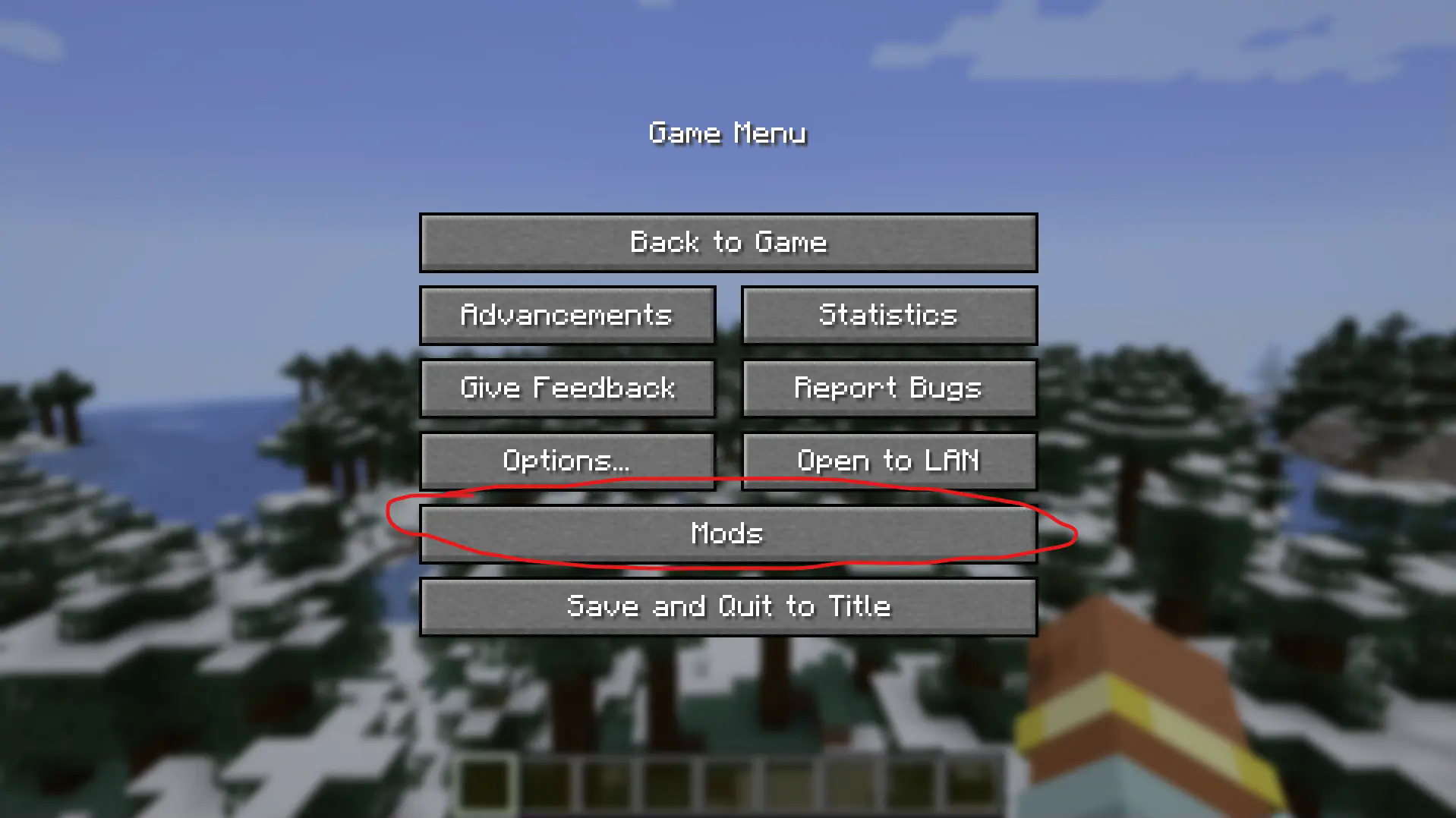
好吧,进入游戏并按下 Escape 键打开菜单,找到“模组”按钮,这必须在世界中进行。
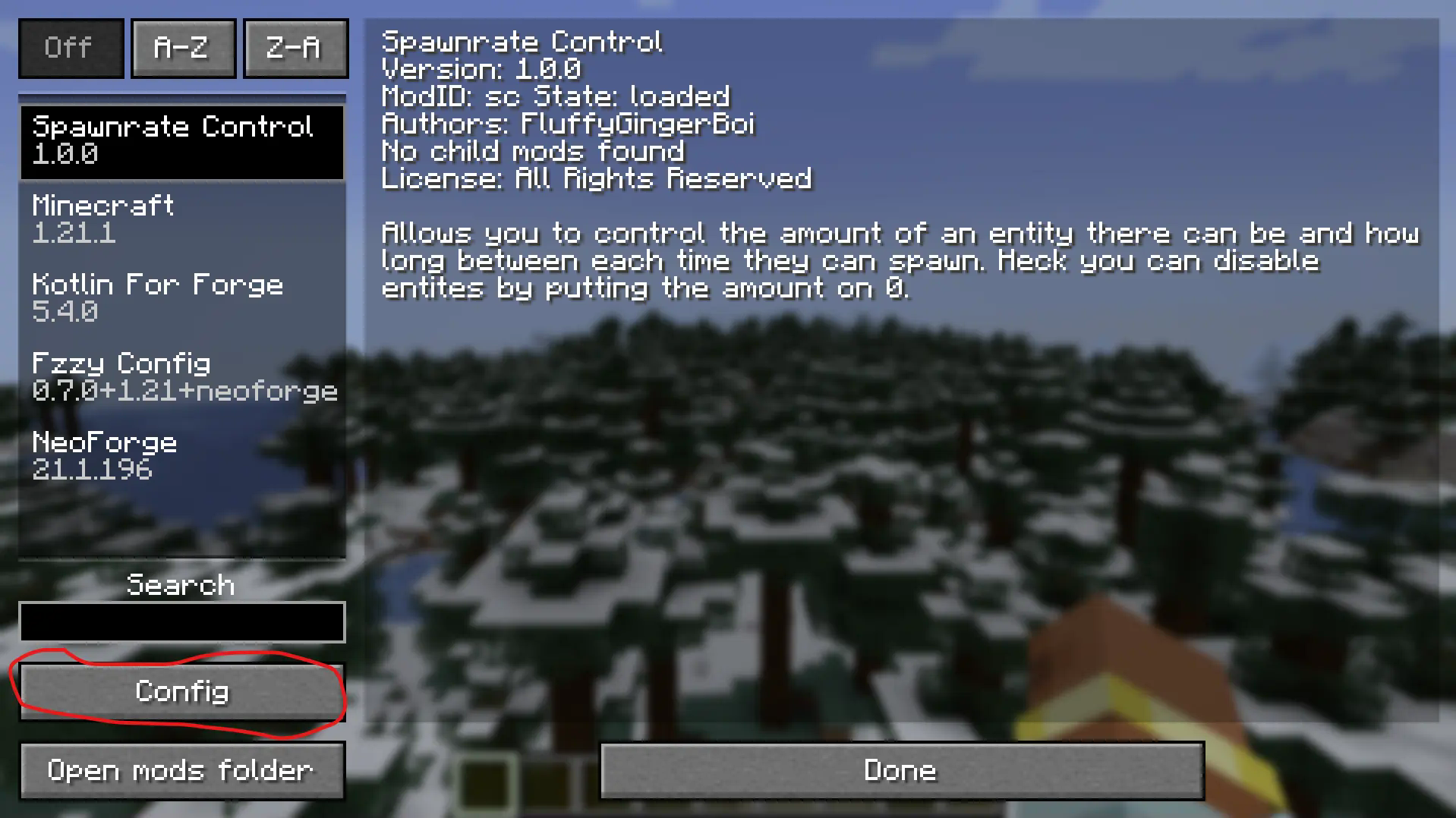
现在找到模组“Spawnrate Control”,然后点击“Config”按钮。
恭喜,你已经进入了实际的配置菜单。现在你需要点击“Edit Map”按钮来添加一个实体。你可能会看到里面已经有三个实体作为示例,说实话,这就是我制作这个模组的唯一目的。把这些当作示例,每当你添加一个实体时,点击旁边的小 + 按钮并定义该实体。那么如何知道实体的标识符呢?一个好的检查方法是使用 /summon 命令。此模组支持模组实体,所以这是查找它们标识符的最佳方式。
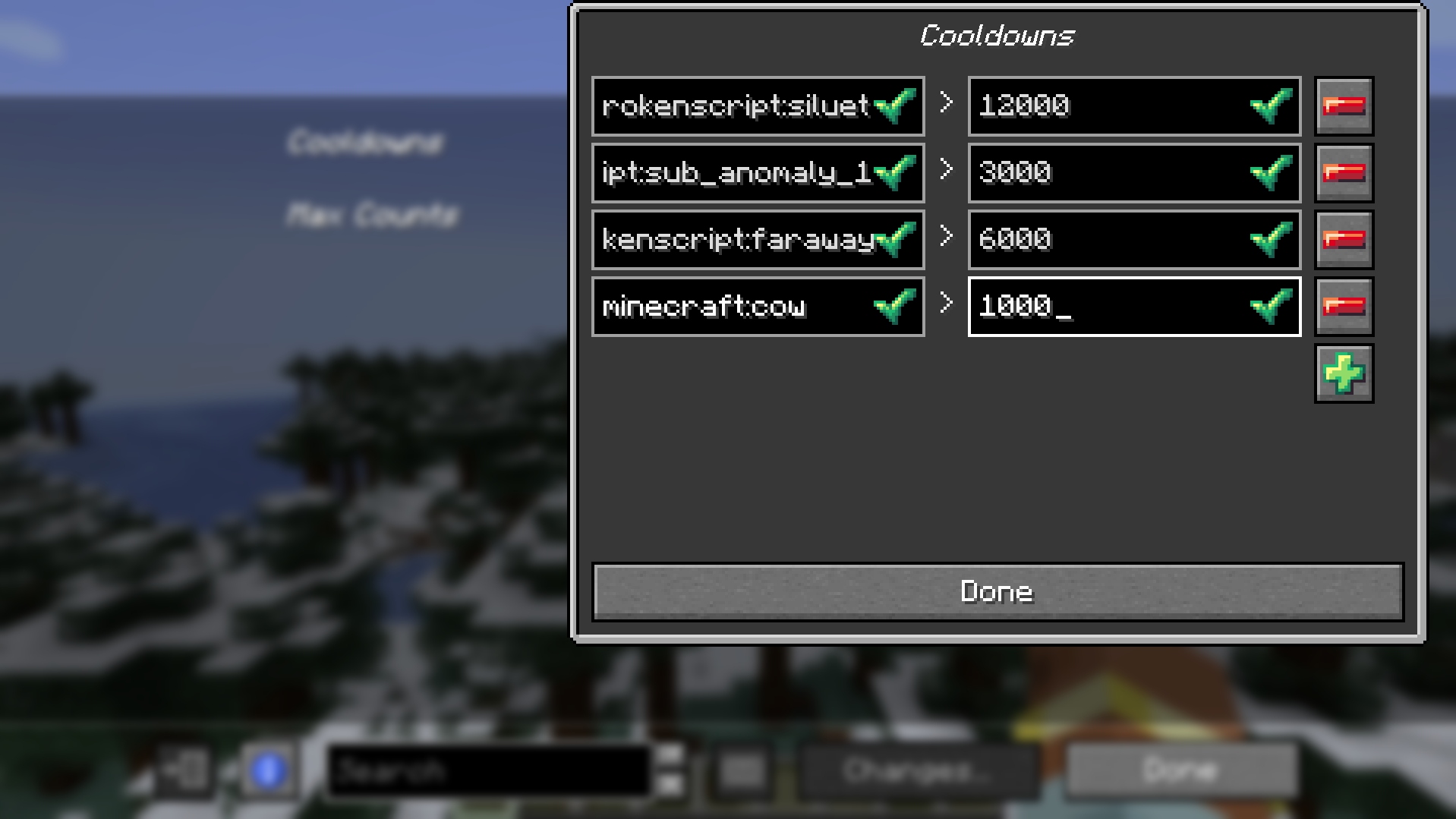 上面是一个示例,我添加了原版实体牛,它每 1000 刻只能生成一次。如果你不是我的话,你可能不知道如何计算刻数。要将秒转换为刻,只需将其乘以 20。例如,5 秒是 100 刻,因为 5 * 20 = 100。简单的数学,你能行的。
现在你已经添加了你的实体(在我的例子中是牛),你现在可以添加数量上限了!(这是可选的,冷却时间也是如此,你可以只有冷却时间而没有上限,或者只有上限而没有冷却时间,随你便)
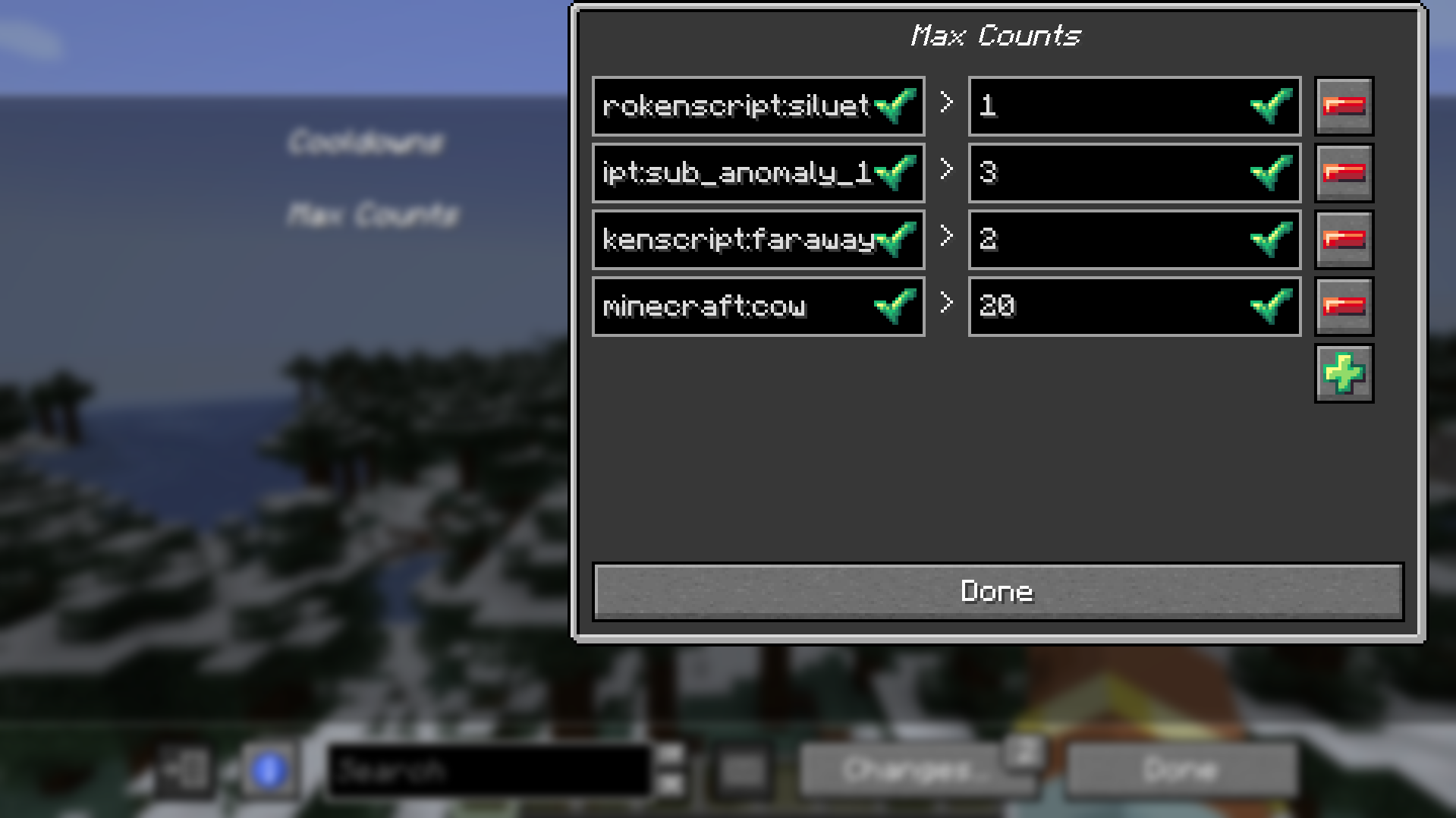
要做到这一点,只需像对待冷却时间一样操作,添加你的实体标识符(在我的例子中是 minecraft:cow),然后输入你的具体数值。顺便说一下,这不是刻数,提前告知一下。
现在最后且最重要的一步是保存你的更改,这真的很重要,一定要做。按下“Changes...”按钮,然后选择“Apply Changes”。
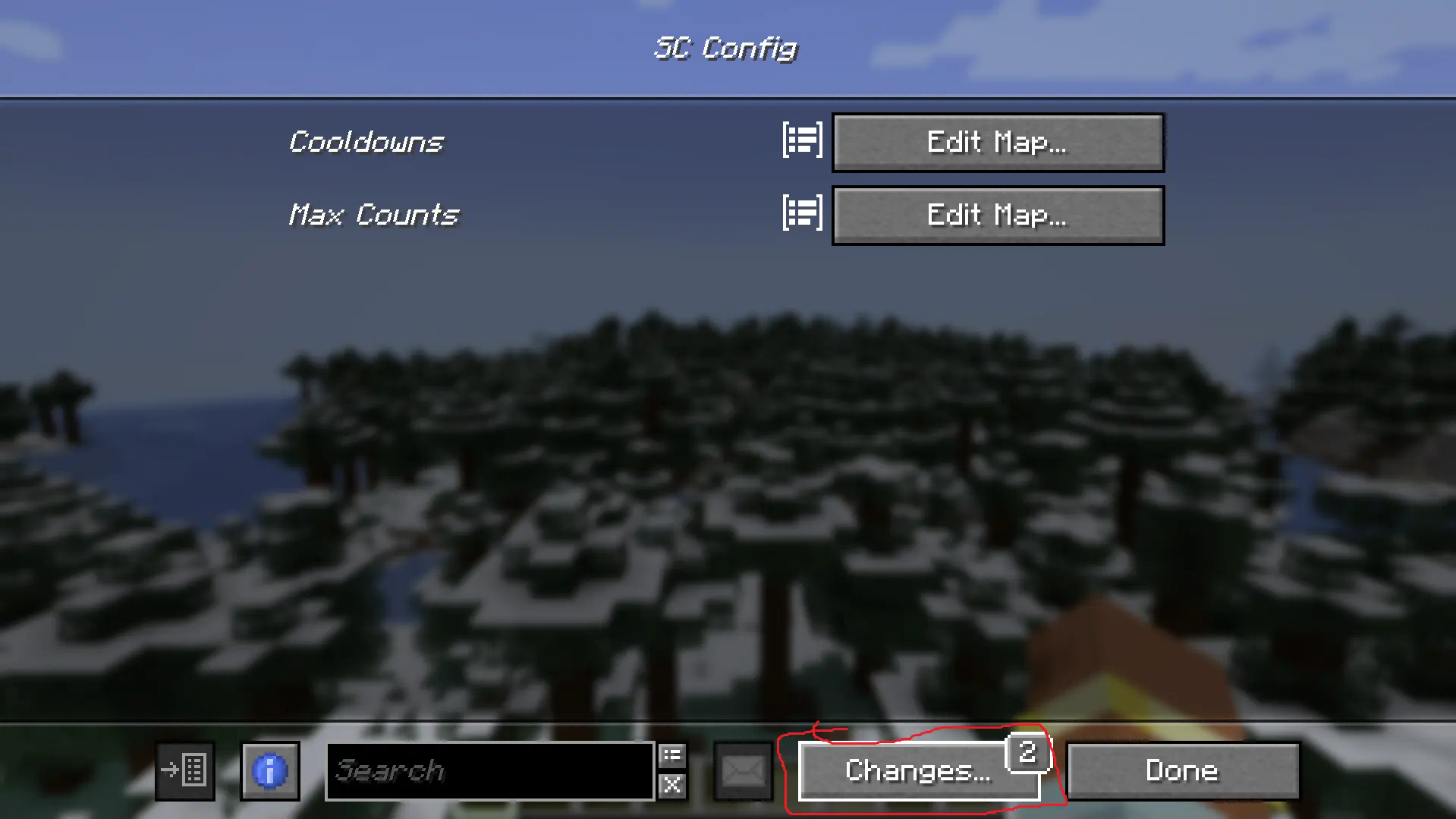
搞定,完成 麦克风落地。
最终说明(来自最新版本)
现在有一个选项可以启用按玩家模式(实体的生成和冷却时间对每个玩家单独生效)和一个调试模式,老实说主要是给我用的,但如果你发现它有用,那就尽管用吧。这个菜单并不美观,因为我并不是史上最棒的菜单设计者,但调试菜单毕竟是调试菜单。


Hey, hi, hello there. With this mod you can easily control how many entities can spawn in a world and how long before that entity can spawn again!
Be sure to download this mods dependency - Fzzy Config
Support me :3
Any questions or suggestions you ahve for me I highly suggest joining our Discord down below I'd be happy to help or to take criticism!
How in tarnation do you configure this
Well go to your escape menu and find the "Mods" button in-game, it MUST be while in a world.
Now find the mod "Spawnrate Control" and click the "Config" button.
Congrats, you've made it to the actual config menu. Now you'll want to click the "Edit Map" button to add an entity. You may already see three entities in there as an example, and to be fully honest the sole purpos I made this mod. Use these as an example, whenever you add an entity you press the little + button there and define the entity. Now how does one know the entity. Well a great way to check is the "/summon" command. This mod suports modded entities so this is the best way to find their identifier.
Here is an example above where I added the vanilla entity cow that can only spawn every 1000 ticks. Now if you aren't me you amy not know how to count in ticks. To convert seconds to ticks just simply multiple it by 20. So for example 5 seconds is 100 ticks becasue 5 * 20 = 100. Simple maths, you got this.
Now that you have added your entity, cow in my case, you can now add the amount cap! (This is optional, same with the cooldown you could have a cooldown but no cap or a cap but no cooldown, up to you)
To do this just simply do what you did for the cooldown, add your entities identifier, minecraft:cow in my case and then put your solid number. Not ticks by the way, just a heads up.
Now the last and final importan thing to do is save your changes, this is actually important DO IT. Press the "Changes..." button and then "Apply Changes".
Boom, done mic drop.
Final Notes (from the newest version)
There is now an option to enable per player mode (entity spawns and cooldowns are effected on each player seperately) and a debug mode mostly for me honestly but if you find it of use then hey go ahead man. It isn't the prettiest menu as I am not the best menu maker of all time but the debug do be a debug menu.


 模组

 模组
 模组

 模组
 模组

 模组

评论 0
登录后参与评分
还没有评论,来抢沙发吧