
SpecSpoof:一个 Fabric 模组,用于修改 F3 菜单中的硬件字符串!
SpecSpoof 是一个 Fabric 模组,允许你修改在 F3 菜单中显示的硬件字符串。通过此模组,你可以按照自己的喜好自定义 F3 菜单中显示的硬件信息。无论你想炫耀你的 (欺诈性) 高端硬件,还是想隐藏你的配置。现在依赖于 Roselib!
兼容性
该模组应与其他模组具有高度兼容性,但如果你发现任何不兼容或错误,只需在 GitHub 仓库中提交一个问题。我可能会尝试实现一种解决方法。
附加信息:
推荐使用 ModMenu 以便更方便地修改配置!
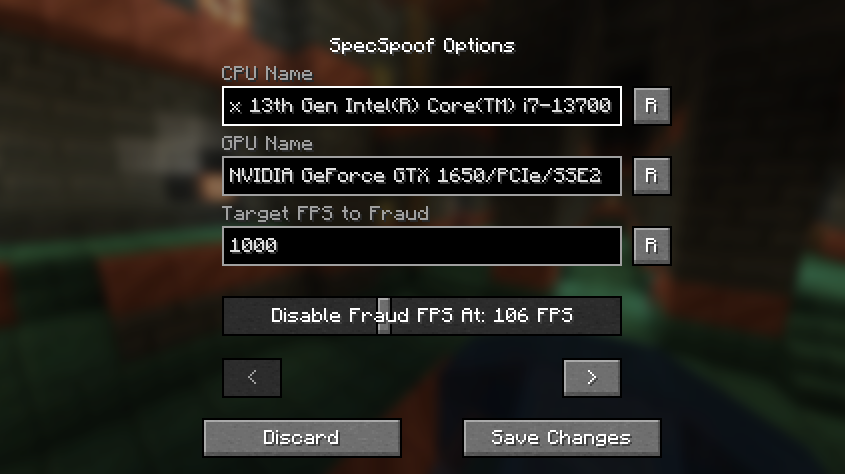
所有选项都应一目了然,所以尽情使用吧!
JSON 说明(适用于旧版本):
快速文档 JSON:
{
  "CPU": "你的 CPU 名称", // 期望的假 CPU 名称
  "GPU": "你的 GPU 名称", // 期望的假 GPU 名称
  "FPS": 1000, // 要伪造的帧率
  "disableFPSThreshold": 100 // 禁用假帧率的阈值。你知道吗?为了让它更可信,如果你的帧数下降,帧率应该实际反映这一点。想象一下,你说你有 1000 FPS,但游戏运行得像幻灯片一样,这根本行不通。(如果不想启用此功能,设置为 999999;如果想始终伪造帧率,设置为 0)
  "GPUVendor": "供应商", // 这是在分辨率旁边的括号中显示的内容,如果你想让它更可信,可能需要将其更改为你想要的 GPU 品牌。
  "GPUDriver": "驱动程序" // 这是 GPU 驱动字符串,显示在 GPU 字符串下方,如果你想让你的假 GPU 更可信,也应该更改此项。
}
格式也由你决定,你可以让它看起来非常可信,或者只是在字符串中输入一些随机 nonsense。
示例:
{
  "CPU": "112x Intel(R) Xeon(R) w9-3495X",
  "GPU": "NVIDIA GeForce RTX 2080 SUPER/PCIe/SSE2",
  "FPS": 3400,
  "disableFPSThreshold": 100
  "GPUVendor": "NVIDIA Corporation",
  "GPUDriver": "3.2.0 NVIDIA 531.37"
}
{
  "CPU": "Rose Flowers",
  "GPU": "Pigeons",
  "FPS": 10,
  "disableFPSThreshold": 0
  "GPUVendor": "Eggs Inc",
  "GPUDriver": "1.2 months"
}
SpecSpoof: A fabric mod to modify the hardware string in the F3 menu!
SpecSpoof is a Fabric mod that allows you to modify the hardware string displayed in the F3 menu. With this mod, you can customize the hardware information shown in the F3 menu to your liking. Whether you want to show off your (fraud) high-end hardware or keep your specs private. Now depends on Roselib!
Compatibility
This mod should be highly compatible with other mods, but if you find any incompatibilities or bugs, just open up an issue in the GitHub repo. I'll probably try to implement a workaround.
Additional Infos:
ModMenu is recommended for easier config modification!
All options should be straightforward, so go nuts!
JSON Instructions (for legacy versions):
Quick Documentation JSON:
{
  "CPU": "your cpu name", //desired fake CPU name
  "GPU": ""your gpu name", // desired fake GPU name
  "FPS": 1000, // desired FPS to be faked as
  "disableFPSThreshold": 100 // The FPS Threshold for the fake fps to be deactivated, you see, to make it more believable, if your frames are dipping, the fps should actually reflect to that. imagine saying you have 1000 fps but your game runs like a slideshow, that just wouldn't work. (set to 999999 if you don't want this feature, set to 0 if you want to always fake your FPS)
  "GPUVendor": "the vendor", // This is what shows in the brackets right beside your resolution, you might want to change this to your desired GPU brand if you want to make it believable.
  "GPUDriver": "the driver" // This is the GPU driver string, which shows below the GPU string, you should also change this if you want to make your fake GPU believable.
}
The formatting is also your choice, you can make it actually believable or just put random nonsense on the string.
Examples:
{
  "CPU": "112x Intel(R) Xeon(R) w9-3495X",
  "GPU": "NVIDIA GeForce RTX 2080 SUPER/PCIe/SSE2",
  "FPS": 3400,
  "disableFPSThreshold": 100
  "GPUVendor": "NVIDIA Corporation",
  "GPUDriver": "3.2.0 NVIDIA 531.37"
}
{
  "CPU": "Rose Flowers",
  "GPU": "Pigeons",
  "FPS": 10,
  "disableFPSThreshold": 0
  "GPUVendor": "Eggs Inc",
  "GPUDriver": "1.2 months"
}

下载 SpecSpoof
下载 SpecSpoof
下载 SpecSpoof
下载 SpecSpoof
下载 SpecSpoof
下载 SpecSpoof
下载 SpecSpoof
需要联机服务器吗?
稳定流畅、一键部署,几分钟即可和朋友联机开服
最低仅需 8 元/月 即可畅快联机
下载 SpecSpoof
下载 SpecSpoof
需要联机服务器吗?
稳定流畅、一键部署,几分钟即可和朋友联机开服
最低仅需 8 元/月 即可畅快联机
下载 SpecSpoof
需要联机服务器吗?
稳定流畅、一键部署,几分钟即可和朋友联机开服
最低仅需 8 元/月 即可畅快联机
小型维护更新
- 已更新至 26.3,注入代码再次进行了修改,因为渲染代码已从 Blaze3D 迁移至 RenderPearl。
本次新更新依赖于 Rose-Bush 1.4,请确保更新您的模组列表!
就这些了,感谢您使用 SpecSpoof!
关于这个资源的讨论、问题反馈与使用心得
还没有讨论,来发第一帖吧
你是这个资源的作者?登录后可认领此资源。
相似资源
 模组

显示你正在注视的方块的信息。(适用于 Minecraft 1.16+ 的 Hwyla/Waila 分支)
 模组

查看物品与配方
 模组
使用 JavaScript 编辑配方、添加自定义物品、编写世界事件!
 模组
在游戏画面角落显示附近世界地形、玩家、生物和实体的地图。可创建路径点,帮助你找到标记过的位置。
 模组
AE2:一款流行的自动化与存储模组
 模组
添加区块认领和玩家组队功能,并与 Xaero's Minimap 和 World Map 集成
评论 0
登录后参与评分
还没有评论,来抢沙发吧