一款 Fabric 模组,将 Spotify 客户端带入 Minecraft。按下 Ctrl + M 即可在 Spotify 配色主题下打开全屏覆盖层,使用你自己的 Spotify 账号登录,浏览曲库、搜索、管理播放列表并控制播放,全程无需退出游戏。收听派对功能让服务器上的其他玩家也能听到相同的音乐,他们可以通过自己的 Spotify 账号收听,或通过 Simple Voice Chat 以实时音频流的形式收听。
该模组通过官方 Spotify Web API 进行通信。在同步模式下,它不会解码、下载或重新托管 Spotify 音频;而在广播模式下,它会捕获操作系统当前正在播放的任何内容:在 Windows 上直接从扬声器输出,无需安装任何额外软件;在其他系统上则从你自行选择的回环设备中获取。
世界歌词数据来自 LRCLIB,这是一个免费且开源的歌词数据库,因为 Spotify Web API 不提供歌词服务。仅发送曲目标题和首位艺术家信息至该数据库,一旦在设置中关闭“世界歌词”功能,将不再发送任何数据。
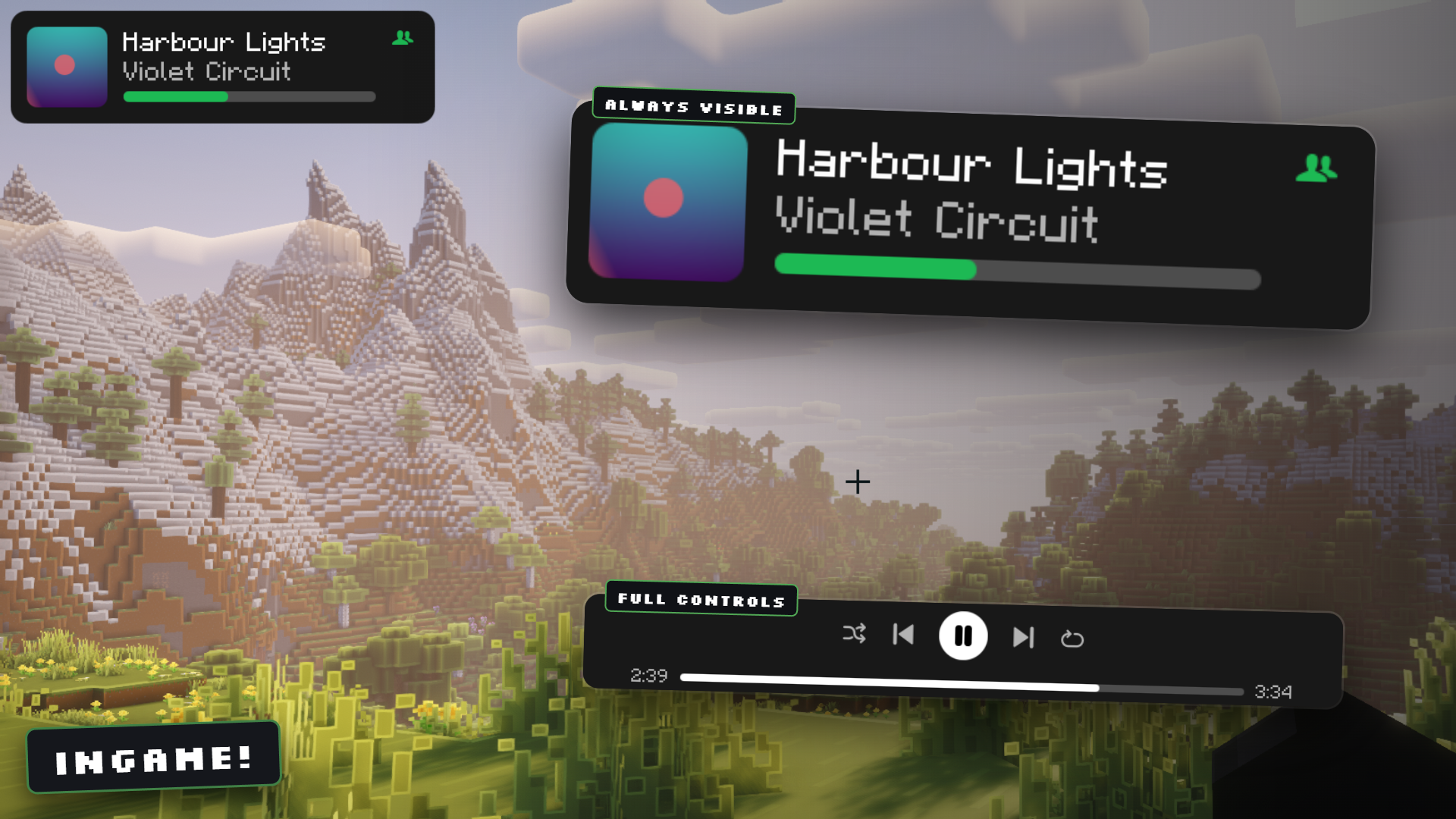
任意角落的正在播放 HUD 以及无需离开世界的完整播放器栏
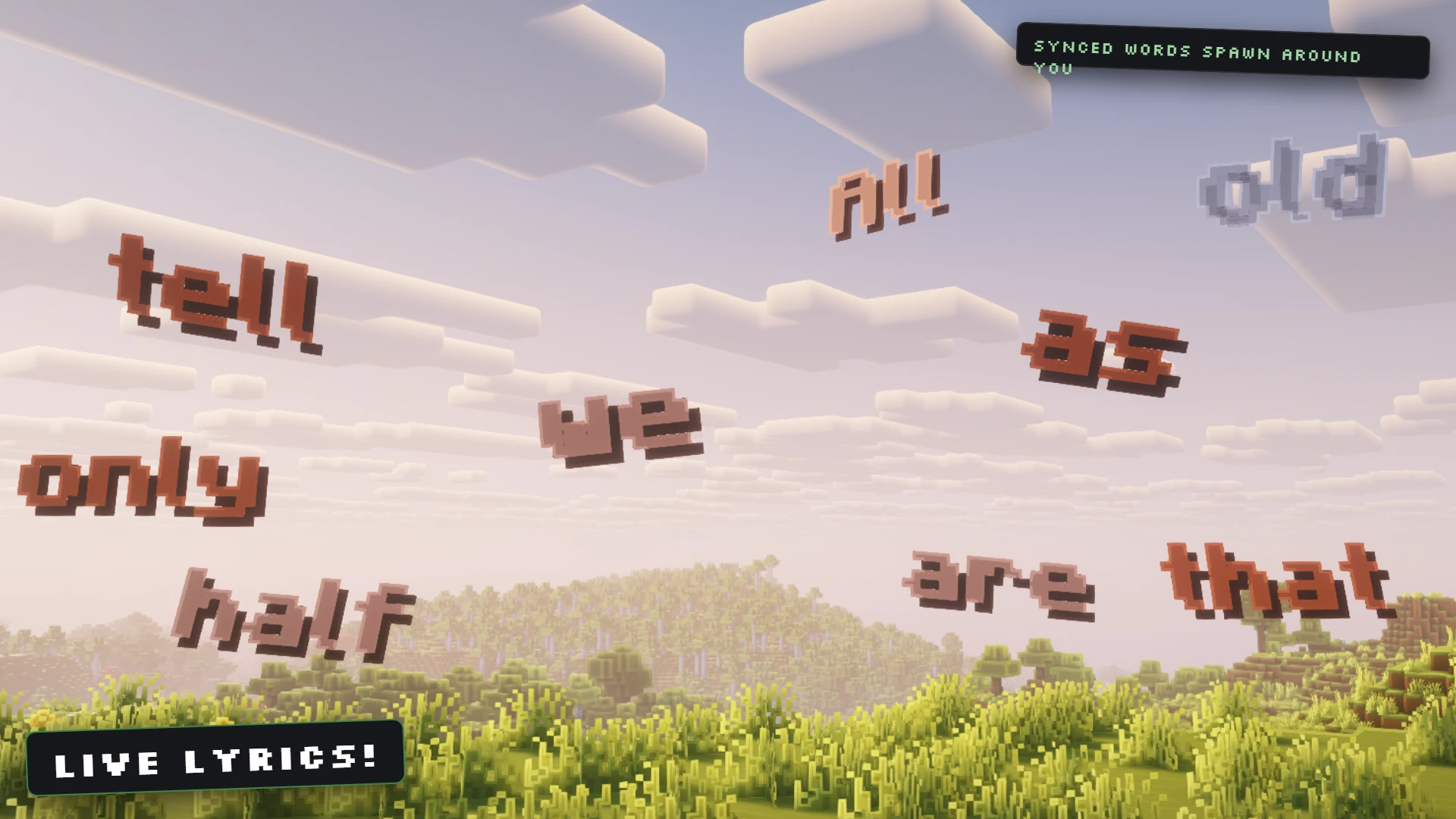
实时歌词:歌曲中的每个单词都会在唱出的瞬间出现在世界中
功能
- 采用 Spotify 配色主题(#121212 基础色,#1DB954 强调色)的全屏覆盖层,包含侧边栏、搜索、曲库、播放列表详情视图以及底部播放器栏
- 支持带 PKCE 的 OAuth 2.0 登录,无需客户端密钥,令牌本地存储并自动刷新
- 播放控制:播放、暂停、下一首、上一首、跳转、音量、随机播放、重复播放、队列管理和设备切换
- 当没有运行中的设备时,会自动在后台最小化启动 Spotify 桌面版应用,因此你无需手动打开它
- 曲库:你的播放列表、喜欢的歌曲、最近播放、热门曲目以及按播放列表划分的曲目列表
- 队列视图:当前曲目置顶,每 5 秒刷新一次,点击任意条目即可跳转至该曲目
- 跨曲目、播放列表、专辑和艺术家的搜索功能,每种结果类型均有独立标签页
- 播放列表管理:创建播放列表、添加和移除曲目、喜欢和不喜欢曲目
- 游戏内渲染专辑封面,圆角设计,按需下载并缓存为 GPU 纹理
- 矢量图标和面板圆角以原生屏幕分辨率光栅化并启用抗锯齿,确保在任何 GUI 缩放比例下都不会出现锯齿感
- 任意屏幕角落的正在播放 HUD,显示曲目、艺术家及进度条
- 世界歌词:正在播放歌曲的同步歌词以 3D 文字形式逐词出现在你面前,每个单词独占一个方块,面向你显示一次后固定在原位。单词之间互不遮挡,遇到地形会避让,在森林和洞穴中会靠近并变小,冲刺时会向前移动。当一行歌词结束、经过设定时间或超出设定数量后,歌词会逐渐淡出
- 曲目列表中的每个标题后都有一个歌词标记,显示哪些歌曲拥有同步歌词;队列按钮旁边的歌词按钮可开启或关闭世界歌词
- 两种模式的收听派对:SYNC 模式使每位成员的 Spotify 播放器保持在同一曲目和相同位置;BROADCAST 模式通过 Simple Voice Chat 将主机的桌面音频流传输给派对成员
- 可选的位置广播功能,使配置半径内的所有方块都能听到主机声音,或静态频道功能,使只有派对成员在世界任何地方都能听到
- 在 Windows 上,BROADCAST 模式通过声卡本身捕获扬声器输出,因此无需启用立体声混音(Stereo Mix)或安装虚拟线缆
- 覆盖层使用独立的 GUI 缩放比例渲染(默认为 2),因此在游戏运行于 3 或 4 倍缩放时仍能保持紧凑
- Mod Menu 集成:“配置”按钮可打开覆盖层设置,也可从标题屏幕访问
- 七种语言支持:英语、德语、俄语、西班牙语、法语、日语、中文
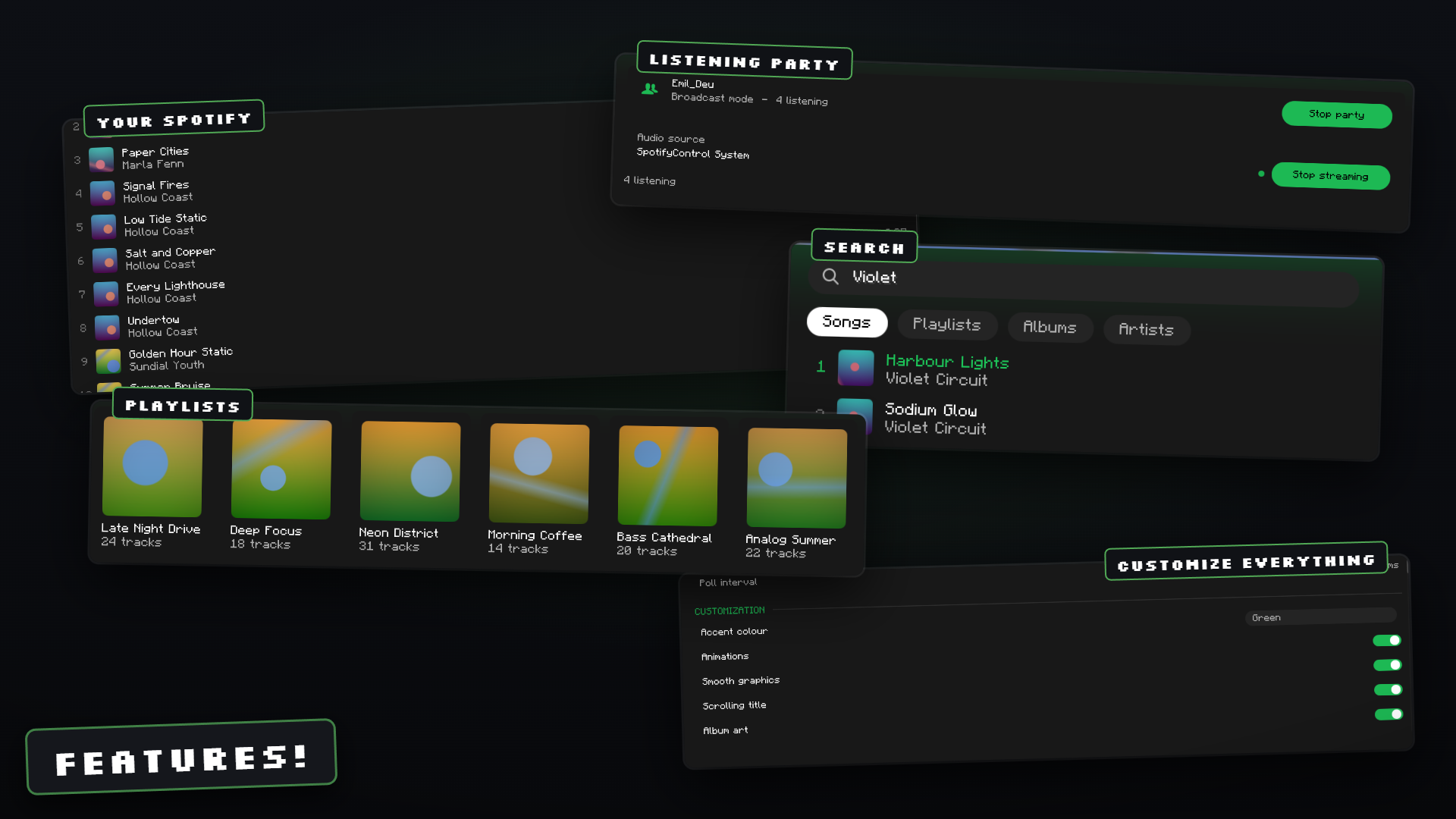
曲库、搜索、收听派对和设置,全部在游戏内完成
设置
该模组需要你自己创建一个 Spotify 应用程序,因为 Spotify 不允许在公开模组中内置客户端 ID。
- 打开 developer.spotify.com/dashboard 并创建一个应用。
- 将
http://127.0.0.1:8888/callback 添加为重定向 URI。如果你在配置文件中更改了 callbackPort,请使用该端口代替。
- 从应用页面复制客户端 ID。
- 在 Minecraft 中,按下 Ctrl + M,在侧边栏中打开设置并粘贴客户端 ID。
- 点击“连接至 Spotify”。浏览器标签页将打开,你批准权限范围后,该标签页会自动关闭。
播放控制需要 Spotify Premium 会员。对于免费账户,覆盖层仍会显示你的曲库、搜索结果和当前播放内容,但播放、暂停、跳转和音量调整请求会被 Spotify API 以 HTTP 403 错误拒绝。
Spotify 还需要一个播放设备,因为 Web API 是控制 Spotify 播放器而非自身作为播放器。你无需手动管理此过程:当你按下播放键且没有任何设备运行时,模组会在后台启动最小化的 Spotify 桌面版应用,等待其作为设备出现并将播放任务转移至该设备。任何其他设备(网页播放器、手机、音箱)均可使用,并可在播放器栏的设备菜单中选择。
收听派对
SYNC 模式是默认模式。主机将当前曲目 URI 和播放位置报告给服务器,服务器将其转发给所有派对成员,每个成员的客户端调用 Spotify API 在自己的账户上同步播放同一曲目的相同位置。所有人需要拥有各自的 Premium 账户。音频质量由 Spotify 正常提供,且没有音频通过 Minecraft 服务器传输。
BROADCAST(广播)模式适用于其他玩家没有 Spotify 的派对。客户端从主机的音频源读取 20 毫秒、48 kHz 立体声音频帧,将其混音为单声道,使用 Simple Voice Chat 提供的 Opus 编码器进行编码,然后发送给服务器。服务器将这些帧推送到 Simple Voice Chat 的音频频道中。
在 Windows 上无需安装任何内容或启用额外设置。模组会向声卡系统请求即将输出到扬声器的混合音频流并在此处捕获它,因此音频源默认为“系统声音 (自动)”,即使从未为此进行过设置的机器也能直接工作。代价是这将是整个混合音频流:Minecraft 自身的音效、通知声音以及其他应用程序的语音聊天都会与音乐一起发送出去。在开始流媒体传输之前,请静音你不希望发送的声音。
如果只想共享 Spotify 音频而不包含其他声音,仍然可以手动选择设备。安装虚拟音频线缆(如 VB-Audio Virtual Cable),在 Windows 应用音量设置中将 Spotify 单独设置为输出到此线缆,并在模组中选择其输入端;只有 Spotify 会通过该线缆,因此不会有其他声音泄露到派对中。另一种手动选项是在声音控制面板中启用的“立体声混音”(Stereo Mix),但它同样会传输整个桌面音频,效果与自动捕获类似。
在 Linux 和 macOS 上,自动捕获不适用,广播模式仍需要一个回环设备(loopback device),即一条传输机器正在播放的内容而非麦克风听到的内容的输入线路。在 Linux 上,PipeWire 或 PulseAudio 的“Monitor of”(监听)源可以直接使用;在 macOS 上则需要像 BlackHole 这样的回环驱动。麦克风不能替代回环设备:如果选择麦克风,派对成员将听到你的房间环境音而不是音乐,而且在语音聊天中静音你自己也无济于事,因为捕获是从声卡系统直接引出的第二条独立线路。模组会将回环设备列在最前面,并标记哪些条目看起来像是输出设备,哪些看起来像是麦克风,同时在从麦克风而非桌面音频流媒体传输时会发出警告。
配置
服务器端,config/spotifycontrol/server.json:
{
  "enabled": true,
  "language": "en",
  "allowListeningParties": true,
  "allowAudioBroadcast": true,
  "maxPartySize": 20,
  "broadcastRangeBlocks": 0,
  "requireSameDimension": true,
  "maxAudioKilobitsPerSecond": 96,
  "announcePartyInChat": true,
  "broadcastNowPlayingToParty": true,
  "partyIdleTimeoutSeconds": 120
}
| 键 |
含义 |
enabled |
总开关,等同于 /spotifycontrol off |
language |
用于服务器聊天消息的语言文件 |
allowListeningParties |
允许玩家开启收听派对 |
allowAudioBroadcast |
允许 BROADCAST 模式,如果缺少 Simple Voice Chat 则此设置被忽略 |
maxPartySize |
主机加上成员的最大数量 |
broadcastRangeBlocks |
0 表示仅通过静态频道向派对成员发送音频;任何大于 0 的值会在主机周围打开一个具有该半径的位置频道,使附近的玩家也能听到 |
requireSameDimension |
跳过处于其他维度的派对成员(仅限静态频道) |
maxAudioKilobitsPerSecond |
作为广播预算报告给客户端 |
announcePartyInChat |
向派对发送加入和离开提示行 |
broadcastNowPlayingToParty |
转发曲目元数据,SYNC 模式必需 |
partyIdleTimeoutSeconds |
在此时长内无音频后关闭广播派对,设为 0 则禁用超时功能 |
客户端,config/spotifycontrol/client.json:
{
  "language": "en",
  "spotifyClientId": "",
  "callbackPort": 8888,
  "requireModifierKey": true,
  "modifierKey": "CONTROL",
  "playbackPollMillis": 2000,
  "showNowPlayingHud": true,
  "hudCorner": "TOP_RIGHT",
  "hudGuiScale": 2,
  "appMargin": 10,
  "startView": "HOME",
  "smoothGraphics": true,
  "hudMargin": 4,
  "overlayGuiScale": 2,
  "pauseGameOnOverlay": false,
  "blurBackground": true,
  "overlayVolumeStep": 5,
  "autoLaunchSpotify": true,
  "minimizeSpotifyWindow": true,
  "preferredDeviceName": "",
  "captureDeviceName": "",
  "captureVolumePercent": 100,
  "muteMinecraftMusicWhileListening": true,
  "showAlbumArt": true,
  "albumArtCacheSize": 128,
  "backgroundDim": 50,
  "accentColor": 0,
  "overlayKeyCode": -1,
  "scrollingTitles": true,
  "dimUnavailableTracks": true,
  "showTrackTime": true,
  "showShuffleRepeat": true,
  "showVolumeSlider": true,
  "showQueueButton": true,
  "showDeviceButton": true,
  "showLikeButton": true,
  "hudShowAlbumArt": true,
  "hudShowProgress": true,
  "hudShowArtist": true,
  "hudOnlyWhilePlaying": false,
  "pauseOnLeave": true,
  "closeSpotifyOnQuit": true,
  "worldLyrics": true,
  "lyricsWordsPerPiece": 1,
  "lyricsMinDistance": 10,
  "lyricsMaxDistance": 20,
  "lyricsSprintExtraDistance": 15,
  "lyricsTilt": true,
  "lyricsTextSize": 75,
  "showLyricsButton": true,
  "lyricsKept": 40,
  "lyricsKeepMode": "LINE",
  "lyricsSeconds": 5
}
| 键 |
含义 |
spotifyClientId |
你的 Spotify 应用的 Client ID |
callbackPort |
本地 OAuth 回调服务器的端口,必须与重定向 URI 匹配 |
requireModifierKey / modifierKey |
按键绑定时必须按住的功能键之一:CONTROL、SHIFT、ALT、NONE |
playbackPollMillis |
当应用或覆盖层在屏幕上时,客户端向 Spotify 请求播放状态的频率,范围为 1000 到 5000。暂停时轮询减慢至 8 秒,当模组内容完全不可见时减慢至 30 秒,以保持在 Spotify 的频率限制内 |
hudCorner |
TOP_LEFT(左上)、TOP_RIGHT(右上)、BOTTOM_LEFT(左下)或 BOTTOM_RIGHT(右下) |
hudMargin |
小覆盖层与其角落之间的距离,两个轴均适用 |
appMargin |
屏幕边缘与应用窗口之间的距离,两个轴均适用 |
startView |
应用打开的页面:HOME(主页)、SEARCH(搜索)、LIBRARY(库)或 LIKED(喜欢) |
smoothGraphics |
关闭时会以粗糙分辨率绘制相同的矢量形状,边缘生硬,每个方块占两个屏幕像素 |
overlayGuiScale |
覆盖层渲染时的 GUI 缩放比例,独立于游戏设置:2 可在 1080p 和 1440p 下保持紧凑,0 跟随游戏缩放,但从不大于游戏缩放 |
pauseGameOnOverlay |
当覆盖层打开时暂停单人游戏 |
autoLaunchSpotify |
当你按下播放且没有设备运行时启动 Spotify 桌面应用,然后将播放转移至该设备 |
minimizeSpotifyWindow |
以最小化状态启动,以免遮挡游戏 |
preferredDeviceName |
当有多个设备可用时优先选择的设备。留空则选择计算机,然后选择已在播放的设备;音箱、电视和音箱组仅在此处命名时才被使用 |
captureDeviceName |
BROADCAST 模式的音频源,在覆盖层设置中选择,Windows 上留空表示自动扬声器捕获 |
captureVolumePercent |
Opus 编码前应用的增益,范围 0 到 200 |
muteMinecraftMusicWhileListening |
当 Spotify 播放时停止原版音乐管理器 |
albumArtCacheSize |
作为 GPU 纹理保留的专辑封面数量 |
backgroundDim |
覆盖层后方游戏的暗化程度,范围 0 到 100 |
accentColor |
强调色调色板:0 绿色、1 蓝色、2 紫色、3 橙色、4 粉色、5 红色 |
hudGuiScale |
HUD 渲染时的 GUI 缩放比例,步进方式与 overlayGuiScale 相同 |
overlayKeyCode |
打开覆盖层的键的 GLFW 代码,-1 保持游戏的按键绑定 |
scrollingTitles |
对于无法容纳的标题,使其左右滑动而不是截断 |
dimUnavailableTracks |
将 Spotify 报告在你所在国家/地区不可播放的歌曲变灰并禁用 |
showTrackTime, showShuffleRepeat, showVolumeSlider, showQueueButton, showDeviceButton, showLikeButton |
播放器栏的各个部分,均可在覆盖层设置中切换 |
hudShowAlbumArt, hudShowProgress, hudShowArtist, hudOnlyWhilePlaying |
小型当前播放覆盖层的组成部分和行为 |
pauseOnLeave |
离开世界或服务器时暂停 Spotify |
closeSpotifyOnQuit |
Minecraft 关闭时关闭 Spotify 桌面应用 |
worldLyrics |
在世界中以 3D 文本形式显示正在播放歌曲的歌词。通过 LRCLIB 查找歌词 |
lyricsWordsPerPiece |
多少个单词共享一个方块 |
lyricsMinDistance / lyricsMaxDistance |
你前方新单词出现的范围,以方块为单位 |
lyricsSprintExtraDistance |
冲刺时(步行或飞行)添加到上述两个距离中的额外值 |
lyricsTilt |
随机轻微倾斜每个单词,横向并向你靠近 |
lyricsTextSize |
文本大小百分比 |
showLyricsButton |
在队列按钮旁边显示歌词按钮 |
lyricsKeepMode |
当单词淡出时:LINE 在其行结束时,COUNT 超过 lyricsKept 个单词后,SECONDS 在 lyricsSeconds 之后 |
lyricsKept / lyricsSeconds |
上述模式使用的单词数量和生存时间 |
令牌存储在 config/spotifycontrol/tokens.json 中。删除文件或在使用覆盖层设置中注销以断开账户连接。
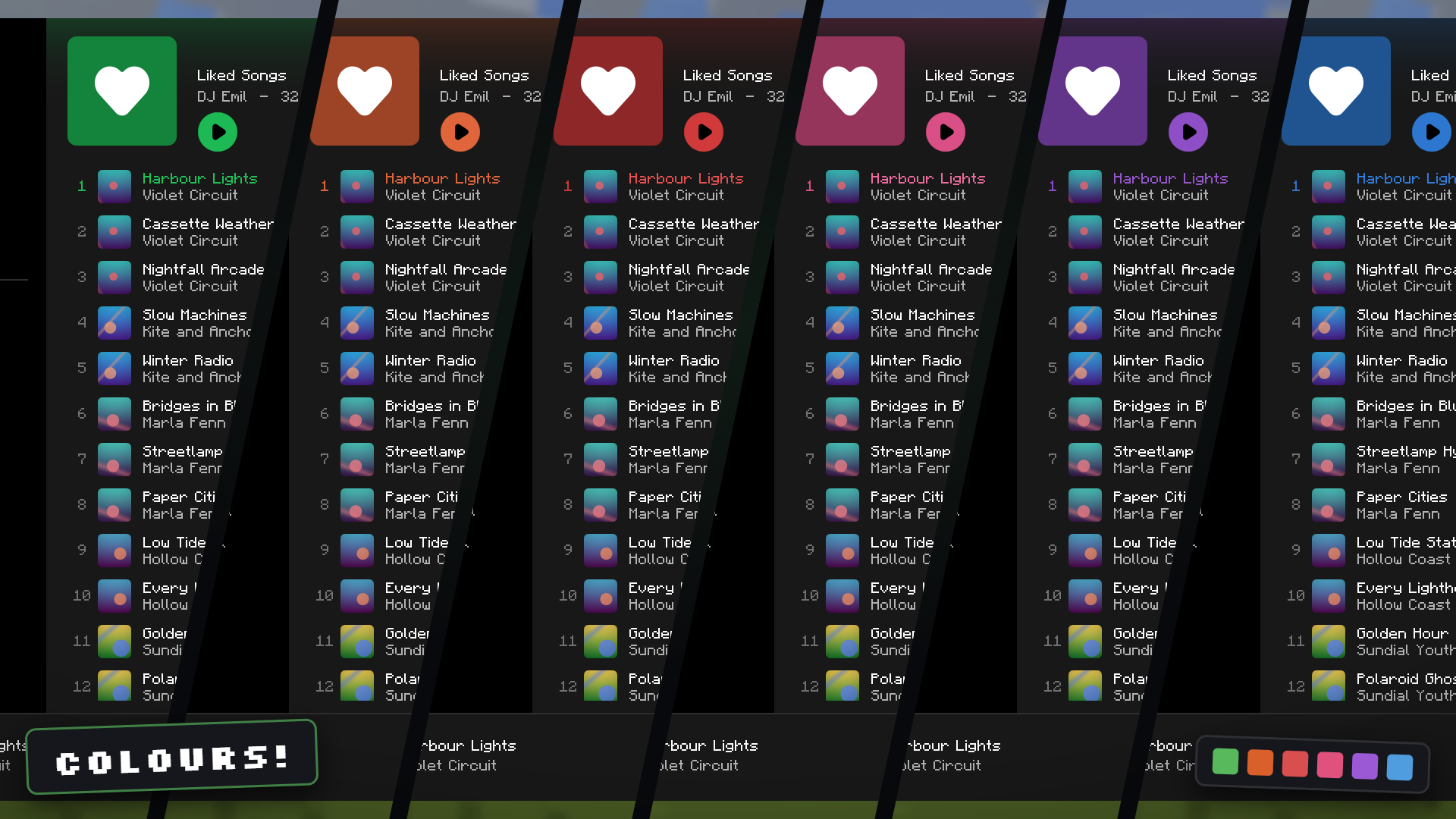
六种强调色调板,在设置中切换而无需重启
按键绑定
所有绑定均可在原版控制屏幕的 SpotifyControl 类别下重新绑定。启用 requireModifierKey 时,还必须按住配置的功能键。
| 绑定 |
默认值 |
操作 |
| 打开 Spotify 覆盖层 |
Ctrl + M |
打开覆盖层 |
| 播放 / 暂停 |
Ctrl + K |
切换播放状态 |
| 下一首 |
Ctrl + . |
前进跳过 |
| 上一首 |
Ctrl + , |
后退跳过 |
| 音量增大 |
Ctrl + Page Up |
按 overlayVolumeStep 提高音量 |
| 音量减小 |
Ctrl + Page Down |
按 overlayVolumeStep 降低音量 |
| 切换当前播放 HUD |
Ctrl + H |
显示或隐藏 HUD |
权限
| 权限 |
描述 |
默认值 |
| Permission level 2 (OP) |
/spotifycontrol on、off、reload |
OP |
| Permission level 0 |
/spotifycontrol status 及所有 party 子命令 |
Everyone |
权限使用原版权限级别 0 到 4。如需节点级控制,请使用 Fabric Permissions API 或 LuckPerms Fabric。
命令
| 命令 |
描述 |
/spotifycontrol on |
全局启用模组 |
/spotifycontrol off |
全局禁用模组并关闭所有派对 |
/spotifycontrol status |
显示当前状态、派对数量、听众数量和语音聊天状态 |
/spotifycontrol reload |
重新加载服务器配置并将其推送给所有客户端 |
/spotifycontrol party start [sync|broadcast] |
开启收听派对,未指定模式时为 SYNC |
/spotifycontrol party stop |
关闭你的收听派对 |
/spotifycontrol party join <host> |
加入其他玩家的收听派对 |
/spotifycontrol party leave |
退出你所在的派对 |
/spotifycontrol party invite <player> |
向玩家发送邀请行 |
别名:/sc,完整命令:/spotifycontrol
支持版本
一个 JAR 文件覆盖 1.21 至 1.21.11。在此期间 Minecraft 的客户端 API 被破坏了六次,因此该模组为每个世代携带一个实现,并在启动时选择正确的实现。
| Minecraft |
实现 |
该世代中的变更 |
| 1.21, 1.21.1 |
platform.impl.a |
基线 |
| 1.21.2 至 1.21.4 |
platform.impl.b |
GuiGraphics.blit 接受 RenderType 工厂 |
| 1.21.5 |
platform.impl.c |
DynamicTexture 需要标签供应器 |
| 1.21.6 至 1.21.8 |
platform.impl.d |
渲染管线,Matrix3x2fStack 替换 PoseStack |
| 1.21.9, 1.21.10 |
platform.impl.e |
输入事件变为记录类型,键绑定需要 KeyMapping.Category |
| 1.21.11 |
platform.impl.f |
ResourceLocation 重命名为 Identifier,Util 移动,权限集 |
每个实现包含两个类。其余约 60 个类是共享的,并在每个世代中编译为字节码完全相同的代码。发布版为单个文件 SpotifyControl_1.0_1.21.x_BETA.jar。
要求
|
|
| Minecraft |
1.21 至 1.21.11,通用 JAR 文件 |
| Fabric Loader |
0.16+ |
| Fabric API |
与你 Minecraft 版本对应的最新版 |
| Java |
21+ |
| Simple Voice Chat |
2.5+,可选,仅用于 BROADCAST 模式 |
| Mod Menu |
可选,添加配置按钮 |
| Spotify |
播放控制需 Premium,浏览功能任何账户均可 |
将 SpotifyControl_1.0_1.21.x_BETA.jar 与 Fabric API 一起放入 mods/ 目录。它覆盖从 1.21 到 1.21.11 的所有 Minecraft 版本。对于听歌派对,模组也必须安装在服务器上,且 BROADCAST 模式需要在双方都安装 Simple Voice Chat。不支持 Forge、NeoForge 和 Quilt。
工作原理
认证使用带有 PKCE 的 OAuth 2.0 授权码流程。客户端生成验证器,通过 Util.getPlatform().openUri 打开 Spotify 同意页面,并运行绑定在 127.0.0.1 上的 com.sun.net.httpserver.HttpServer 以处理单次回调请求。访问令牌在 SpotifyApi.raw 内部按需刷新,该函数还会在 HTTP 401 时重试一次,并遵守 HTTP 429 的 Retry-After 头信息。所有 API 流量都在一个守护线程上运行,因此渲染线程永远不会在网络调用上阻塞。
渲染避免使用纹理图集且不附带图标 PNG 文件。每个图标都是由圆、胶囊、矩形、弧线和三角形在 IconShapes 中合成的有符号距离场。RasterCache 在图标将在屏幕上占据的确切像素大小(GUI 大小乘以 GUI 缩放比例)下评估该距离场,将距离转换为抗锯齿覆盖率,将结果编码为内存中的 PNG,并将其传递给 NativeImage.read,这是在整个 1.21 系列中保持稳定唯一的图像入口点。然后纹理以一对一的像素映射绘制,因此没有重采样也没有模糊。圆角面板对其四个角使用相同的技巧,其余部分使用直线填充,专辑封面则通过在顶部绘制的倒置角掩码获得圆角。专辑封面本身由 NativeImage.read 解码并注册为 DynamicTexture。Minecraft 在 1.21 系列期间更改了客户端 API 的这一部分六次,因此每次发生移动的调用都位于 PlatformApi 接口之后。六个实现在 src/platform-a 到 src/platform-f 中,每个都针对其各自的 Minecraft 版本进行编译,通用 JAR 将所有六个捆绑在 xx.xxxx.spotifycontrol.platform.impl 下。首次使用时,Platform 从 Fabric Loader 读取 Minecraft 版本并按名称加载匹配的实
A Fabric mod that puts a Spotify client into Minecraft. Press Ctrl + M to open a full overlay in the
Spotify colour theme, log in with your own Spotify account, browse your library, search, manage
playlists and control playback without leaving the game. A listening party feature lets other players
on the server hear the same music, either through their own Spotify account or as a live audio stream
over Simple Voice Chat.
The mod talks to the official Spotify Web API. It does not decode, download or re-host Spotify audio
in sync mode, and broadcast mode captures whatever your operating system is already playing: on
Windows straight from the speakers with nothing to install, on other systems from a loopback device
you select yourself.
The world lyrics come from LRCLIB, a free and open lyrics database, because the
Spotify Web API offers no lyrics. Only the track title and the first artist are sent there, and nothing
at all once Lyrics in the world is switched off in the settings.
Now playing HUD in any corner, and the full player bar without leaving the world
Live lyrics: every word of the song appears in the world the moment it is sung
Features
- Full-screen overlay in the Spotify colour theme (#121212 base, #1DB954 accent) with sidebar, search,
library, playlist detail view and a bottom player bar
- OAuth 2.0 login with PKCE, no client secret needed, tokens stored locally and refreshed automatically
- Playback control: play, pause, next, previous, seek, volume, shuffle, repeat, queue and device transfer
- Starts the Spotify desktop app minimized in the background when no device is running, so you never have to open it yourself
- Library: your playlists, Liked Songs, recently played, top tracks, and per-playlist track lists
- Queue view with the current track on top, refreshed every 5 seconds, click any entry to jump to it
- Search across tracks, playlists, albums and artists with tabs for each result type
- Playlist management: create playlists, add and remove tracks, like and unlike tracks
- Album art rendered in game with rounded corners, downloaded on demand and cached as GPU textures
- Vector icons and panel corners rasterized at native screen resolution with anti-aliasing, so nothing looks blocky at any GUI scale
- Now-playing HUD in any screen corner with track, artist and a progress bar
- World lyrics: the synced lyrics of the playing song appear word by word as 3D text in front of you,
each word on its own block, turned towards you once and then left in place. Words never cover each
other, step aside for terrain, come closer and smaller in forests and caves, and move further ahead
while you sprint. They fade out when their line ends, after a set time or beyond a set count
- A lyrics mark after every title in the track lists shows which songs have synced lyrics, and a
lyrics button next to the queue button switches the world lyrics on and off
- Listening parties in two modes: SYNC keeps every member's own Spotify player on the same track and
position, BROADCAST streams the host's desktop audio to the party through Simple Voice Chat
- Locational broadcast option so everyone within a configurable block radius hears the host, or static
channels so only party members hear it anywhere in the world
- On Windows, BROADCAST captures the speakers through the sound system itself, so there is no Stereo
Mix to enable and no virtual cable to install
- Overlay renders at its own GUI scale (2 by default) so it stays compact when the game runs at scale 3 or 4
- Mod Menu integration: the Configure button opens the overlay settings, also from the title screen
- Seven languages: English, German, Russian, Spanish, French, Japanese, Chinese
Library, search, listening parties and the settings, all inside the game
Setup
The mod needs a Spotify application of your own, because Spotify does not allow shipping a client ID
inside a public mod.
- Open developer.spotify.com/dashboard and create an app.
- Add
http://127.0.0.1:8888/callback as a redirect URI. If you change callbackPort in the config,
use that port instead.
- Copy the client ID from the app page.
- In Minecraft, press Ctrl + M, open Settings in the sidebar and paste the client ID.
- Click Connect to Spotify. A browser tab opens, you approve the scopes, and the tab closes itself.
Playback control requires Spotify Premium. With a free account the overlay still shows your library,
search results and what is currently playing, but play, pause, seek and volume calls are rejected by
the Spotify API with HTTP 403.
Spotify also needs a playback device, because the Web API controls a Spotify player rather than being
one. You do not have to manage that yourself: when you press play and nothing is running, the mod
starts the Spotify desktop app minimized in the background, waits for it to show up as a device and
moves playback there. Any other device (web player, phone, speaker) works too and can be picked from
the device menu in the player bar.
Listening parties
SYNC mode is the default. The host reports the current track URI and position to the server, the
server forwards it to every party member, and each member's client calls the Spotify API to play the
same track at the same position on their own account. Everyone needs their own Premium account. Audio
quality is whatever Spotify normally delivers, and no audio travels through the Minecraft server.
BROADCAST mode is for parties where the other players do not have Spotify. The client reads 20 ms
frames of 48 kHz stereo audio from the host's audio source, downmixes to mono, encodes them with the
Opus encoder provided by Simple Voice Chat, and sends them to the server. The server pushes the
frames into a Simple Voice Chat audio channel.
On Windows there is nothing to install and nothing to enable. The mod asks the sound system for the
mix that is going to the speakers and captures it there, so the audio source starts on "System sound
(automatic)" and a machine that has never been set up for this simply works. The price is that this
is the whole mix: Minecraft's own sound, notification sounds and voice chat from other applications
go out with the music. Mute what you do not want to send before starting the stream.
For Spotify and nothing else, the manual device choice is still there. Install a virtual audio cable
such as VB-Audio Virtual Cable, set Spotify alone to output to it in the Windows app volume settings
and select its input in the mod; only Spotify goes through the cable, so nothing else can leak into
the party. Stereo Mix, enabled in the Sound Control Panel, is the other manual option, but it carries
the whole desktop just as the automatic capture does.
On Linux and macOS the automatic capture does not apply and broadcast mode still needs a loopback
device, an input line that carries what the machine is playing back rather than what a microphone
hears. On Linux the "Monitor of" source of PipeWire or PulseAudio works as it is, on macOS a loopback
driver such as BlackHole does. A microphone is not a substitute: pick one and the party hears your
room instead of the music, and muting yourself in the voice chat does not help, because the capture
is a second line straight from the sound system. The mod lists the loopback devices first and marks
which entries look like an output and which look like a microphone, and it warns while streaming
from a microphone rather than claiming to send desktop audio.
Configuration
Server side, config/spotifycontrol/server.json:
{
  "enabled": true,
  "language": "en",
  "allowListeningParties": true,
  "allowAudioBroadcast": true,
  "maxPartySize": 20,
  "broadcastRangeBlocks": 0,
  "requireSameDimension": true,
  "maxAudioKilobitsPerSecond": 96,
  "announcePartyInChat": true,
  "broadcastNowPlayingToParty": true,
  "partyIdleTimeoutSeconds": 120
}
| Key |
Meaning |
enabled |
Master switch, same as /spotifycontrol off |
language |
Language file used for server chat messages |
allowListeningParties |
Allow players to open listening parties at all |
allowAudioBroadcast |
Allow BROADCAST mode, ignored when Simple Voice Chat is missing |
maxPartySize |
Host plus members |
broadcastRangeBlocks |
0 sends audio only to party members through static channels, any value above 0 opens a locational channel at the host with that radius so nearby players hear it too |
requireSameDimension |
Skip party members who are in another dimension (static channels only) |
maxAudioKilobitsPerSecond |
Reported to clients as the broadcast budget |
announcePartyInChat |
Send join and leave lines to the party |
broadcastNowPlayingToParty |
Forward track metadata, required for SYNC mode |
partyIdleTimeoutSeconds |
Close a broadcast party after this long without audio, 0 disables |
Client side, config/spotifycontrol/client.json:
{
  "language": "en",
  "spotifyClientId": "",
  "callbackPort": 8888,
  "requireModifierKey": true,
  "modifierKey": "CONTROL",
  "playbackPollMillis": 2000,
  "showNowPlayingHud": true,
  "hudCorner": "TOP_RIGHT",
  "hudGuiScale": 2,
  "appMargin": 10,
  "startView": "HOME",
  "smoothGraphics": true,
  "hudMargin": 4,
  "overlayGuiScale": 2,
  "pauseGameOnOverlay": false,
  "blurBackground": true,
  "overlayVolumeStep": 5,
  "autoLaunchSpotify": true,
  "minimizeSpotifyWindow": true,
  "preferredDeviceName": "",
  "captureDeviceName": "",
  "captureVolumePercent": 100,
  "muteMinecraftMusicWhileListening": true,
  "showAlbumArt": true,
  "albumArtCacheSize": 128,
  "backgroundDim": 50,
  "accentColor": 0,
  "overlayKeyCode": -1,
  "scrollingTitles": true,
  "dimUnavailableTracks": true,
  "showTrackTime": true,
  "showShuffleRepeat": true,
  "showVolumeSlider": true,
  "showQueueButton": true,
  "showDeviceButton": true,
  "showLikeButton": true,
  "hudShowAlbumArt": true,
  "hudShowProgress": true,
  "hudShowArtist": true,
  "hudOnlyWhilePlaying": false,
  "pauseOnLeave": true,
  "closeSpotifyOnQuit": true,
  "worldLyrics": true,
  "lyricsWordsPerPiece": 1,
  "lyricsMinDistance": 10,
  "lyricsMaxDistance": 20,
  "lyricsSprintExtraDistance": 15,
  "lyricsTilt": true,
  "lyricsTextSize": 75,
  "showLyricsButton": true,
  "lyricsKept": 40,
  "lyricsKeepMode": "LINE",
  "lyricsSeconds": 5
}
| Key |
Meaning |
spotifyClientId |
Client ID of your own Spotify app |
callbackPort |
Port of the local OAuth callback server, must match the redirect URI |
requireModifierKey / modifierKey |
Modifier that has to be held with the key bindings, one of CONTROL, SHIFT, ALT, NONE |
playbackPollMillis |
How often the client asks Spotify for the playback state while the app or overlay is on screen, between 1000 and 5000. Polling slows to 8 s while paused and to 30 s while nothing of the mod is visible, to stay well inside Spotify's rate limit |
hudCorner |
TOP_LEFT, TOP_RIGHT, BOTTOM_LEFT or BOTTOM_RIGHT |
hudMargin |
Distance of the small overlay from its corner, both axes |
appMargin |
Distance between the screen edge and the app window, both axes |
startView |
Page the app opens on: HOME, SEARCH, LIBRARY or LIKED |
smoothGraphics |
Off draws the same vector shapes at a coarse resolution with hard edges, two screen pixels per block |
overlayGuiScale |
GUI scale the overlay renders at, independent of the game setting: 2 keeps it compact on 1080p and 1440p, 0 follows the game scale, never larger than the game scale |
pauseGameOnOverlay |
Pause singleplayer while the overlay is open |
autoLaunchSpotify |
Start the Spotify desktop app when you press play and no device is running, then move playback to it |
minimizeSpotifyWindow |
Start it minimized so it does not cover the game |
preferredDeviceName |
Device to prefer when several are available. Empty picks a computer, then the device that is already playing; speakers, TVs and speaker groups are only used when named here |
captureDeviceName |
Audio source for BROADCAST mode, picked in the overlay settings, empty for the automatic speaker capture on Windows |
captureVolumePercent |
Gain applied before Opus encoding, 0 to 200 |
muteMinecraftMusicWhileListening |
Stop the vanilla music manager while Spotify is playing |
albumArtCacheSize |
Number of album covers kept as GPU textures |
backgroundDim |
How strongly the game behind the overlay is darkened, 0 to 100 |
accentColor |
Accent palette: 0 green, 1 blue, 2 purple, 3 orange, 4 pink, 5 red |
hudGuiScale |
Gui scale the HUD renders at, same steps as overlayGuiScale |
overlayKeyCode |
GLFW code of the key that opens the overlay, -1 keeps the game's key binding |
scrollingTitles |
Slide titles that do not fit back and forth instead of cutting them off |
dimUnavailableTracks |
Grey out and block tracks Spotify reports as unplayable in your country |
showTrackTime, showShuffleRepeat, showVolumeSlider, showQueueButton, showDeviceButton, showLikeButton |
Individual parts of the player bar, all switchable in the overlay settings |
hudShowAlbumArt, hudShowProgress, hudShowArtist, hudOnlyWhilePlaying |
Parts and behaviour of the small now playing overlay |
pauseOnLeave |
Pause Spotify when leaving a world or server |
closeSpotifyOnQuit |
Close the Spotify desktop app when Minecraft closes |
worldLyrics |
Show the lyrics of the playing song as 3D text in the world. Looks lyrics up on LRCLIB |
lyricsWordsPerPiece |
How many words share one block |
lyricsMinDistance / lyricsMaxDistance |
Range in front of you, in blocks, where new words appear |
lyricsSprintExtraDistance |
Added to both distances while sprinting, on foot or flying |
lyricsTilt |
Tilt each word slightly at random, sideways and towards you |
lyricsTextSize |
Text size in percent |
showLyricsButton |
Show the lyrics button next to the queue button |
lyricsKeepMode |
When words fade out: LINE when their line ends, COUNT beyond lyricsKept words, SECONDS after lyricsSeconds |
lyricsKept / lyricsSeconds |
Word count and lifetime used by the modes above |
Tokens live in config/spotifycontrol/tokens.json. Delete the file or use Log out in the overlay
settings to disconnect the account.
Six accent palettes, switched in the settings without a restart
Key bindings
All bindings are rebindable in the vanilla Controls screen under the SpotifyControl category. With
requireModifierKey on, the configured modifier has to be held as well.
| Binding |
Default |
Action |
| Open Spotify overlay |
Ctrl + M |
Open the overlay |
| Play / Pause |
Ctrl + K |
Toggle playback |
| Next track |
Ctrl + . |
Skip forward |
| Previous track |
Ctrl + , |
Skip back |
| Volume up |
Ctrl + Page Up |
Raise volume by overlayVolumeStep |
| Volume down |
Ctrl + Page Down |
Lower volume by overlayVolumeStep |
| Toggle now-playing HUD |
Ctrl + H |
Show or hide the HUD |
Permissions
| Permission |
Description |
Default |
| Permission level 2 (OP) |
/spotifycontrol on, off, reload |
OP |
| Permission level 0 |
/spotifycontrol status and all party subcommands |
Everyone |
Permissions use the vanilla permission levels 0 to 4. For per-node control, use the Fabric Permissions
API or LuckPerms Fabric.
Commands
| Command |
Description |
/spotifycontrol on |
Enable the mod globally |
/spotifycontrol off |
Disable the mod globally and close all parties |
/spotifycontrol status |
Show current state, party count, listener count and voice chat status |
/spotifycontrol reload |
Reload the server config and push it to all clients |
/spotifycontrol party start [sync|broadcast] |
Open a listening party, SYNC when no mode is given |
/spotifycontrol party stop |
Close your listening party |
/spotifycontrol party join <host> |
Join another player's listening party |
/spotifycontrol party leave |
Leave the party you are in |
/spotifycontrol party invite <player> |
Send an invite line to a player |
Alias: /sc, full command: /spotifycontrol
Supported versions
One jar covers 1.21 through 1.21.11. Minecraft broke the client API six times during that line, so
the mod carries one implementation per generation and picks the right one when it starts.
| Minecraft |
Implementation |
What changed in that generation |
| 1.21, 1.21.1 |
platform.impl.a |
Baseline |
| 1.21.2 to 1.21.4 |
platform.impl.b |
GuiGraphics.blit takes a RenderType factory |
| 1.21.5 |
platform.impl.c |
DynamicTexture needs a label supplier |
| 1.21.6 to 1.21.8 |
platform.impl.d |
Render pipelines, Matrix3x2fStack replaces PoseStack |
| 1.21.9, 1.21.10 |
platform.impl.e |
Input events became records, key bindings need a KeyMapping.Category |
| 1.21.11 |
platform.impl.f |
ResourceLocation renamed to Identifier, Util moved, permission sets |
Each implementation is two classes. Everything else, roughly 60 classes, is shared and compiles to
byte-identical code on every generation. The release is a single file, SpotifyControl_1.0_1.21.x_BETA.jar.
Requirements
|
|
| Minecraft |
1.21 to 1.21.11, one universal jar |
| Fabric Loader |
0.16+ |
| Fabric API |
Latest for your Minecraft version |
| Java |
21+ |
| Simple Voice Chat |
2.5+, optional, only for BROADCAST mode |
| Mod Menu |
Optional, adds a Configure button |
| Spotify |
Premium for playback control, any account for browsing |
Drop SpotifyControl_1.0_1.21.x_BETA.jar into mods/ together with Fabric API. It covers every
Minecraft version from 1.21 to 1.21.11. For listening parties the mod has to be on the server as
well, and BROADCAST mode needs Simple Voice Chat on both sides. Forge, NeoForge and Quilt are not
supported.
How it works
Authentication uses the OAuth 2.0 authorization code flow with PKCE. The client generates a verifier,
opens the Spotify consent page through Util.getPlatform().openUri, and runs a
com.sun.net.httpserver.HttpServer bound to 127.0.0.1 for the single callback request. Access tokens
are refreshed on demand inside SpotifyApi.raw, which also retries once on HTTP 401 and honours the
Retry-After header on HTTP 429. All API traffic runs on one daemon thread so the render thread never
blocks on a network call.
Rendering avoids texture atlases and ships no icon PNGs. Every icon is a signed distance field
composed in IconShapes from circles, capsules, boxes, arcs and triangles. RasterCache evaluates
the field at the exact pixel size the icon will occupy on screen (GUI size times GUI scale), turns the
distance into anti-aliased coverage, encodes the result as an in-memory PNG and hands it to
NativeImage.read, which is the one image entry point that stayed stable across the whole 1.21 line.
The texture is then drawn at a one-to-one pixel mapping, so there is no resampling and no blur.
Rounded panels use the same trick for their four corners and straight fills for the rest, and album
art gets its rounded corners from inverted corner masks drawn on top. Album art itself is decoded
with NativeImage.read and registered as a DynamicTexture. Minecraft changed that part of the client API six times during the 1.21 line, so
every call that moved sits behind the PlatformApi interface. Six implementations live in
src/platform-a through src/platform-f, each compiled against its own Minecraft version, and the
universal jar bundles all six under xx.xxxx.spotifycontrol.platform.impl. On first use Platform
reads the Minecraft version from Fabric Loader and loads the matching implementation by name. The
other five are never class-loaded, so their incompatible bytecode is never verified.
That split only works because the remaining code is genuinely version-independent. Of the 69 distinct
Minecraft methods the shared classes call, 66 keep the same intermediary name and descriptor across
all twelve releases. The three that do not, GuiGraphics.drawString (return type changed),
ServerPlayer.sendSystemMessage (renamed) and ServerPlayer.level (return type changed), go through
the platform layer as well. With those wrapped, the shared classes compile to byte-identical output on
every generation, which the build verifies by diffing the remapped jars.
Party state travels over three custom payloads registered with PayloadTypeRegistry. The host's
client sends now_playing whenever the track changes or every five seconds, the server fans it out to
party members, and members in SYNC mode call the Spotify API to match track and position when the
drift exceeds 2.5 seconds. In BROADCAST mode the client encodes 960-sample Opus frames with the
encoder from the Simple Voice Chat client API and sends them as audio_frame packets. The server
relays each frame straight into a StaticAudioChannel per listener, or into one
LocationalAudioChannel at the host position when broadcastRangeBlocks is above 0. Simple Voice
Chat classes are only touched behind a FabricLoader.isModLoaded("voicechat") check, so the mod runs
normally without it.
Spotify is a trademark of Spotify AB, which is not affiliated with this project.


 模组

 模组

 模组
 模组

 模组
 模组
评论 0
登录后参与评分
还没有评论,来抢沙发吧