功能介绍
一款 Fabric 模组,让你能随时使用**悖论(Paradox)**暂停时间并将其倒流。
- 添加悖论,这是一款拥有双面的时钟:一面用于停止时间,另一面用于倒流时间。
- 冻结几乎所有事物:包括生物、音乐、投射物、粒子、天气、动画纹理、红石等。
- 倒流:在时间静止时,回溯过去几秒并改变已发生的事件。
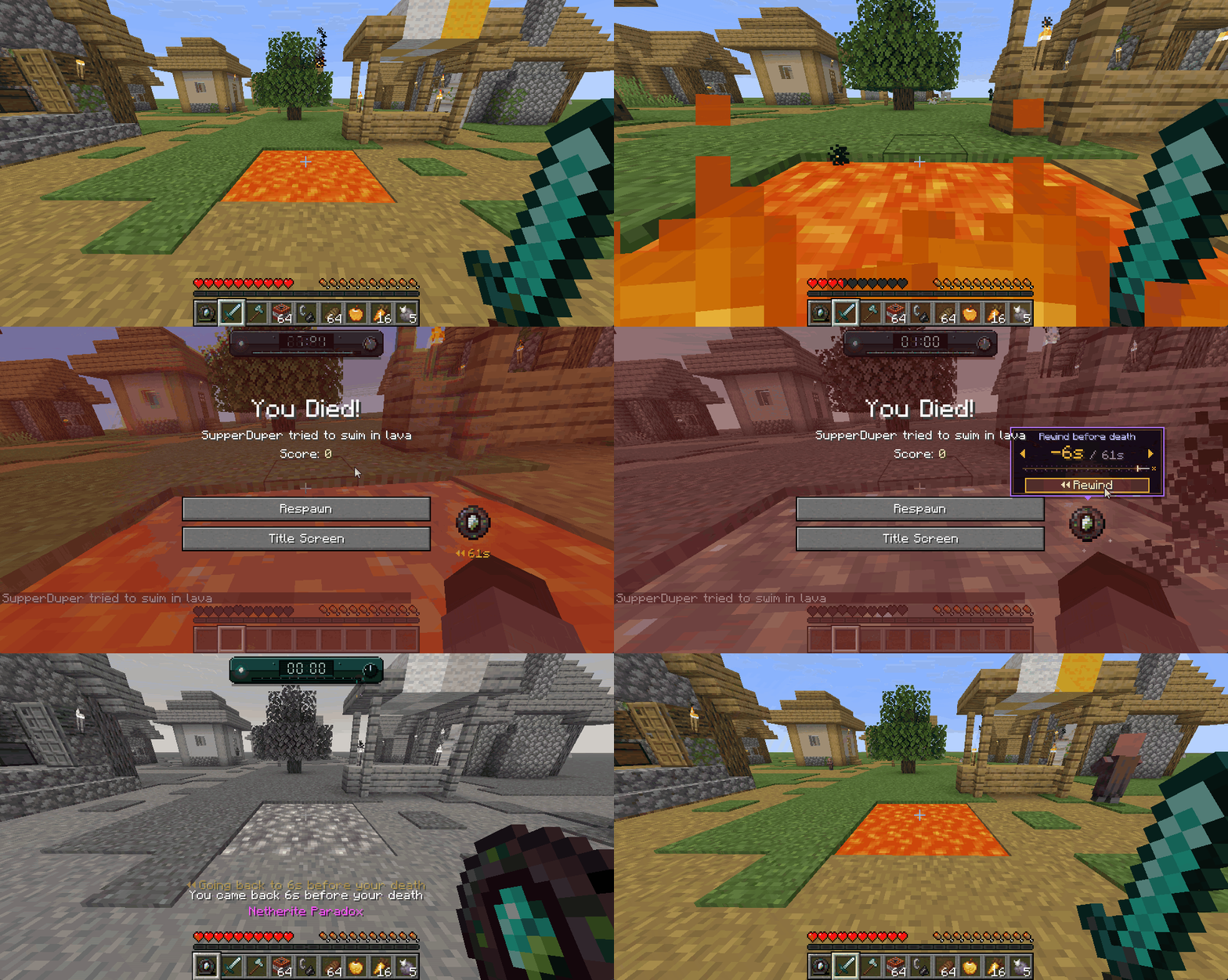
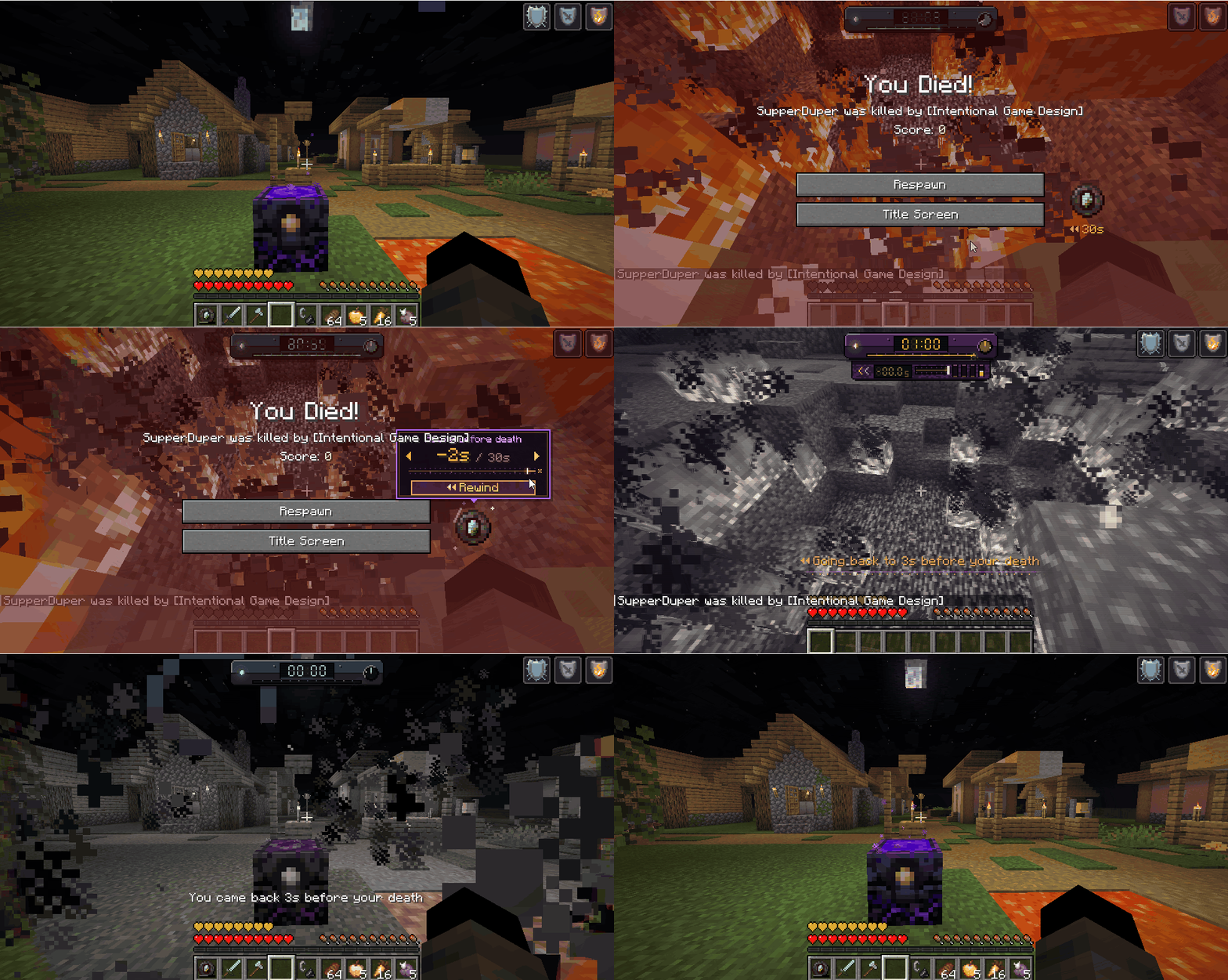
- 死亡回溯:如果你携带悖论死亡,你将获得一次回到死亡前时刻的机会。
- 预知未来:手持下界合金悖论即可窥探未来,随后带着对未来的认知回归本体。
- 重定向投射物:击中一个被冻结的投射物,可将其引导至你注视的方向,并预览其落点。
- 多人共享模式:在你的朋友可以移动的同时,世界的其余部分保持静止。
- 3 个等级:金、钻石和下界合金。
- 控制面板:用于设置间隔时长、增加充能次数以及在静止和倒流模式之间切换。
- 游戏内配置界面(支持 Mod Menu)及安全命令:/stasis break
当时间静止时,你可以做几乎任何事情!战斗、建造、破坏方块、射击和使用红石。你所做的所有操作都会在时间恢复流动后生效,且红石操作按照你操作的顺序执行。你使用的方块(如箱子、门和唱片机)会以彩色形式短暂复活几秒钟,以便它们在静止的世界中仍能正常工作。摔落伤害和火焰伤害依然有效,但你会在时间恢复流动时才受到这些伤害。
控制说明
悖论(The Paradox)
- 右键点击:使用选定的间隔时长停止时间。
- 时间静止时右键点击:提前恢复时间流动。
- 潜行 + 右键点击:打开控制面板。
- 按住右键 (下界合金):预知未来。再次右键点击以回归本体。
时间静止期间
- 按住 R (钻石和下界合金):倒流时间。
- 按住 G:快速前进回到你原本的位置。
- 轻点 R:进入倒流模式。鼠标滚轮用于在时间轴上移动(向下滚动回溯,向上滚动前进)。再次轻点 R 退出该模式。
- 左键点击被冻结的投射物:将其重定向到你注视的方向。
控制面板
- 点击或滚动拨盘:选择 10秒、20秒、30秒 或 自定义。
- 顶部按钮 (钻石和下界合金):在静止面和倒流面之间切换。
- 旋钮 (下界合金):设置自定义间隔时长。
- 左侧按钮:开启或关闭共享模式。
- 应用:保存更改,或在放置好 4 个共振器时进行重铸。
物品栏
- 右键点击带有“时空砂砾”的倒流充能道具:为其补充 5 秒时长。
死亡屏幕
R 和 G 可在 Minecraft 的控制设置中进行更改。


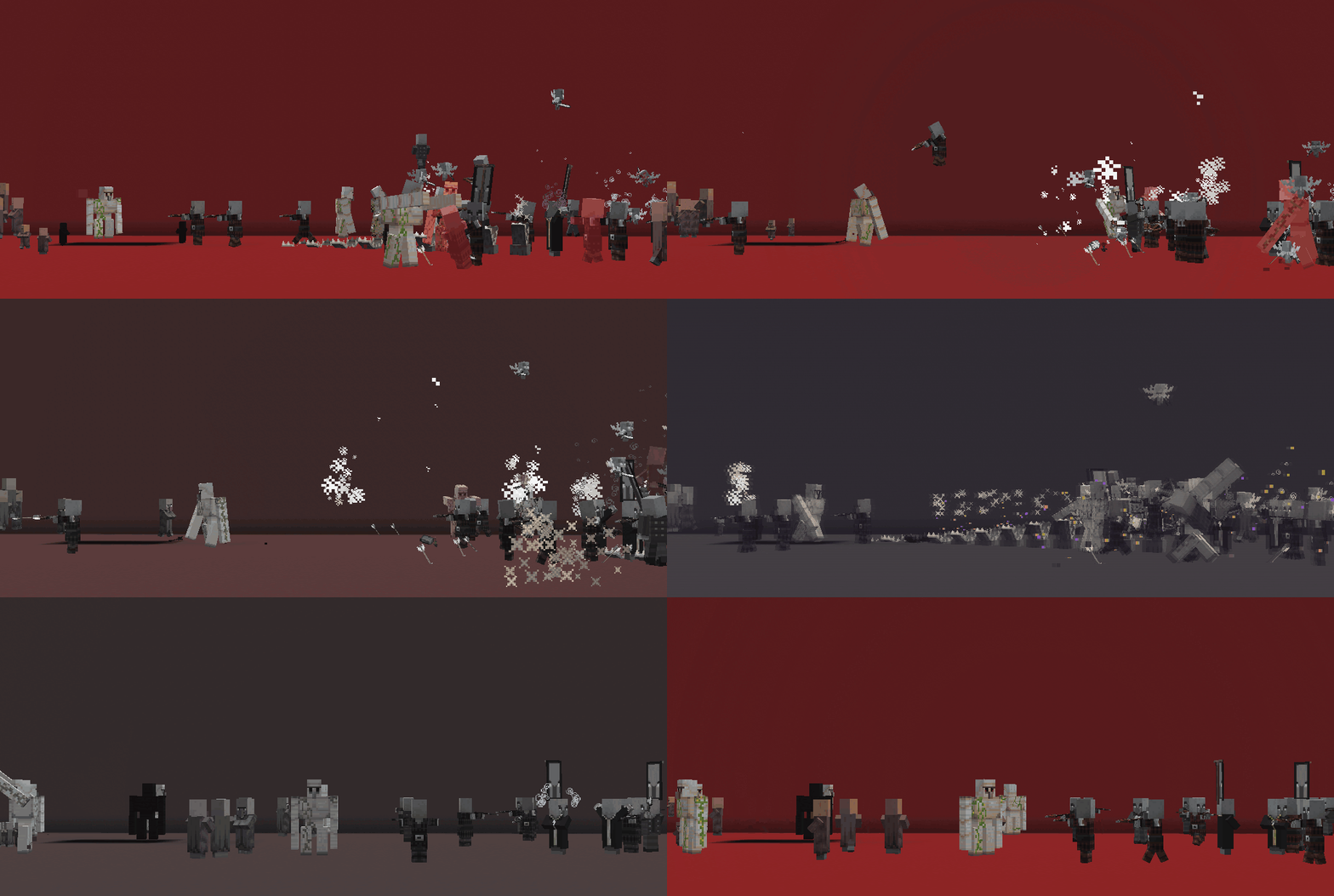
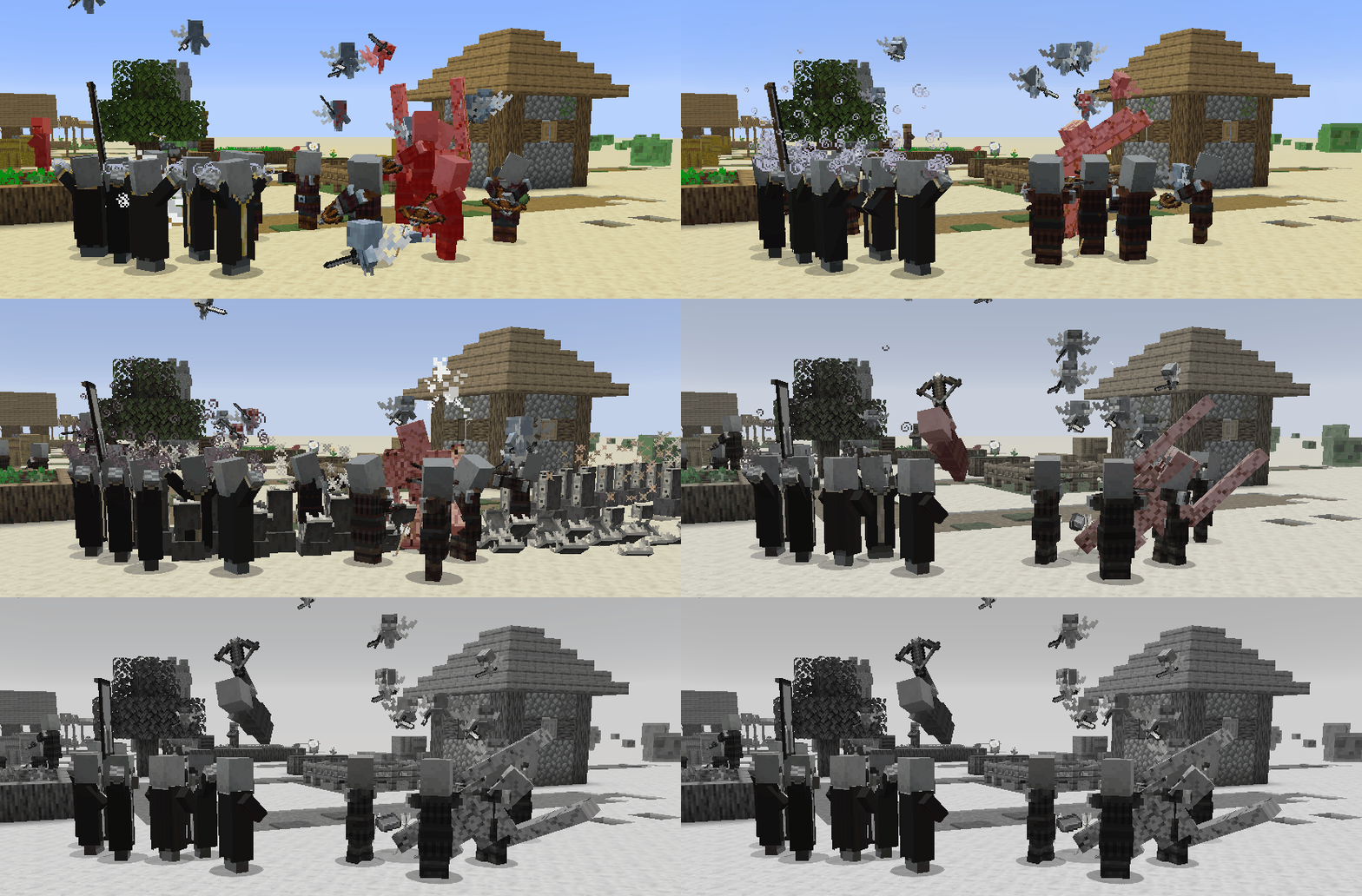 一个傀儡正在与一群生物战斗中,画面定格在战斗中途。
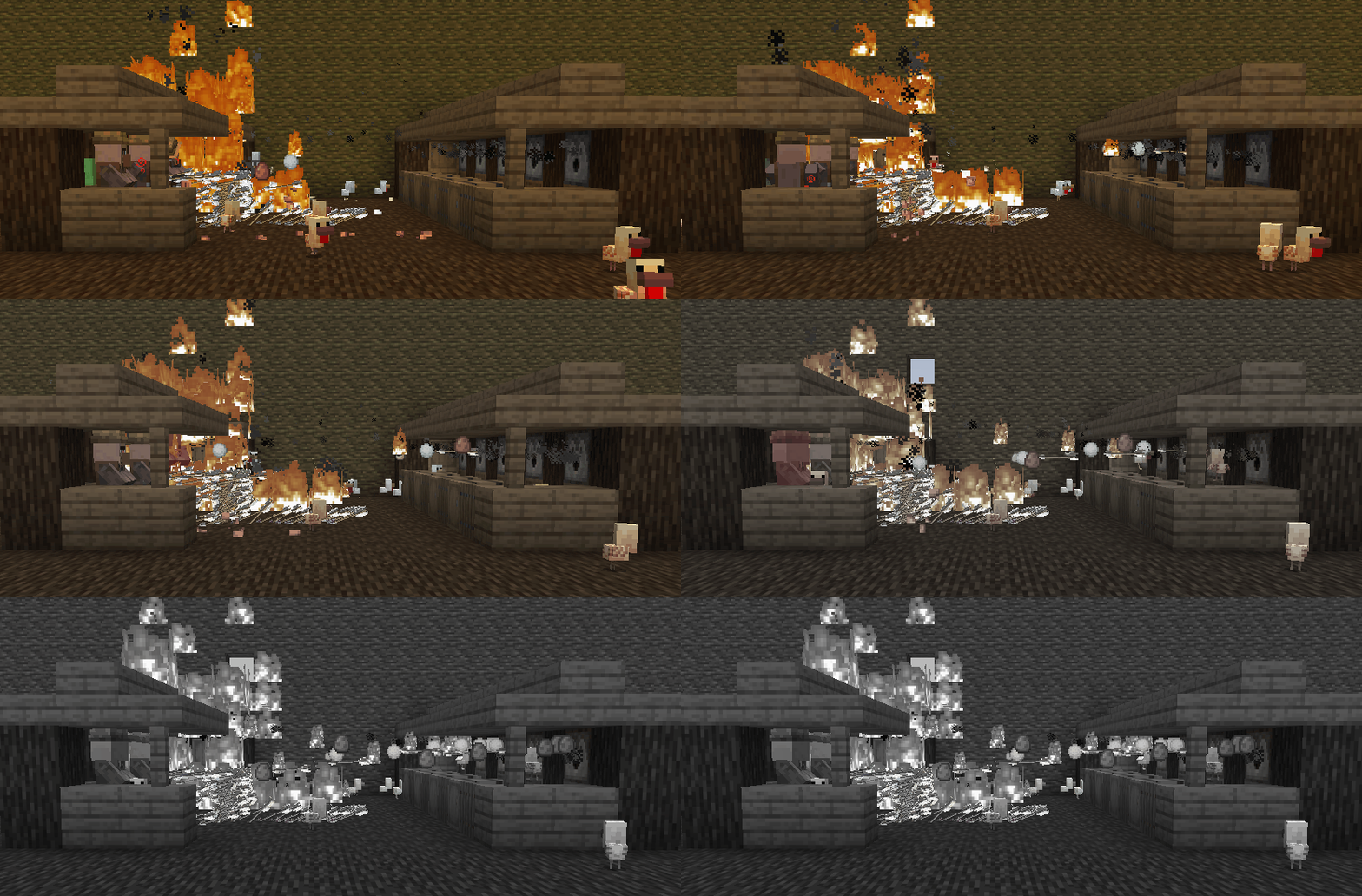 射向村民的投射物逐渐减速直至停止。
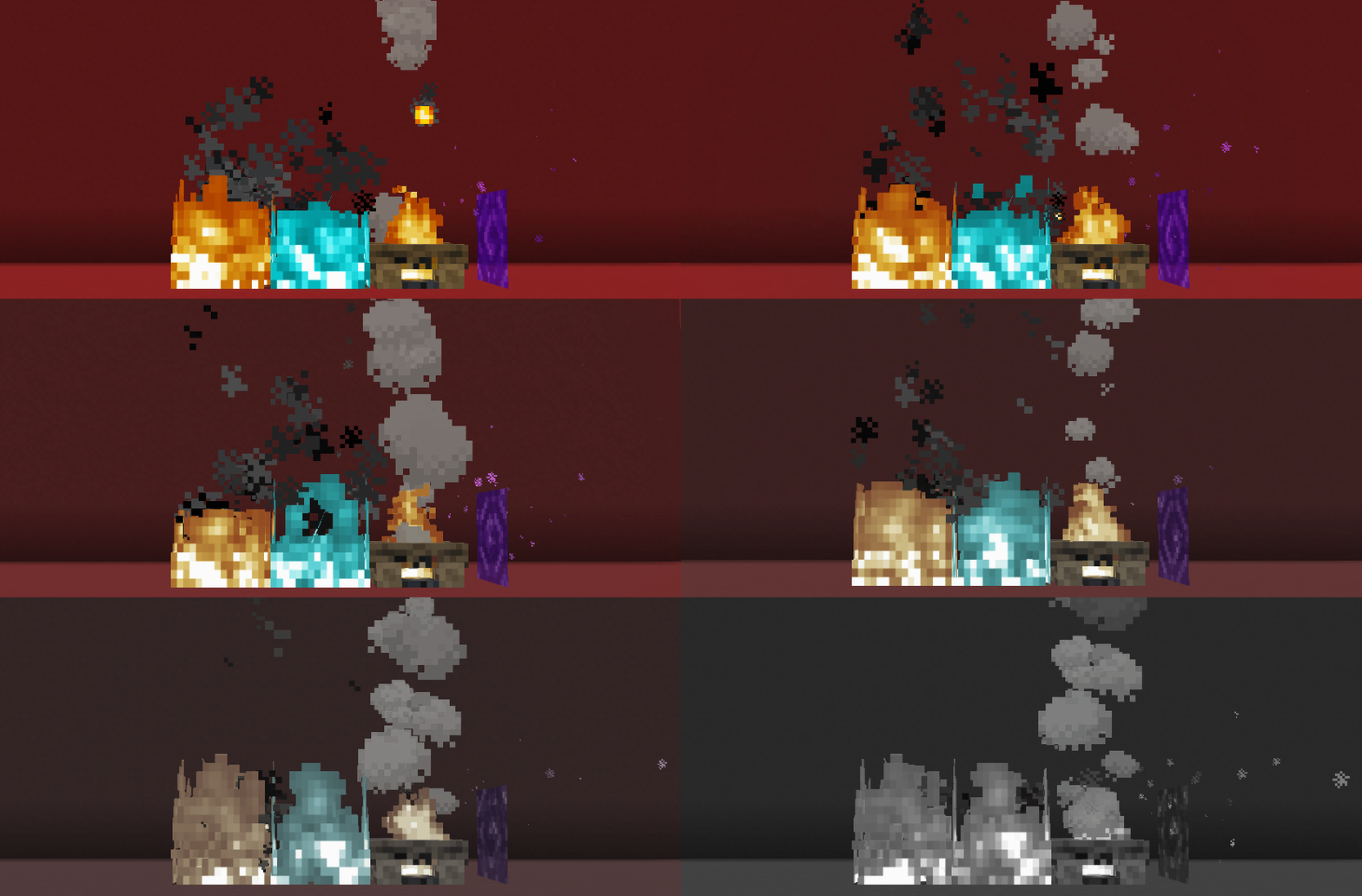 动画纹理和粒子逐渐减速直至冻结。
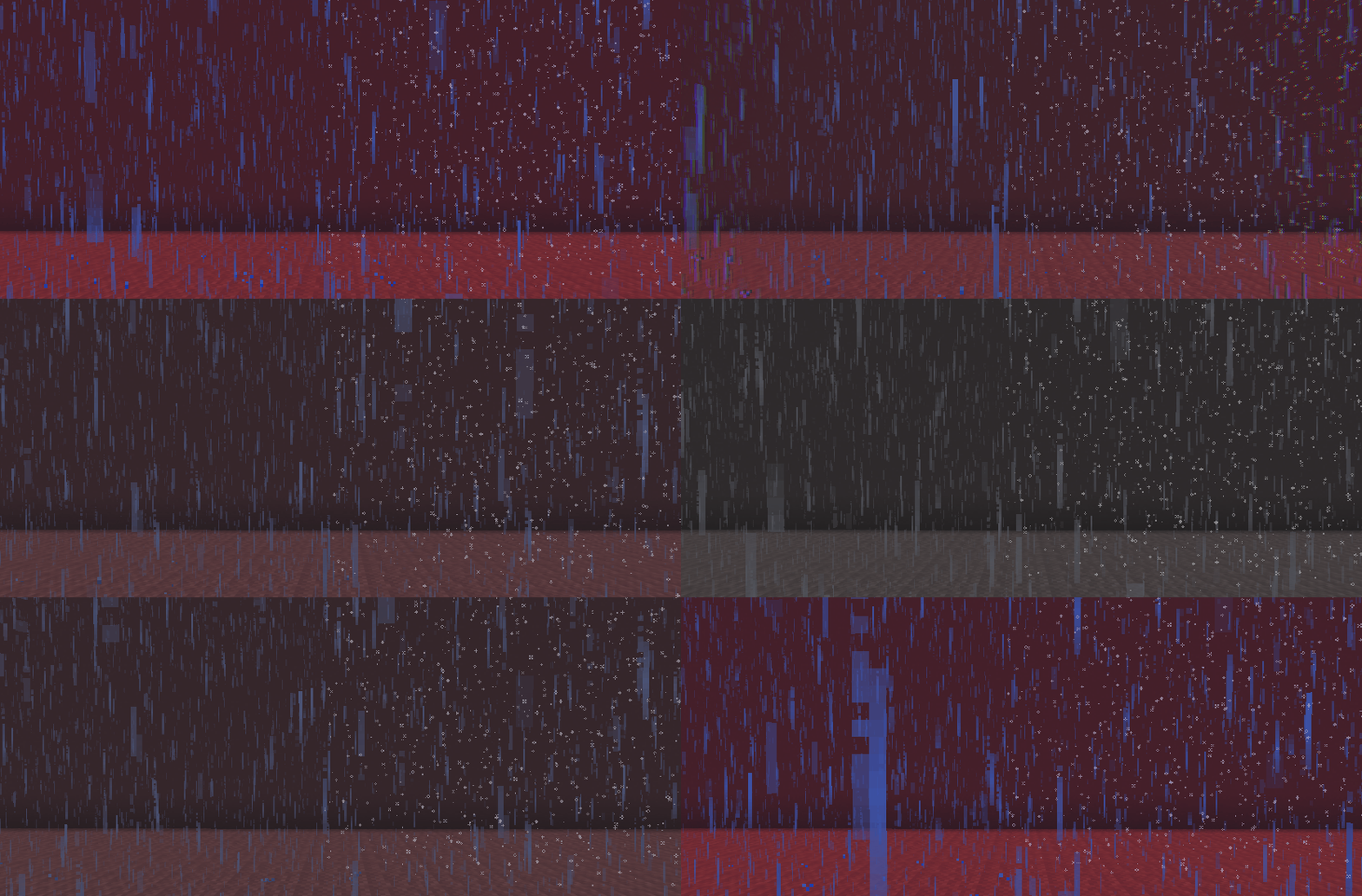 雨雪逐渐减速、冻结,然后恢复流动。


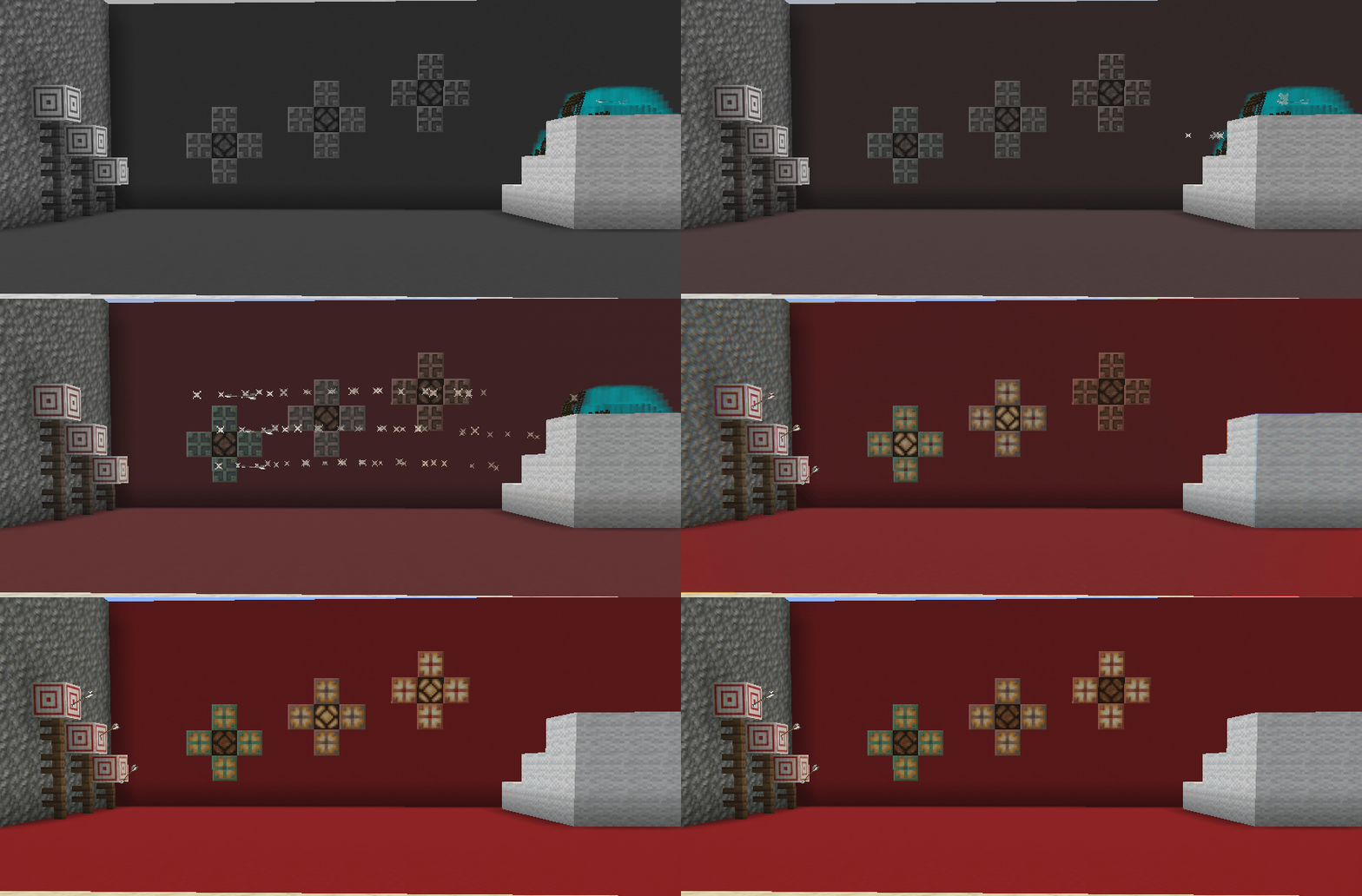 在静止期间射出的三支箭会在时间恢复时继续飞行并命中目标。
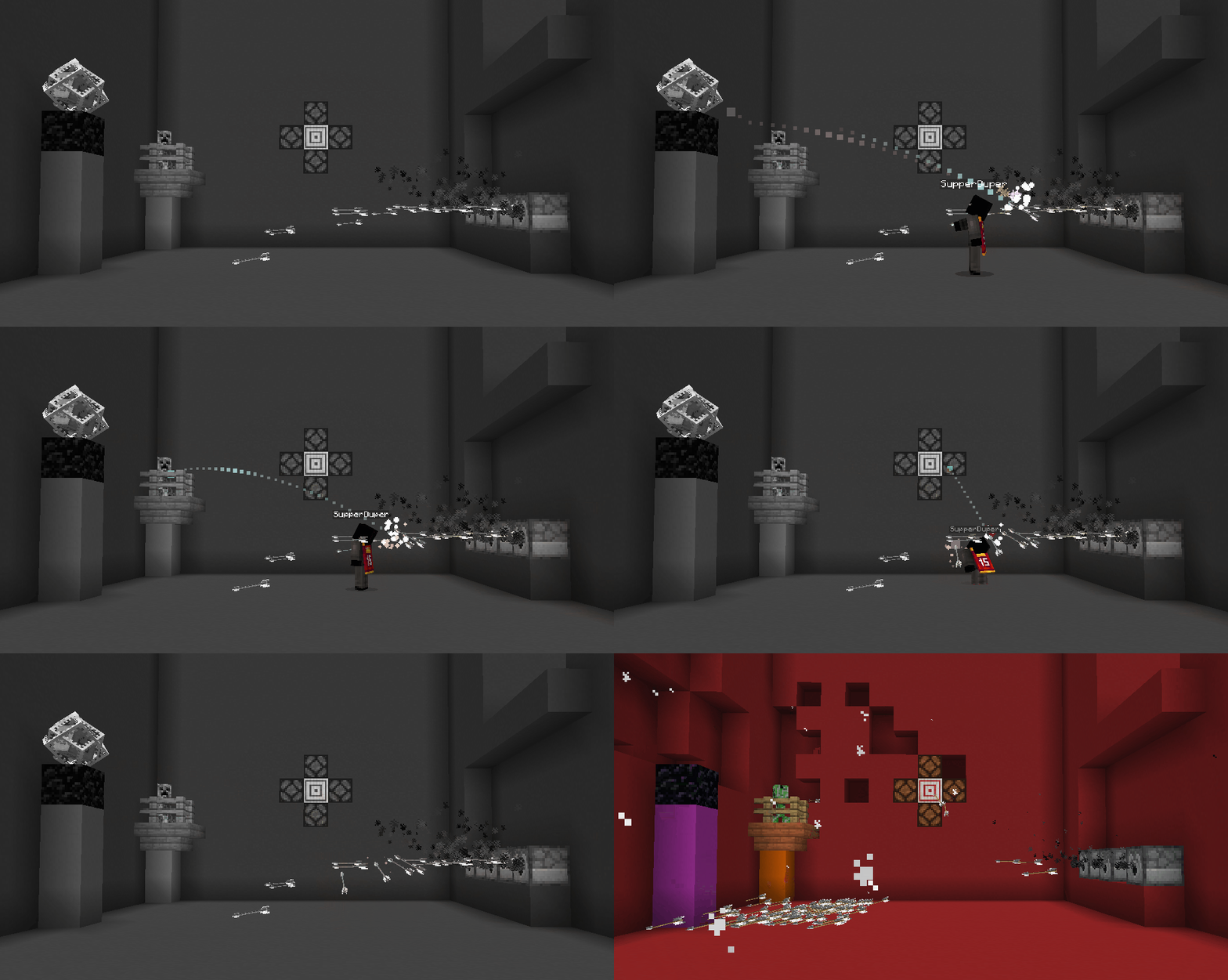 不喜欢被冻结的投射物飞行的方向?击中它。它会转向你注视的方向,保持原有速度,并且一条彩色轨迹会显示它将落在何处。
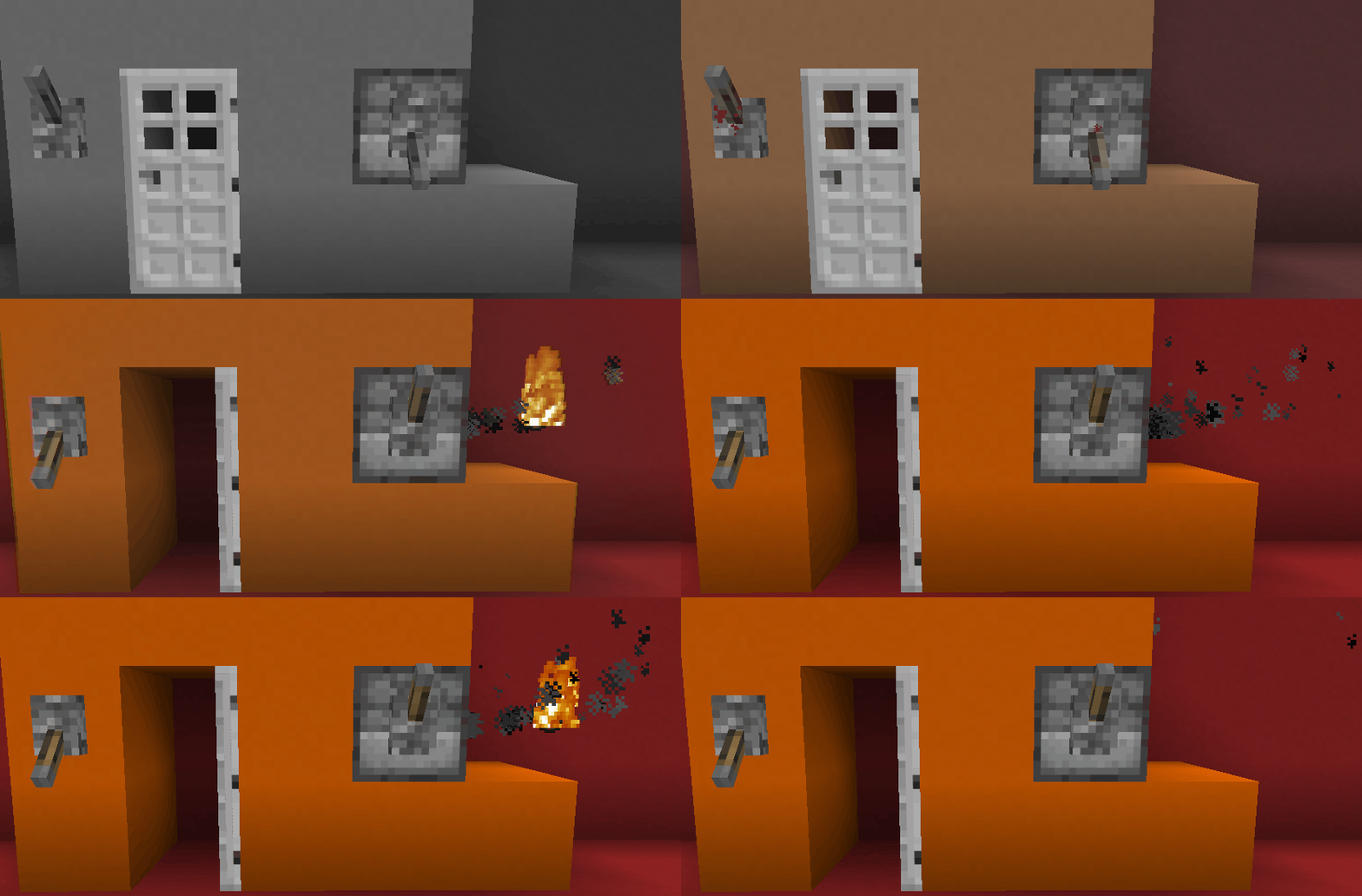 红石动作会在时间恢复时按顺序重新播放。
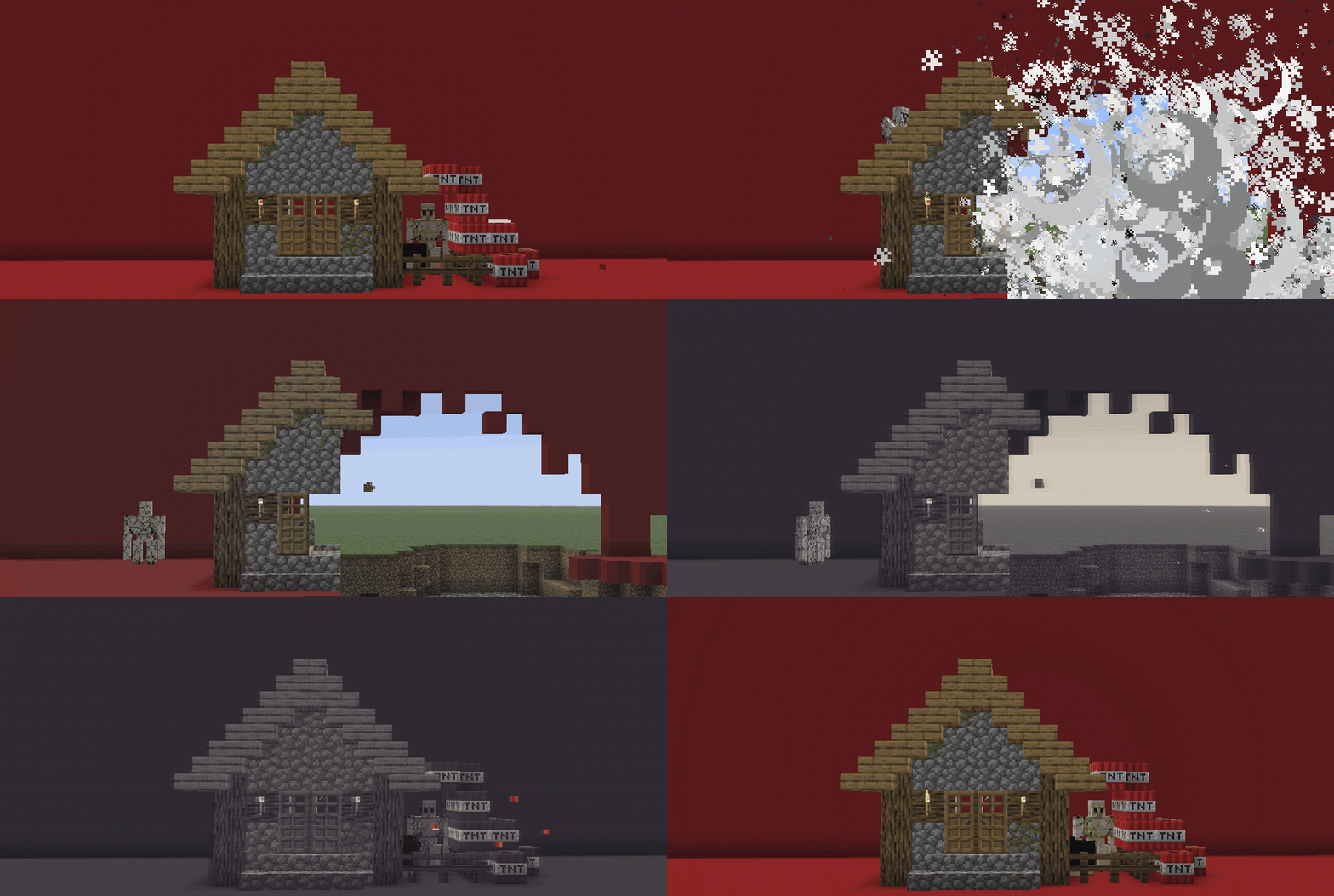
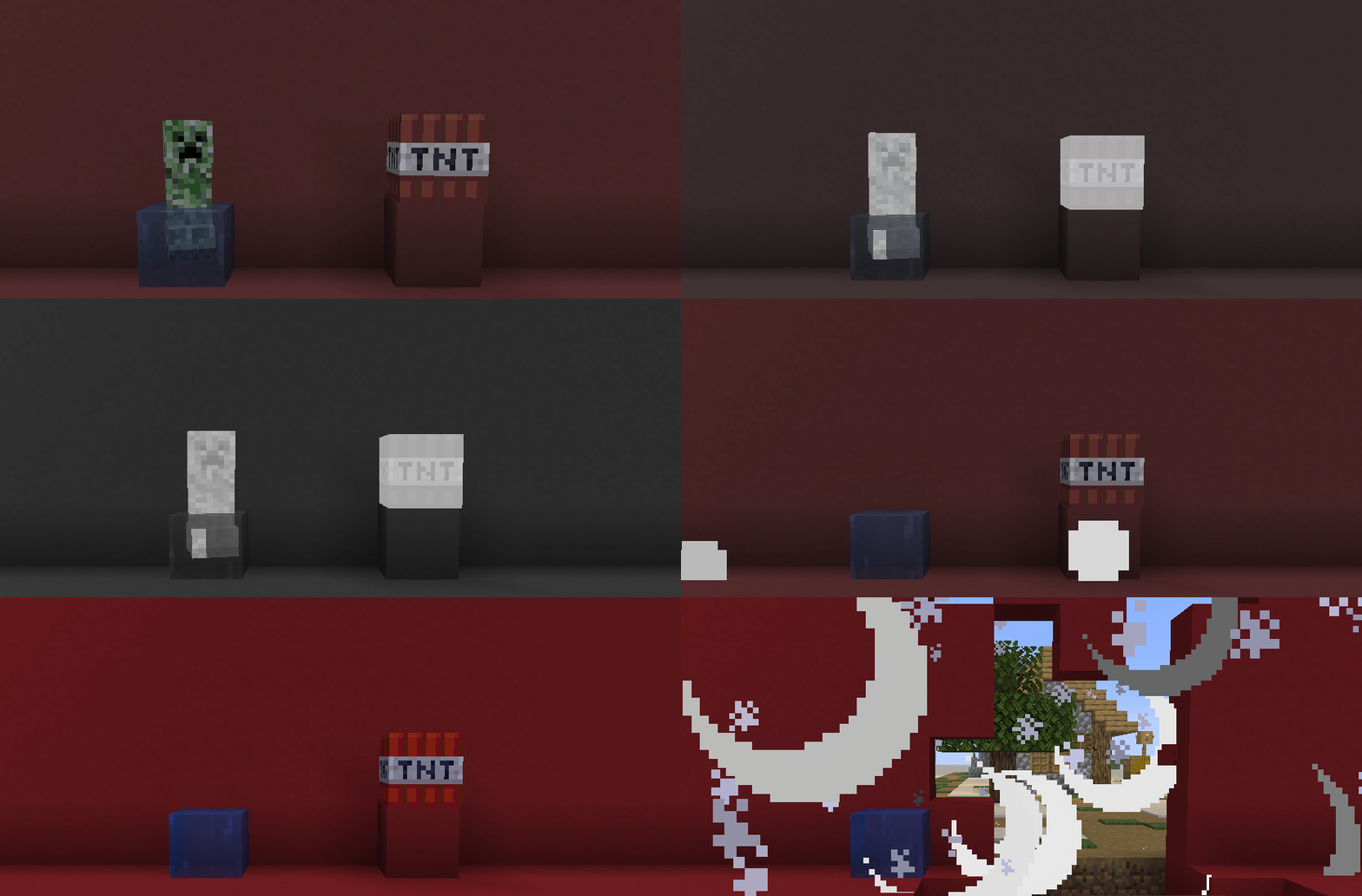 一只苦力怕和一个 TNT 方块在被引燃时冻结,随后恢复运行。


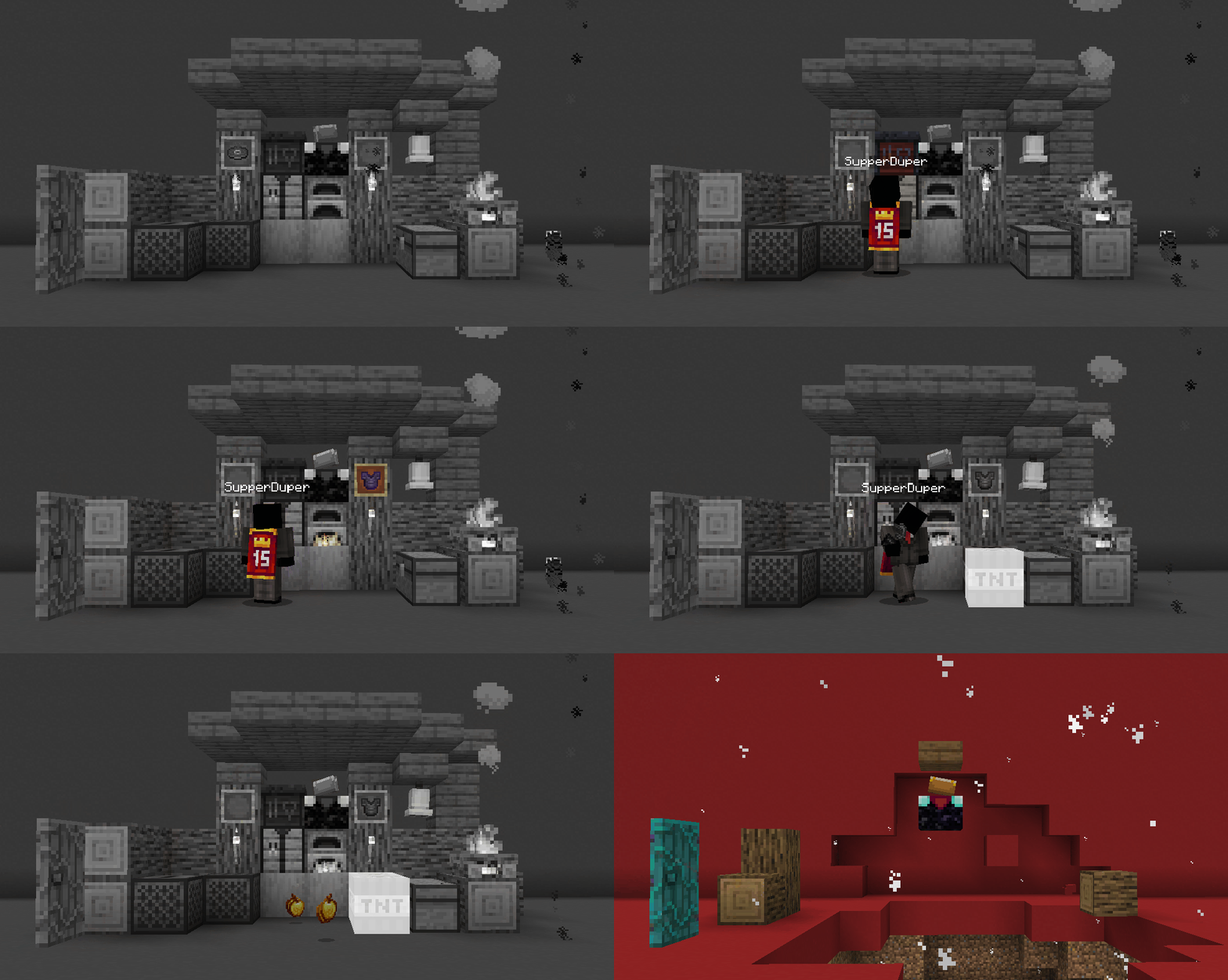 与门、熔炉、箱子、已放置的方块、TNT 和营火的交互:它们都会短暂地“复活”。
当你在时间停止时使用某个方块,它会复活几秒钟:
- 它会恢复为彩色。
- 它的粒子效果、声音和动态纹理会重新出现。
- 它会正常工作一小段时间,然后再次冻结。
掉落物也会复活,并保持彩色:
- 你破坏方块后掉落的物品会落到地面,可以立即拾取。
- 你投掷的物品,或者与你一同移动的玩家在共享模式下投掷的物品,会掉落并可被拾取,从而允许你在时间停止时互相传递物品。由被冻结玩家投掷的物品会悬浮在空中保持冻结状态,直到时间恢复。

 仅仅停止时间还不够。拥有 钻石 悖论或更高级别的物品,你便可以 逆转时间。
当时间停止时,世界会记录最后几秒的状态。按下 R 键即可倒放:方块复原,爆炸自行撤销,怪物后退并重新站起,箭矢飞回原位,物品回归你的背包,天空与天气也一并回溯。时间恢复后,将从那个时刻继续推进,仿佛那段未来从未发生。
能够回溯到过去的事物
- 任何人破坏、放置或炸毁的方块,包括箱子及其内容物、告示牌和罐子。
- 生物:它们的位置和生命值。死亡的生物也会复活,包括驯服的狼、命名过的生物以及染色的羊。
- 红石:拉杆、发射器、活塞、灯等其余部分。
- 玩家:物品栏、生命值、饥饿值、状态效果以及火焰。其他玩家也会一同回溯(可关闭)。
- 投射物、掉落物、盔甲架、物品展示框、矿车和船。
- 一天中的时间和天气(可关闭)。
- 粒子效果,甚至是屏幕上图腾的动画。
**悖论(Paradox)**本身不会被回溯,因此它无法被复制或因回溯而丢失。
回溯充能 
每次回溯都会消耗回溯充能。一次充能可维持 20 秒(可配置),而一个悖论核心最多可储存 4 次充能,总计 80 秒。
空余的充能可以重新填充:在物品栏中右键点击时空粗砂即可为它们充能,如同捆绑操作。每份粗砂会增加 5 秒。
死亡回溯
如果你在携带装有回溯充能和时空粗砂的钻石或下界合金悖论核心时死亡,时间会在你死亡的那一刻停止。你可以在死亡界面选择回溯多少秒,从而让这次死亡从未发生。
你有 60 秒的时间进行选择。如果正常重生,该机会将消失。
手持 下界悖论 按住 右键。你的身体会留在原地作为存档点,而另一个 你 则前往未来。再次使用悖论即可从过去返回该存档点。
- 它使用 回溯充能:每在现实世界中停留一秒,未来中的持续时间相当于消耗半秒充能,因此其实际持续时间是充能上限的 两倍。
- 当你 再次使用悖论、充能耗尽 或 死亡 时,你将回到本体。如果死亡,你在未来发现的所有物品都将丢失,且已消耗的充能不会返还。
- 其他玩家不会被送回过去。他们在你离开期间所做的事情将被保留。
你保留的内容
- 你挖掘的方块、拾取的物品、击杀的生物(以及它们掉落的物品)和你投掷的物品。
- 你对箱子所做的更改。如果某个箱子被摧毁,它会带着里面的更改一起恢复。
- 你使用过的物品展示框、盔甲架和矿车箱。
会回退的内容
- 生物、村民及其交易、敌对生物、爆炸、监守者和嘶鸣者。
- 你放置的方块和你射出的箭。这些会被消耗掉。
- 你的生命值、饥饿值、状态效果和游戏模式。
只有下界合金悖论才能使用“预知”功能。金质和钻石质的需要先重铸。
和朋友一起玩?选择让他们与世界一起冻结,还是跟随你一起行动。
每个悖论都有自己独立的分享模式开关:控制面板上的左侧按钮。该设置保存在悖论中。
分享模式 关闭
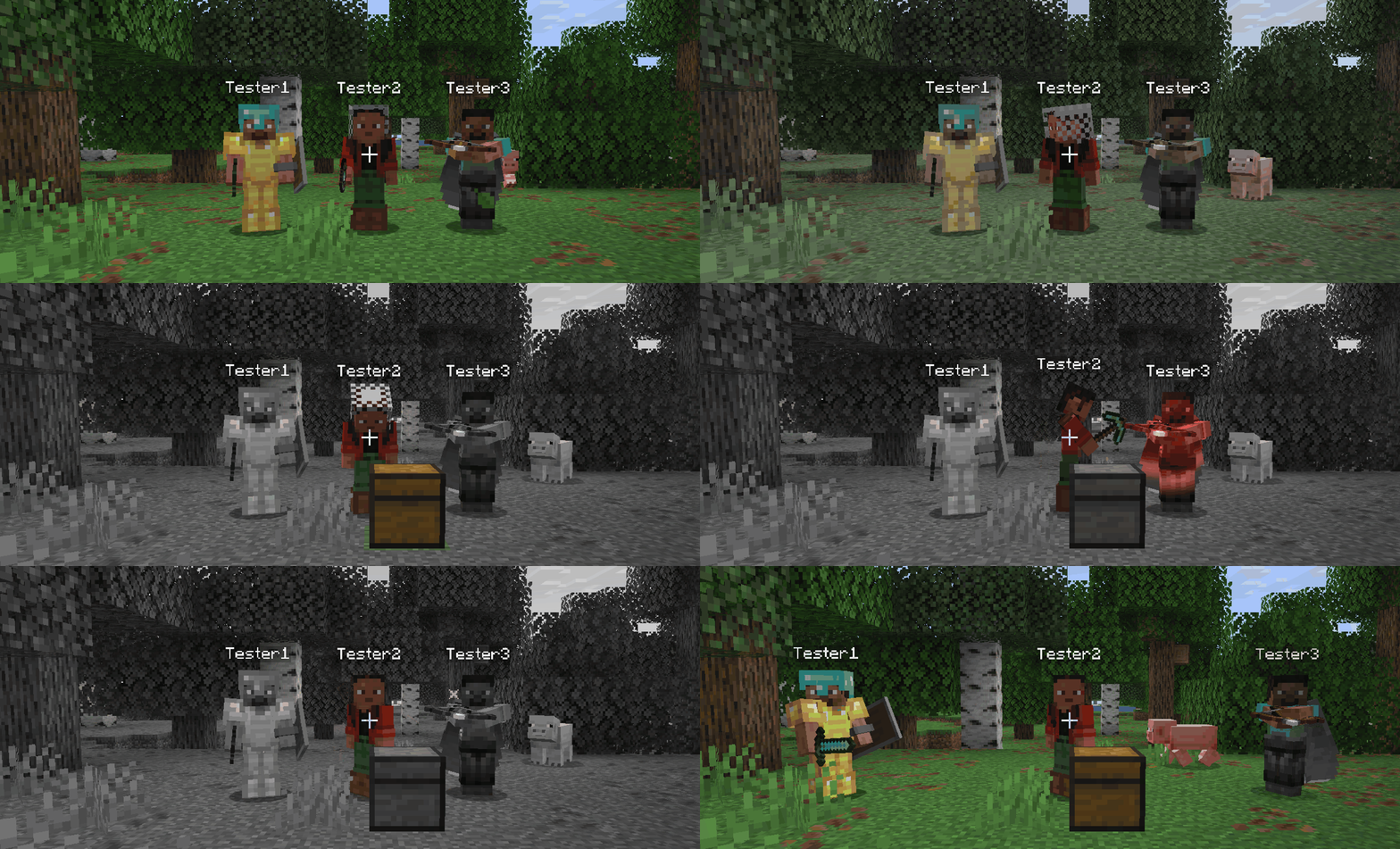
只有停止时间的玩家处于彩色状态。他们对冻结玩家造成的伤害会在时间恢复时生效。
- 只有你可以移动。其他人会与世界一起冻结。
- 你仍然可以攻击他们、推动他们或破坏他们脚下的方块。他们只有在时间恢复时才会感受到这一切,且按顺序一次性发生,包括击退效果。
- 冻结的玩家无法移动、攻击或使用任何物品,直到时间恢复。
分享模式 开启
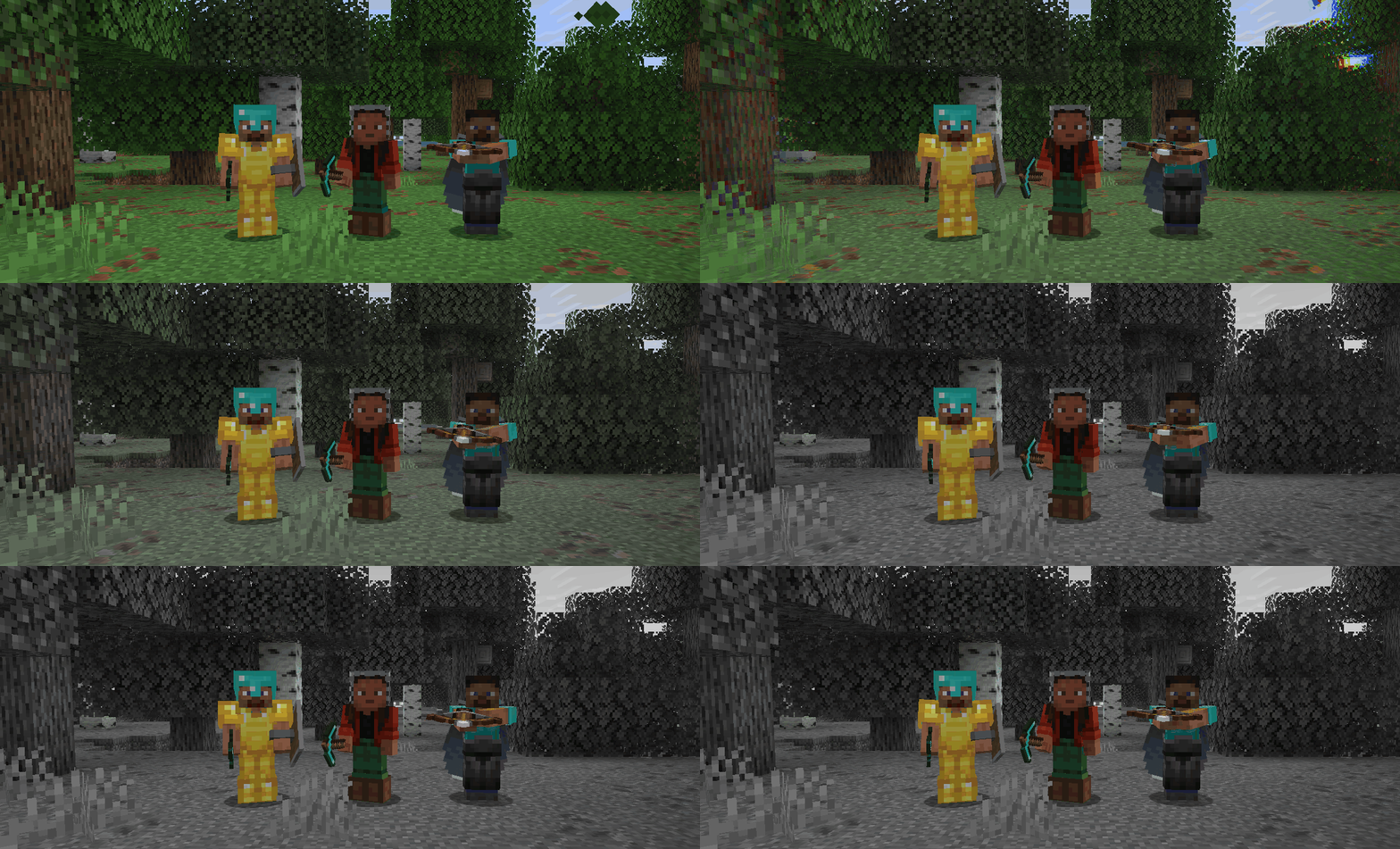
所有3名玩家均处于彩色状态,而世界保持冻结。
- 所有人都会跟随你一起移动并显示为彩色,而世界保持冻结。
- 你的朋友可以做你能做的一切:行走、建造、破坏方块、打开箱子和射击。他们的红石操作会与你的操作加入同一个队列。
- 玩家可以立即互相造成伤害。
- 世界此时还无法伤害任何人:火焰、熔岩和坠落伤害会等到时间恢复时才生效。
两种模式下均适用
- 只有停止时间的玩家才能倒带时间或提前结束它。
- 当你倒带时,每位玩家的物品栏都会回退,因此物品不会重复生成。他们的生命值和位置也会回退(可通过 RewindAffectsPlayers 配置项关闭)。
- 服务器可以通过 AffectPlayersOverride 强制为所有人开启或关闭分享模式。面板上的按钮随后会显示其已锁定。
控制面板
悖论控制面板
潜行 + 右键点击悖论以打开它。它有两面:
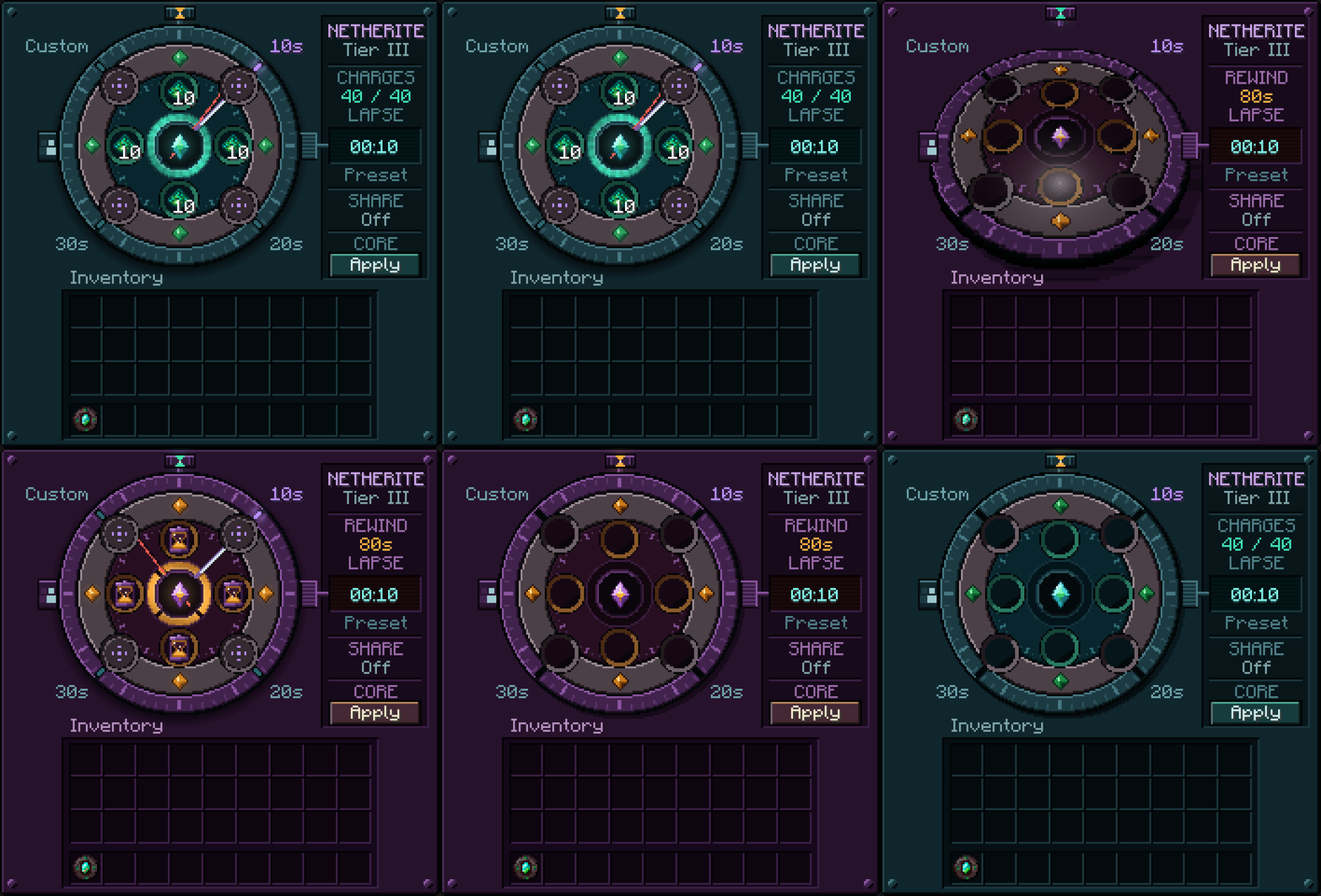
静止面和倒位面。
- 旋钮:通过点击或滚动选择 10秒、20秒、30秒 或 自定义。
- 静止面上的4个插槽用于存放时空残渣,每次静止使用一个充能。
- 倒位面上的4个插槽用于存放倒带充能。
- 顶部按钮在两个面之间切换 (钻石和下界合金)。
- 右侧的皇冠用于设置自定义时长 (下界合金)。
- 左侧按钮用于开启或关闭分享模式。
- 4个角落的插槽用于存放谐振器,用于将悖论重铸到下一个等级。
- 应用保存你的更改。当4个谐振器全部就位时,它会变为重铸。
等级

|
时长 |
残渣充能 |
倒带 |
预知 |
 金色 |
10秒 |
4 |
无 |
无 |
 钻石 |
10秒, 20秒, 30秒 |
12 |
有 |
无 |
 下界合金 |
10秒, 20秒, 30秒 + 自定义 |
40 |
有 |
有 |
合成配方
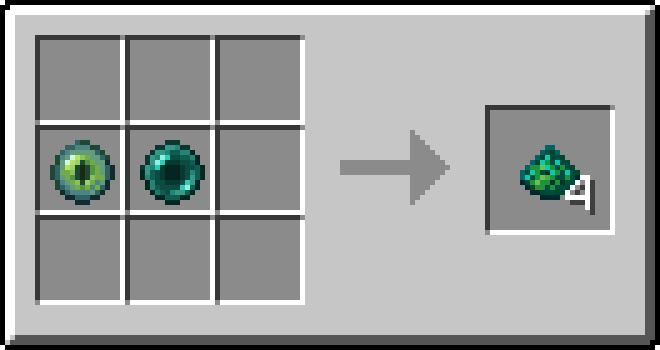
 时空残渣:末影之眼 + 末影珍珠
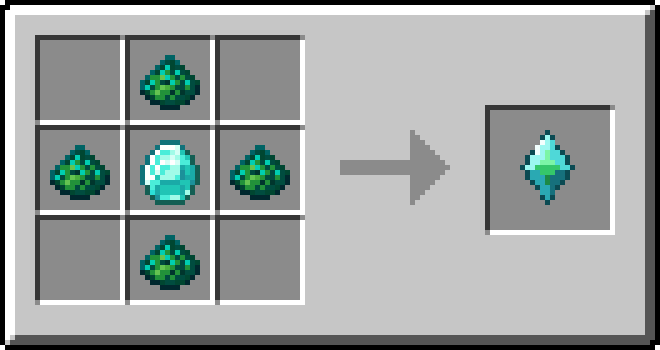
 静止核心:4个时空残渣 + 钻石
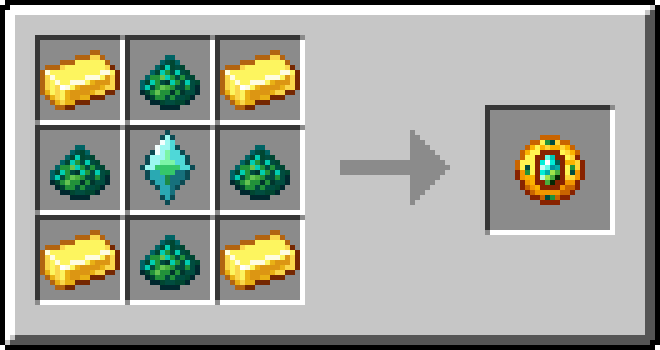
悖论:4个金锭 + 4个时空残渣 + 静止核心
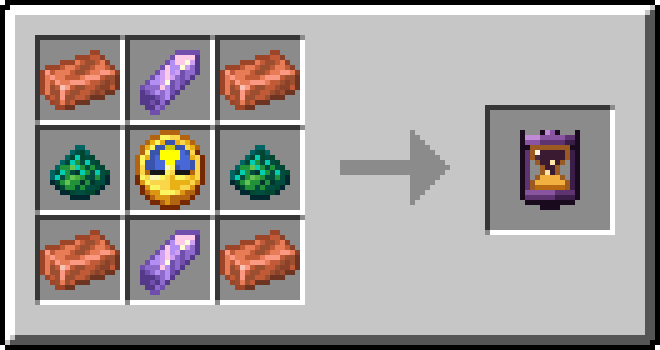
 倒带充能:4个铜锭 + 2个紫水晶碎片 + 2个时空残渣 + 时钟
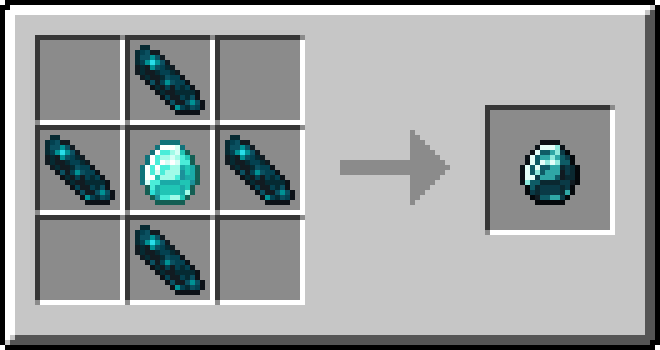
 钻石谐振器:4个回声碎片 + 钻石
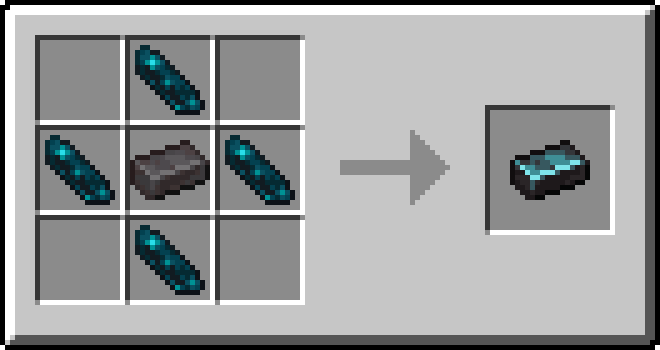
 下界合金谐振器:4个回声碎片 + 下界合金锭
重铸你的悖论
- 将4个钻石谐振器放置在控制面板的角落插槽中。应用会变成重铸,按下它(或静止核心)即可从金色升级为钻石。
- 对4个下界合金谐振器执行相同操作,即可从钻石升级为下界合金。
配置
所有游戏内内容均可通过 Mod Menu 或在 config/stasis-paradox.json 中进行修改。
轨迹(Trails)
-
TrailsActive: 开启或关闭轨迹显示。
-
TrailsRenderCapes: 在轨迹上显示玩家的披风。
-
TrailsAmountLimit: 同时存在的最大轨迹数量。最旧的轨迹会最先消失。(默认值 70)
-
TrailsGenerationType: 轨迹的生成方式。
C = 连续模式(每隔 X 秒生成一个轨迹)
S = 秒模式(每隔游戏内的一秒生成一个轨迹)
你托管的世界 / 服务器
-
AffectPlayersOverride: none 允许每个 Paradox 自行决定,force_shared 强制启用共享模式,force_frozen 强制禁用该模式。
-
CustomLapseMax: 玩家可设置的最长自定义停滞时长,格式为 MM:SS(范围从 00:01 到 59:59)。
-
CustomLapseMaxOperators: 同上,但针对管理员(operators)。
回溯(Rewind)
-
RewindEnabled: 开启或关闭回溯功能。预知(Foresight)也依赖此选项。
-
RewindMaxSeconds: 回溯可以回退的最大时间长度,以及单次充能可支持的时长。(范围 5 至 60,默认值 20)
-
RewindRadius: 以每位玩家为中心,记录世界范围的半径(方块单位)。(范围 16 至 128,默认值 48)
-
RewindTimeAndWeather: 同时回溯一天中的时间和天气状况。
-
RewindAffectsPlayers: 同时回溯其他玩家的位置和生命值。物品栏始终会恢复原状。
过渡效果(Transitions)(你托管的世界 / 服务器)
- TransitionDuration: 时间停止和恢复所需的时间长度,占完整时长的百分比:0,或 50 至 100。较短的过渡会使声音加速播放以保持同步。设为 0 时,时间将瞬间停止和恢复,仅保留钟声效果。在服务器上,服务器的设置值对所有玩家生效。(默认值 100)
音效(Sounds)(仅限客户端)
- SoundVolume, SoundStasisVolume, SoundRewindVolume, SoundInterfaceVolume: 音量范围从 0 到 100。
命令
- /stasis break: 立即结束当前的停滞状态 (管理员权限)。
- /stasis start [seconds]: 在不使用 Paradox 的情况下停止时间 (管理员权限)。
注意: 如果你设置了非常长的自定义停滞时长,请使用 /stasis break。
兼容性
与 Sodium、Iris(包括光影)、Entity Model Features / Entity Texture Features、Fresh Animations 和 Not Enough Animations 兼容。需要 Fabric API。
反馈
1.3 是一个重大更新。如果发现任何错误或兼容性问题,请通过 CurseForge 评论 或加入 Discord 服务器 告知我。谢谢!
此外,欢迎随时将此模组加入到你喜欢的任何整合包中!
What it does
A Fabric mod that lets you stop time whenever you want, and turn it back, using the Paradox.
- Adds the Paradox, a clock with two faces: one stops time, the other rewinds it.
- Freezes almost everything: mobs, music, projectiles, particles, weather, animated textures, redstone and more.
- Rewind: while time is stopped, go back through the last seconds and change what happened.
- Death rewind: if you die carrying your Paradox, you get one chance to go back before it happened.
- Foresight: hold a Netherite Paradox to see the future, then return to your body knowing what comes next.
- Redirect projectiles: hit a frozen projectile to send it where you are looking, with a preview of where it will land.
- Share Mode for multiplayer: your friends can keep moving while the rest of the world stays frozen.
- 3 tiers: Golden, Diamond and Netherite.
- A Control Panel to set the lapse, add charges and switch between stasis and rewind.
- In-game config screen (with Mod Menu) and a safety command: /stasis break

While time is stopped you can do almost anything! fight, build, break blocks, shoot and use redstone. Everything you do takes effect when time resumes, and redstone actions run in the order you made them. The blocks you use, like chests, doors and jukeboxes, come back to life in color for a few seconds, so they still work in a frozen world. Fall damage and burns still count, but you only take them when time resumes.
Controls
The Paradox
- Right-click: stops time with the selected lapse.
- Right-click while time is stopped: resumes it early.
- Sneak + right-click: opens the Control Panel.
- Hold right-click (Netherite): Foresight. Right-click again to return to your body.
While time is stopped
- Hold R (Diamond and Netherite): rewind.
- Hold G: fast-forward back to where you were.
- Tap R: rewind mode. The mouse wheel moves through time (down goes back, up goes forward). Tap R again to leave.
- Left-click a frozen projectile: redirect it where you are looking.
Control Panel
- Click or scroll the dial: choose 10s, 20s, 30s or Custom.
- Top button (Diamond and Netherite): flips between the stasis face and the rewind face.
- Crown (Netherite): sets the custom lapse.
- Left button: turns Share Mode on and off.
- Apply: saves your changes, or Reforge when the 4 Resonators are in place.
Inventory
- Right-click a Rewind Charge with Temporal Grit: refills it by 5 seconds.
Death screen
- Choose the seconds and press Rewind: go back to before you died.
R and G can be changed in Minecraft's controls settings.
A golem fighting a group of mobs, stopped in the middle of the fight.
Projectiles shot at villagers slow down until they stop.
Animated textures and particles slowing down until they freeze.
Rain and snow slowing down, freezing, and then resuming.
Three arrows shot during stasis resume and hit their target.
Don't like where a frozen proyectile is going? Hit it. It turns toward where you are looking, keeps its speed, and a colored trail shows where it will land.
Redstone actions are replayed in order when time resumes.
A creeper and a TNT block frozen while primed, then resuming.
Interacting with doors, furnaces, chests, placed blocks, TNT and campfires: they all come back to life for a brief moment.
When you use a block while time is stopped, it comes back to life for a few seconds:
- It turns back to color.
- Its particles, sounds and animated textures come back.
- It works normally for a moment, then freezes again.
Drops come back to life too, and stay in color:
- What a block you break drops falls to the ground and can be picked up right away.
- Items you throw, or that players moving with you throw in Share Mode, fall and can be picked up, so you can hand things to each other while time is stopped. Items thrown by frozen players stay frozen in the air until time resumes.
Stopping time was not enough. With a Diamond Paradox or better, you can turn it back.
While time is stopped, the world keeps a record of the last seconds. Press
R and it plays backwards, blocks return, explosions undo themselves, mobs walk back and get up, arrows fly back, items return to your inventory, and the sky and weather go back too. When time resumes, it continues
from that moment, as if that future never happened.
What goes back in time
- Blocks broken, placed or blown up by anyone, including chests and their contents, signs and pots.
- Mobs: their position and health. Dead mobs come back, including tamed wolves, named mobs and dyed sheep.
- Redstone: levers, dispensers, pistons, lamps and the rest.
- Players: inventory, health, hunger, effects and fire. Other players go back too (can be turned off).
- Projectiles, dropped items, armor stands, item frames, minecarts and boats.
- Time of day and weather (can be turned off).
- Particles, and even the totem animation on your screen.
The Paradox itself is never rewound, so it can't be duplicated or lost to a rewind.
Rewind Charges
Each rewind uses Rewind Charges. One charge holds 20 seconds (configurable), and a Paradox holds up to 4, so 80 seconds in total.
Empty charges can be refilled: right-click them with Temporal Grit in your inventory, like a bundle. Each grit adds 5 seconds.
Death rewind
If you die carrying a Diamond or Netherite Paradox with Rewind Charges and Temporal Grit, time stops at the moment of your death. Choose how many seconds to go back from the death screen, and the death never happened.
You have 60 seconds to choose. If you respawn normally, the chance is gone.
Why stop time when you can see what's coming?
Hold right-click with a Netherite Paradox. Your body stays behind as a checkpoint, while a copy of you moves ahead into the future. Use the Paradox again and you return to that checkpoint from the past.
- It uses Rewind Charges: each second in the future costs half a second of charge, so it lasts twice as long as your charge.
- You return to your body when you use the Paradox again, when time runs out, or if you die. If you die, you lose what you found there, and the charges are still spent.
- Other players are not sent back. What they did while you were away is kept.
What you keep
- Blocks you mined, items you picked up, mobs you killed (and what they dropped), and items you threw.
- Changes you made to chests. If a chest was destroyed, it comes back with your changes inside.
- Item frames, armor stands and minecart chests you used.
What goes back
- Mobs, villagers and their trades, angry mobs, explosions, wardens and shriekers.
- Blocks you placed and arrows you shot. Those are used up.
- Your health, hunger, effects and game mode.
Only a Netherite Paradox can use Foresight. Golden and Diamond ones need to be reforged first.
Playing with friends? Choose whether they freeze with the world or move with you.
Each Paradox has its own Share Mode switch: the button on the left of the Control Panel. The setting is saved in the Paradox.
Share Mode OFF
Only the player who stopped time is in color. Their hits on frozen players land when time resumes.
- Only you can move. Everyone else freezes with the world.
- You can still hit them, push them or break the blocks under them. They feel it only when time resumes, all at once and in order, knockback included.
- Frozen players can't move, attack or use anything until time resumes.
Share Mode ON
All 3 players in color while the world stays frozen.
- Everyone moves with you, in color, while the world stays frozen.
- Your friends can do everything you can: walk, build, break blocks, open chests and shoot. Their redstone actions join the same queue as yours.
- Players can hurt each other right away.
- The world can't hurt anyone yet: fire, lava and falls wait until time resumes.
In both modes
- Only the player who stopped time can rewind it or end it early.
- When you rewind, every player's inventory goes back too, so items can't be duplicated. Their position and health go back as well (can be turned off with RewindAffectsPlayers).
- Servers can force Share Mode on or off for everyone with AffectPlayersOverride. The button on the panel then shows it's locked.

Control Panel
The Paradox Control Panel
Sneak + right-click the Paradox to open it. It has two faces:
The stasis face and the rewind face.
- The dial: choose 10s, 20s, 30s or Custom, by clicking or scrolling.
- The 4 sockets on the stasis face hold Temporal Grit, one charge per stasis.
- The 4 sockets on the rewind face hold Rewind Charges.
- The top button flips between the two faces (Diamond and Netherite).
- The crown on the right sets the custom lapse (Netherite).
- The left button turns Share Mode on and off.
- The 4 corner sockets hold Resonators, used to reforge the Paradox to the next tier.
- Apply saves your changes. It becomes Reforge when all 4 Resonators are in place.
Tiers
|
Lapses |
Grit charges |
Rewind |
Foresight |
| Golden |
10s |
4 |
No |
No |
| Diamond |
10s, 20s, 30s |
12 |
Yes |
No |
| Netherite |
10s, 20s, 30s + Custom |
40 |
Yes |
Yes |
Crafting Recipes
Temporal Grit: Ender Eye + Ender Pearl
Stasis Core: 4 Temporal Grit + Diamond
Paradox: 4 Gold Ingots + 4 Temporal Grit + Stasis Core
Rewind Charge: 4 Copper Ingots + 2 Amethyst Shards + 2 Temporal Grit + Clock
Diamond Resonator: 4 Echo Shards + Diamond
Netherite Resonator: 4 Echo Shards + Netherite Ingot
Reforging your Paradox
- Place 4 Diamond Resonators in the corner sockets of the Control Panel. Apply turns into Reforge, press it (or the Stasis Core) to go from Golden to Diamond.
- Do the same with 4 Netherite Resonators to go from Diamond to Netherite.
Configuration
Everything can be changed in game with Mod Menu, or in config/stasis-paradox.json.
Trails
-
TrailsActive: Turns trails on or off.
-
TrailsRenderCapes: Shows the player's cape on trails.
-
TrailsAmountLimit: Maximum number of trails at once. The oldest fades first. (default 70)
-
TrailsGenerationType: How trails are created.
C = Continuous (a trail every X seconds)
S = Seconds (a trail every in-game second)
Worlds you host / servers
-
AffectPlayersOverride: none lets each Paradox decide, force_shared forces Share Mode on, force_frozen forces it off.
-
CustomLapseMax: Longest custom lapse a player can set, as MM:SS (from 00:01 to 59:59).
-
CustomLapseMaxOperators: Same, for operators.
Rewind
-
RewindEnabled: Turns rewinding on or off. Foresight also needs it.
-
RewindMaxSeconds: How far back a rewind can go, and how much one charge holds. (5 to 60, default 20)
-
RewindRadius: How far around each player the world is recorded, in blocks. (16 to 128, default 48)
-
RewindTimeAndWeather: Also rewinds the time of day and the weather.
-
RewindAffectsPlayers: Also rewinds other players' position and health. Inventories always go back.
Transitions (worlds you host / servers)
- TransitionDuration: How long time takes to stop and resume, as a percentage of the full length: 0, or 50 to 100. Shorter transitions speed up their sounds to keep up. At 0, time stops and resumes at once, with only the bell. On a server, the server's value applies to everyone. (default 100)
Sounds (client only)
- SoundVolume, SoundStasisVolume, SoundRewindVolume, SoundInterfaceVolume: From 0 to 100.
Commands
- /stasis break: ends the current stasis right away (operators).
- /stasis start [seconds]: stops time without a Paradox (operators).
Note: use /stasis break if you set a very long custom lapse.
Compatibility
Works with Sodium, Iris (including shaders), Entity Model Features / Entity Texture Features, Fresh Animations and Not Enough Animations. Requires Fabric API.
Feedback
1.3 is a big update. If you find a bug or an incompatibility, please let me know in the CurseForge comments or through the Discord Server. Thank you!
Also, feel free to add the mod into any Modpacks you'd like!






 模组

 模组

 模组
 模组

 模组
 模组
评论 0
登录后参与评分
还没有评论,来抢沙发吧