
Status4Discord
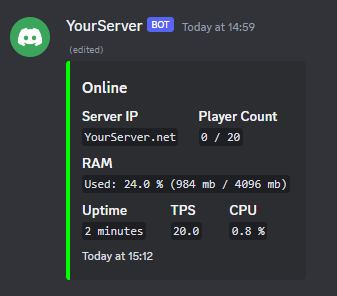
Status4Discord 是一款适用于 Minecraft 服务器的动态 Discord 机器人,通过嵌入卡片(embeds)和活动状态提供实时的服务器统计信息。它能轻松地将你的 Minecraft 服务器与 Discord 连接起来,让你的社区随时掌握从 TPS 到玩家数量等各类信息,保持互动与关注。
开始使用
命令
Minecraft
/status4discord reload 重载配置文件
/status4discord invite 邀请 Discord 机器人
/status4discord info 查看本插件相关信息
/status4discord help 查看所有命令
Discord
@YourDiscordBot setembed 设置嵌入卡片的文本频道
@YourDiscordBot setlogs 设置日志记录的文本频道
权限
Minecraft
status4mc.admin使用 /status4discord reload 和 /status4discord invite 命令
Discord
- Permission.ADMINISTRATOR (管理员权限)
配置
显示配置
#   _____ _        _             _  _   _____  _                       _
#  / ____| |      | |           | || | |  __ \(_)                     | |
# | (___ | |_ __ _| |_ _   _ ___| || |_| |  | |_ ___  ___ ___  _ __ __| |
#  \___ \| __/ _` | __| | | / __|__   _| |  | | / __|/ __/ _ \| '__/ _` |
#  ____) | || (_| | |_| |_| \__ \  | | | |__| | \__ \ (_| (_) | | | (_| |
# |_____/ \__\__,_|\__|\__,_|___/  |_| |_____/|_|___/\___\___/|_|  \__,_|
#
# Thank you for using Status4Discord by Joni
# To setup Status4Discord, please visit https://github.com/LasaJoniHD/Status4DiscordMC/wiki/Setup

#   _____ ___  _  _____ _  _
# |_   _/ _ \| |/ / __| \| |
#   | || (_) | ' <| _|| .` |
#   |_| \___/|_|\_\___|_|\_|
#
# Please paste your discord bot token here
token: ""

#    _   ___ _____ _____   _____ _______   __
#   /_\ / __|_   _|_ _\ \ / /_ _|_   _\ \ / /
#  / _ \ (__  | |  | | \ V / | |  | |  \ V /
# /_/ \_\___| |_| |___| \_/ |___| |_|   |_|
#
# Available Activities:
# PLAYING, WATCHING, LISTENING, CUSTOM_STATUS, COMPETING
# Available Status:
# ONLINE, IDLE, DO_NOT_DISTURB, INVISIBLE, OFFLINE
# You can use PlaceholderAPI if installed (only placeholders that do not require a player).
# Find placeholders included in Status4Discord at https://github.com/LasaJoniHD/Status4DiscordMC/wiki/Placeholders.
activity: "PLAYING %online_players% / %max_players% Players"
status-activity: "ONLINE"
update-activity: 30 # in seconds

# Activities for server start
server-starting-activity: "CUSTOM_STATUS Server is starting..."
server-starting-status: "IDLE"

# ServerIP
# will replace internal Placeholder %serverip%
# --------------------------------------------------------------------------------------------------------------------
# 'serverIP' sets the server IP shown in activity and in the embed.
# If in server.properties, it will obtain the IP that the server is bound to; if not set, it will display "not set."
serverIP: "server.properties"

#  _    ___   ___ ___
# | |  / _ \ / __/ __|
# | |_| (_) | (_ \__ \
# |____\___/ \___|___/
#
# If enabled, the bot will send a message when the server starts/stops in the specified logs channel.
# If you don't know how to obtain the textChannelID and have admin privileges,
# simply send a message in Discord in the channel like this: @MentionYourDiscordBot setlogs.
logs:
  enabled: true
  textChannelID: ""
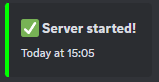
  start:
    color: "GREEN"
    message: ":white_check_mark: **Server started!**"
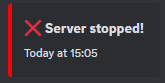
  stop:
    color: "RED"
    message: ":x: **Server stopped!**"

#  ___ __  __ ___ ___ ___
# | __|  \/  | _ ) __|   \
# | _|| |\/| | _ \ _|| |) |
# |___|_|  |_|___/___|___/
#
# If enabled, the bot will send a status embed in the specified channel; this embed will be updated every few seconds.
# If you don't know how to obtain the textChannelID and have admin privileges,
# simply send a message in Discord in the channel like this:
# @MentionYourDiscordBot setembed.
embed:
  enabled: true
  textChannelID: ""
  update: 15 # in seconds

  online:
    title: "Online"
    color: "GREEN" # supports any java.awt.Color enum name (e.g. `RED`, `BLUE`, etc.) or a hex code (e.g. `#FF0000` for red)

    timestamp: true

    footer:
      text: "Uptime: %uptime%"

    fields:
      - name: "Server IP"
        value: "%serverip%"
        inline: true

      - name: "Player Count"
        value: "%online_players% / %max_players%"
        inline: true

      - name: "RAM"
        value: "Used: %usedram_percentage% % (%usedram% mb / %maxram% mb)"
        inline: false

      - name: "Uptime"
        value: "%uptime%"
        inline: true

      - name: "TPS"
        value: "%tps%"
        inline: true

      - name: "CPU"
        value: "%cpu% %"
        inline: true

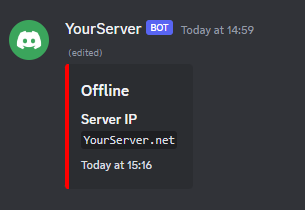
  offline:
    title: "Offline"
    color: "RED"

    fields:
      - name: "Server IP"
        value: "%serverip%"
        inline: true

# Do not touch if you don't know what this setting does
embedMessageID: ""
debug: false
config-version: 4
示例
活动状态

状态嵌入卡片
服务器在线时
服务器离线时
启动/停止日志消息
服务器启动
服务器停止

你是这个资源的作者?登录后可认领此资源。
相似资源
 模组

玉Jade ?
Snownee
显示你正在注视的方块的信息。(适用于 Minecraft 1.16+ 的 Hwyla/Waila 分支)
实用前置
341
 模组
Xaero的小地图
thexaero
在游戏画面角落显示附近世界地形、玩家、生物和实体的地图。可创建路径点,帮助你找到标记过的位置。
冒险交通
241
 模组

物品管理器Just Enough Items (JEI)
mezz
查看物品与配方
前置实用
240
 模组
KubeJS
Lat
使用 JavaScript 编辑配方、添加自定义物品、编写世界事件!
前置实用
239
 模组
Applied Energistics 2
shartte
AE2:一款流行的自动化与存储模组
存储科技
217
 模组
WTHIT
deirn
那是什么?一个 Waila/Hwyla 的分支。
前置实用
165
评论 0
登录后参与评分
还没有评论,来抢沙发吧