
状态效果计时器
这是一个适用于 Fabric 的 Minecraft 模组,它会在原版状态效果 HUD 图标上叠加一个计时器。
该模组会在原版的指示器上叠加显示状态效果的剩余时间。如果效果拥有等级(例如“急迫 II”),则也会叠加显示等级信息。仅此而已。这是一个极简主义的模组,无需也不提供任何设置选项。
时间以剩余秒数显示。持续时间超过 60 秒的效果会以剩余分钟数显示(后跟“m”),而持续时间超过 60 分钟的效果则会以剩余小时数显示(后跟“h”)。
在 1.19.4 版本之前,持续时间为 32147 刻(约 25 分钟)以上的状态效果被视为“无限”,并在本模组中标记为 "**"。从 1.19.4 开始,状态效果可以真正实现无限持续,此时会标记为 "∞" 符号,并且移除了 32147 刻的限制。
我创建这个模组是因为原版的用户体验并不理想:玩家必须打开物品栏并关闭配方书才能查看状态效果的剩余时间。虽然也有其他模组尝试实现这一功能,但大多数模组对原版代码的大部分内容进行了臃肿的替换,而其余的模组仍未能保留原版的基本特性。
截图
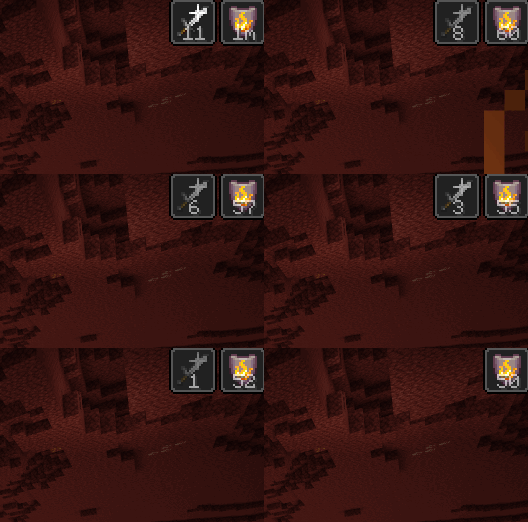
这是使用该模组时的样子。

下载
你可以从以下任一网站下载该模组:
- GitHub releases
- Modrinth versions
- CurseForge
安装
像安装其他任何 Fabric 模组一样安装此模组。(推荐使用 Prism Launcher 作为加载模组的 Minecraft 启动器。)
支持
如果你在使用该模组时遇到任何问题,请在 Github 上提交 Issue。
已知不兼容项
如果安装了模组 'Slight' Gui Modifications 且配置项 fluidStatusEffects 已启用,则本模组无法正常工作。
本模组与 Giselbaer's Durability Viewer 存在冲突,因为该模组也会在状态效果图标上绘制计时器。你需要禁用 Durability Viewer 中的效果时间功能以避免界面杂乱。
如果你正在使用 Feather Client,请进入 General > Vanilla Effect Overlay 并选择 “Off” 或 “Bar”。
其他模组
浏览我的其他模组,它们也提供了类似原版的可用性增强功能:
Mod Settings

Mod Settings 是一款适用于 Fabric 的 Minecraft 模组,它为所有已安装的模组提供了一个易于访问的配置界面。
Elytra Indicators

Elytra Indicators 是一款适用于 Fabric 的 Minecraft 模组,它为鞘翅飞行提供了类似原版的“仪表飞行”支持。
Status Effect Timer
This is a Minecraft mod for Fabric that overlays a timer on the Vanilla status effect HUD icons.
This mod overlays the time left of the status effect on the vanilla indicator. If the effect has an amplifier (as in "Haste II"), the amplifier is also overlaid. That's it. This is a very minimalistic mod. No settings are required nor provided.
The time is presented as seconds remaining. Durations longer than 60 seconds are presented as minutes remaining (followed by "m"), and durations longer than 60 minutes are presented as hours remaining (followed by "h").
Prior to 1.19.4, status effects longer than 32147 ticks (roughly 25 minutes) where considered "infinite", and are marked as "**" in the mod. Starting with 1.19.4, status effects can be properly infinite, which is marked by a "∞" symbol, and the 32147 tick limit has been removed.
I created this since the vanilla user experience of going into the inventory, and closing the recipe book, to check the remaining time of status effects was .. not ideal. There are some other mods that tried to achieve this, but most are bloated replacement for large parts of vanilla code, and the remaining still did not keep the vanilla basics.
Screenshot
This is what it looks like when you are using the mod.
Download
You can download the mod from any of these sites:
- GitHub releases
- Modrinth versions
- CurseForge
Installation
Install this as you would any other Fabric mod. (I recommend using Prism Launcher as Minecraft launcher for modded Minecraft.)
Support
Do you have any problems with the mod? Please open an issue on Github.
Known Incompatibilities
This mod does not work if the mod 'Slight' Gui Modifications is installed and the configuration fluidStatusEffects is enabled.
This mod conflicts with Giselbaer's Durability Viewer, since that mod also draws a timer on the status effect icon. You need to disable the effect time feature in Durability Viewer to avoid clutter.
If you are using the Feather Client, you need to go to General > Vanilla Effect Overlay and select "Off" or "Bar".
Other Mods
Check out my other mods, which also supplies vanilla-style usability enhancements:
Mod Settings
Mod Settings is a Minecraft mod for Fabric that provides an easy to access configuration screen for all installed mods.
Elytra Indicators
Elytra Indicators is a Minecraft mod for Fabric that provides Vanilla-style "fly by instrument" support for elytra flight.

下载 Status Effect Timer
下载 Status Effect Timer
需要联机服务器吗?
稳定流畅、一键部署,几分钟即可和朋友联机开服
最低仅需 8 元/月 即可畅快联机
下载 Status Effect Timer
需要联机服务器吗?
稳定流畅、一键部署,几分钟即可和朋友联机开服
最低仅需 8 元/月 即可畅快联机
下载 Status Effect Timer
下载 Status Effect Timer
下载 Status Effect Timer
需要联机服务器吗?
稳定流畅、一键部署,几分钟即可和朋友联机开服
最低仅需 8 元/月 即可畅快联机
下载 Status Effect Timer
需要联机服务器吗?
稳定流畅、一键部署,几分钟即可和朋友联机开服
最低仅需 8 元/月 即可畅快联机
下载 Status Effect Timer
下载 Status Effect Timer
下载 Status Effect Timer
新增
- 支持 Minecraft 26.3
关于这个资源的讨论、问题反馈与使用心得
还没有讨论,来发第一帖吧
你是这个资源的作者?登录后可认领此资源。
相似资源
 模组

显示你正在注视的方块的信息。(适用于 Minecraft 1.16+ 的 Hwyla/Waila 分支)
 模组
使用 JavaScript 编辑配方、添加自定义物品、编写世界事件!
 模组

查看物品与配方
 模组
在游戏画面角落显示附近世界地形、玩家、生物和实体的地图。可创建路径点,帮助你找到标记过的位置。
 模组
AE2:一款流行的自动化与存储模组
 模组
那是什么?一个 Waila/Hwyla 的分支。
评论 0
登录后参与评分
还没有评论,来抢沙发吧