
进入任意结构时,自动显示其名称及所属模组来源,确保易于识别并归功于模组创作者。无缝兼容其他模组的结构,保证兼容性。 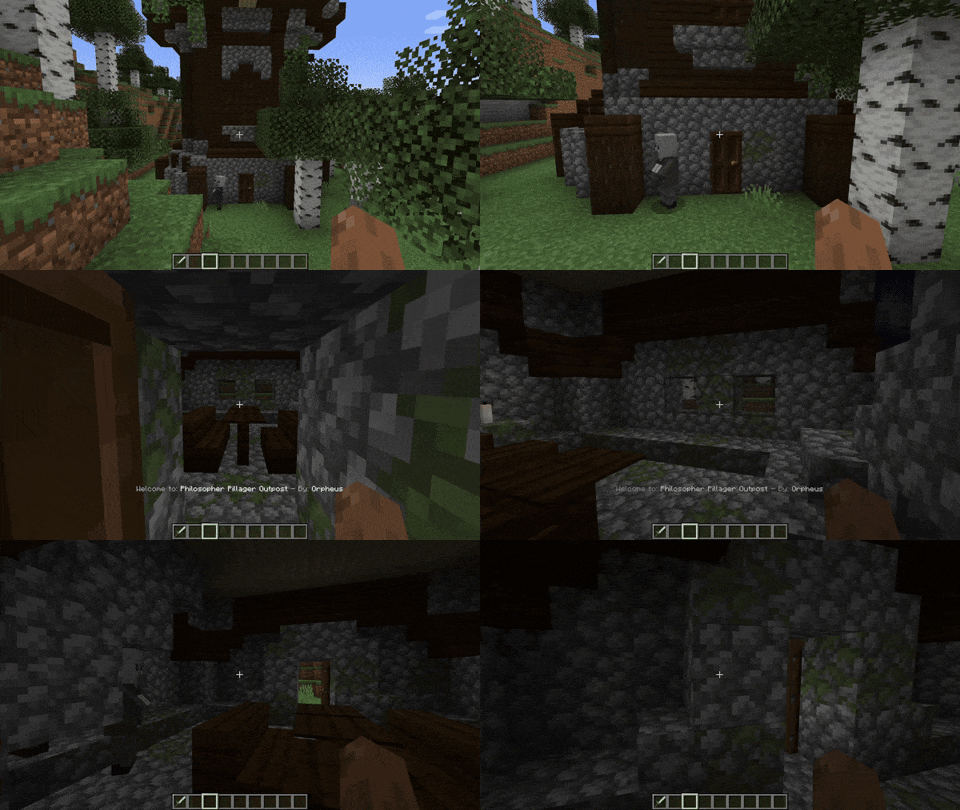
如果你希望该提示在 Minecraft 原版结构中也能显示,请打开配置文件 .json,删除以 minecraft: 开头的行即可。
会不会很烦人? 不会! 如果你的基地建在某个结构内,完全不用担心!默认情况下,每个结构的提示信息仅出现一次。
你甚至可以自定义结构名称!
"customStructureName": {
  "minecraft:swamp_hut": "a_cat:cat_hut"
Discord:
常见问题解答(FAQ)
问:会不会很烦人?
答:我已经尽力做到不扰民了,但如果对你来说仍然很烦:请检查配置和键位绑定,并使用它们。
或者有一个非常实用的配置选项(默认为开启/True),它会让每个结构只在你第一次访问时显示一次提示。首次访问后,你将不会再看到该结构的提示。
那如果我想禁用这个设置呢?别担心,因为即使禁用了此设置,当你看到一个结构的提示(结构 A)时,你需要离开该结构,进入另一个不同的结构(结构 B),然后重新回到之前的结构(结构 A),才能再次看到名称。因此,如果有人住在某个结构里,也不会被打扰。
问:我可以提建议吗?
答:当然可以,欢迎提出建议。
问:我可以把这个模组加入我的整合包吗?
答:当然可以,尽管使用吧!
**
如何使用配置:**
前往你的配置文件夹,找到 structurecredits-config.json,你会看到如下内容:
{
  "active": true,
  "showOnlyOneTime": true,
  "chatMessage": false,
  "customStructureName": {
    "minecraft:swamp_hut": "a_cat:cat_hut"
  },
  "dontShowAll": [
    "minecraft:",
    "dimdungeons:"
  ],
  "dontShow": [
    "minecraft:plains_village",
    "minecraft:desert_village"
  ]
}
此外,游戏中还有一个可绑定的快捷键,你可以将其设置为停用所有提示消息。
本模组与 Dimensional Dungeons 兼容 —— 感谢 Catastrophe 的贡献 —— 仅在自定义房间中显示提示,前提是你已在 'config dontShowAll' 中配置了以下项:"dimdungeons:"(默认配置,推荐)。创建新的自定义房间时请记住,包名对应的是“By: X”,而结构名称对应的是“Welcome to: X”。
Automatically displays the name and mod source of any structure upon entry, ensuring easy recognition and credit for mod creators. Seamlessly integrates with structures from other mods, ensuring compatibility.
If you want the message to show up in Minecraft vanilla structures, go to the config .json file and delete the lines starting with "minecraft:"
Is it going to be annoying? No! if your base is inside a structure, don't worry! By default, the structure messages only appear once per structure.
You can change the Structure Names too!
"customStructureName": {
  "minecraft:swamp_hut": "a_cat:cat_hut"
Discord:
FAQ
Q: Is it going to be annoying?
A: I did the max to make it no-annoying, but if it's annoying for you: Check the config and the keybinds and use them
OR There is a really good config (by default it is on ON/True) that will make you see the structure message only one time per structure. After the first time visiting the structure you will never see it again.
But what if I want that setting disable? don't worry beacause if it's disable when you see the message of a structure (Structure A) you have to leave the structure, enter a different one (Structure B), and re-enter the other structure (Structure A) to see again the name. So now if someone lives in one structure it will not bother
Q: Can I suggest something?
A: Please, yes.
Q: Can I add this to my modpack.
A: Go ahead!
**
How to use configs:**
Go to your config folder, structurecredits-config.json and you will see this:
{
  "active": true,
  "showOnlyOneTime": true,
  "chatMessage": false,
  "customStructureName": {
    "minecraft:swamp_hut": "a_cat:cat_hut"
  },
  "dontShowAll": [
    "minecraft:",
    "dimdungeons:"
  ],
  "dontShow": [
    "minecraft:plains_village",
    "minecraft:desert_village"
  ]
}
Plus, there is an in-game keybind that you can assign to deactivate all messages
The mod is compatible with Dimensional Dungeons - thanks Catastrophe - The message will only be displayed in custom rooms if you have the following setting configured in 'config dontShowAll': "dimdungeons:" (Default configuration, and recommended). When creating a new custom room, remember, the package name is the "By: X" and the structure name is the "Welcome to: X".

下载 Structure Credits
下载 Structure Credits
下载 Structure Credits
下载 Structure Credits
下载 Structure Credits
下载 Structure Credits
下载 Structure Credits
下载 Structure Credits
下载 Structure Credits
下载 Structure Credits
修复卡顿
关于这个资源的讨论、问题反馈与使用心得
还没有讨论,来发第一帖吧
你是这个资源的作者?登录后可认领此资源。
相似资源
 模组

显示你正在注视的方块的信息。(适用于 Minecraft 1.16+ 的 Hwyla/Waila 分支)
 模组
使用 JavaScript 编辑配方、添加自定义物品、编写世界事件!
 模组

查看物品与配方
 模组
在游戏画面角落显示附近世界地形、玩家、生物和实体的地图。可创建路径点,帮助你找到标记过的位置。
 模组
AE2:一款流行的自动化与存储模组
 模组
那是什么?一个 Waila/Hwyla 的分支。
评论 0
登录后参与评分
还没有评论,来抢沙发吧