
Structure Gel 是一个旨在让开发者更容易创建结构的模组 API,特别是针对使用拼图系统(jigsaw system)的结构。所有代码均为开源并提供文档说明。
其部分功能包括:
? 在此阅读 Structure Gel API 文档
如需查看此 API 的开源工作示例,请查阅 Dungeons Plus你可以根据 Minecraft 版本找到关于如何开发和使用该 API 的详细信息。
最新文档
? 最新功能
?️ 建造工具
建造工具是一项仅适用于创造模式的新型物品,用于执行各种大规模方块修改操作。- 你可以在“结构物品”创造模式标签页中找到它。
- 在空气中右键点击建造工具以打开 GUI。打开后,你可以选择想要使用的模式、撤销、重做、选择位置等。

图形用户界面 (GUI)
GUI 包含各种用于修改建造工具设置的按钮,以及一些便捷的工具。- 按下
enter、e、escape键,或点击屏幕上非按钮的任何区域,即可关闭 GUI。 - 将鼠标悬停在 GUI 上的任何物品上,右侧会显示提示框,解释其功能及使用方法。
- 使用径向菜单,你可以选择想要使用的模式。
- 某些模式支持定位。如果支持,左上角会出现一个按钮,根据你当前的位置选择坐标。这在无法右键点击方块或右键点击非常不便时非常有用。
- 左侧的撤销和重做按钮功能如其名。它们尝试撤销或重做你最近一次使用建造工具执行的操作。最多可保存并撤销 32 个操作。
- 某些模式具有额外设置,这些设置将显示在撤销和重做按钮下方。
- 中间的按钮用于选择你想要使用的方块。点击它会弹出一个文本框供你输入方块状态(block state)。这在游戏中也可以完成,但对于水等难以点击的方块来说,这种方式更为方便。
控制方式
- 中键:选中你当前注视的方块状态(也可在 GUI 中完成)。
- 左键:这是通用“执行操作”按键,具体取决于你所处的模式。
- 右键点击空气:打开 GUI。
- 右键点击方块:某些模式使用此操作来设置位置,不支持设置位置的模式也允许通过此操作“执行操作”。
- Shift + 右键点击:清除当前选定的位置。
模式
建造工具模式是建造工具可以执行的不同操作。-
延伸(Extend):根据你点击的方块侧面检测图案,并尝试在该方向前方放置方块以延续该图案。如果你熟悉旧版的 Builder's Wands 模组,它的理念基本相同。

-
填充(Flood):填充你点击所在的 Y 轴切片内的所有空气方块,直到遇到边界,然后继续向下填充。例如,这对于用水平面填满湖泊非常有用。
-
填充区域(Fill):与原版 /fill 命令非常相似。选择两个对角点,然后左键点击以用当前选中的方块填充该区域。支持替换特定方块以及仅放置框架或空心立方体等选项。
-
直线(Line):在选定的位置之间使用当前选中的方块放置一条直线。
-
克隆(Clone):复制选定区域并将其粘贴到你点击的位置。支持旋转、镜像以及裁剪而非复制。

-
移动(Move):将你朝攻击方向移动选定区域。
-
清除(Clear):移除选定位置内的所有方块。
-
形状:在你点击的位置放置一个形状。可以通过图形界面中的模式属性来更改形状以及要替换的方块。

模式属性
某些模式支持额外的设置以修改其行为。一些示例包括:- 完整性(Integrity):决定实际放置多少方块。
- 替换(Replace):决定该模式在放置方块时替换什么。All 替换所有方块,Air 仅替换空气,Clicked 替换你点击的那个方块。
- 旋转与镜像(Rotation and Mirror):旋转或镜像克隆的区域。还可以选择随机值。
? 结构凝胶方块
这是一种创造模式工具,用于轻松填充结构的内部。当你的结构生成时,凝胶会被替换为空气,而在放置过程中所有的空气都会被忽略。这确保了你的结构不会在不应该出现的地方包含自然地形。凝胶方块的行为类似于结构虚空(structure voids),你可以穿过它,但它实际上是可见的。当你潜行放置凝胶时,可以触发扩散机制。每种凝胶的扩散方式不同,你可以将鼠标悬停在物品上查看其工作原理。
? 认识这些凝胶!
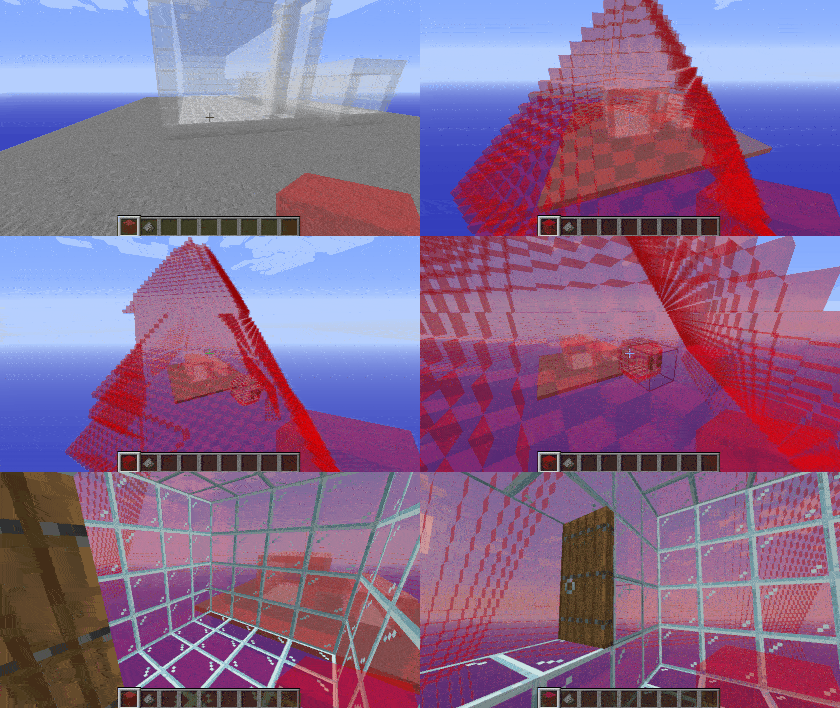
? 红色凝胶
红色凝胶使用默认的扩散机制,沿基本方向扩散,仅替换空气。Spoiler
? 蓝色凝胶
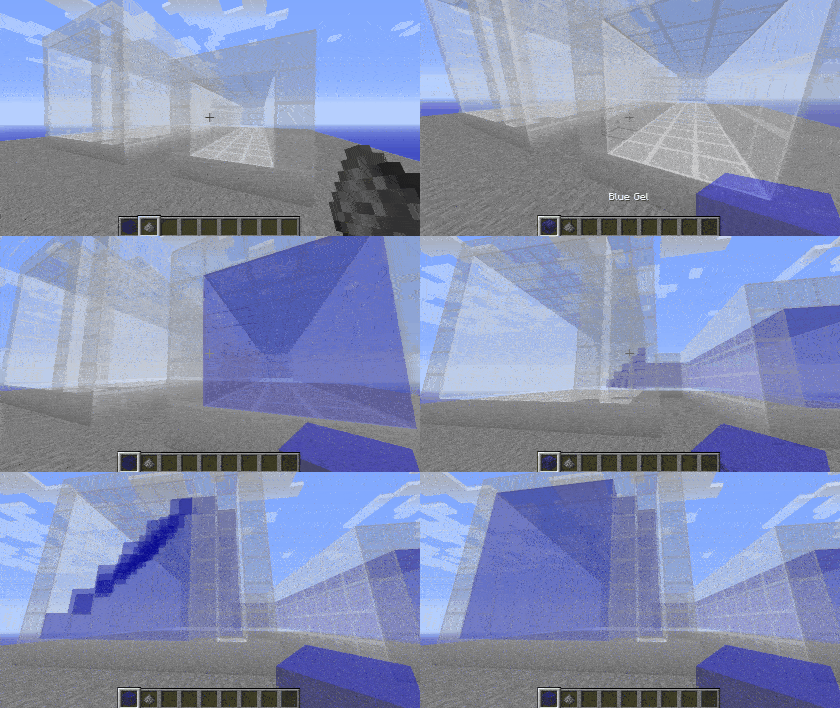
蓝色凝胶的功能与红色凝胶类似,但它不会向能看到天空的位置扩散。Spoiler
? 绿色凝胶
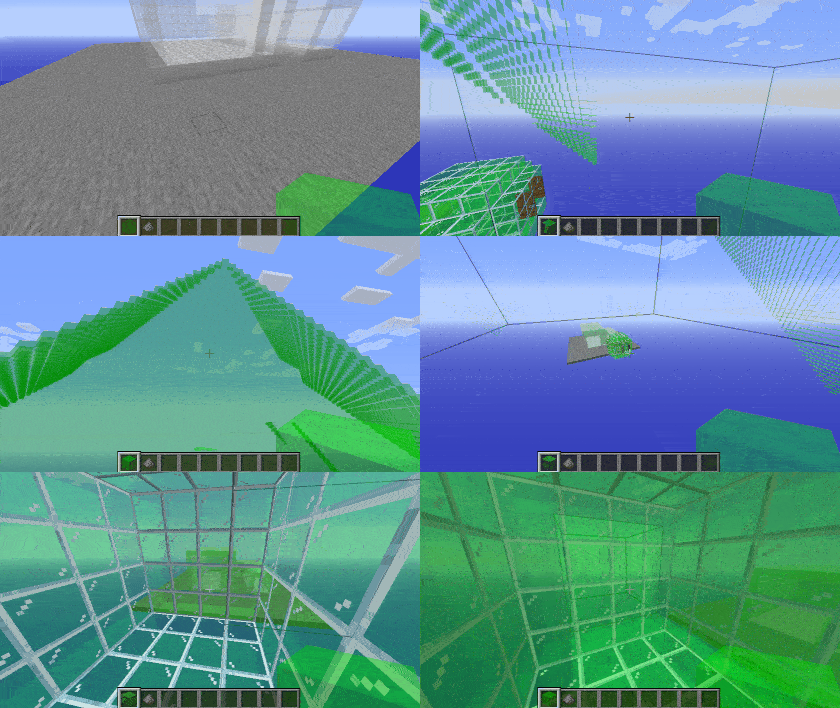
绿色凝胶的扩散方式与红色凝胶相同,并增加了对角线扩散的能力。这使得它能够穿过由藤蔓或其他复杂建筑形成的角落。请小心不要让它泄漏到建筑外部。Spoiler
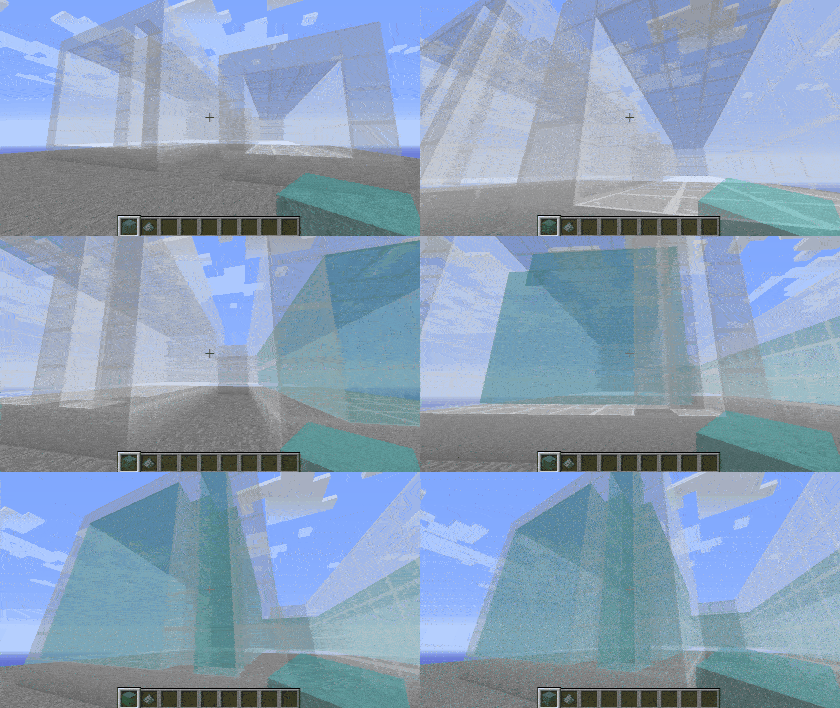
? 青色凝胶
青色凝胶结合了绿色和蓝色凝胶的特性,既能对角线扩散,又能避开天空。Spoiler
? 橙色凝胶
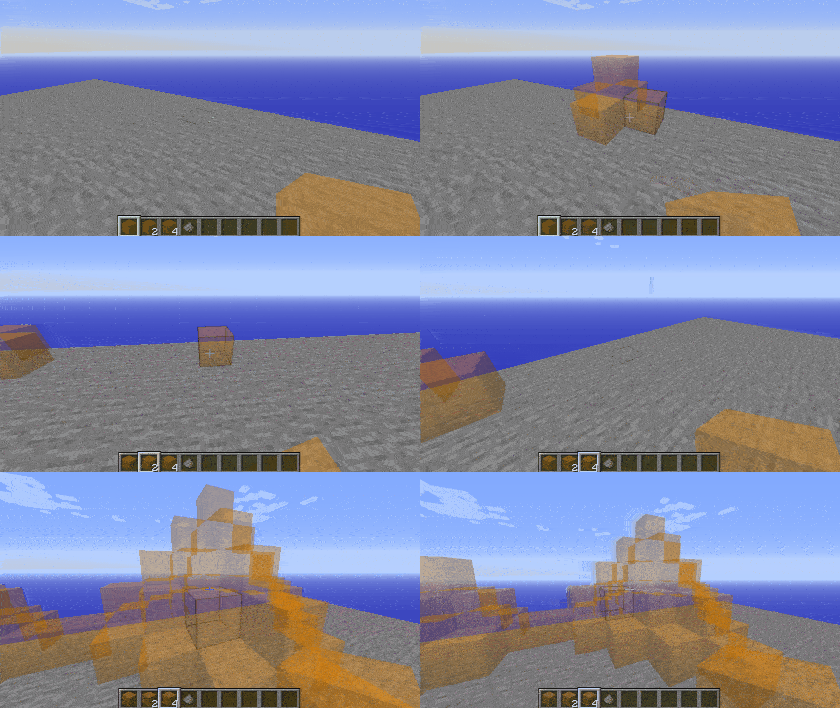
橙色凝胶的行为与红色凝胶相同,但其扩散距离取决于你在放置时手持的数量,使其非常适合在开阔区域进行建造。Spoiler
? 黄色凝胶
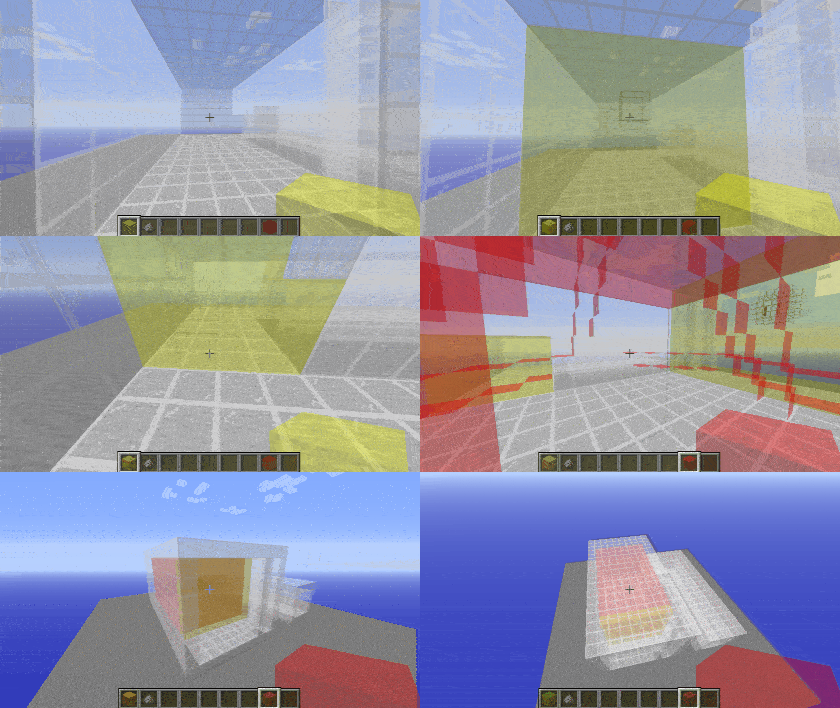
黄色凝胶仅在你放置时所面对平面的方向上扩散,非常适合用来封堵墙壁、窗户或其他凝胶可能会穿过的孔洞。Spoiler
移除凝胶
可以使用火药来移除凝胶。这样做会引发连锁反应,移除所有相连的同类型凝胶。Spoiler
示例
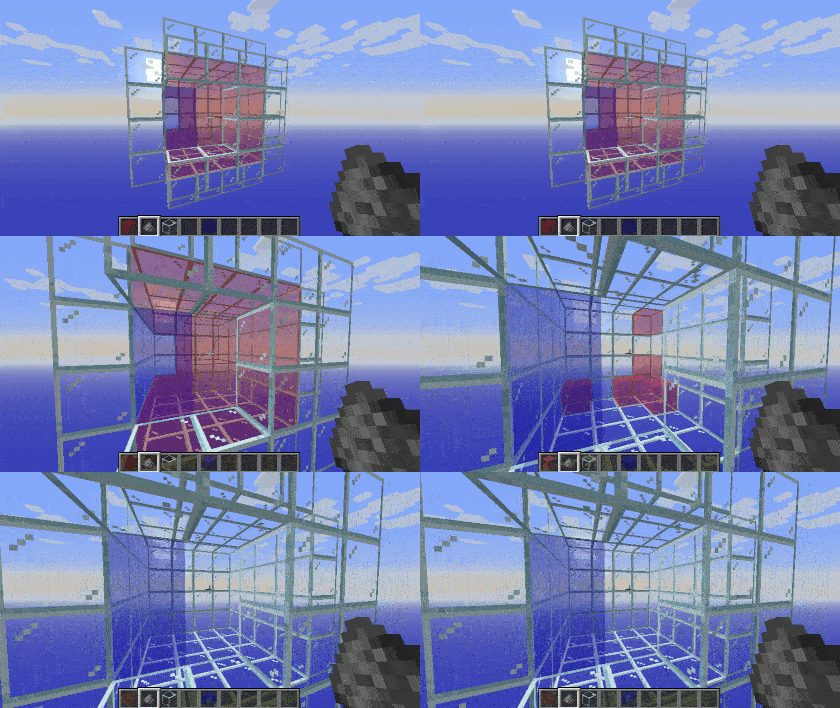
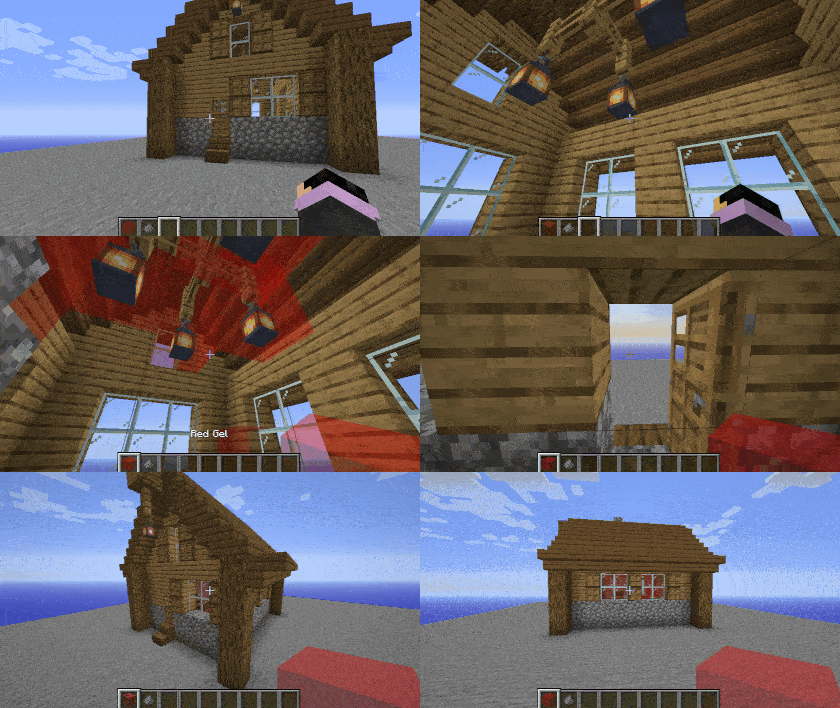
这里有一个如何在建筑中使用的示例。如果将此结构加载到游戏中,内部的凝胶将被替换为空气,而外部的空气则不会被放置。Spoiler
? 翻译 Structure Gel API - 帮助打破语言障碍!
所有翻译者都将在此处署名。感谢每一位帮助使此模组易于访问的人!| 旗帜 | 语言 | 翻译者 |
|---|---|---|
 |
Deutsch | A1403, Barion |
 |
Português (Brasil) | gabisaoo, simsgameboh |
 |
Nederlands (Nederland) | faas.mr |
 |
Español (España) | Minaderm , guillermojuegostablet, juggernogk |
 |
Українська (Ukrayins'ka) | Queez |
 |
Türkçe (Türkiye) | asimemir58, demirgokler406 |
 |
עברית ('Ivriyþ) | pecan1245 |
 |
Español (Argentina) | patriciofagetti |
 |
Italiano (Italia) | antonioauciello226 |
 |
Lietuvių | WaryRGMCA |
? 支持:如果您对我们的模组有任何疑问或问题,请阅读常见问题解答!您也可以在问题追踪器上提交一个问题,或者加入我们的 Discord 服务器,我们将为您提供帮助!
Structure Gel is an API mod designed to make creating structures easier on the developers, specifically ones using the jigsaw system. All code is open source and documented.
Some of its features include:
? Read the Structure Gel API Documentation Here
For an open source working example of this api, check out Dungeons PlusYou can find detailed information on how to develop and use this API by Minecraft version.
Latest Documentation
? Latest Features
?️ Building Tools
The Building Tool is a new creative mode only item used to perform various large scale block alterations.- It can be found in the Structure Items creative mode tab.
- Right click the Building Tool in the air to open the GUI. Once open, you can select what mode you want to use, undo, redo, select your position, and more.
GUI
The GUI contains various buttons to modify the Building Tool's settings, as well as some convienent tools.- Pressing,
enter,e,escape, or clicking anywhere on the screen that isn't a button will close the GUI. - Hovering over any item on the GUI will display a tooltip on the right side to explain what it does and how to use it.
- Using the radial menu, you can select which mode you want to use.
- Some modes support positions. If they do, a button will appear on the top left to select a position based on your current location. This is mainly useful when right clicking a block isn't possible or is highly inconvenient.
- The Undo and Redo buttons on the left exist to do exactly what they say. They attempt to undo or redo the last action you performed with the Building Tool. Up to 32 actions are saved and can be undone.
- Some modes have additional settings, these settings will appear below the undo and redo buttons.
- The button in the middle is used to select what block you want to use. When you click it, a text box will open for you to type a block state. This can be done in game as well, but some blocks like water are more than difficult to click on.
Controls
- Middle Click: Selects the current block state you're looking at (also can be done in the GUI).
- Left Click: This is the general key for "do the thing" depending on what mode you're in.
- Right Click Air: Opens the GUI.
- Right Click Block: Some modes use this to set positions, but ones that don't also allow this to "do the thing" as well.
- Shift + Right Click: Clears the currently selected positions.
Modes
Building Tool Modes are different operations that the Building Tool can perform.-
Extend: Detects a pattern based on the side of the block you click, and attempts to place blocks in front of that to continue that pattern. If you're familiar with the old Builder's Wands mod, it's essentially the same idea.
-
Flood: Fills all air blocks within the y level slice that you click, until it hits a border, then continues to fill going downward. This is useful for filling a lake with water for example.
-
Fill: Very similar to the vanilla fill command. Select two corners and then left click to fill the area between with the currently selected block. Has options for replacing specific blocks and only placing a frame or hollow box.
-
Line: Places a line of blocks between the selected positions using the currently selected block.
-
Clone: Copies the selected region and pastes it where you click. Allows for rotating, mirroring, and cutting instead of copying.
-
Move: Moves the selected region in the direction that you punch.
-
Clear: Removes all blocks within the selected positions.
-
Shape: Places a shape where you click. The shape and what blocks will be replaced can be changed though the mode's properties in the GUI.
Mode Properties
Some modes support additional settings to modify their behavior. Some examples include:- Integrity: Determines how many blocks will actually place.
- Replace: Determines what the mode will replace when placing blocks. All replaces everything, Air replaces only air, and Clicked replaces the block you clicked on.
- Rotation and Mirror: Rotates or mirrors the cloned region. Allows for selecting a random value as well.
? Structure Gel Block
This block is a creative tool to fill the insides of structures easily. The gel is replaced with air when your structure generates while all air is ignored when being placed. This ensures that your structures won't have natural terrain where it shouldn't be. The gel block behaves similarly to structure voids in that you can walk through it, while actually being visible.When placing gel while sneaking, you can trigger the spreading mechanic. Each gel spreads differently, and you can read how they work by hovering over the item.
? Meet the Gels!
? Red Gel
Red gel uses the default spreading mechanic, spreading along the cardinal directions, only replacing air.Spoiler
? Blue Gel
Blue gel functions similarly to red, except it won't spread into locations where the sky can be seen.Spoiler
? Green Gel
Green gel spreads the same as red gel, with the addition of also spreading diagonally. This allows it to get through corners created by vines or other complex builds. Be careful not to let it leak outside of your build.Spoiler
? Cyan Gel
Cyan gel acts as a combination of green and blue gel, by both spreading diagonally and avoiding the sky.Spoiler
? Orange Gel
Orange gel behaves the same as red gel, but the distance it spreads is determined by how many you're holding when you place it, making it handy for builds in open areas.Spoiler
? Yellow Gel
Yellow gel will only spread along the plane that you're facing when you place it, making it great for sealing off walls, windows, or other holes that the gel would otherwise go through.Spoiler
Removing Gels
Gel can be removed by using gunpowder on it. Doing this will trigger a chain reaction, removing all connected gels of the same type.Spoiler
Examples
Here's an example of how it could be used in a build. If this structure were loaded into the game, the gel inside would be replaced with air, while the air outside would not be placed.Spoiler
? Translate Structure Gel API - Help break the language barrier!
All translators are credited here. Thank you to everyone who helps make this mod accessible!| Flag | Language | Translators |
|---|---|---|
|
Deutsch | A1403, Barion |
|
Português (Brasil) | gabisaoo, simsgameboh |
|
Nederlands (Nederland) | faas.mr |
|
Español (España) | Minaderm , guillermojuegostablet, juggernogk |
|
Українська (Ukrayins'ka) | Queez |
|
Türkçe (Türkiye) | asimemir58, demirgokler406 |
|
עברית ('Ivriyþ) | pecan1245 |
|
Español (Argentina) | patriciofagetti |
|
Italiano (Italia) | antonioauciello226 |
|
Lietuvių | WaryRGMCA |
? Support: If you have questions or any issues with our mods, read the FAQ! You can also either submit an issue on the issue tracker, or come into our Discord server where we can help you!

下载 Structure Gel API
下载 Structure Gel API
下载 Structure Gel API
下载 Structure Gel API
下载 Structure Gel API
下载 Structure Gel API
下载 Structure Gel API
下载 Structure Gel API
下载 Structure Gel API
下载 Structure Gel API
26.1.2-v2.22.0
Loot Sampler
- 新增用于测试战利品表的创造模式方块。
- GUI 包含以下内容:
- 顶部有一个文本字段,用于输入战利品表 ID。
- 按钮,用于在提供的物品栏中生成战利品。
- 按钮,用于刷新概率显示菜单。
- 按钮,用于切换战利品是否来自玩家击杀。
- 左侧有一个菜单,显示物品概率和数量。
- 当输入有效的战利品表时,它将对战利品表进行大量采样,以获得在游戏内准确估算从该表中获得每种物品的可能性。所有当前装备都会被考虑在内,例如带有“抢夺”附魔的剑或带有“效率”附魔的镐。
- GUI 包含以下内容:
JigsawCapability
- 新增
void modifyGenerationContext(JigsawStructureContext context)。- 允许更改用于生成
ExtendedJigsawStructure的值。- 目前仅允许更改生成高度。
- 允许更改用于生成
ITemplateNameGetter
- 获取用于生成的结构模板的 ID。
- 调用静态方法
Optional<Identifier> ITemplateNameGetter.getTemplateName(StructurePiece piece)以获取结构模板 ID。 - 应用于
StructurePiece或StructurePoolElement的接口。- 通过 mixin 应用于
TemplateStructurePiece、PoolElementStructurePiece和SinglePoolElement。
- 通过 mixin 应用于
StructureProcessor
- 新增
RetainExistingProcessor- 仅当现有方块可被替换时才放置方块。
ITooltipBlock
- 应用于应拥有工具提示方块的接口。
- 工具提示在
ItemTooltipEvent期间添加。
- 工具提示在
命令
/structure_gel distance现在还会记录平均搜索时间。
修复
- 修复了
JigsawPoolBuilder未正确排序值导致不必要的数据生成文件更改的问题。 - 移除了建筑工具和结构边界渲染中的雾气,因为浓雾(如在下界中)会导致渲染不准确。
- 修复了数据处理器屏幕中的滚动问题。
- 数据处理器现在会正确显示所有战利品表,而不仅仅是显示战利品表别名。
- 将排序后的 Structure Gel 物品添加到 Operator Utilities 创造模式标签页中。
关于这个资源的讨论、问题反馈与使用心得
还没有讨论,来发第一帖吧
你是这个资源的作者?登录后可认领此资源。
相似资源
 模组

显示你正在注视的方块的信息。(适用于 Minecraft 1.16+ 的 Hwyla/Waila 分支)
 模组

查看物品与配方
 模组

原版世界生成优化模组
 模组
在游戏画面角落显示附近世界地形、玩家、生物和实体的地图。可创建路径点,帮助你找到标记过的位置。
 模组
使用 JavaScript 编辑配方、添加自定义物品、编写世界事件!
 模组
AE2:一款流行的自动化与存储模组
评论 0
登录后参与评分
还没有评论,来抢沙发吧