Minecraft-Structure-Voidable
概述
Structure Voidable 模组为 Minecraft 内容开发者提供了便利,使 Structure Void(结构虚空)方块的使用更加轻松。
适用于 Minecraft 1.21
使用 ArchitecturyAPI
应支持仅客户端运行*
功能特性
Structure Void 行为
- Barrier 样式:在世界中以类似 Barrier(屏障)和 Light(光源)方块的视觉风格将 Structure Void 方块显示为物品。
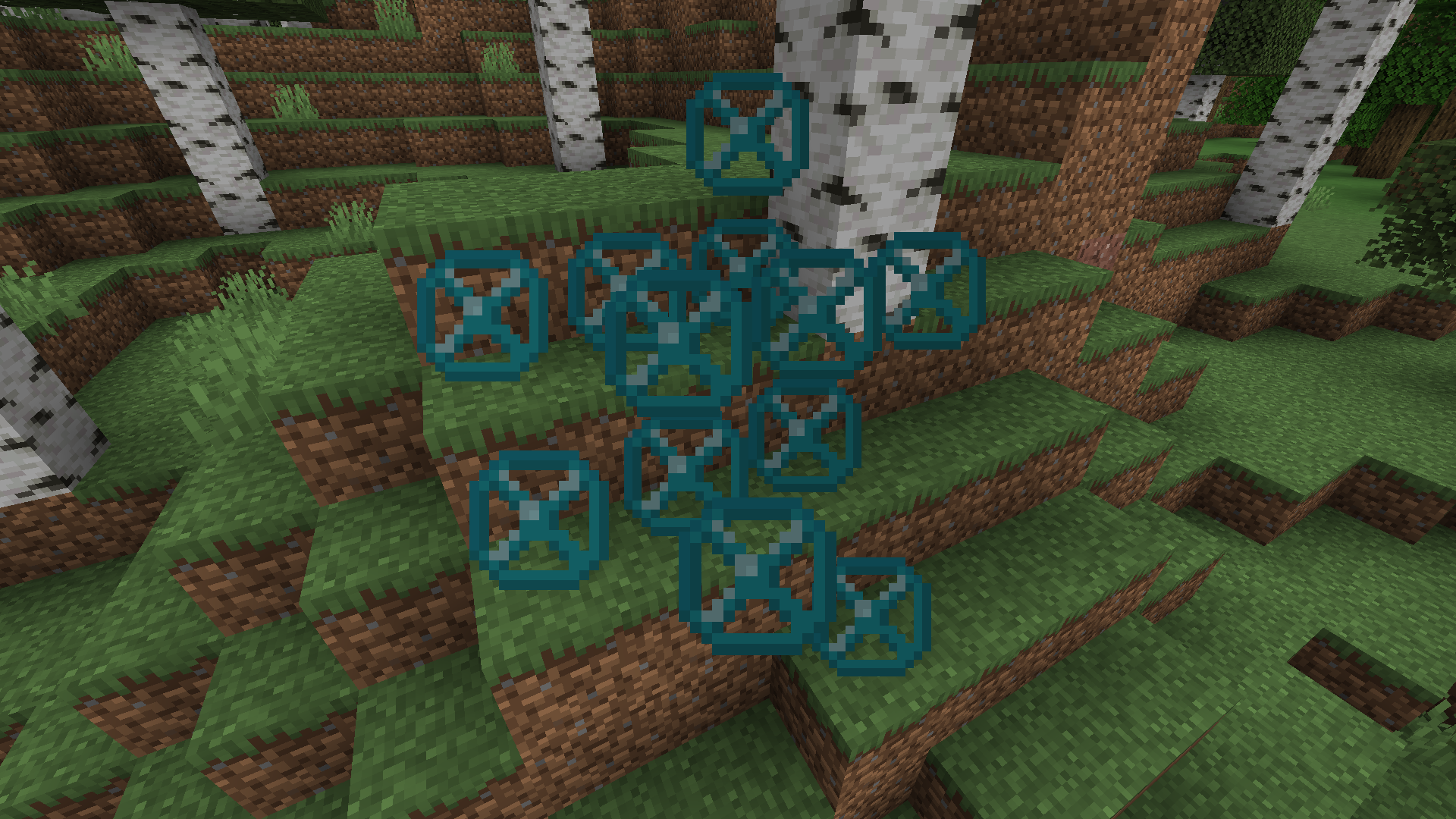
- 全图可见:一个设置项,用于启用标准 Structure Void 渲染效果的查看,无论其在 Structure Block Field(结构方块区域)中的放置位置如何。
- 完整方块轮廓:可破坏和可放置的 Structure Void 轮廓线可以扩大至完整方块的大小。
- 完整方块渲染:标准的 Structure Void 渲染框轮廓可以扩大至完整方块的大小。
- 自定义轮廓:更改 Structure Void 框轮廓的颜色。
安装方法
- 下载 Structure Voidable 模组文件。
- 确保已安装 Minecraft Fabric Loader。
- 将模组文件放入你的 Minecraft
mods 文件夹中。
- 使用 Fabric 配置文件启动 Minecraft。
依赖项
- 必需:ArchitecturyAPI
- 推荐:ModMenu
配置
模组配置文件
- 位于 config 文件夹中,配置文件允许你自定义模组的各个方面,例如轮廓颜色和轮廓大小。
- ModMenu 允许在游戏中直接更改配置。
使用方法
Structure Void 放置
- 初次安装后:所有 Structure Void 方块的渲染方式与 Barrier 方块相同。
- 初次安装后:所有 Structure Void 方块的破拆和放置轮廓将扩大至完整方块大小。
- 在配置文件中:如果启用了“Voids Everywhere”和“Full Block Render”,新放置的 Structure Void 方块将更新为新样式,任何接收到方块更新的 Structure Void 方块也会随之更新。
贡献
欢迎贡献!
如果你有新功能、优化或漏洞修复的想法,
请随时在模组的 GitHub 仓库中提交 issue 或 pull request。
*我不确定它是否 100% 支持仅客户端运行,所以不要完全相信我;当我加入一个没有安装该模组的服务器时,它仍然正常工作。
看起来如果服务器端安装了它,客户端也必须安装才能正常工作。

Minecraft-Structure-Voidable
Overview
The Structure Voidable Mod for Minecraft helps the Minecraft content developer by making the Structure Void block easier to use.
Works in Minecraft 1.21
Uses ArchitecturyAPI
Should work as Client-side Only*
Features
Structure Void Behavior
- Barrier Behavior: Display the Structure Void block as an item in the world similar to the visual style of Barrier and Light blocks.

- Voids Everywhere: A setting to enable the view of the standard Structure Void render regardless of placement within a Structure Block Field
- Full Block Outline: The breakable and placeable outline of the Structure Void can be increased to be the size of a full block.
- Full Block Render: The standard Structure Void rendered box outline can be enlarged to be a full block.
- Customizable Outline: Change the color of the Structure Void box outline.
Installation
- Download the Structure Voidable Mod file.
- Ensure you have Minecraft Fabric Loader installed.
- Place the mod file into your Minecraft
mods folder.
- Start Minecraft using the Fabric profile.
Dependencies
- Required: ArchitecturyAPI
- Recommended: ModMenu
Configuration
Mod Configuration File
- Located in the config folder, the configuration file allows you to customize various aspects of the mod, such as outline color and outline size.
- ModMenu allows changing of the config while in the game.
Usage
Structure Void Placement
- On initial install: All Structure Void blocks rendered in the same method as Barrier blocks.
- On initial install: All Structure Void blocks will have the breakable and placeable outline increased to a full block.
- In the config: If Voids Everywhere and Full Block Render is turned on, newly placed Structure Void blocks will update with the new style, as well as any Structure Void blocks that get a block update.
Contributions
Contributions are welcome!
If you have ideas for new features, optimizations, or bug fixes,
please feel free to open an issue or submit a pull request in the mod's GitHub repository.
*I'm not sure if it 100% works client-side only so don't quote me, it still worked when I joined a server that didn't have it.
It seems like if the server has it, you have to have it too.
评论 0
登录后参与评分
还没有评论,来抢沙发吧