Sync (Forge)
Sync (Forge) 是 Sync 模组的非官方重新实现,该模组最初由 iChun 开发。
关于该模组的简要说明,我认为原版描述已经足够全面:
此模组提供克隆体,或者我们称之为“躯壳”(shells)。这些躯壳本质上是全新的个体,拥有独立的物品栏、经验等级甚至游戏模式。然而,它们缺乏控制它们的意识。这时就需要玩家介入了。每个躯壳都与用于创建它的样本所属玩家生物特征绑定,允许玩家将意识与其“同步”,从而实质上创建多个玩家实例。
合成配方
Sync 核心:

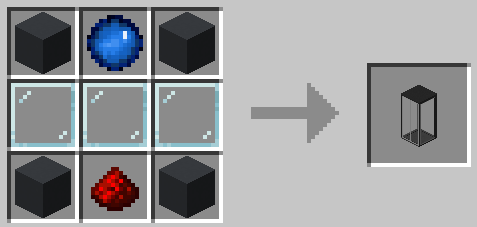
躯壳构建器:
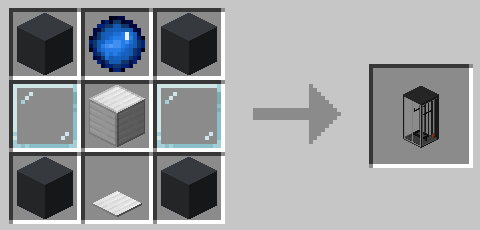
躯壳存储箱:
跑步机:
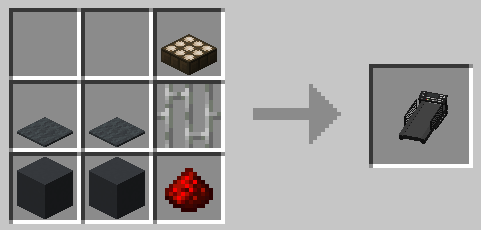
玩法指南
- 你需要合成一个
躯壳构建器 并将其放置。
- 然后你需要为其提供样本——只需
右键点击 该方块即可。⚠️警告:此操作会杀死你! 为了创建一个满血的躯壳,构建器必须吸收 20HP (硬核模式下为 40HP)。如果你不想死,可以吃一个金苹果来增加最大生命值,或者在过程中持有不死图腾 (这是硬核模式下唯一的选择)。
- 躯壳构建器工作需要电力,因此在其旁边放置一个
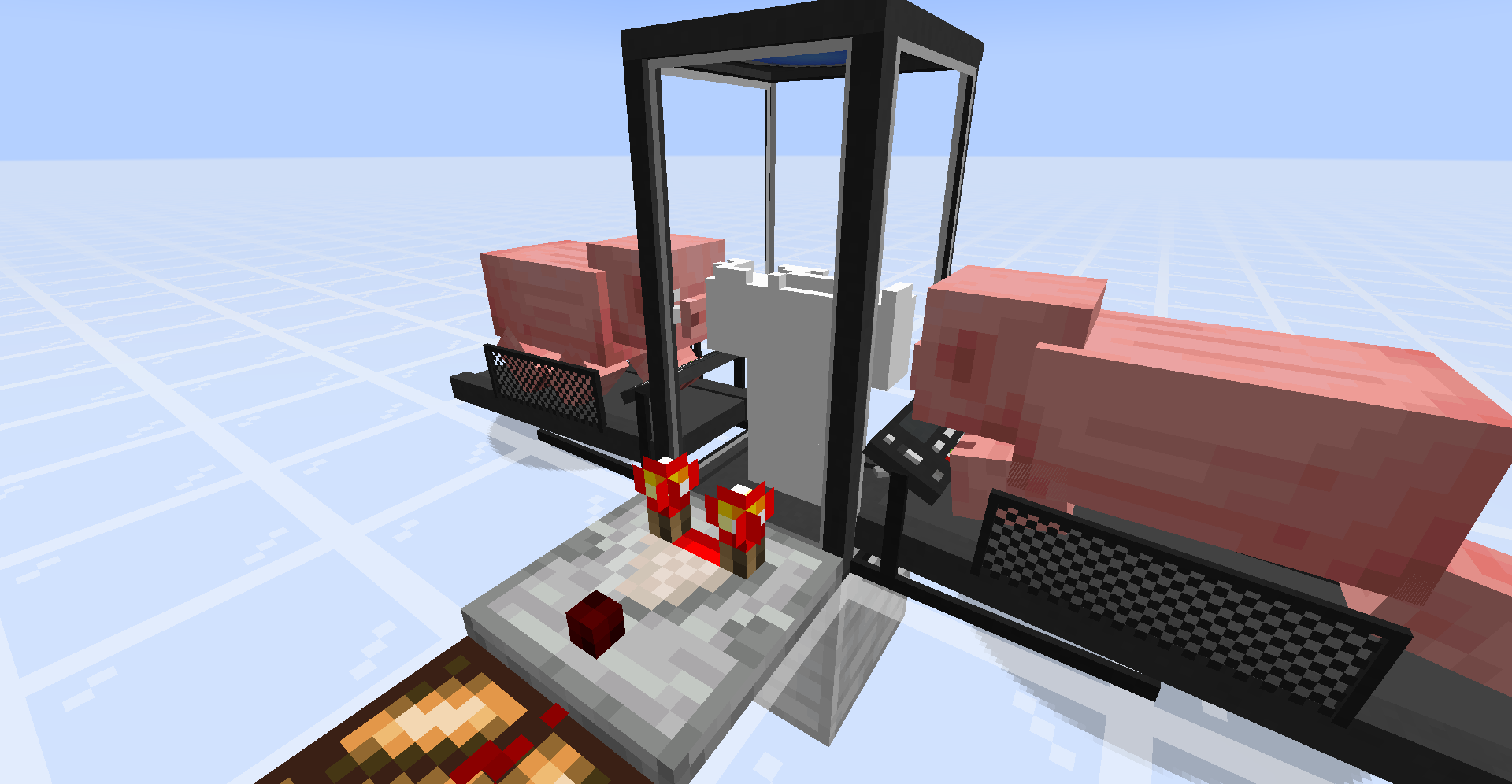
跑步机 (它应接触躯壳构建器任何部分或侧面的任意一侧) 并将 猪 或 狼 引诱至其中心以开始发电。最终效果应类似于此:
P.S. - 你实际上并不需要比较器,这里只是用来演示如何通过比较器输出强度来判断躯壳建造进度。
- 一旦新的躯壳构建完成,你需要合成一个
躯壳存储箱 并将其放置。
- 为其提供
红石信号。
- 当躯壳存储箱的门打开后,你可以
走进其中。
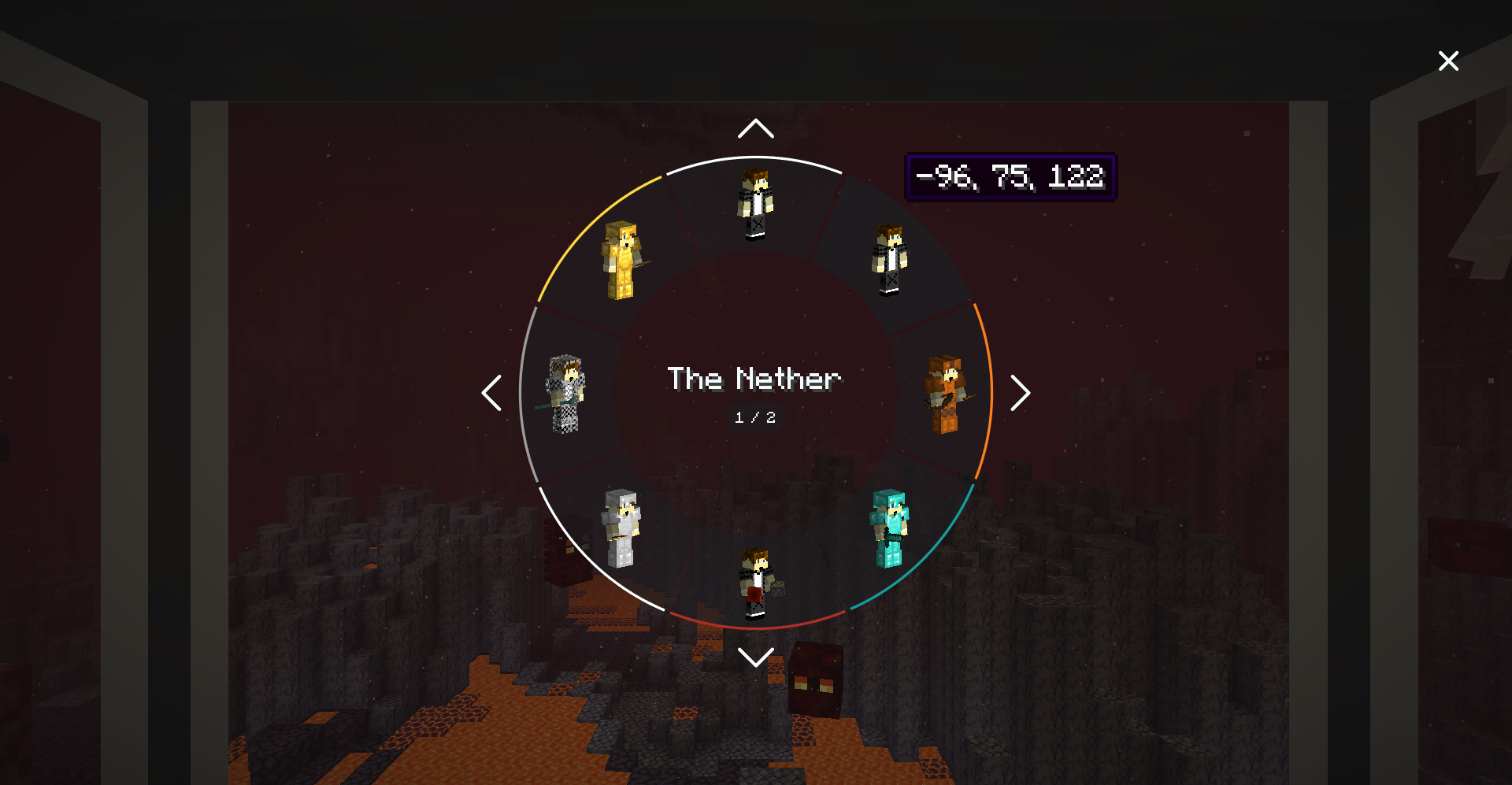
- 你会看到一个径向
菜单 显示你的躯壳:
选择 你想要将意识转移到的躯壳,享受这个过程吧!
注意事项
- 你可以对存储在躯壳存储箱中的躯壳进行染色编码。只需用染料右键点击躯壳存储箱即可。
- 同步功能支持跨维度操作,并应支持自定义维度。
- 如果你在使用躯壳时死亡,你将立即与本体同步 (如果你还有本体的话;否则你的意识将被转移到随机一个躯壳中)。
- 躯壳的死亡不会增加你的死亡计数。
- 可以通过连接到相应躯壳容器的漏斗来为躯壳装备(或卸下)盔甲、工具等物品。
- 为了保持存储的躯壳存活,躯壳存储箱必须持续供电。
- 如果
shellStorageAcceptsRedstone 选项设置为 true,躯壳存储箱可以通过红石供电。
- 躯壳存储箱可以通过任何有效的能源(例如跑步机、流行科技模组中的机械装置等)供电。
- 可以使用比较器测量躯壳容器的状态。
- 你可以通过比较器输出强度来判断躯壳建造进度。
- 你可以通过比较器输出强度来测量躯壳物品栏的满载程度。
- 你可以使用扳手右键点击躯壳容器来更改比较器输出类型。
- 躯壳存储箱和躯壳构建器相当脆弱,因此请尝试不要在没有
精准采集 附魔的情况下挖掘它们。
配置
该模组具有高度可配置性。你可以在模组的 README 中阅读更多相关内容。
安装
要求:
- Minecraft 1.20.1
- Forge 47.3.0 或更高版本
- Java 17
致谢
- 原版 Sync 模组由 iChun 制作
- 从 Sync (Fabric) 移植
- 由 Sumiku 移植至 Forge 1.20.1
许可证
本项目采用 MIT 许可证授权

Sync (Forge)
Sync (Forge) is an unofficial reimplementation of the Sync mod, that was originally developed by iChun.
As for the brief description of the mod, I think the original one says it all:
This mod provides clones, or as we like to call it, "shells". These shells are basically new individuals, with their own inventory, experience level, and even gamemode. However, they lack a mind that would control them. That's where the player comes in. Each shell is biometrically tied to the player whose sample was used to create it, and allows the player to "sync" their mind with it, essentially creating multiple player instances.
Crafting recipes
Sync Core:

Shell Constructor:

Shell Storage:

Treadmill:

How to play
- You need to craft a
shell constructor and place it down.
- Then you need to provide it with a sample - just
right-click the thing. ⚠️WARNING: this action will kill you! In order to create a shell with full health, the constructor must absorb 20HP (40 for Hardcore players). If you don't want to die, you can eat a golden apple to increase your maximum health, or you can hold a totem of undying during the process (which is the only option for Hardcore players).
- The shell constructor needs power to work, so put a
treadmill next to it (it should touch any side of any part of the shell constructor) and lure a pig or a wolf to its center to start generating piggawatts. You should end up with something like this:
P.S. - You don't really need a comparator, it's here just to demonstrate that you can determine progress of the shell construction process via strength of the comparator output.
- Once your new shell is constructed, you need to craft a
shell storage and place it down.
- Supply it with
redstone power.
- Once doors of the shell storage are open, you can
walk into it.
- You'll see a radial
menu that displays your shells: 
Select the shell you want to transfer your mind into, and enjoy the process!
Notes
- You can color-code shells stored in shell storages. Just right-click a shell storage with dye.
- Syncing works cross dimensional, and should support custom dimensions.
- If you die while using a shell, you'll be immediately synced with your original body (if you still have one; otherwise your mind will be transferred to a random shell).
- Death of a shell doesn't increase your death counter.
- Shell can be equipped (or unequipped) with armor, tools, etc. via hoppers connected to a corresponding shell container.
- Shell storage should be constantly supplied with power in order to keep stored shell alive.
- Shell storage can be powered by redstone, if the
shellStorageAcceptsRedstone option is set to true.
- Shell storage can be powered by any valid energy source (e.g., treadmills, machinery from popular tech mods, etc.).
- It's possible to measure a shell container's state with a comparator.
- You can determine progress of the shell construction process via strength of the comparator output.
- You can measure the fullness of a shell's inventory via strength of the comparator output.
- You can change a comparator output type by right-clicking on a shell container with a wrench.
- Shell storage and shell constructor are pretty fragile, so don't try to mine them without
silk touch enchantment.
Config
The mod is highly configurable. You can read more about it in the mod's README.
Installation
Requirements:
评论 0
登录后参与评分
还没有评论,来抢沙发吧