
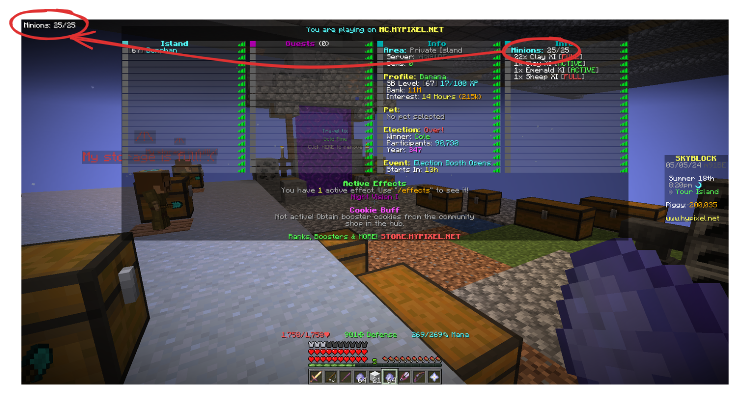
一款 Minecraft HUD 模组,将标签菜单中显示的信息聚合为易于解析的格式。通过用户完全自定义的正则表达式,该模组能够将解析后的信息以 HUD 的形式显示在屏幕上。 这允许用户在想要持续查看标签菜单上显示的信息时,无需不断按下 Tab 键。
重要提示: 一个格式化错误会影响此模组在 2025 年 6 月 13 日之前发布的旧版本。下面的 ZeroMinr 示例不适用于在此日期之前发布的版本。如果您在 Minecraft 1.21.3 或更高版本上游玩,请下载此模组的最新版本。对于那些在低于 1.21.3 的版本上游玩的玩家,不幸的是回溯移植更改在时间上非常痛苦,但好消息是,只要您不做任何奇怪的操作(例如嵌套花括号),大多数格式化程序都能正常工作。
注意: 尽管计分板在单人游戏中也可用,但为了简单起见,此模组将不支持这种特定用例。
要求
- Minecraft 1.20.4-1.21.1/1.21.3-1.21.8
- Fabric
- Fabric API
- Cloth Config
- Mod Menu
示例
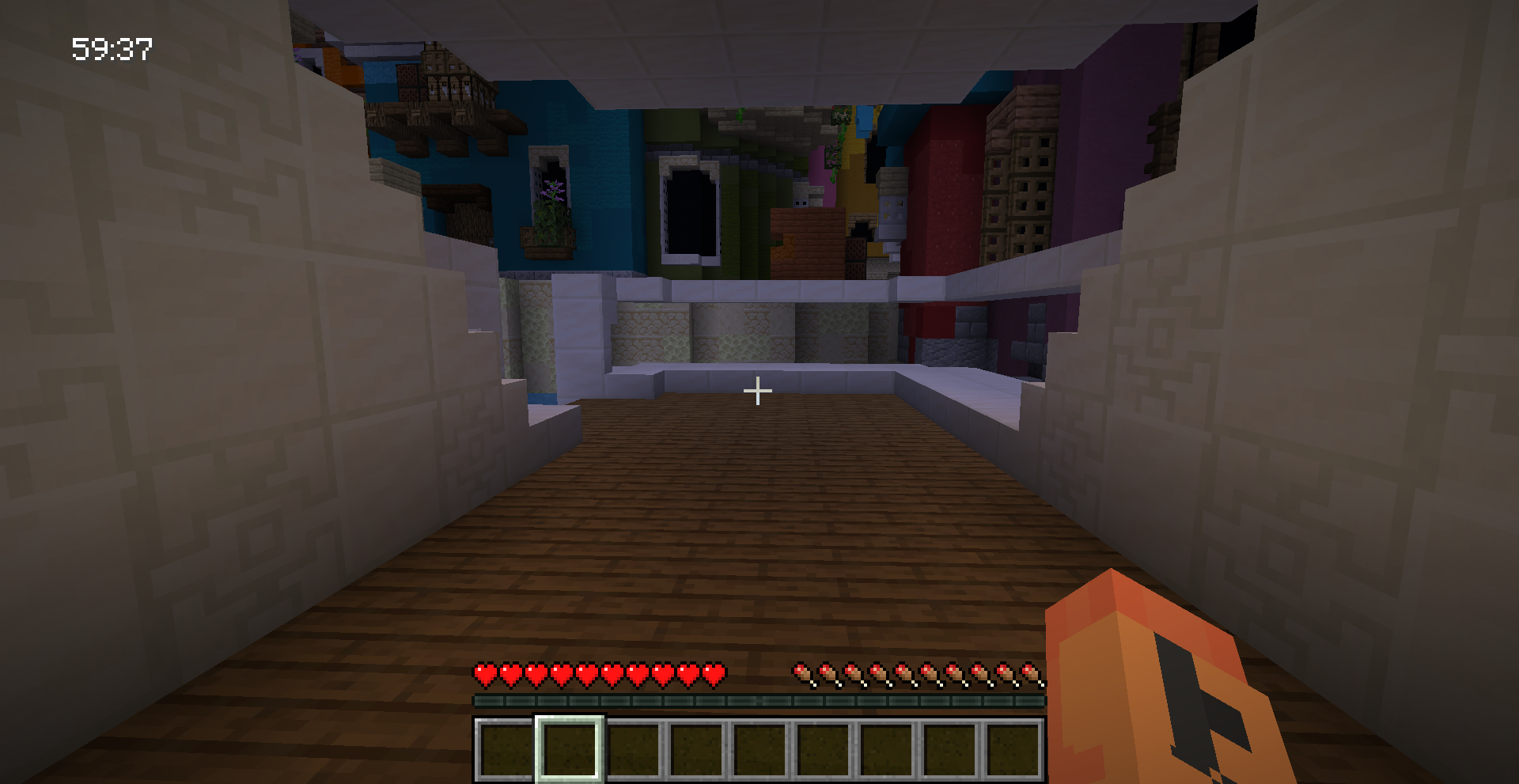
服务器 ZeroMinr 因其仅在跑酷课程的标签菜单中显示计时器而闻名。 您可以这样做,以便在不频繁按下 TAB 键的情况下在屏幕上显示计时器:
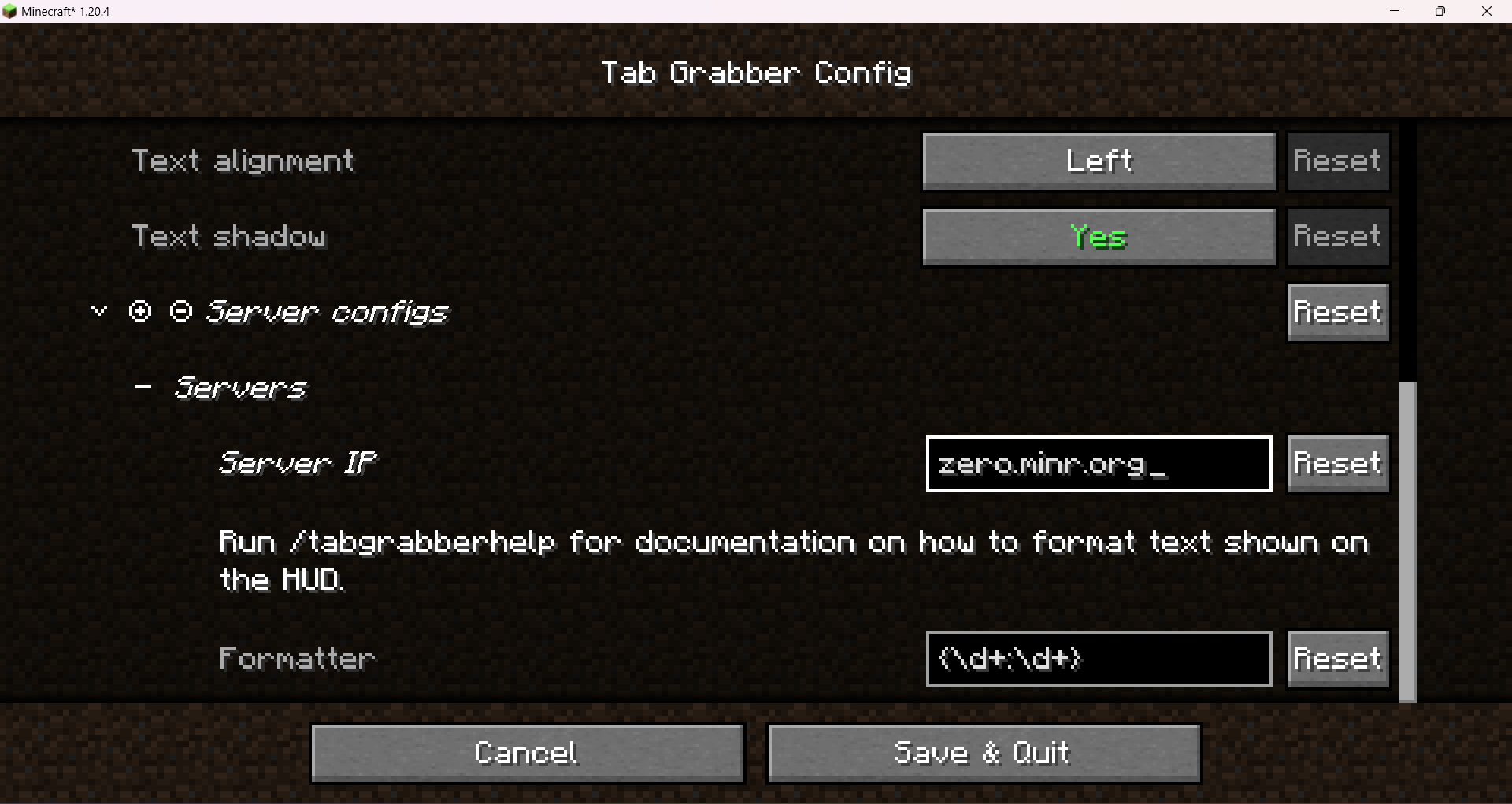
- 在配置界面中,将
zero.minr.org设置为服务器 IP,并将{(\d+h )?\d\{2\}:\d\{2\}}设置为格式化程序(此模组的旧版本存在格式化错误,使得此格式化程序无法使用,如果您在 Minecraft 1.21.3 或更高版本上游玩,请下载最新版本)。
这就是您需要做的全部!
如果您需要有关格式化程序匹配内容的示例,请运行 /tabgrabberdebug。
它应该大致显示以下内容(已编辑以隐藏除我以外的所有玩家名称):
Player1: null
Player2: null
Player3: null
Donphan: null
Header: zero.minr.org
Footer: Bussolai: 00:04
用法
此模组基于 正则表达式 的自定义格式来在屏幕上显示有用信息。
如果您尝试在格式化程序中输入文本,它将原样显示在 HUD 中。
示例:
格式化程序 abcdef 将在屏幕上显示 abcdef。
此模组的强大之处在于其捕获标签菜单信息的能力。
为此,请用花括号包围正则表达式。
例如,如果您想在标签菜单中匹配像 23:01 这样的计时器,并希望它在 HUD 上显示 Timer: 23:01,请使用 Timer: {\d+:\d+} 作为格式化程序。
就是这么简单!
由于这是一个 Java 模组,所使用的正则表达式必须与 Java 附带的标准正则表达式解析器兼容。
要转义花括号,请在其前面加上反斜杠 (\)。这也适用于正则表达式的一部分的花括号。
注意: 尽量避免使用带有回溯或使用过多的复杂正则表达式。 为服务器提供的正则表达式会在每个刻检查标签菜单信息,因此如果提供的正则表达式没有特别优化,可能会显著降低客户端 FPS。 为了进一步减轻您的 PC 负担,此模组会尽量避免编译正则表达式,除非绝对必要,并且如果提供的正则表达式不发生变化,则会缓存它们。
关于标签信息的更多信息
实际上,此模组抓取的是服务器发送的页眉和页脚信息以及计分板。 页眉的一个例子可能是“欢迎来到 Hypixel”。
显示的计分板基于服务器所有者设置的目标。 例如,如果健康被设置为要向玩家显示的目标,此模组就会被编程为执行此操作,将心形图标替换为小数。
为了便于解析,此模组移除了服务器指定的任何样式和章节符号,并去除了空白字符。
一种称为“格式化程序”的东西用于解析标签菜单信息并将其格式化为 HUD。
注意: 格式化程序中的换行符在确定向用户显示的内容方面起着至关重要的作用。 如果您的格式化程序中的一行未能匹配标签上的任何内容,它将静默失败并跳过到您的格式化程序中的下一行。 如果服务器在不同的迷你游戏中显示类似的标签信息,用户可以利用这一点。
配置选项
通过模组菜单进入配置界面。
- 启用/禁用 HUD(您也可以通过按键绑定切换此功能)
- HUD 位置(百分比)
- 文本颜色
- 文本背景
- 文本对齐方式
- 文本阴影
- 文本缩放
- 服务器配置
服务器配置
为了允许在不同服务器上显示不同的信息,此模组使用服务器域名来确定是否应显示任何 HUD 信息。 如果在配置的服务器配置部分提到了服务器,它将使用其相应的格式化程序来解析标签菜单。 这允许用户对不同服务器有条件地应用不同的解析/格式化规则。
调试
要查看您的格式化程序需要匹配的标签信息,请在希望 HUD 出现的服务器中输入 /tabgrabberdebug。
这将实时输出标签菜单向用户显示的原始信息。
格式将为 key: value,由换行符分隔。
键 Header 和 Footer 专门保留用于显示页眉和页脚信息。
它们将始终按顺序出现在计分板信息下方。
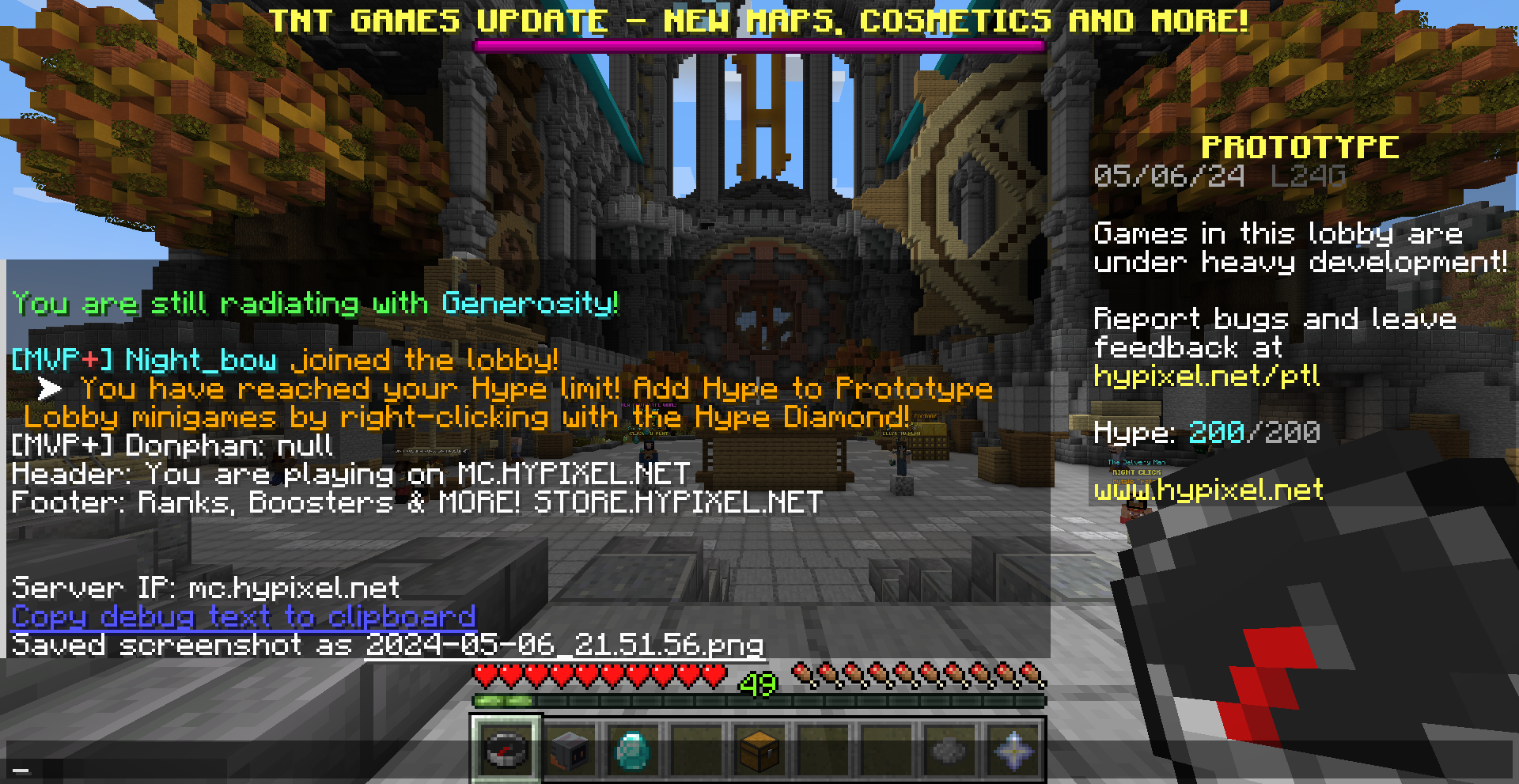
如果没有目标,运行此命令时可能会看到以下内容:
Player1: null
Player2: null
这是正常现象,如果你不太在意计分板的话,可以忽略它。
在调试信息下方还会提供一个链接,点击即可将其复制到剪贴板。如果服务器使用了任何特殊符号或资源包来美化标签页菜单,这将特别有用。
A Minecraft HUD mod that aggregates information shown on the tab menu into an easily parseable format. Using custom regex fully customisable by the user, this mod is able to show the parsed information as a HUD on screen. This allows the user to not have to constantly press the tab key on servers if they want to constantly view information shown on the tab menu.
IMPORTANT: A formatting bug affects older versions of this mod published before June 13, 2025. The ZeroMinr example below would not work for versions published before this date. If you are playing on Minecraft 1.21.3 or newer, please download the latest version of this mod. For those playing on versions older than 1.21.3, unfortunately backporting changes is painful time-wise, but the good news is most formatters would work as long as you do not do anything weird (e.g., nesting curly braces).
NOTE: Even though scoreboards are also available on singleplayer, for simplicity’s sake this mod will not support that particular use case.
Requirements
- Minecraft 1.20.4-1.21.1/1.21.3-1.21.8
- Fabric
- Fabric API
- Cloth Config
- Mod Menu
Example
The server ZeroMinr is notorious for only showing its timers on the tab menu in parkour courses. This is what you can do to show the timer on your screen without constantly pressing TAB:
- In the config screen, set
zero.minr.orgas the server IP and{(\d+h )?\d\{2\}:\d\{2\}}as the formatter (there is a formatting bug on older versions of this mod which makes this formatter unusable, download the latest version if you are playing on Minecraft 1.21.3 or newer).
That's all you need to do!
If you need an example as to what the formatter is matching, run /tabgrabberdebug.
This is what it should approximately show (redacted to hide all player names except mine):
Player1: null
Player2: null
Player3: null
Donphan: null
Header: zero.minr.org
Footer: Bussolai: 00:04
Usage
This mod uses a custom format based on regular expressions to show useful information on screen.
If you try typing text on the formatter, it will be shown in the HUD as is.
Example:
A formatter of abcdef will show abcdef on screen.
The power of this mod comes from its ability to capture information on the tab menu.
To do that, surround a regex with curly braces.
For example, if you want to match a timer on the tab menu like 23:01, and you want it to show Timer: 23:01 on the HUD, use Timer: {\d+:\d+} as the formatter.
It's that straightforward!
Since this is a Java mod, the regex used must be compatible with the stock regex parser that comes with Java.
To escape curly braces, put a backslash (\) before it. This applies to curly braces that are part of a regex too.
NOTE: Try and avoid overcomplicated regexes with backtracking or the use of too many of them at once. The regexes provided for a server matches tab menu information on every tick, so it may slow down client-side FPS significantly if the regexes provided are not particularly well optimized. To avoid any further strain on your PC, this mod tries to avoid compiling regexes unless absolutely necessary, and caches them if the regexes provided does not change.
More on tab information
In reality, what the mod is actually scraping is header and footer information sent from the server, together with the scoreboard. An example of a header can be something like "Welcome to Hypixel".
What scoreboard is shown is based on the objective set by the server owner. For example, if health is set as an objective to be shown to the player, this mod is programmed to do that, replacing the heart icons with a decimal.
To allow for easier parsing, this mod removes any styling and section symbols specified by the server, and also strips whitespace.
Something known as a "formatter" is used to parse tab menu info and format it as a HUD.
NOTE: Newlines in your formatter play a crucial role in determining what would be shown to the user. If a line in your formatter fails to match anything on your tab, it will silently fail and skip over to the next line in your formatter. This can be exploited by the user if the server shows similar tab info on different minigames for example.
Config options
Enter the config screen via the mod menu.
- Enable/disable HUD (you can also toggle this via a keybind)
- HUD position (in percentage)
- Text color
- Text background
- Text alignment
- Text shadow
- Text scale
- Server configuration
Server configuration
To allow for different information to be shown on different servers, this mod uses the server domain to determine if it should show any HUD info. If the server is mentioned in the server configuration section of the config, it will use its respective formatter to parse the tab menu. This allows for the user to conditionally apply different parsing/formatting rules to different servers.
Debugging
To see what tab info your formatter needs to match, enter /tabgrabberdebug in the server you want the HUD to show up.
This will output the raw information the tab menu is showing to the user in real time.
This will be in the format key: value separated by newlines.
The keys Header and Footer are specially reserved for showing header and footer information.
They will always appear below the scoreboard info in order.
If there are no objectives, you might see the following when you run this command:
Player1: null
Player2: null
This is normal, and you can ignore that if you don't particularly care about the scoreboard.
There will also be a link you can click on below the debug info to copy it to your clipboard. This is particularly useful if the server uses any esoteric symbols or a resource pack to style the tab menu.

下载 Tab Grabber
需要联机服务器吗?
稳定流畅、一键部署,几分钟即可和朋友联机开服
最低仅需 8 元/月 即可畅快联机
下载 Tab Grabber
需要联机服务器吗?
稳定流畅、一键部署,几分钟即可和朋友联机开服
最低仅需 8 元/月 即可畅快联机
下载 Tab Grabber
下载 Tab Grabber
需要联机服务器吗?
稳定流畅、一键部署,几分钟即可和朋友联机开服
最低仅需 8 元/月 即可畅快联机
下载 Tab Grabber
下载 Tab Grabber
下载 Tab Grabber
需要联机服务器吗?
稳定流畅、一键部署,几分钟即可和朋友联机开服
最低仅需 8 元/月 即可畅快联机
下载 Tab Grabber
下载 Tab Grabber
下载 Tab Grabber
添加俄语本地化
关于这个资源的讨论、问题反馈与使用心得
还没有讨论,来发第一帖吧
你是这个资源的作者?登录后可认领此资源。
相似资源
 模组

显示你正在注视的方块的信息。(适用于 Minecraft 1.16+ 的 Hwyla/Waila 分支)
 模组
使用 JavaScript 编辑配方、添加自定义物品、编写世界事件!
 模组

查看物品与配方
 模组
在游戏画面角落显示附近世界地形、玩家、生物和实体的地图。可创建路径点,帮助你找到标记过的位置。
 模组
AE2:一款流行的自动化与存储模组
 模组
那是什么?一个 Waila/Hwyla 的分支。
评论 0
登录后参与评分
还没有评论,来抢沙发吧