
TabTPS Enhanced 在 标签页列表、操作栏和 Boss 条中显示 TPS、MSPT、延迟等信息。在 Folia 上,每位玩家看到的是其所处区域的数值,而非全服平均值。它作为插件运行于 Folia、Canvas、Paper、Purpur、Leaf 和 Spigot,同时提供 Forge 模组版本,并附带可选的 Velocity 插件。
功能特性
- 实时显示:在标签页列表、操作栏和 Boss 条中显示,每位玩家可以自行开启或关闭
- Folia 区域独立: 显示玩家所在区域的 TPS 和 MSPT,以及最低、中位数和最高区域 TPS
- 游戏内设置菜单:
/tabtps可更改显示内容、模块、主题、卡顿警报等,无需编辑配置文件 - 区域概览:
/tabtps regions列出负载最高的区域,点击即可传送至该区域 - 卡顿警报:当服务器 TPS 低于阈值或 MSPT 高于限制时,在聊天、控制台和 Discord 中发出警报
- 网络视图: 在 Velocity 上使用
/networktps可一次性查看所有后端服务器状态 - PlaceholderAPI 和 MiniPlaceholders 占位符,如
%tabtps_tps%和<tabtps_tps> - 支持使用 MiniMessage 自定义文本、通过自定义颜色级别设置主题,以及添加生物上限、在线时长、CPU 和内存等模块
所有额外功能默认均为关闭状态,因此在不触碰任何配置文件的情况下,TabTPS 仅会显示你设置的显示内容。
设置菜单
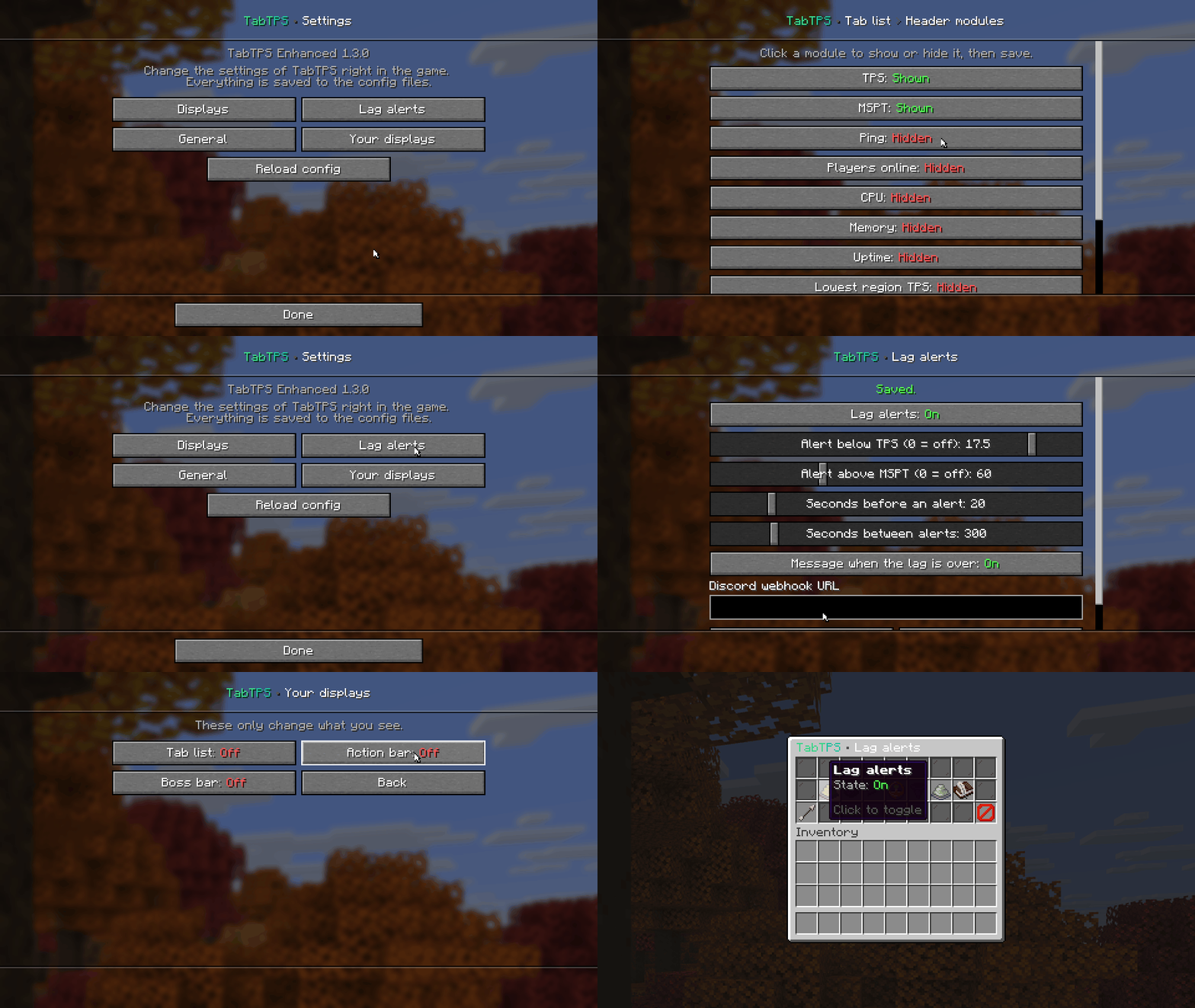
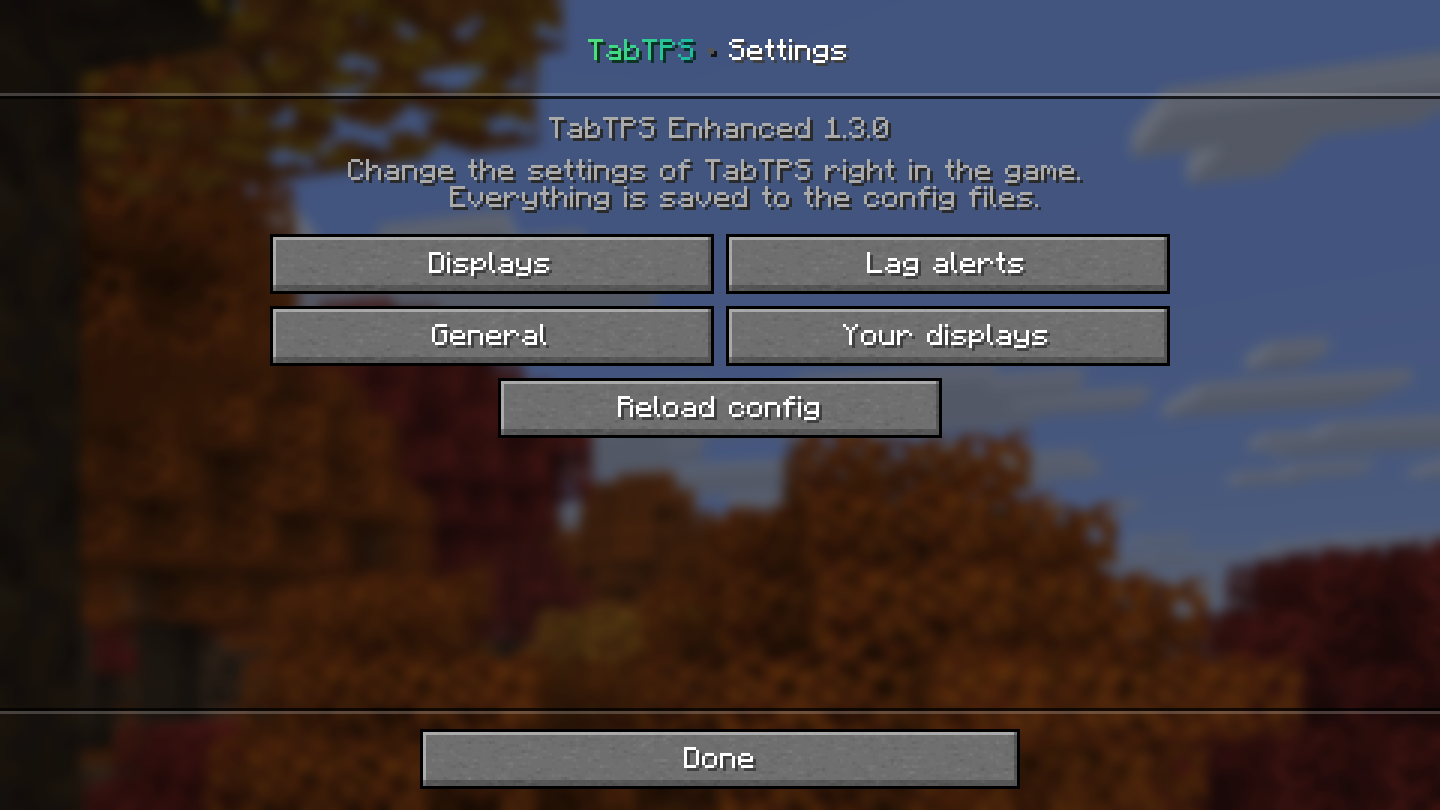
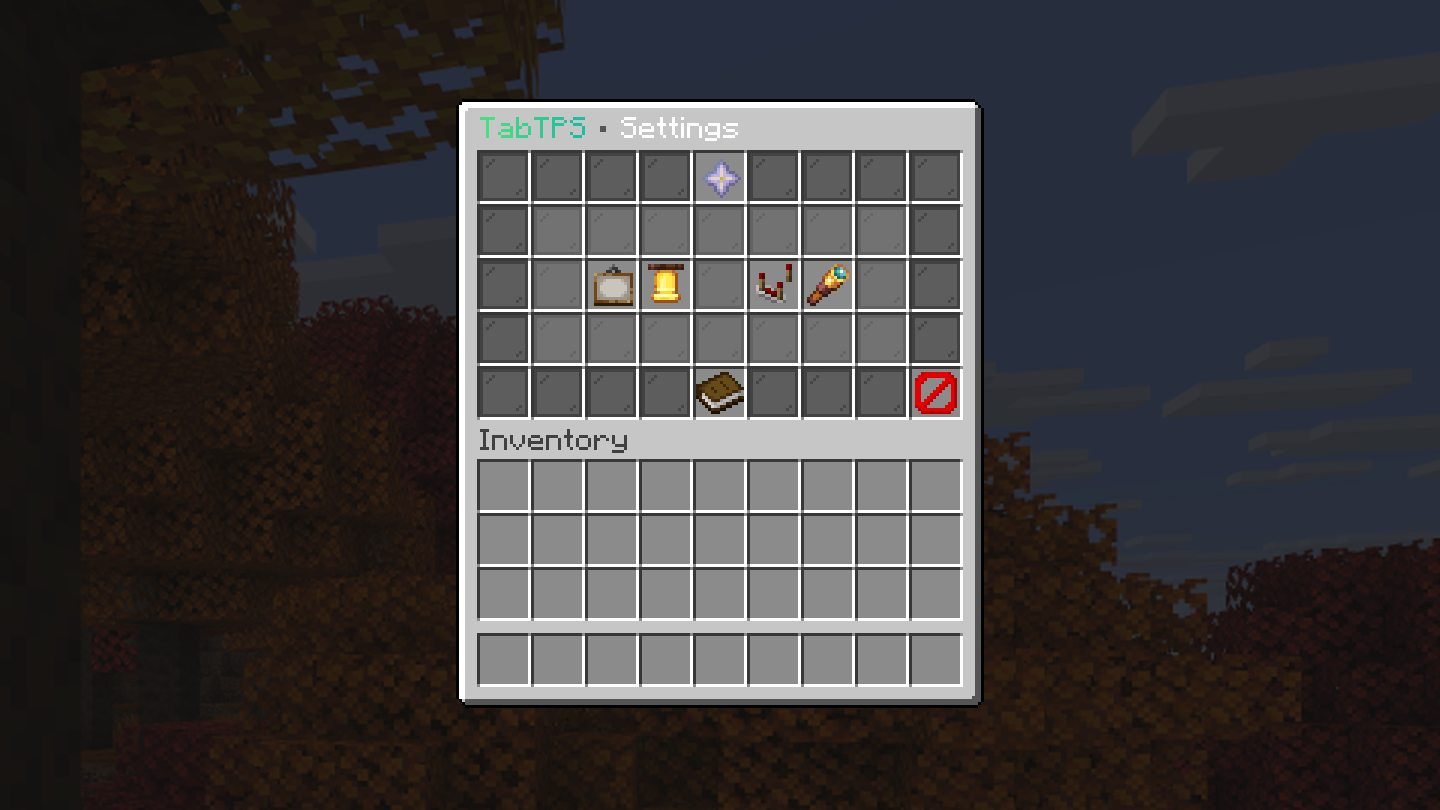
使用 /tabtps(权限 tabtps.gui)打开。在 Minecraft 1.21.6 及更高版本中,它使用 Minecraft 的原生对话框界面;在较低版本中则使用箱子菜单。插件和 Forge 模组均适用。所有更改都会立即写入配置文件并生效。
| 对话框 (1.21.6+) | 箱子菜单 |
|---|---|
 |
 |
显示方式
| 标签页列表 | 操作栏与 Boss 条 |
|---|---|
 |
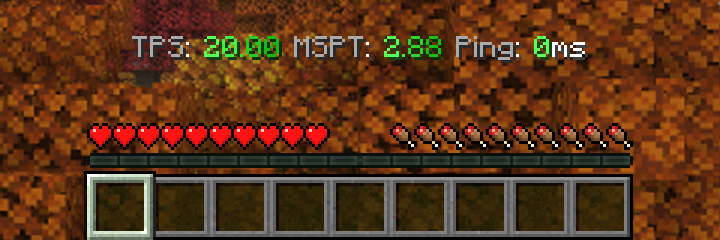  |
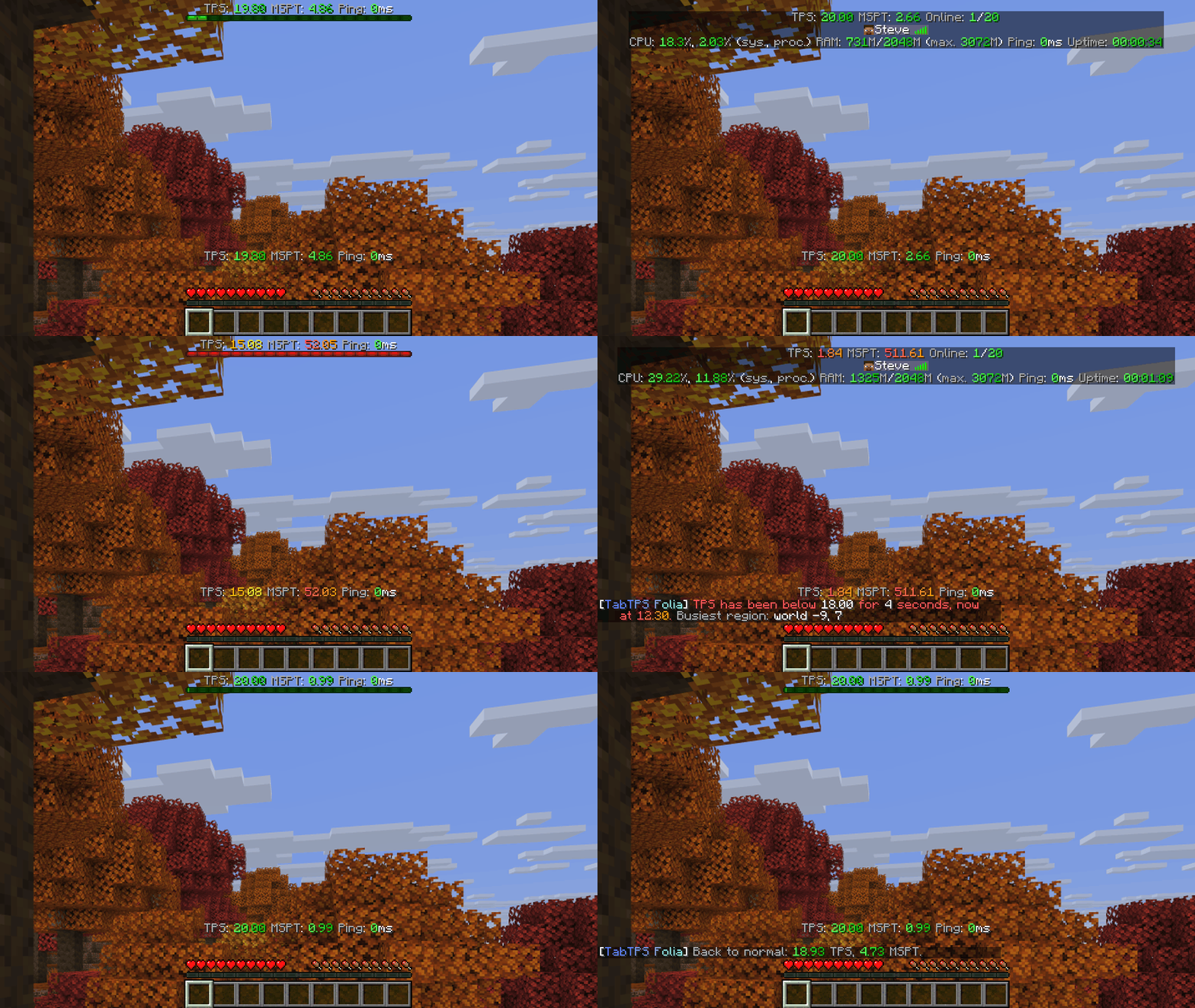
在高负载下,Boss 条会改变颜色并逐渐填充:

区域概览 (Folia 和 Canvas)
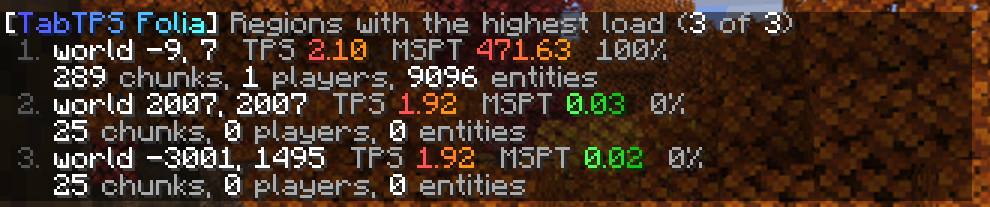
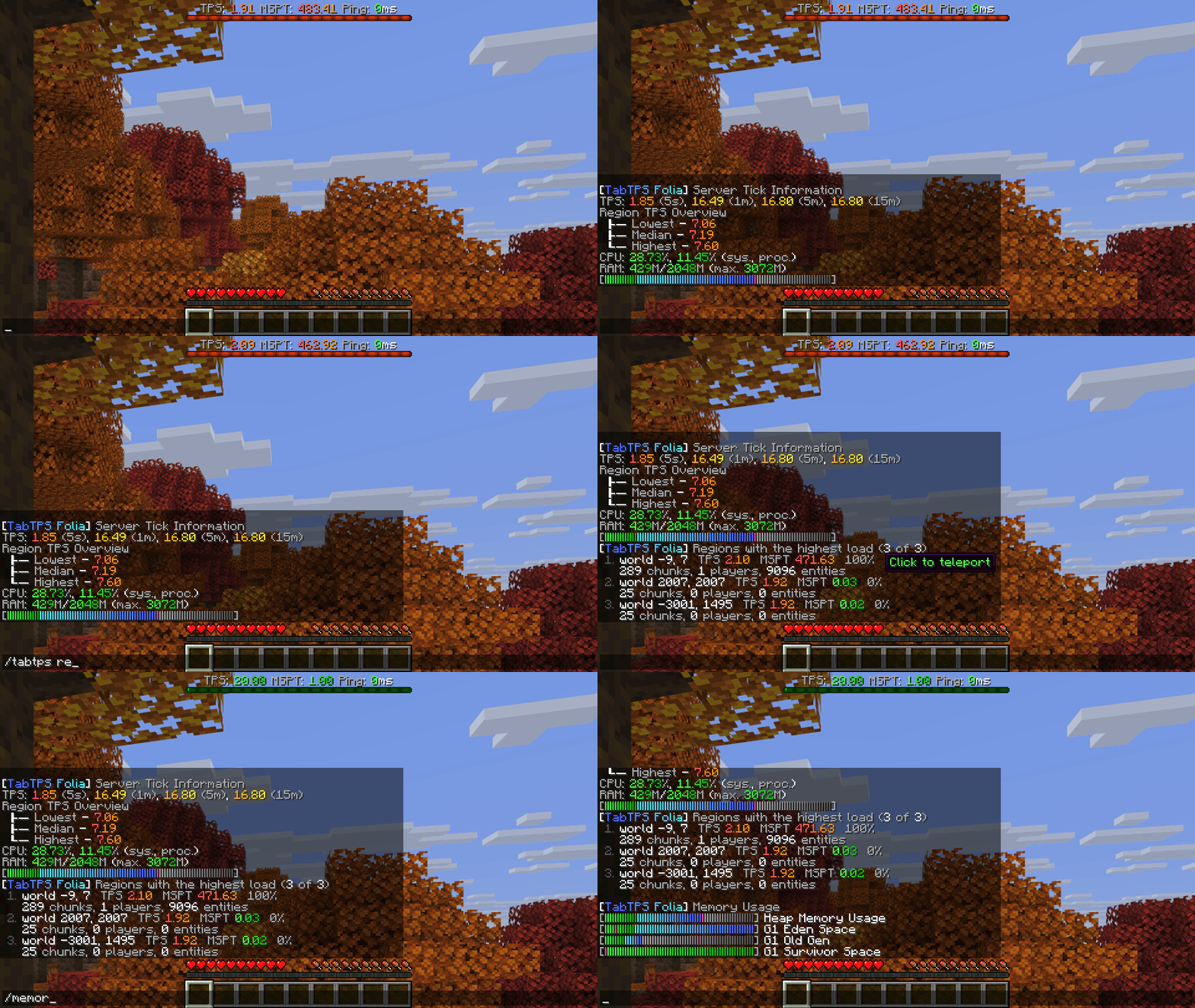
/tabtps regions 列出负载最高的区域,包括其 TPS、MSPT、利用率、区块数、玩家数和实体数。点击某一行即可传送至该区域。
卡顿警报
在 main.conf 的 lag-alerts 部分设置 enabled=true,或在设置菜单中开启。拥有 tabtps.lagalert 权限的玩家会收到聊天消息,控制台会记录日志行,Discord webhook 也可接收消息。在 Folia 上,警报会指明负载最高的区域。

Velocity 网络视图
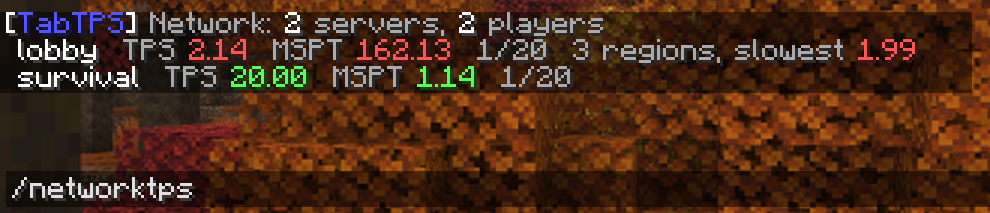
将 tabtps-velocity 放置在代理服务器上,并在后端服务器上设置 send-stats-to-proxy=true。随后执行 /networktps(权限 tabtps.network)即可显示所有服务器的 TPS、MSPT 和玩家数量。
命令
| 命令 | 作用 | 权限 |
|---|---|---|
/tabtps 或 /tabtps gui |
打开设置菜单 | tabtps.gui |
/tabtps toggle tab|actionbar|bossbar [player] |
开启或关闭显示 | 取决于显示配置,对其他玩家使用 tabtps.toggle.others |
/tickinfo, /mspt |
Tick 时间,Folia 下按区域统计 | tabtps.tps |
/memory |
内存使用情况 | tabtps.tps |
/ping [player], /pingall |
查看你、某位玩家或所有人的延迟 | tabtps.ping, tabtps.ping.others |
/tabtps regions [count] |
最繁忙的区域(适用于 Folia、Canvas) | tabtps.regions |
/tabtps mobcaps |
每个世界的生物生成上限 | tabtps.mobcaps |
/tabtps reload |
重载配置文件 | tabtps.reload |
/networktps (Velocity) |
所有后端服务器的 TPS | tabtps.network |
我需要哪个文件?
| 服务器端 | 文件 | 文件夹 |
|---|---|---|
| Folia, Canvas, Paper, Purpur, Leaf, Spigot (1.20 – 26.3, Java 17+) | tabtps-enhanced-<version>.jar |
plugins/ |
| Forge 26.3 (服务端或单人游戏) | tabtps-forge-mc26.3-<version>.jar |
mods/ |
| Forge 1.20.1 (服务端或单人游戏) | tabtps-forge-mc1.20.1-<version>.jar |
mods/ |
| Velocity 3.4+ (可选) | tabtps-velocity-<version>.jar |
plugins/ |
Forge 模组只需安装在服务端,玩家无需安装。如果你从 TabTPS Folia 升级:更新时请删除旧的 tabtps-folia-*.jar。
更多信息
所有选项、模块、占位符和权限说明请参阅 文档。反馈漏洞和建议:GitHub Issues。
基于 jpenilla 的 TabTPS(MIT 协议)。
TabTPS Enhanced shows TPS, MSPT, ping and more in the tab list, action bar and boss bar. On Folia every player sees the values of the region they are standing in, not a server-wide average. It runs as a plugin on Folia, Canvas, Paper, Purpur, Leaf and Spigot, as a Forge mod and comes with an optional Velocity plugin.
Features
- Live displays in the tab list, action bar and boss bar, each player can turn them on and off
- Per region on Folia: TPS and MSPT of the player's own region, plus the lowest, median and highest region TPS
- Settings menu in the game:
/tabtpschanges displays, modules, themes, lag alerts and more, no config editing needed - Region overview:
/tabtps regionslists the busiest regions, click one to teleport there - Lag alerts in chat, console and Discord when the server stays below a TPS or above an MSPT limit
- Network view:
/networktpson Velocity shows all your backend servers at once - PlaceholderAPI and MiniPlaceholders placeholders like
%tabtps_tps%and<tabtps_tps> - Custom text with MiniMessage, themes with your own color levels, mob caps, uptime, CPU and memory modules
Every extra feature is off by default, so without touching a config TabTPS just shows your displays.
Settings menu
Open it with /tabtps (permission tabtps.gui). On Minecraft 1.21.6 and newer it uses Minecraft's dialog screens, on older versions a chest menu, on the plugin and the Forge mod alike. Every change is written to the config files and applied right away.
| Dialog (1.21.6+) | Chest menu |
|---|---|
|
|
Displays
| Tab list | Action bar and boss bar |
|---|---|
|
|
Under load the boss bar changes color and fills up:
Region overview (Folia and Canvas)
/tabtps regions lists the regions with the highest load with their TPS, MSPT, utilisation, chunks, players and entities. Click a line to teleport to that region.
Lag alerts
Turn them on with enabled=true in the lag-alerts section of main.conf or in the settings menu. Players with tabtps.lagalert get a chat message, the console a log line and a Discord webhook can get a message too. On Folia the alert names the busiest region.
Velocity network view
Put tabtps-velocity on your proxy and set send-stats-to-proxy=true on your backends. /networktps (permission tabtps.network) then shows TPS, MSPT and players of every server.
Commands
| Command | What it does | Permission |
|---|---|---|
/tabtps or /tabtps gui |
Opens the settings menu | tabtps.gui |
/tabtps toggle tab|actionbar|bossbar [player] |
Turns a display on or off | from the display config, tabtps.toggle.others for other players |
/tickinfo, /mspt |
Tick times, per region on Folia | tabtps.tps |
/memory |
Memory usage | tabtps.tps |
/ping [player], /pingall |
Ping of you, a player or everyone | tabtps.ping, tabtps.ping.others |
/tabtps regions [count] |
Busiest regions (Folia, Canvas) | tabtps.regions |
/tabtps mobcaps |
Mob caps of every world | tabtps.mobcaps |
/tabtps reload |
Reloads the config | tabtps.reload |
/networktps (Velocity) |
All backend servers | tabtps.network |
Which file do I need?
| Server | File | Folder |
|---|---|---|
| Folia, Canvas, Paper, Purpur, Leaf, Spigot (1.20 – 26.3, Java 17+) | tabtps-enhanced-<version>.jar |
plugins/ |
| Forge 26.3 (server or singleplayer) | tabtps-forge-mc26.3-<version>.jar |
mods/ |
| Forge 1.20.1 (server or singleplayer) | tabtps-forge-mc1.20.1-<version>.jar |
mods/ |
| Velocity 3.4+ (optional) | tabtps-velocity-<version>.jar |
plugins/ |
The Forge mod only has to be on the server, players don't need it. Coming from TabTPS Folia: delete the old tabtps-folia-*.jar when you update.
More
Every option, module, placeholder and permission is explained in the documentation. Bugs and ideas: GitHub issues.
Based on TabTPS by jpenilla (MIT).

下载 TabTPS Enhanced
下载 TabTPS Enhanced
下载 TabTPS Enhanced
需要联机服务器吗?
稳定流畅、一键部署,几分钟即可和朋友联机开服
最低仅需 8 元/月 即可畅快联机
下载 TabTPS Enhanced
需要联机服务器吗?
稳定流畅、一键部署,几分钟即可和朋友联机开服
最低仅需 8 元/月 即可畅快联机
下载 TabTPS Enhanced
下载 TabTPS Enhanced
下载 TabTPS Enhanced
需要联机服务器吗?
稳定流畅、一键部署,几分钟即可和朋友联机开服
最低仅需 8 元/月 即可畅快联机
下载 TabTPS Enhanced
需要联机服务器吗?
稳定流畅、一键部署,几分钟即可和朋友联机开服
最低仅需 8 元/月 即可畅快联机
下载 TabTPS Enhanced
下载 TabTPS Enhanced
需要联机服务器吗?
稳定流畅、一键部署,几分钟即可和朋友联机开服
最低仅需 8 元/月 即可畅快联机
新增
- 游戏内设置菜单:
/tabtps或/tabtps gui可更改显示方式、模块、主题、自定义文本、卡顿提醒和常规选项,并将这些设置写入配置文件。在 Minecraft 1.21.6 及更高版本中,它使用对话框屏幕,页面切换平滑且无需确认命令;在旧版本中则使用箱子菜单。该箱子菜单会实时显示你的 TPS 和 MSPT,并可以播放音效(menu-sounds,默认关闭)。gui-style用于选择对话框或箱子菜单。插件版和 Forge 模组版均支持,权限为tabtps.gui - Folia 和 Canvas 上的区域概览:
/tabtps regions列出繁忙的区域,包含世界、中心坐标、TPS、MSPT、利用率、区块数、玩家数和实体数。点击某一行即可传送至该区域(权限tabtps.regions.teleport) - 卡顿提醒: 当服务器 TPS 低于阈值或 MSPT 高于阈值时,发送聊天消息、控制台日志,并可选择性地向 Discord 发送消息。提醒信息会指出最繁忙的区域。默认关闭,需在
main.conf的lag-alerts部分将enabled=true以启用 - Velocity 插件:
/networktps(别名/ntps)显示代理后端所有服务器的 TPS、MSPT 和玩家数量。后端通过send-stats-to-proxy=true发送其数值 - MiniPlaceholders: 当安装了 MiniPlaceholders 2.x 或 3.x 时,这些占位符也可作为 MiniMessage 标签使用,例如
<tabtps_tps> - 无法在服务器上运行的模块(例如没有区域的区域模块,或在 Folia 上无法使用的生物上限模块)将被省略,而不是显示 N/A
- 本项目现更名为 TabTPS Enhanced(原名为 TabTPS Folia)。插件 jar 文件现在为
tabtps-enhanced-<version>.jar;插件名称、配置文件夹和下载链接保持不变 - 更新检查器使用永久的 Modrinth 项目 ID
所有新选项默认均为关闭状态。
更新插件时,请从 plugins 文件夹中删除旧的 tabtps-folia-*.jar,否则服务器会发现两个名为 TabTPS 的插件。
测试环境
每个构建版本均在以下环境中启动、加载并运行命令且无错误:
- Folia 1.20.1, 1.20.2, 1.20.4, 1.20.6, 1.21.4, 1.21.5, 1.21.6, 1.21.8, 1.21.11, 26.1.2, 26.2, 26.3
- Canvas 26.3
- Paper 1.20.1, 26.3
- Purpur 1.20.1, 1.21.4, 1.21.10, 26.3
- Leaf 1.21.4, 26.3
- Spigot 1.20.1, 26.3
- Forge 26.3 和 1.20.1
- Velocity 3.5.1, 4.3.1
设置菜单已在以下环境的游戏中进行测试:Folia 1.21.11 和 26.3,Paper 1.20.1 和 1.21.11,Spigot 1.21.11 以及 Forge 26.3 和 1.20.1(专用服务器和单人游戏)。
下载
- 插件:
tabtps-enhanced-1.4.0.jar - Forge 26.3:
tabtps-forge-mc26.3-1.4.0.jar - Forge 1.20.1:
tabtps-forge-mc1.20.1-1.4.0.jar - Velocity:
tabtps-velocity-1.4.0.jar
基于 jpenilla (MIT) 开发的 TabTPS。
新增
- 适用于 Minecraft 26.3 和 1.20.1 的 Forge 模组。仅需安装在服务器上,玩家无需安装,同时也支持单人游戏
- 现已将 Paper 列为支持的平台
- 支持 PlaceholderAPI 占位符,如
%tabtps_tps%、%tabtps_mspt%和%tabtps_uptime%,在 Folia 上按区域生效。仅在安装了 PlaceholderAPI 时激活 - 使用 MiniMessage 自定义标签页列表、动作栏和 Boss 栏文本,例如 "Server runs at <tps> TPS"
- 新增模块:uptime(运行时间)、mob_caps(生物上限)和 mob_cap_<category>(特定类别的生物上限;Folia 上不提供生物上限功能)
/tabtps mobcaps命令列出每个世界的生物上限/tabtps toggle <display> <player>用于切换其他玩家的显示效果,/execute as ... run tabtps toggle同样有效- 主题和 Boss 栏的颜色级别更多
- 加入服务器后,Boss 栏出现前可选延迟
- 当有更新可用时,操作员会在加入时收到一条简短的聊天消息;更新检查仅报告当前平台和 Minecraft 版本的版本信息
/memory命令在控制台中显示相关数值,可关闭控制台颜色输出
所有新增选项默认处于关闭状态,除了操作员的加入通知消息。你可以通过在 main.conf 中设置 update-notify-on-join=false 来关闭该通知。
修复
- 当从未被 TabTPS 追踪的玩家(例如假玩家或登录失败的玩家)离开时,不再报错
- 插件加载时已在线的玩家会正确获取其显示效果
- Boss 栏现在跟随
/tick rate(刻率)同步 - TabTPS 在退出单人游戏时不再导致游戏窗口无法关闭
已在以下环境测试
- Folia 1.20.1, 1.20.2, 1.20.4, 1.20.6, 1.21.4, 1.21.5, 1.21.6, 1.21.8, 1.21.11, 26.1.2, 26.2, 26.3
- Canvas 26.3
- Paper 1.20.1, 26.3
- Purpur 1.20.1, 1.21.4, 1.21.10, 26.3
- Leaf 1.21.4, 26.3
- Spigot 1.20.1, 1.21.1, 1.21.4, 26.3
- Forge 26.3 和 1.20.1,专用服务器及单人游戏
下载
- 插件:
tabtps-folia-1.3.0.jar - Forge 26.3:
tabtps-forge-mc26.3-1.3.0.jar - Forge 1.20.1:
tabtps-forge-mc1.20.1-1.3.0.jar
基于 jpenilla (MIT) 开发的 TabTPS。
TabTPS-Folia v1.1.0
将 TabTPS-Folia 更新至 Minecraft 26.1.2,基于 v1.0.0 中引入的区域感知监控功能。
✨ 更新内容
支持 Minecraft 26.1.2
已更新至 Folia API 26.1.2.build.8-stable 和 Minecraft 26.1.2。
为 26.1.2 重新调整区域 Tick 数据
针对 26.1.2 的内部机制调整了区域 TPS/MSPT 读取器——现在优先使用 5 秒区域 tick 报告,并带有优雅的降级方案——因此 /tickinfo 命令及区域模块能报告正确的各区域数值。
构建与工具链
- 基于 Java 25 构建;
cloud-minecraft更新至2.0.0-beta.15 - 移除了孤立的 checkstyle 和 license-header 工具,使
gradle build再次通过
? 依赖要求
- Folia 26.1.2
- Java 25
? 安装方法
将 tabtps-folia-1.1.0.jar 放入 Folia 服务器的 plugins/ 文件夹并重启。
? 致谢
关于这个资源的讨论、问题反馈与使用心得
还没有讨论,来发第一帖吧
你是这个资源的作者?登录后可认领此资源。
相似资源
 模组
缓冲的原始输入和线程化的事件轮询
 模组

显示你正在注视的方块的信息。(适用于 Minecraft 1.16+ 的 Hwyla/Waila 分支)
 模组

原版世界生成优化模组
 模组
在游戏画面角落显示附近世界地形、玩家、生物和实体的地图。可创建路径点,帮助你找到标记过的位置。
 模组

查看物品与配方
 模组
使用 JavaScript 编辑配方、添加自定义物品、编写世界事件!
评论 0
登录后参与评分
还没有评论,来抢沙发吧