TasksManager 是一款轻量级的客户端 Fabric 模组,帮助你在不退出游戏的情况下追踪物品收集目标。无论你是为大型建筑刷取资源、寻找稀有掉落物,还是整理生存清单,TasksManager 都能让你的 HUD 始终显示所需信息。
功能特性
任务追踪 - 可创建带物品或不带物品的任务。带有物品的任务会自动追踪你的库存,并在达到目标数量时标记为完成。
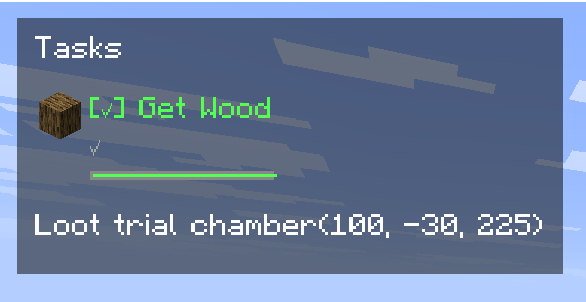
实时进度条和倒计时器精确显示剩余时间。
退出暂停 - 离开世界时截止日期会冻结,返回后继续计时。休息不会受到惩罚。
按世界/服务器独立 - 每个世界和服务器都有独立的列表。你的单人游戏目标不会影响服务器上的日常任务。
截止日期 - 可为任何任务设置时间限制。
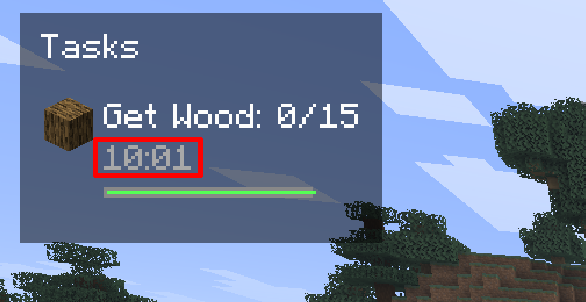
自动完成 - 基于物品的任务在收集足够数量时自动完成。手动任务只需点击一次即可勾选完成。
HUD 显示 - 在左上角查看当前活跃任务,包括进度、状态图标、截止日期栏和倒计时。
响应式布局 适配带有或没有截止日期的任务。
完整的任务管理界面 - 按 U(可配置)打开任务屏幕。
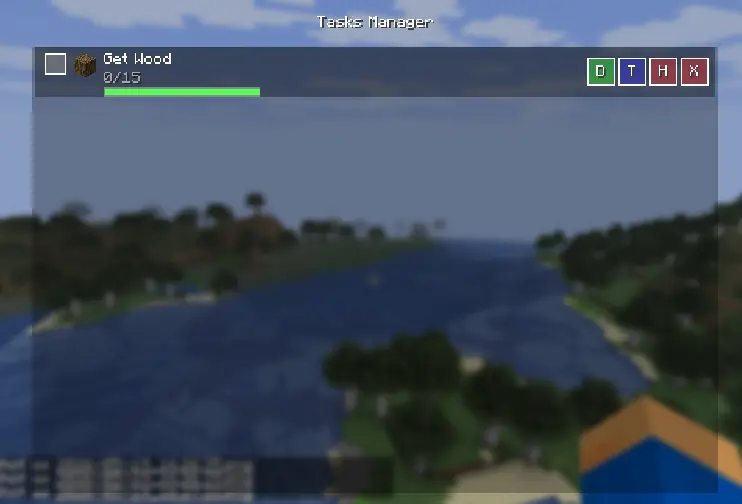
添加、编辑目标、设置截止日期、隐藏或删除任务。
内置物品搜索 帮助你找到正确的物品 ID。
使用方法
按 U 打开任务管理器,点击 "Add Task"(添加任务),为其命名,可选择链接一个物品(通过名称或 ID 搜索),设置目标数量,并分配以分钟为单位的截止日期。
任务会自动出现在 HUD 上。当你拾取或丢弃物品时,物品计数会实时更新。
在任务列表中点击复选框可手动将任务标记为完成,或者让自动完成机制处理。
使用 H、T、D、X 按钮分别隐藏任务、编辑目标、设置截止日期或删除任务。
TasksManager is a lightweight, client-side Fabric mod that helps you track item-collection goals without leaving the game. Whether you're grinding resources for a mega-build, hunting rare drops, or just organising your survival checklist TasksManager keeps everything visible on your HUD.
Features
Task Tracking - Create tasks with or without items. Tasks with items track your inventory automatically and mark as complete when you hit the target.
A live progress bar and countdown timer show exactly how much time remains.
Pause on Exit - Deadlines freeze when you leave the world and resume when you return. No penalty for taking a break.
Per-World / Per-Server - Every world and server has its own task list. Your single-player goals won't interfere with your server chores.
Deadlines - Set a time limit on any task.
Auto-Complete - Item-based tasks finish automatically the moment you collect enough. Manual tasks can be checked off with a single click.
HUD Display - See your active tasks in the top-left corner with progress, status icons, deadline bars, and countdowns.
Responsive layout adapts to tasks with and without deadlines.
Full Task Management UI - Press U (configurable) to open the task screen.
Add, edit targets, set deadlines, hide, or delete tasks.
Built-in item search helps you find the right item ID.
How to Use
Press U to open the task manager, Click "Add Task", give it a name, optionally link an item (search by name or ID), set a target count, and assign a deadline in minutes
Tasks appear on the HUD automatically. Item counts update in real time as you pick up or drop items.
Click the checkbox in the task list to manually mark a task complete, or let auto-complete handle it.
Use the H, T, D, X buttons to hide, edit target, set deadline, or delete a task

 模组

 模组
 模组

 模组
 模组
 模组

评论 0
登录后参与评分
还没有评论,来抢沙发吧