Telepathic Maid / Remote Control Maid
此模组为《Touhou Little Maid》的附加模组,需以 DiligentStalker 为前提依赖。它允许玩家直接操控自己的女仆。通过将女仆与一个雕像绑定,玩家可以在任何时间、无论距离远近进入“心灵感应控制模式”,协助女仆执行动作。
在此模式下,玩家将共享女仆的视角,控制其移动,远程切换其任务模式,并可随意打开/关闭女仆的图形用户界面(GUI)。
拥有此模组后,你的女仆不再仅仅可爱,有时也会显得不知所措。在必要时,玩家可以接管直接控制,从而实现大于各部分之和的协同效果。
入门指南
在使用心灵感应控制之前,你必须先为你的女仆制作一个特殊的雕像:
- 制作一台相机并拍摄一张女仆的照片。
- 在主手持有雕刻刀,副手持有女仆的照片,以此雕刻一个 1x1 的黏土雕像。
- 将黏土雕像放置在火源上方。经过一段时间后,它会被烧制成完成的雕像。
在主手持有女仆雕像,并对准该特定的女仆实体按住潜行键 + 右键点击以进行绑定。一个雕像只能绑定一次。
雕像与女仆之间的绑定由以下三个条件确认:
- 雕像的所有者是女仆的所有者。
- 雕像记录的 UUID 与女仆的 UUID 匹配。
- 雕像的外观模型与女仆的外观模型匹配。
当所有条件满足时,手持雕像将会高亮显示对应的女仆。

心灵感应控制
在主手持有已绑定的女仆雕像并按右键,即可进入女仆的视角。此时会出现一个特殊的 HUD:
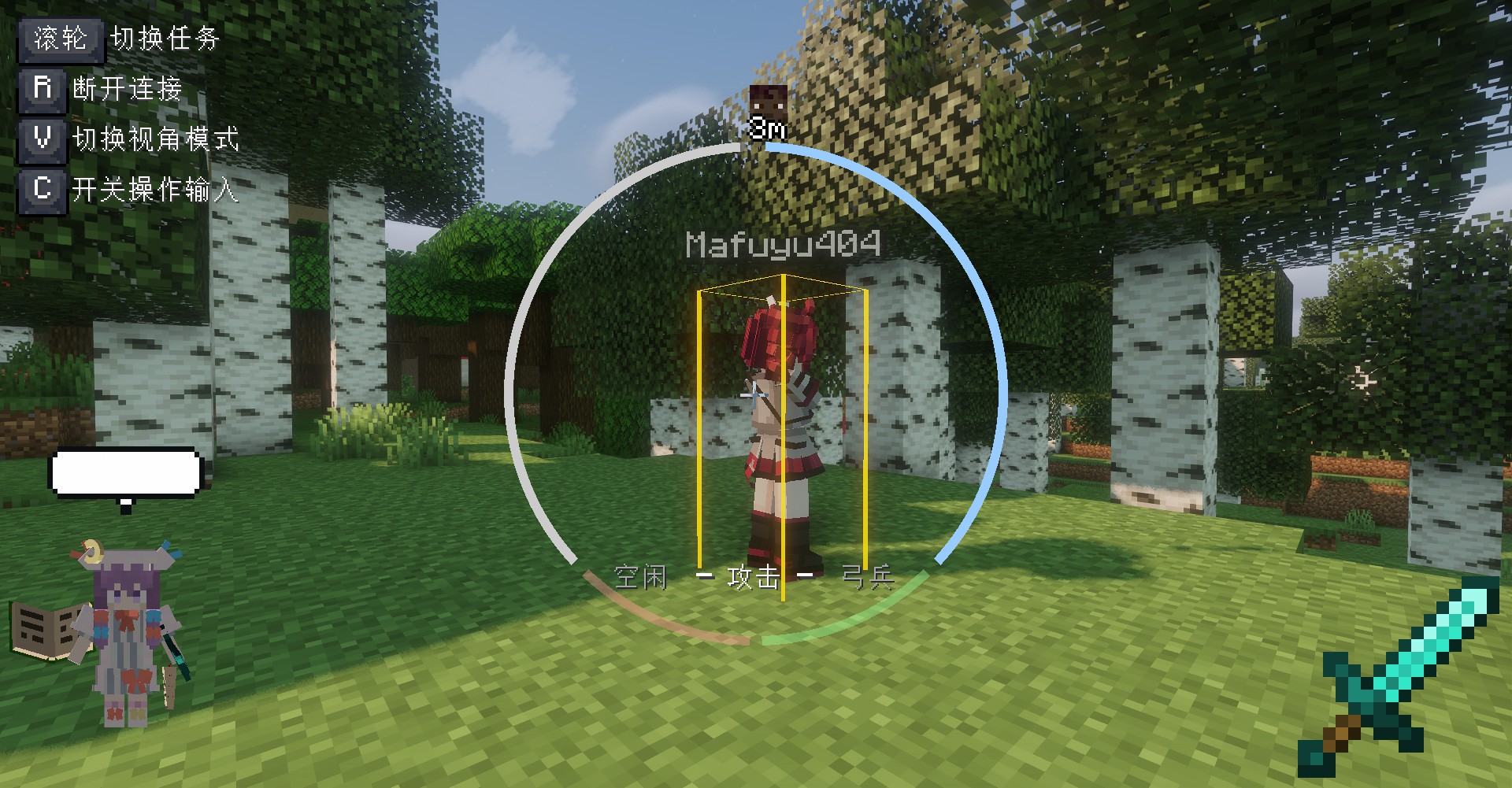
屏幕中央显示女仆的状态,例如信号强度和能量。如果信号超出范围,则无法进行控制。本版本中尚未使用能量机制;如果后续实现,可能会消耗糖作为燃料。
左下角显示女仆实体的渲染图,反映其当前状态。右下角显示女仆手中持有的物品。
屏幕顶部显示相对于主人(Master)的方向和距离。该图标的位置会动态变化。
屏幕最底部中央的文字是任务指示器,显示女仆当前分配的任务。使用鼠标滚轮可以快速循环切换任务。
左上角显示按键提示(建议配合 Controlling 附加模组使用,以便灵活显示按键绑定)。主要功能如下:
- 按
R(默认)退出心灵感应控制模式。如果在退出时女仆处于跟随模式,她将瞬移至主人身边。
- 按
C(默认)切换控制输入开关。开启时,你的移动(WASD)、跳跃和潜行动作将直接控制女仆的行为。关闭时,女仆将恢复正常的 AI 行为。
- 按
V(默认)循环切换视角模式:自由视角、跟随视角和控制视角。跟随视角类似于旁观者模式观察女仆。在控制视角下,你可以直接控制女仆的注视方向。
女仆注视的实体周围会出现高亮框,让你轻松看到她的目标。
此外,心灵感应控制还具有以下特性:
- 它适用于任意距离。即使女仆位于未加载的区块中,模组也会强制加载该区块以建立连接。被控制的女仆会像玩家一样保持周围区块的加载和渲染状态。
- 在控制期间,按下背包键(
E)将打开女仆的 GUI 而不是你自己的背包。这便于管理女仆的物品栏。
- 心灵感应控制无法跨维度使用。
注意事项
- 在跟随模式下,如果女仆正处于心灵感应控制中,她不会自动瞬移至主人身边。
- 如果你希望女仆停留在遥远的位置,请在退出心灵感应控制之前将她设置为 HOME 模式。
- 如果你在心灵感应控制模式下遇到相机无响应或区块未加载等问题,请向 QinLaoStalker 的问题追踪器报告。
- 协调是关键!例如,在远程攻击任务中,你可以控制定位和目标选择,而女仆负责自动射击和后坐力控制。
未来计划
- 在心灵感应控制期间快速交换女仆手中的物品,类似于使用玩家的快捷栏。
- 为心灵感应控制实施能量消耗机制,需要女仆背包中有糖。
- 添加与此模组功能相关的新配件,例如增加信号范围的配件。
Telepathic Maid / Remote Control Maid
This addon mod for Touhou Little Maid, requiring DiligentStalker as a prerequisite, allows the player to directly control their Maid. By binding a Maid to a figurine, the player can enter "Telepathic Control Mode" at any time, regardless of distance, to assist the Maid's actions.
In this mode, the player shares the Maid's perspective, controls her movement, remotely switches her task mode, and can open/close the Maid's GUI at will.
With this mod, your Maid is no longer just cute but sometimes clueless. When necessary, the player can take direct control to achieve a synergistic effect greater than the sum of its parts.
Getting Started
Before using telepathic control, you must first create a special figurine of your Maid:
- Craft a Camera and take a photo of the Maid.
- Hold the Maid's photo in your off-hand and a Carving Knife in your main hand to carve a 1x1 Clay Statue.
- Place the Clay Statue above a fire source. After some time, it will be fired into the finished Figurine.
Hold the Maid Figurine in your main hand and sneak + right-click on the Maid to bind it to that specific Maid entity. A figurine can only be bound once.
The binding between the figurine and the Maid is confirmed by three conditions:
- The owner of the figurine is the Maid's owner.
- The UUID recorded by the figurine matches the Maid's UUID.
- The figurine's model matches the Maid's model.
When all conditions are met, holding the figurine will highlight the corresponding Maid.
Telepathic Control
Hold the bound Maid Figurine in your main hand and right-click to enter the Maid's perspective. A special HUD will appear:
The center of the screen shows the Maid's status, such as Signal and Energy. Control is impossible if the signal is out of range. The Energy mechanic is currently unused in this version; if implemented later, Sugar will likely be consumed as fuel.
The bottom left shows a render of the Maid entity, reflecting her current state. The bottom right shows the item the Maid is holding.
The top of the screen shows the direction and distance to the Master. This icon's position changes dynamically.
The text at the very bottom center is the Task Indicator, showing the Maid's currently assigned task. Use the mouse wheel to quickly cycle through tasks.
The top left shows key hints (recommended to use with the Controlling addon for flexible keybinding display). Key functions are as follows:
- Press
R (default) to exit Telepathic Control Mode. If the Maid is in Follow mode when exiting, she will teleport to the Master.
- Press
C (default) to toggle control input. When ON, your movement (WASD), jump, and sneak inputs will directly control the Maid's actions. When OFF, the Maid will revert to her normal AI behavior.
- Press
V (default) to cycle through view modes: Free, Follow, and Control. Follow mode is like Spectator mode watching the Maid. In Control mode, you can directly control where the Maid looks.
A highlight box appears around the entity the Maid is looking at, allowing you to easily see her target.
Additionally, Telepathic Control has the following features:
- It works over any distance. Even if the Maid is in an unloaded chunk, the mod will force-load the chunk to establish a connection. The controlled Maid will keep surrounding chunks loaded and rendered, similar to a player.
- While controlling, pressing the inventory key (
E) opens the Maid's GUI instead of your own inventory. This allows easy management of the Maid's inventory.
- Telepathic Control cannot be used across dimensions.
Notes
- In Follow mode, if the Maid is under Telepathic Control, she will not automatically teleport to the Master.
- If you want the Maid to stay in a faraway location, set her to HOME mode before exiting Telepathic Control.
- If you experience issues like an unresponsive camera or chunks not loading while in Telepathic Control mode, please report them to the QinLaoStalker issue tracker.
- Coordination is key! For example, with the Ranged Attack task, you can control positioning and target selection, while the Maid handles automatic firing and recoil control.
Future Plans
- Quick-swap the Maid's held items during Telepathic Control, similar to using the player's hotbar.
- Implement an energy cost for Telepathic Control, requiring Sugar in the Maid's inventory.
- Add new accessories related to this mod's functions, such as ones that increase the signal range.


 模组

 模组
 模组

 模组
 模组
 模组
评论 0
登录后参与评分
还没有评论,来抢沙发吧