
传送方块
放置两个方块。连接它们。瞬间传送。无需命令。只需简单的基于方块的旅行。
工作原理
使用原版材料合成该方块,在需要的地方放置两个,并通过 Shift+右键点击 将它们链接起来。从那一刻起,右键点击任一方块即可将你瞬间传送到另一个方块处。
无需配置——放置即用。想要调整某些设置?有一个可选的游戏内设置菜单。
适用于 Minecraft 1.21.1 的 NeoForge 和 Fabric。
功能特性
跨维度链接
链接主世界、下界、末地以及模组添加的维度之间的方块。操作方式与以往相同:Shift+右键点击第一个方块,传送到另一个维度,然后 Shift+右键点击第二个方块。点击、被动模式和末影珍珠传送均可跨维度工作。
维度间的距离按主世界比例的坐标计算,就像原版传送门一样:下界的 x8 比例意味着下界中位于 125, 0 的方块正好对应主世界中 1000, 0 的位置。
被动模式
手持传送方块时,通过 Shift+右键点击可在 主动(点击传送)和 被动(踩上即传送)之间切换。链接的两端会同时切换状态。按住 Shift 可安全走过被动传送门而不触发它。你落脚的方块不会在你离开前再次将你传送回去。
命名链接
对已链接的方块应用 命名牌,为你的传送门对自定义名称。该名称会显示在 Jade 的工具提示和 JourneyMap 的地标中。
彩色链接
每个链接都有唯一的随机颜色——在 Jade 工具提示、JourneyMap 地标和调试叠加层中可见。颜色有助于你一眼区分多个传送门。
地图标记
使用 填充地图 右键点击已链接的方块,可将两个传送门作为持久标记添加到该地图上。对于位于不同维度的传送门对,只有位于地图所在维度的那个方块会被标记。
末影珍珠传送
向已链接的方块投掷末影珍珠——你会直接传送到配对的方块处,而不是落在原处。适用于方块间链接和 Waystone 链接。如果传送无法执行,末影珍珠会正常落地。
红石信号中继
一对链接的方块会通过链接中继红石信号,衰减一半(向上取整)。链接时比较器输出为 8,未链接时为 0。当两个方块均加载时,跨维度也可工作。
安全传送
- 禁止传送到岩浆、火焰、传送门、蜘蛛网、细雪、甜浆果丛或凋玫瑰中
- 如果配对方块被移动或破坏,断裂的链接会被自动检测并移除
- 禁止传送到世界边界之外
外观与音效
- 粒子效果直观显示方块状态:未链接的方块几乎不发光,已链接的方块吸入粒子,被动模式的方块从方块周围的环形区域吸入粒子,跨维度的方块从四面八方吸入粒子
- 已链接的方块会向其伙伴直送少量紫色末影粒子
- 链接过程中选择的第一个方块会用柔和的白色火花勾勒轮廓
- 自定义方块音效:放置声类似充能重生锚,破坏声类似耗尽重生锚,脚步声和击中声类似磁石。跨维度方块会低声嗡鸣
- 所有音效均有字幕,并可由资源包替换
- 消息显示传送方块图标并按类型着色:红色表示错误,黄色表示冷却中,绿色表示成功,紫色表示提示
进度与统计
通过自定义统计追踪你的传送次数。内置五项进度奖励链接第一对方块、第一次传送以及高频使用。
方块属性
- 爆炸抗性 1200(高于黑曜石)——仅凋零可破坏它
- 光照等级 15
- 防火物品(耐岩浆)
- 不可被活塞推动
- 用镐开采时掉落自身
设置
打开 模组 列表(来自主菜单或暂停菜单),选择 Teleport Block 并按下 Config。滑块、开关、撤销和重置为默认值等功能均已内置。在 Fabric 上,Config 按钮需要 Mod Menu。
模组会自动选择合适的设置:
- 单人游戏 — 针对你自己世界的设置,包括以局域网开放的世界。存储在
config/teleportblock-singleplayer.toml - 服务器 — 仅在专用服务器上应用服务器的设置。管理员在服务器上编辑
config/teleportblock-server.toml。当你连接到服务器时,单人游戏设置将变为灰色不可选
| 设置项 | 默认值 | 描述 |
|---|---|---|
| 传送冷却时间 | 2 秒 | 通过同一对方块连续传送之间的延迟 |
| 末影珍珠冷却时间 | 1 秒 | 通过同一对方块连续使用末影珍珠传送之间的延迟 |
| 最大链接距离 | 1024 格 | 两个链接方块之间的最大距离 |
| 每次传送检查距离 | 关 | 在每次传送时强制执行距离限制,而不仅仅是在链接时(对船只有用) |
| 每 100 格经验消耗 | 0(免费) | 基于直线距离的经验值(非等级)可选消耗 |
| 单次传送最大经验消耗 | 0(无限制) | 单次传送费用的上限 |
| 允许跨维度链接 | 开 | 关闭此选项不会删除现有链接——重新开启后它们仍可工作 |
| 维度黑名单 | 空 | 不能与其他维度链接的维度(例如 minecraft:the_end)。黑名单维度内部的链接仍然有效 |
| 跨维度额外经验消耗 | 0(免费) | 在距离费用之上可选的固定费用 |
| 仅所有者可更改链接 | 关 | 仅链接该对方块的玩家(或服务器操作员)可以重新链接、重命名或切换其模式。其他人仍可传送 |
创造模式和旁观者模式的玩家始终免费传送。
模组兼容
Jade
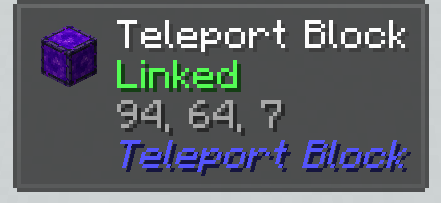
查看该方块时,显示链接状态、目标坐标、配对方块所在的维度、链接名称和链接颜色。
JEI / EMI / REI
在三种配方浏览器中均可查看合成配方和物品描述。
Waystones
将传送方块直接链接至传送到石——先按住 Shift 点击传送方块,然后手持传送方块按住 Shift 点击传送到石。可单向瞬移至任意已命名的传送到石,包括其他维度中的传送到石。
Sable / Create: Aeronautics(仅限 NeoForge)
完全兼容移动装置与子层级。可在飞船上放置传送门——坐标会自动转换为全局空间坐标。如果飞船距离过远且处于未加载状态,传送将被安全取消。使用官方的 Sable Companion 库(已捆绑)。
FTB Chunks
玩家无法传送至其他队伍占领的区块——即使是通过停放在占领区内的飞船上的方块进行传送也是如此。传送至自己占领的区块则正常工作。
Open Parties and Claims
玩家无法像使用 FTB Chunks 那样传送至他人占领的区块。但所有者、其所属小队及盟友(根据占领区设置)可以。
JourneyMap
链接的方块会自动以彩色路点的形式显示在小地图(客户端本地,非持久化)上,并位于正确的维度中。
Create (Ponder)(仅限 NeoForge)
内置两个 Ponder 场景,通过交互式动画解释链接与传送操作。
Fabric
Fabric 版本的功能、外观和操作体验与 NeoForge 版本相同。
- 需要 Fabric API。无需安装其他内容
- 安装 Mod Menu 以便在游戏中打开设置界面
- Create、Ponder 以及 Create: Aeronautics 的集成仅限 NeoForge
- Fabric 发布版使用偶数版本号(如 2.2、2.4、2.6 ...)
合成配方
| 荧石粉 | 重生锚 | 荧石粉 |
|---|---|---|
| 重生锚 | 末影之眼 | 重生锚 |
| 荧石粉 | 重生锚 | 荧石粉 |
资源包
提供 Faithful 纹理包:
Teleport Block
Place two blocks. Link them. Teleport instantly. No commands. Just simple block-based travel.
How It Works
Craft the block using vanilla materials, place two of them wherever you need, and link them together with a Shift+Right Click. From that moment, a right click on either block instantly moves you to the other.
No configuration required — just place and go. Want to tweak something? There's an optional in-game settings menu.
Available for NeoForge and Fabric on Minecraft 1.21.1.
Features
Cross-Dimension Links
Link blocks between the Overworld, the Nether, the End and modded dimensions. Do it the same way as always: Shift+Right Click the first block, travel to another dimension, Shift+Right Click the second one. Click, passive mode and ender pearl teleports all work across dimensions.
Distance between dimensions is counted in Overworld-scale coordinates, just like vanilla portals: the Nether counts x8, so a block at 125, 0 in the Nether is right next to 1000, 0 in the Overworld.
Passive Mode
Toggle between active (click to teleport) and passive (step on to teleport) with Shift+Right Click while holding a Teleport Block. Both sides of the link switch together. Hold Shift to safely walk over a passive portal without triggering it. The block you arrive on won't send you back until you step off it.
Named Links
Apply a Name Tag to a linked block to give your portal pair a custom name. The name appears in Jade tooltips and in the JourneyMap waypoint.
Colored Links
Each link gets a unique random color — visible in Jade tooltips, JourneyMap waypoints and the debug overlay. Colors help you tell multiple portals apart at a glance.
Map Markers
Right-click a linked block with a Filled Map to add both portals as persistent markers on that map. For a pair in different dimensions, only the block in the map's own dimension is marked.
Ender Pearl Teleport
Throw an ender pearl at a linked block — you teleport to the paired block instead of landing on the spot. Works with both block-to-block and Waystone links. If the teleport can't happen, the pearl lands normally.
Redstone Signal Relay
A linked pair relays redstone signal through the link, attenuated by half (rounded up). Comparator output reads 8 when linked, 0 when not. Works across dimensions while both blocks are loaded.
Safe Teleports
- Teleporting into lava, fire, portals, cobwebs, powder snow, sweet berry bushes or wither roses is blocked
- If the paired block was moved or destroyed, the broken link is detected and removed automatically
- Teleporting outside the world border is blocked
Look and Sound
- Particles show the block's state at a glance: unlinked blocks barely glow, linked blocks draw particles in, passive blocks pull them in from a ring around the block, cross-dimension blocks draw them in from all sides
- Linked blocks send a few purple ender particles straight toward their partner
- The first block you select while linking is outlined with soft white sparks
- Custom block sounds: placing sounds like charging a Respawn Anchor, breaking like depleting one, footsteps and hits like a Lodestone. Cross-dimension blocks hum quietly
- All sounds have subtitles and can be replaced by resource packs
- Messages show the Teleport Block icon and are colored by type: red for errors, yellow for cooldowns, green for success, purple for hints
Advancements & Statistics
Track your teleportation count with a custom statistic. Five built-in advancements reward linking your first pair, your first teleport, and heavy usage.
Block Properties
- Explosion resistance 1200 (higher than obsidian) — only the Wither can break it
- Light level 15
- Fire resistant item (survives lava)
- Immovable by pistons
- Drops itself when mined with a pickaxe
Settings
Open the Mods list (from the main menu or the pause menu), select Teleport Block and press Config. Sliders, toggles, Undo and Reset to defaults are all built in. On Fabric the Config button needs Mod Menu.
The mod picks the right settings automatically:
- Singleplayer — settings for your own worlds, including worlds opened to LAN. Stored in
config/teleportblock-singleplayer.toml - Server — on a dedicated server only the server's settings apply. Admins edit
config/teleportblock-server.tomlon the server. The singleplayer settings are greyed out while you're connected to a server
| Setting | Default | Description |
|---|---|---|
| Teleport cooldown | 2 s | Delay between teleports through the same pair of blocks |
| Ender pearl cooldown | 1 s | Delay between ender pearl teleports through the same pair |
| Max link distance | 1024 blocks | Maximum distance between two linked blocks |
| Check distance on every teleport | Off | Enforce the distance limit on each teleport, not only when linking (useful for ships) |
| XP cost per 100 blocks | 0 (free) | Optional cost in experience points (not levels), based on straight-line distance |
| Max XP cost per teleport | 0 (no limit) | Upper limit for the cost of one teleport |
| Allow cross-dimension links | On | Turning it off keeps existing links - they work again when it's turned back on |
| Dimension blacklist | Empty | Dimensions that can't be linked to or from another dimension (for example minecraft:the_end). Links inside a blacklisted dimension still work |
| Extra XP cost between dimensions | 0 (free) | Optional flat cost on top of the distance cost |
| Only owner can change links | Off | Only the player who linked a pair (or a server operator) can re-link, rename or switch its mode. Everyone can still teleport |
Creative and spectator players always teleport for free.
Mod Compatibility
Jade
Shows link status, target coordinates, the paired block's dimension, link name, and link color when looking at the block.
JEI / EMI / REI
Crafting recipe and item description visible in all three recipe browsers.
Waystones
Link a Teleport Block directly to a Waystone — Shift+Click the Teleport Block first, then Shift+Click the Waystone with a Teleport Block in hand. One-way instant travel to any named waystone, including waystones in other dimensions.
Sable / Create: Aeronautics (NeoForge only)
Fully compatible with moving contraptions and sub-levels. Place portals on airships — coordinates are automatically converted to global space. If the ship is too far away and unloaded, the teleport is safely cancelled. Uses the official Sable Companion library (bundled).
FTB Chunks
Players cannot teleport into chunks claimed by other teams — including through blocks on ships parked inside a claim. Teleporting into your own claimed chunks works as normal.
Open Parties and Claims
Players cannot teleport into chunks claimed by others, the same way as with FTB Chunks. Owners, their party and allies (per the claim's settings) can.
JourneyMap
Linked blocks automatically appear as colored waypoints on the minimap (client-side, non-persistent), in the correct dimension.
Create (Ponder) (NeoForge only)
Two built-in Ponder scenes explain linking and teleporting with interactive animations.
Fabric
The Fabric version has the same features, look and feel as the NeoForge one.
- Requires Fabric API. Nothing else to install
- Install Mod Menu to open the settings in game
- Create, Ponder and Create: Aeronautics integrations are NeoForge-only
- Fabric releases use even version numbers (2.2, 2.4, 2.6 ...)
Crafting Recipe
| Glowstone Dust | Respawn Anchor | Glowstone Dust |
|---|---|---|
| Respawn Anchor | Eye of Ender | Respawn Anchor |
| Glowstone Dust | Respawn Anchor | Glowstone Dust |
Resource Packs
Faithful texture packs available:

下载 TeleportBlock
下载 TeleportBlock
下载 TeleportBlock
下载 TeleportBlock
下载 TeleportBlock
下载 TeleportBlock
下载 TeleportBlock
下载 TeleportBlock
下载 TeleportBlock
下载 TeleportBlock
版本 2.2.0(初始 Fabric 发布版)
Teleport Block 的 Fabric 首个发布版本。其功能、外观和体验与 NeoForge 的 2.2.0 版本相同。
核心功能
- Teleport Block - 一种将玩家传送至关联方块的方块
- Shift+右键点击两个方块以将它们链接在一起
- 右键点击以传送至关联方块
- 被动模式 - 踩上该方块即可传送。按住 Shift 可安全通过
- 末影珍珠传送 - 向关联方块投掷珍珠即可抵达其配对方块
- 跨维度链接 - 支持主世界、下界、末地及模组维度,距离按主世界坐标尺度计算
- 使用命名牌为链接命名,并为每个链接分配唯一颜色
- 原版地图标记 - 使用已填充地图右键点击关联方块
- 通过链接中继红石信号,并提供比较器输出
- 安全传送 - 防止传送至墙壁、熔岩、火焰及其他危险区域,以及世界边界之外
- 爆炸抗性为 1200,光照等级为 15,防火物品,无法被活塞推动
- 用镐挖掘时掉落自身
外观与音效
- 粒子效果显示方块状态:未链接、已链接、被动模式或跨维度
- 已链接的方块向其配对方块发送末影粒子
- 链接过程中第一个选中的方块会显示白色火花轮廓
- 自定义方块音效并附带字幕,可通过资源包替换
- 消息显示 Teleport Block 图标,并按类型着色
设置
- 游戏内设置菜单,包含滑块、开关、撤销和重置功能 - 从 Mod Menu 打开
- 单人游戏与服务器分别设置:
teleportblock-singleplayer.toml和teleportblock-server.toml - 传送与末影珍珠冷却时间
- 最大链接距离(默认 1024 格),可选择在每次传送时进行检查
- 可选按距离消耗经验值,设有上限,且跨维度时有额外消耗
- 允许或禁止跨维度链接,以及维度黑名单
- 仅所有者可更改链接(适用于多人游戏)
兼容性
- Jade - 显示链接状态、目标坐标、维度、链接名称和颜色
- JEI / REI / EMI - 配方查看器中可见配方和描述
- JourneyMap - 关联方块显示为彩色路标点
- Waystones - 可将 Teleport Block 链接至 Waystone 作为目标,包括其他维度
- FTB Chunks - 玩家无法传送至其他团队占领的区块
- Open Parties and Claims - 玩家无法传送至他人占领的区块
- Mod Menu - 模组列表中包含设置按钮
- Carry On - 无法拾取 Teleport Block
- Inventory Sorter - Teleport Block 被列入库存整理黑名单
- Create, Ponder 和 Create: Aeronautics 集成仅限 NeoForge
进度
- Teleport Block - 制作一个 Teleport Block
- Connected - 将两个 Teleport Block 链接在一起
- Leap of Faith - 首次进行传送
- Long Jump - 传送 10 次
- Traveler - 传送 100 次
本地化
完全支持 14 种语言:英语、俄语、德语、西班牙语、法语、意大利语、日语、韩语、荷兰语、波兰语、巴西葡萄牙语、土耳其语、乌克兰语、简体中文
要求
- Fabric API。Forge Config API Port 已内置,无需安装其他内容
- Fabric 发布版使用偶数版本号:2.2、2.4、2.6 等
关于这个资源的讨论、问题反馈与使用心得
还没有讨论,来发第一帖吧
你是这个资源的作者?登录后可认领此资源。
相似资源
 模组

一个用于收集生物掉落物的多区块模组。
 模组

显示你正在注视的方块的信息。(适用于 Minecraft 1.16+ 的 Hwyla/Waila 分支)
 模组
在游戏画面角落显示附近世界地形、玩家、生物和实体的地图。可创建路径点,帮助你找到标记过的位置。
 模组
使用 JavaScript 编辑配方、添加自定义物品、编写世界事件!
 模组

查看物品与配方
 模组
AE2:一款流行的自动化与存储模组
评论 0
登录后参与评分
还没有评论,来抢沙发吧