Teleprompter Mod
一款专为 Minecraft 内容创作者、演员和导演设计的内置高可定制提词器。在录制时,你可以直接在屏幕上阅读剧本、舞台指导和对话,无需任何 Alt-Tab 操作!
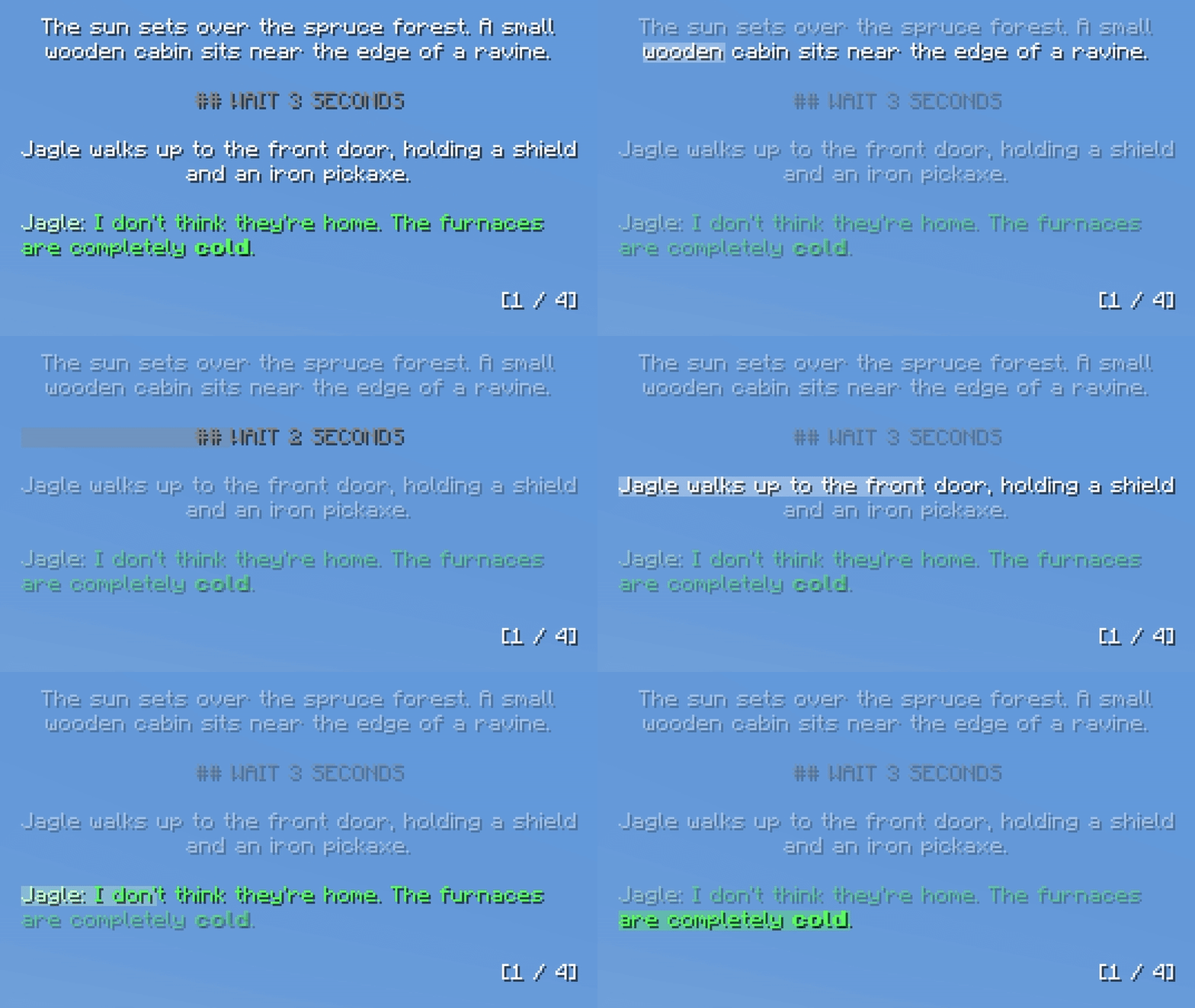
注意:此模组直接在游戏内渲染。如果你正在通过 OBS 等工具录制自己的屏幕,提词器将显示在你的最终视频画面中。
功能
-
实时文件同步: 在你的文本编辑器中编辑脚本。按下 Ctrl + S 后,游戏内的提词器会立即更新。
-
行高亮显示: 活动行追踪器根据可自定义的每分钟字数(WPM)设置平滑向下滚动。
-
对话格式化: 自动检测角色名称,并将其与舞台指示区分开着色。在设置中设定你的用户名,即可拥有独特的颜色。
-
支持 Markdown: 在文本文件中使用标准 Markdown 语法,使文字加粗、斜体 或 下划线。
-
UI 响应式缩放: 将提示器固定在屏幕的任意角落。它会随着原生 Minecraft GUI 缩放平滑调整大小,允许你微调框内边距、文本缩放和像素偏移量。
-
多脚本支持: 将任意数量的 .txt 文件放入 config/scripts/ 文件夹中,即可在游戏中通过快捷键即时切换。
编写脚本
首次启动游戏时,模组会生成一个 config/scripts/ 文件夹,其中包含一个内置的教程脚本。你可以编辑该脚本或添加自己的脚本。
格式设置提示:
- 分页符: 在新的一行输入三个连字符(
---)以强制实现平滑的硬翻页效果。(段落同样受到动态保护,确保句子不会因分页符而被截断!)
- 等待指令: 在单独的一行输入
## WAIT 10 SECONDS 或 ## WAIT 2 MINUTES。高亮显示功能将放慢速度,文本将在屏幕上实时倒计时至 0,然后再移动到下一行。
- 对话格式: 要触发对话着色和智能对齐功能,您必须使用冒号和引号。
- 示例:
Michael: "Hello?"
- 注意: 引号仅用于模组检测对话。它们将被移除,并在游戏内的最终文本中隐藏。
- 舞台指示: 任何标准文本或列表(不使用对话格式)将自动在框内居中显示。
Teleprompter Mod
An in-game, highly customizable teleprompter designed for Minecraft content creators, actors, and directors. Read your scripts, stage directions, and dialogue directly on your screen while recording without ever having to Alt-Tab!

Note: This mod renders directly in-game. If you are capturing your own screen for a video (via OBS, etc.), the teleprompter will show up in your final footage.
Features
- Live File Syncing: Edit your scripts in your text editor. As soon as you hit
Ctrl + S, the teleprompter updates in-game instantly.
- Line Highlighter: The active line tracker smoothly progresses down the page based on a customizable WPM setting.
- Dialogue Formatting: Automatically detects character names and colors them differently from stage directions. Set your username in the settings for a unique color.
- Markdown Support: Use standard Markdown in your text files to make words bold, italic, or underlined.
- UI-Responsive Scaling: Pin the prompter to any corner of your screen. It smoothly scales with your native Minecraft GUI scale, allowing you to fine-tune the box padding, text scale, and pixel offsets.
- Multi-Script Support: Drop as many
.txt files as you want into the config/scripts/ folder and instantly cycle between them in-game via hotkey.
Writing Scripts
When you launch the game for the first time, the mod will generate a config/scripts/ folder with a built-in tutorial script. You can edit this or add your own.
Formatting Tips:
- Page Breaks: Type three dashes (
---) on a new line to force a smooth, hard page flip. (Paragraphs are also dynamically protected, ensuring sentences are never cut in half by a page break!)
- Wait Commands: Type
## WAIT 10 SECONDS or ## WAIT 2 MINUTES on its own line. The line highlighter feature will slow, and the text will physically count down to 0 live on your screen before moving to the next line.
- Dialogue Formatting: To trigger the dialogue coloring and smart-alignment feature, you must use a colon and quotation marks.
- Example:
Michael: "Hello?"
- Note: The quotation marks are used purely for the mod to detect the dialogue. They will be removed and hidden from the final text in-game.
- Stage Directions: Any standard text or list (without the dialogue formatting) will automatically be centered in the box.
评论 0
登录后参与评分
还没有评论,来抢沙发吧