Terramap 是 Terraplusplus Minecraft 模组的附加组件。它能在游戏内渲染真实世界地图,并具备扩展功能。目前仍处于测试阶段,缺少部分预期功能。
有用链接:
功能:
- 完整的全屏世界地图(目前仅支持栅格地图)
- 小地图和指南针,配有直观的界面配置 UI
- 使用地图进行便捷的全球传送
- 在地图上显示玩家位置,无论他们距离你有多远
- 快速获取某地点的技术信息,包括失真度或区域坐标
- 快速访问其他地图服务
- 支持自定义地图端点,具备服务器到客户端的配置同步功能
计划中的功能
- 栅格地图
- 地理编码
- 支持更多模组框架(Forge、Fabric、Bukkit)
- 支持更新版本的 Minecraft
安装说明
请确保已安装 Minecraft Forge 1.12.2,以及必要的模组依赖项:Terraplusplus、CubicChunks 和 CubicWorldGen。安装 Forge 模组只需将模组文件放入 Minecraft 安装目录下的 mods 文件夹即可(此处不赘述具体细节,网上有许多优秀的指南可供参考)。
或者,Terramap 也包含在 Build The Earth 整合包安装程序中。
截图
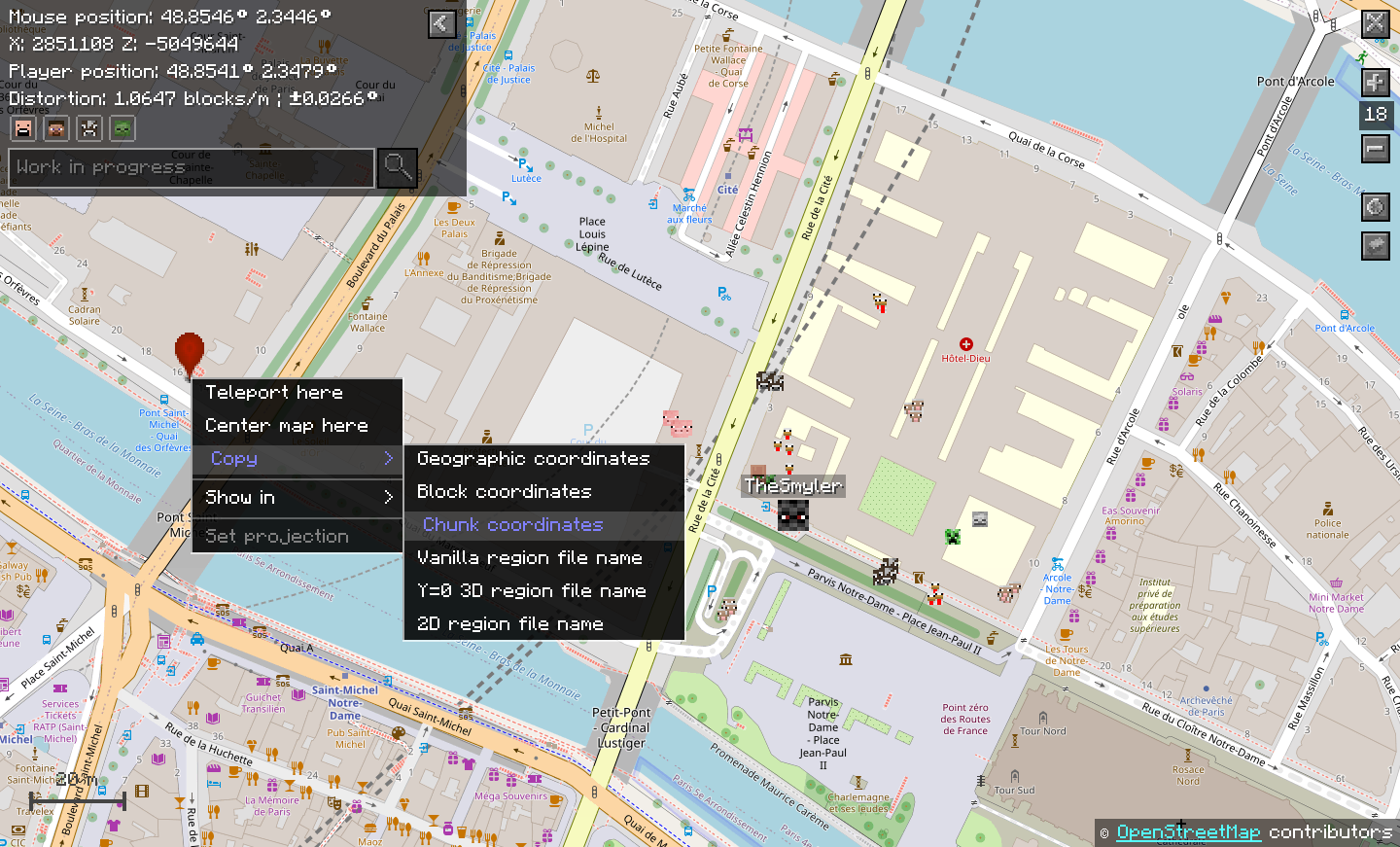
Terramap 在单人世界中使用原版 OSM 风格的效果:
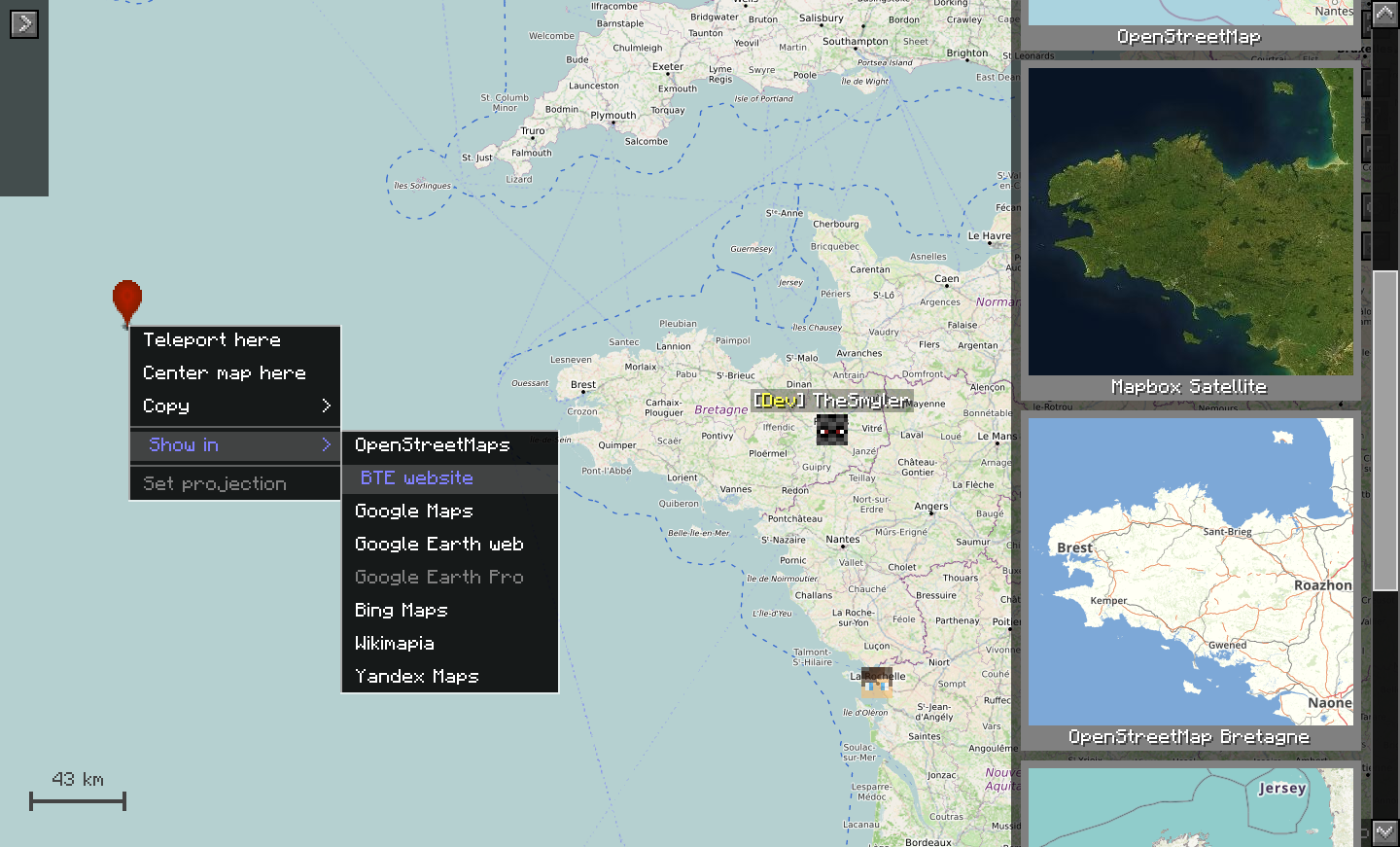
在 BTE-France 中使用的自定义地图样式:
使用方法:
在游戏中,按 M 键打开全屏地图(默认按键,但可以在配置文件中更改)。
拖动、缩放并探索世界,就像使用其他任何数字地图一样。
右键点击任意位置以获取包含各种实用工具的菜单(请参阅截图)。
此外,您还可以:按 P 键切换调试模式,按住 Ctrl 启用快速传送模式,在地图样式菜单中更改地图样式,更改实体显示偏好,双击跟随某个实体或玩家,在模组配置中配置小地图,添加自定义地图样式等等……
查看 维基 以获取更多技术信息。
如果同时在服务器和客户端安装 Terramap,其效果最佳。这是因为需要将服务器使用的地图投影同步到客户端。即使仅在客户端安装,只要您了解并花时间手动设置所使用的投影,它仍然可以使用。
贡献项目:
如果您想做出贡献,请确保加入 Discord。您将在其中获得贡献者角色。
代码
未来的更新已经计划在内,因此请在贡献代码之前联系我,以便我们先讨论您想要进行的更改。
无论如何,请 Fork 此仓库并从您的 Fork 创建拉取请求。您可以将您的 Fork 克隆到计算机上,并在 IDE 中进行工作。请务必遵循 Minecraft Forge 的开发环境设置说明。
翻译
欢迎随时为翻译做出贡献。请注意,该模组仍会进行大量更改,您的翻译可能需要进行更新以反映这些变化。您不必亲自保持可用状态以进行更新,但如果需要,您的工作可能会被其他人修改。如果您不习惯使用 GitHub,可以通过 Discord 向我发送您的翻译文件,或者在那里询问任何问题。
Terramap is an addon to the Terraplusplus Minecraft mod. It renders real world maps inside of the game with extended features. It is still in beta and lacks intended features.
Useful links:
Features:
- Fully fledged full-screen world map (only raster maps for now)
- Minimap and compass with an intuituve configuration UI
- Easy world-wide teleportation using the maps
- Displays players on the maps, no matter how far away they are from you
- Quick access to technical information about a place, including distortion or region coordinates
- Quick access to other map services
- Support for customized map endpoints, with server to client config synchronization
Planned features
- Raster maps
- Geocoding
- Support for more modding framework (Forge, Fabric, Bukkit)
- Support for more modern Minecraft versions
Installation
Make sure you have Minecraft Forge 1.12.2 installed, as well as the necessary mod dependencies: Terraplusplus, CubicChunks, and CubicWorldGen. Installing a Forge mod is as simple as dropping the mod file in the mods folder in your Minecraft installation directory (I will not go into the details here, there are plenty of great guides online).
Alternatively, Terramap comes included in the Build The Earth modpack installer.
Screenshots
Terramap on a solo world, with the vanilla osm style:
Custom map styles on BTE-France:
How to use it:
In game, press m to open the full-screen map (by default, but it can be changed in the config)
Drag it, zoom in and out, and explore the world just like with any other digital map.
Right-click somwhere to get a menu with various useful tools (see the screenshots).
Additionally, you can: press p to toggle debug mod, press control to enable quick tp mode, change the map style in the map style menu, change entity display preferences, follow an entity or player by double clicking it, configure the minimap in the mod's config, add your own map styles, and more...
Checkout the wiki for more technical information.
Terramap will work best if it is installed both on the server and the client. This is because it needs to synchronize the map projection used by the server to the client. It is still usable if installed only on the client, as long as you know and take the time to manually set the projection used.
Contributing to the project:
In case you want to contribute, please make sure you join the Discord. You will get a contributor role there.
Code
Future updates are already planned ahead, so please contact me before contributing code so we can discuss the changes you want to make first.
In any case, please fork this repository and create a pull request from your fork. You can clone your fork to your computer and work from your IDE there. Make sure you follow the Minecraft Forge instructions to setup the development environment.
Translation
Contribution for translations are welcomed at any time. Please note however that the mod will still change quite a lot, and your translation will probably need to be updated to reflect theese changes. You don't have to stay available to update it personally, but your work may end up being modified by someone else if needs to be. If you are not comfortable using Github you can send me your translation file on the Discord or ask me anything there.




 模组

 模组
 模组

 模组
 模组
 模组
评论 0
登录后参与评分
还没有评论,来抢沙发吧