模组简介
本模组提供多种类型的实体追踪光标(目前可用两种,一种计划中),协助玩家定位目标。它同时也可作为专用的 HUD 库使用。
当你面对在屏幕上乱飞或穿墙的怪物时,你就需要这个。(幻翼:哈?)
默认情况下,本模组包含末影龙与凋灵的追踪光标,以及与 Confluence: Otherworld 集成的首领指针。
请勿将本模组与 Confluence: Otherworld 同时加载,因为它已内置于 Confluence: Otherworld 中。
本模组是 Confluence: Otherworld 的子模块,但也可以作为实用工具模组单独游玩。
用户可以通过配置文件或游戏内 GUI 对本模组进行配置,选项如下:
- 启用/禁用:切换追踪功能。
- 光标大小:调整光标的相对全局尺寸。默认值:0.6。
- 最大追踪数量:限制被追踪实体的数量,以防止画面过于杂乱。仅显示最近的 n 个实体。默认值:10,最大值:400。
- 中心环绕光标开关:最常用的光标类型之一。详见下文。
- 投影算法:选择中心环绕模式下使用的投影方式。Aitoff 投影通常表现最佳,因此不建议切换。
- 直接投影光标开关:在其他游戏中更常见的任务标记风格。详见下文。
- 经度轴开关:预分配的第三种光标类型,尚未开发。目前无法使用。
- 追踪列表:一个列表,其中每个条目对应一个 EntityType + 光标。你可以指定要追踪的实体类型以及使用的光标样式。详见配置详情。
追踪详情
目前,追踪范围仅限于:x: ±64 格,y: +64 / -48 格,z: ±64 格
中心环绕光标 (TRelativeCursor)
此已完成模式会在屏幕中心周围创建 HUD 指针,以指示实体方向。
旧版本 0.0.3(忽略 Vpet):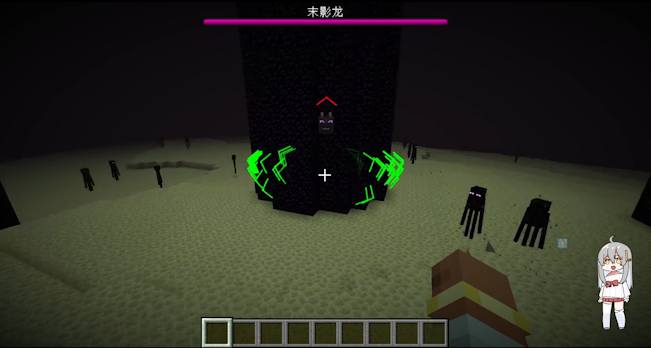
新版本 0.2.5: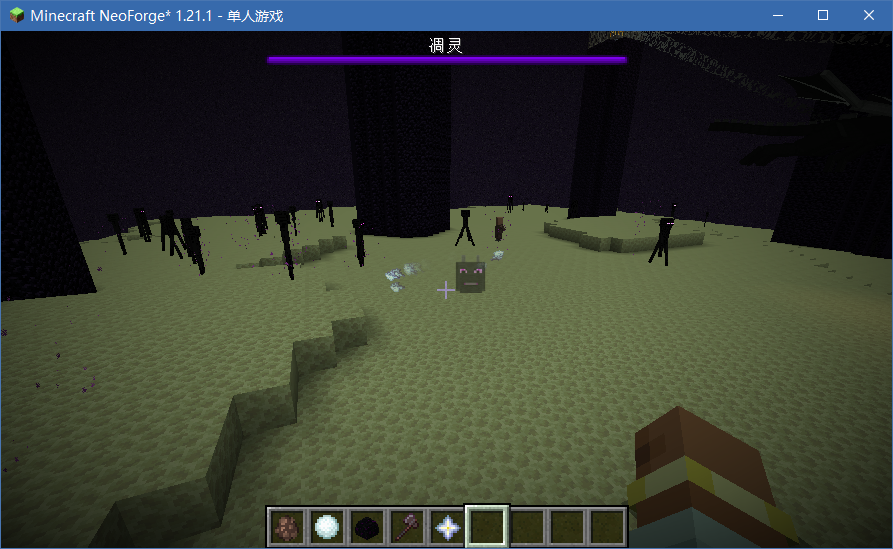
很明显,这些指针指示的是“转向哪个方向可以看到该实体”,而不是“实体在世界中的具体位置”。
光标距离中心的远近反映了你需要旋转视角的程度。当实体方向几乎与你的视线重叠时,光标会淡出。(在旧图中,绿色指针表示附近的僵尸傀儡。)
提供三种投影算法:墨卡托、Aitoff 和温克尔三重。测试表明视觉差异不大,但 Aitoff 表现最佳,因此不推荐其他两种。
有些人可能会想知道是否可以使用原版矩阵进行 2D 到 3D 的方向转换,但研究表明,轻微的曲线偏移能产生更有用的效果。
直接投影光标 (TDirectProjCursor)
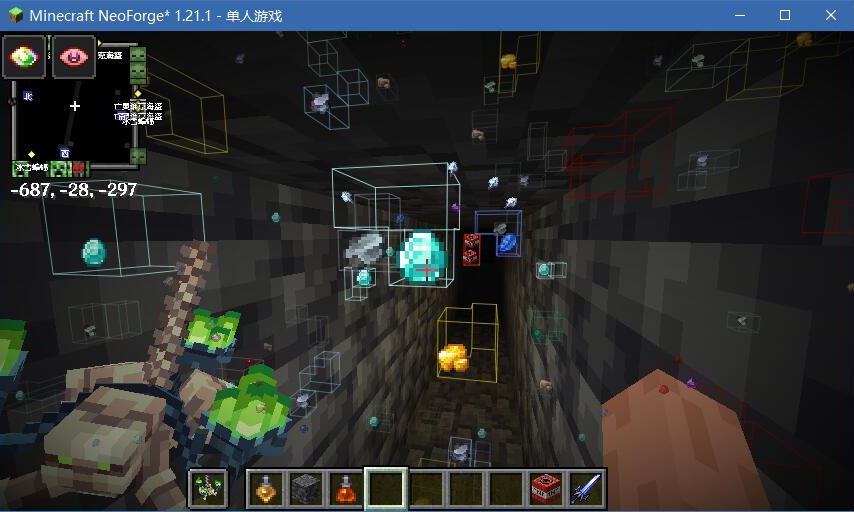
这张截图是在开发 Confluence: Otherworld 的采矿药水时拍摄的。矿石标记是通过本模组实现的。
此模式直接将光标叠加在目标实体上(不是世界标记,而是真正的 2D 覆盖层)。
变体包括单一人像风格标记和目标周围的三个图标。还有彩蛋!
配置模组
在游戏内,你可以使用以下格式创建中心环绕光标:
<modid:entity_type>|<cursor_arrow_type>|<cursor_icon_type>
示例:默认的末影龙光标配置为:
minecraft:ender_dragon|normal|ender_dragon_head
对于直接投影光标,配置更为复杂且处于实验阶段。格式为:
<modid:entity_type>|<cursor_type>:<cursor_icon_type>(|easter_eggs_type)
可用的光标箭头
normal, normal_red, normal_green, normal_white
normal 是新截图中显示的更新版箭头,素材由 LazyPillow 制作。
可用的图标
- 基于原版的:
ender_dragon_head, wither_head。
- Confluence: Otherworld:
king_slime, eye_of_cthulhu, brain_of_cthulhu, queen_bee, eater_of_worlds, skeletron, deerclops, wall_of_flesh。
这些图标可以在不需要 Confluence: Otherworld 作为依赖的情况下直接使用。
如果将某个字段设置为 none,则该部分光标将不会显示。
你还可以通过资源包添加新纹理,只要它们与本模组的资源位于同一目录即可。只要名称不冲突,就可以直接引用。
注意:为了视觉优化,源自 PartEntity 的实体(例如末影龙的翅膀和尾巴)不会被追踪。
提示
许多追踪功能已经完成并部署在 Confluence: Otherworld 中。然而,配置和使用方面可能仍存在不完善之处。欢迎反馈!
备注
加入 Confluence: Otherworld Discord 以支持作者。
如果你是模组开发者,请查看 GitPage 文档以获取更多信息(仅限中文)。
Mod Introduction
This mod provides multiple types of entity-tracking cursors (two available, one planned), assisting players in locating targets. It also serves as a specialized HUD library.
When you're facing mobs flying chaotically across the screen or clipping through walls, you'll need this. (Vex: huh?)
By default, the mod includes tracking cursors for the Ender Dragon and Wither, as well as boss pointers integrated with Confluence: Otherworld.
Do not load this mod together with Confluence: Otherworld, as it is already built into Confluence: Otherworld.
The mod is a submodule in Confluence: Otherworld, but it can also be played standalone as a util mod.
Users can configure the mod (via config file or in-game GUI) with the following options:
- Enable/Disable: Toggle the tracking functionality.
- Cursor Size: Adjust the relative global size of cursors. Default: 0.6.
- Max Tracking Count: Limit the number of tracked entities to prevent excessive clutter. Only the nearest n entities will be shown. Default: 10, maximum: 400.
- Central Surround Cursor Toggle: One of the most commonly used cursor types. See details below.
- Projection Algorithm: Choose the projection used in central surround mode. Aitoff generally performs best, so switching is not recommended.
- Direct Projection Cursor Toggle: A more common quest-marker style seen in other games. See details below.
- Longitude Axis Toggle: A pre-assigned third cursor type, not yet developed. Currently non-functional.
- Tracking List: A list where each entry corresponds to an EntityType + Cursor. You can specify which entity types to track and which cursor style to use. See configuration details below.
Tracking Details
Currently, tracking is limited to the following range: x: ±64 blocks, y: +64 / -48 blocks, z: ±64 blocks
Central Surround Cursor (TRelativeCursor)
This completed mode creates HUD pointers circling the center to indicate entity direction.
Old version 0.0.3 (ignore Vpet):
New version 0.2.5:
It’s clear that these pointers indicate "which way to turn to see the entity" rather than "where the entity is in the world."
The cursor's distance from the center reflects how much you need to rotate your view. When the entity's direction nearly overlaps with your view, the cursor fades out. (In the old image, the green pointer indicates a nearby Enderman.)
Three projection algorithms are available: Mercator, Aitoff, and Winkel Tripel. Tests show little visual difference, but Aitoff performs best, so the others are not recommended.
Some may wonder about using vanilla matrices for 2D-to-3D direction, but research suggests a slight curved offset produces a more useful effect.
Direct Projection Cursor (TDirectProjCursor)
This screenshot was taken while developing Confluence: Otherworld's Mining Potion. The ore markers are implemented via this mod.
This mode directly overlays the cursor onto the target entity (not a world marker, but a true 2D overlay).
Variants include a single portrait-style marker and three icons circling the target. There are also Easter eggs!
Configuring the Mod
In-game, you can create a central surround cursor with the following format:
<modid:entity_type>|<cursor_arrow_type>|<cursor_icon_type>
Example: the default Ender Dragon cursor is configured as:
minecraft:ender_dragon|normal|ender_dragon_head
For direct projection cursors, configuration is more complex and experimental. Format:
<modid:entity_type>|<cursor_type>:<cursor_icon_type>(|easter_eggs_type)
Available Cursor Arrows
normal, normal_red, normal_green, normal_white
normal is the updated arrow shown in the new screenshots, artwork by LazyPillow.
Available Icons
- Vanilla-based:
ender_dragon_head, wither_head.
- Confluence: Otherworld:
king_slime, eye_of_cthulhu, brain_of_cthulhu, queen_bee, eater_of_worlds, skeletron, deerclops, wall_of_flesh.
These icons can be used without requiring Confluence: Otherworld as a dependency.
If you set a field to none, that part of the cursor will not display.
You can also add new textures via resource packs, as long as they share the same directory as this mod’s assets. As long as names don’t conflict, they can be referenced directly.
Note: For visual optimization, entities derived from PartEntity (e.g., Ender Dragon’s wings and tail) will not be tracked.
Tip
Many tracking features are already complete and deployed in Confluence: Otherworld. However, configuration and usage may still have imperfections. Feedback is welcome!
Notes
Join the Confluence: Otherworld Discord to support the author.
If you are a mod developer, check the GitPage documentation for more details(Chinese only).


 模组

 模组

 模组
 模组

 模组
 模组
评论 0
登录后参与评分
还没有评论,来抢沙发吧