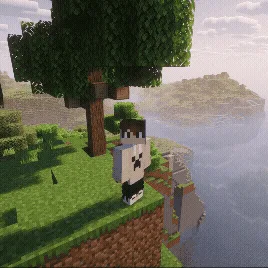
Third Person Mod
一款 Fabric 模组,允许你自定义 Minecraft 第三人称视角(按 F5 键切换)的相机距离。 你可以自由调整相机距离,并可选择禁用当相机与方块或墙壁碰撞时发生的自动拉近效果——允许相机穿透并保持其位置。
主要功能
可调节相机距离
在第三人称视角下,自由设置玩家与相机之间的距离。
默认值为 4.0。
穿透方块
通常,当玩家背后有墙壁或方块时,相机会靠近。
启用此设置后,相机将忽略方块并保持其距离。
适用于在狭窄空间中拍摄截图或检查建筑。
依赖项
本模组需要以下模组:
- Fabric Loader
- Fabric API
- Simple GUI API
- Mod Menu
如何配置
- 如果已安装 Mod Menu,可以在游戏内更改设置。
- 在主菜单或暂停菜单中,点击 Mods 按钮。
- 在模组列表中搜索 "Third Person" 并选中它。
- 点击设置图标。
配置选项
Camera Distance:
使用滑块或数字输入来调整相机距离。
Clip Through Blocks:
设置为 True 以允许相机穿透墙壁。
Copyright (c) 2025 MichiJP. All Rights Reserved.

你是这个资源的作者?登录后可认领此资源。
相似资源
 模组
Ixeris
decce6
缓冲的原始输入和线程化的事件轮询
优化
657
 模组

玉Jade ?
Snownee
显示你正在注视的方块的信息。(适用于 Minecraft 1.16+ 的 Hwyla/Waila 分支)
实用前置
341
 模组

Fast Noise
omo50
原版世界生成优化模组
优化世界生成
242
 模组
Xaero的小地图
thexaero
在游戏画面角落显示附近世界地形、玩家、生物和实体的地图。可创建路径点,帮助你找到标记过的位置。
冒险交通
241
 模组

物品管理器Just Enough Items (JEI)
mezz
查看物品与配方
前置实用
240
 模组
KubeJS
Lat
使用 JavaScript 编辑配方、添加自定义物品、编写世界事件!
前置实用
239
评论 0
登录后参与评分
还没有评论,来抢沙发吧