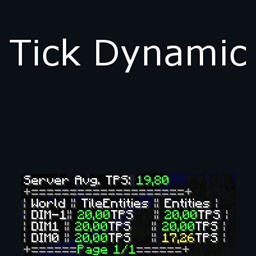
Tick Dynamic 是一个 Minecraft Forge CoreMod,旨在将服务器的每秒刻数(TPS)维持在 20。它通过单独控制每个刻中更新的实体(Entities)和方块实体(TileEntities)数量来实现这一目标。随着服务器 TPS 的下降,每个刻中更新的实体和方块实体的数量也会相应减少,以维持较高的服务器 TPS。
注意:目前此模组不兼容 SpongeForge。
原始项目由 wildex999 开发,据我所知从未发布到 Curse。 这是原始模组的链接,可以在这里找到 1.8 和 1.7.10 版本的下载。这里是他允许我更新该模组的声明,此外该模组还遵循 MIT 许可证。
描述
在 Minecraft 服务器中,世界每秒会更新 20 次。这意味着服务器必须在 50 毫秒内遍历所有活跃世界并更新实体、方块实体以及其他内容,如光照和地形生成。
当你的服务器拥有大量玩家以及大型活跃基地时,服务器可能会开始遇到无法在规定时间内更新所有内容的困难。
这在安装了 Chunk loaders(区块加载器)、拥有大量方块实体且包含许多新怪物和其他实体的模组服务器中尤为明显。
在你的服务器上安装 Tick Dynamic 后,你可以定义每个世界允许使用的时间,以及在每个世界中实体和方块实体允许使用的时间。
一旦达到这些限制,Tick Dynamic 将限制给定组别中每个刻更新的实体和/或方块实体的数量。
本质上,你在每个世界中为实体和方块实体分别设置了独立的 TPS。
那么,通过允许实体和方块实体以更慢的速度更新来维持服务器 20 的 TPS,你能获得什么好处?
- 几乎没有方块延迟
- 无需延迟即可与方块实体(箱子、机器等)进行交互
- 加载区块和传送时无长暂停
- 移动时不会出现玩家卡顿
- 不会因长时间刻而导致断开连接
- 通常更低的延迟和更具响应性的服务器
然而请注意,Tick Dynamic 并不能解决所有情况,某些事件仍会导致 TPS 下降或产生明显的卡顿。
一些例子包括:
- 世界生成为单个刻花费了大量时间。
- 某个世界的使用时间发生快速变化
- 某个模组,或一组生物,在单个刻的某项操作中使用了大量时间。
- 世界备份
不过,Tick Dynamic 应该能够相当程度地平滑这些峰值。
Tick Dynamic 提供了大量关于如何维持 20 TPS 的控制选项。
如果你希望实体以完整的 20 TPS 运行,但对方块实体不太在意,你可以为实体分配更多的时间份额。
如果你希望为主世界(Overworld)分配更多时间,也可以给它比其他世界更大的时间份额。
安装
多人服务器安装
Tick Dynamic 是一个 Minecraft Forge 模组,因此需要 Forge 服务器才能运行。
你可以在这里下载最新的 Forge 安装程序。请记住根据你运行的 Minecraft 版本选择正确的版本。
然后只需安装服务器并启动它,让它完成初始设置。
当你有一个正在运行的 Forge 服务器后,只需从下载页面下载 Tick Dynamic,并将其放入 Forge 服务器的 mods 文件夹中。
然后你需要重启服务器,它将为你创建一个默认配置文件,并将其放置在名为 "tickdynamic.cfg" 的 "config" 文件夹中。
有关如何配置模组的更多信息,请阅读下方的“配置”部分。
单人客户端安装
客户端安装与服务器安装几乎相同
只需下载 Forge 安装程序,运行它,然后将 Tick Dynamic 放入 'mods' 文件夹中即可。
配置
当你首次启动安装了此模组的世界时,它会创建一个新的默认配置文件。
文件中包含注释,应该很容易理解,但我们将对一些概念进行更详细的说明。
默认配置文件看起来可能像这样。
配置的结构如下:你有一个主组,称为 'worlds'(世界)。
在这个 'worlds' 组中,你有每个维度/世界的单独组。
然后在每个世界中,你有 'entity'(实体)和 'tileentity'(方块实体)组。
每种类型始终只有一个,并且 Tick Dynamic 会在服务器创建或加载新世界时自动创建这些组。
建议你先进行一次运行,让模组自动创建这些组,进入配置文件调整你想要的设置,然后在服务器上以 OP 身份执行命令 'tickdynamic reload'。
未来将有一个命令可以直接调整设置,而无需重新加载或编辑配置文件。
slicesMax
在配置文件中,你会反复看到一个名为 'slicesMax' 的选项。
Slices(切片)是你控制分配给每个世界的时长的方式,而在每个世界内部,则是控制分配给实体(Entities)和方块实体(TileEntities)的时长。
每个游戏刻(Tick),时间(默认为 50ms)将根据它们拥有的切片数量在所有世界之间进行分配。
如果你有 3 个世界,每个世界都有 100 个切片,那么每个世界将获得 100/300 = ~33% 的时间。
因此,你可以给予主世界(Overworld)300 个 maxSlices,而给予其他两个世界各 100 个。这样主世界将获得 60% 的时间。
分配给该世界的这部分时间,会进一步根据它们的切片数分配给方块实体和实体,方式相同。
方块实体和实体首先获得分配给该世界的部分时间,因此它们的切片仅在该世界内部相互比较。
如果任何组有未使用的时间,那么这些时间将分配给剩余的组。
所以,即使你给予方块实体 1000 个切片,给予实体 100 个切片,只要方块实体没有用满其全部时间,实体就能使用超过 100 个切片的时间。
因此,切片到时间百分比的计算公式为:(self.maxSlices/allSiblings.maxSlices)*100
注意:maxSlices = 0 具有特殊含义。它表示该组的耗时会被计算,但不受限制。
基本上,它可以占用所需的所有时间,即使超过了父级的 maxTime,也会将其兄弟组降至 minimumObjects。
minimumObjects
随着服务器超出给定的 50ms 游戏刻时间的程度越来越深,它会越来越多地减少正在更新的实体和方块实体的数量。
最终,它会达到完全停止更新它们的程度,而这并不总是你想要的效果。
使用 minimumObjects,你可以设置一个下限,无论服务器的 TPS 多低,都不会低于此点。
命令
/tickdynamic list [dimnames, time, entitiesrun, tps, maxslices, minimumentities] [page]
list 命令将列出所有世界,以及请求的关于它们及其内部实体和方块实体的数据。
如果列表超过 6 行,它将被分页显示。默认情况下它将显示第一页,但你可以提供页码作为最后一个参数。
list dimnames
列出维度名称及其维度 ID。
列表中的其他内容目前都使用维度编号(如 DIM0、DIM-1 等),因此使用 'list dimnames' 你可以获取绑定到这些编号的实际名称列表。
这目前是临时的,仅列出当前已加载并处于运行状态的维度的名称。
之所以最初只使用 DIM 编号,是因为名称通常太长,会导致聊天中的表格换行到多行。
list time [page]
列出平均使用的时间和平均分配的时间(以毫秒为单位)。
在每个游戏刻开始时,Tick Dynamic 会取每个组的平均使用时间和 slicesMax,并重新分配时间。此命令将向你显示这些数据,让你可以看到哪个世界以及该世界内的哪个组正在使用时间。
此列表还显示了一个“World Data”列,这是该世界中实体和方块实体使用的总时间。
这里有一个特殊的条目“(Other)”。
这表示实体和方块实体之外使用的任何时间,当 Tick Dynamic 计算时间分配时,必须从池中扣除这部分时间。
从版本 0.1.3 开始,还有一个“External”组。
此组将显示在游戏刻之间使用的、导致下一个游戏刻延迟开始的时间。如果你在同一台机器上运行 Minecraft 服务器和其他程序,你会注意到这里显示了大量使用时间。
如果这部分占用了显著的时间量,可能表明有其他东西占用了大量的 CPU 时间。
list entitiesrun [page]
列出平均每个游戏刻运行的实体/方块实体的数量。
这让你概览每个游戏刻中运行的实体或方块实体的数量,并结合 'list time' 可以很好地指示出如何减少不同世界中使用的耗时。
list tps [page]
列出每个世界中实体和方块实体的当前每秒游戏刻数(TPS)。
这让你了解特定组被减速的程度。例如,如果实体的 TPS 为 10,这意味着只有半数的实体会在每个服务器游戏刻中更新。
注意:某些世界可能显示 TPS 为 ',00'。这意味着该世界当前未加载和/或未运行。
list maxslices [page]
本质上只是列出配置文件中的当前 slicesMax 值。
查看配置的 slicesMax 文档以获取更多信息。
list minimumentities [page]
本质上只是列出配置文件中的当前 minimumObjects 值。
查看配置的 minimumObjects 文档以获取更多信息。
/tickdynamic tps
打印当前的平均服务器 TPS
/tickdynamic value
此命令目前尚未实现,但在未来它将允许你直接更改配置条目,而无需手动编辑配置文件并运行重载。
/tickdynamic reload
重新加载配置文件,并应用新配置。
/tickdynamic enabled [yes, y, no, n]
启用或禁用 Tick Dynamic。注意,在某些情况下它仍会收集数据,但不再应用任何限制。
注意:它不会将此更改写入配置文件!
/tickdynamic help
目前仅打印本页面的 URL。
查看我的其他模组:
Tick Dynamic is a Minecraft Forge CoreMod, which will attempt to maintain a server Ticks Per Second at 20. It does this by individually controlling how many Entities and TileEntities update each tick. As the server TPS goes down, the number of Entities and TileEntities that update each tick also goes down, to maintain a high server TPS.
Note: this is not currently SpongeForge compatible.
The original project was by wildex999, and never posted to Curse, as far as I know. Here is a link to the original mod, where downloads for 1.8 and 1.7.10 can be found. Here is where he gives permission for me to update it, in addition to the fact that it is licensed under the MIT License.
Description
On a Minecraft server, the world will update 20 times each second. This means that the server has 50 milliseconds to go through every active world and update the Entities, TileEntities and other things such as lighting and terrain generation.
Once your server has a lot of players, and large active bases, the server might start having problems updating everything within the given time.
This is especially true on modded servers with Chunk loaders, large bases with a lot of TileEntities, and many new Monsters and other Entities.
With Tick Dynamic on your server, you will be able to define how much time each world is allowed to use, and within each world, how much time Entities and TileEntities are allowed to use.
Whenever these limits are hit, Tick Dynamic will limit the number of Entities and/or TileEntities that update each tick for the given groups.
You essentially have a separate TPS for Entities and TileEntities in each world.
So what do you gain by maintaining a server TPS of 20, by allowing Entities and TileEntities to update slower?
- Little to no Block lag
- Interact with TileEntities(Chests, Machines etc.) without delays
- Chunk loading and teleporting without long pauses
- No player lag when moving around
- No disconnects due to long ticks
- Generally lower ping and a more responsive server
Note however, that Tick Dynamic will not help for every case, certain events will still cause the TPS to drop, or cause noticeable lag.
Some examples for this are:
- World Generation taking a significant amount of time for a tick.
- Rapid change in time usage for a world
- One mod, or a combination of mobs, using a large amount of time on a single operation during a tick.
- World backup
However, Tick Dynamic should be able to smooth out the spikes by quite a bit.
Tick Dynamic allows a lot of control in how it will maintain that 20 TPS.
If you would have Entities run at a full 20 TPS, but you don't care about TileEntities, you can provide a larger slice of time for Entities.
If you want to give Overworld more time, you can also give it a larger slice of time than the other worlds.
Installation
Multiplayer Server installation
Tick Dynamic is a Minecraft Forge mod, and therefore requires a Forge server to run.
You can download the latest Forge installer here. Remember to choose the correction version according to which Minecraft version you run.
Then you just install the server and start the server to let it do the initial setup.
Once you have a Forge server running, you just download Tick Dynamic from the download page, and put into the mods folder on your Forge server.
Then you need to restart the server, and it will create a default config for you, and place it in the "config" folder, with the name "tickdynamic.cfg".
Read the "Configuration" section beneath this for more information about how to configure the mod.
Single-player Client installation
The client installation if pretty much the same as for the server
Just download the Forge installer, run it, and then place Tick Dynamic in the 'mods' folder.
Configuration
When you first start up a world with this mod installed, it will create a new default configuration file.
It is commented, and should be pretty easy to understand, but there are some concepts we will go into more detail on.
The default config file will look something like this.
The configuration is structured such that you have a main group, called 'worlds'.
Within this 'worlds' group, you have one group for each of the dimensions/worlds.
And then within each world, you have 'entity' and 'tileentity' groups.
There is always only ONE of each, and Tick Dynamic will automatically create the groups for new worlds as they are created or loaded on the server.
It's recommended that you do a first run, allowing the mod to automatically create the groups, go in to the config and adjust the settings you want, and then do the command 'tickdynamic reload' as op on the server.
In the future there will be a command to adjust the settings directly without doing a reload or editing the config.
slicesMax
One of the config options you'll see repeated over the config is 'slicesMax'.
Slices are the way you control the time allotment to each world, and within each world, to Entities and TileEntities.
Each tick the time(By default 50ms) will be distributed among all the worlds, according to how many slices they have.
If you have 3 worlds, each with 100 slices, then each world will get 100/300 = ~33% of the time.
So you can thus give the Overworld a maxSlices of 300, while giving the other two 100 each. This way the Overworld will get 60% of the time.
Of the time given to the world, this is further distributed to TileEntities and Entities according to their slices, the same way.
TileEntities and Entities are given a portion of the time first given to the world, so their slices are only relative to each other within that world.
If any group has unused time, then that time will be distributed to the remaining groups.
So even if you give 1000 slices to TileEntities and 100 to Entities, as long as as TileEntities aren't using it's full time, Entities will be able to use more than 100 slices of time.
So the formula for slices to time percentage is: (self.maxSlices/allSiblings.maxSlices)*100
Note: maxSlices = 0 has a special meaning. It means that the group's time usage is accounted for, but not limited.
Basically it can take all the time it needs, even if it goes above the parent maxTime, pushing its siblings down to minimumObjects.
minimumObjects
As the server goes more and more over the given 50ms tick time, it will reduce the number of updating Entities and TileEntites more and more.
Eventually it will get to a point where it just stops updating them, which is not always what you want.
Using minimumObjects you can set point below which it will not go, no matter how low TPS the server has.
Commands
/tickdynamic list [dimnames, time, entitiesrun, tps, maxslices, minimumentities] [page]
The list command will list all the world, and the requested data for them and the Entities & TileEntities in them.
If this list is longer than 6 rows, it will be put into multiple pages. By default it will show page one, but you can provide a page number as the last argument.
list dimnames
List the names of the dimensions and their dimension id.
Everything else in the list currently uses the dimension numbers(Like DIM0, DIM-1 etc.) so using 'list dimnames' you can get a list of the actual name bound to those numbers.
This is currently temporary, and will only list the names of dimension currently loaded and ticking.
The reason for only using DIM numbers to start with, is that the names often are so long that they cause the table to wrap around to multiple lines in chat.
list time [page]
List the average used, and average given time in milliseconds.
At the start of each tick, Tick Dynamic will take the average time used and slicesMax for each group, and redistribute the time. This command will show you this data, allowing you to see which world, and which group within that world is using the time.
This list also shows an 'World Data' column, which is the combined time used for Entities and TileEntities in that world.
One special entry here is '(Other)'.
This indicates any time used outside Entities and TileEntities, and when Tick Dynamic calculates the time distribution, it will have to remove this time from the pool.
Starting from version 0.1.3 there is also an "External" group.
This group will show the time used between Ticks, that causes the next tick to start late. You will notice this show a lot of time used if you have other things running on the same machine as the minecraft server.
If this uses a significant amount of time, it can indicate that you have something else using up a lot of CPU time.
list entitiesrun [page]
List the number of Entities/TileEntities which run on average each tick.
This gives you an overview of the number of Entities or TileEntities which run each tick, and can in combination with 'list time' give an good indication of what can be done to reduce time used in the different worlds.
list tps [page]
List the current Ticks Per Second of Entities and TileEntities in each world.
This gives you and indication of how much the specific group has been slowed down. For example, if Entities have a TPS of 10, that means only half of the Entities will update each server Tick.
Note: Some worlds may show the TPS as ',00'. This means that the world currently is not loaded and/or running.
list maxslices [page]
Essentially just lists the current slicesMax value from the configuration file.
Check out the slicesMax documentation for the config for more information.
list minimumentities [page]
Essentially just lists the current minimumObjects value from the configuration file.
Check out the minimumObjects documentation for the config for more information.
/tickdynamic tps
Print the current average server TPS
/tickdynamic value
This command is currently not implemented, but in the future it will allow you to directly change the configuration entries without having to manually edit the config file and running reload.
/tickdynamic reload
Reloads the configuration file, and applies the new configuration.
/tickdynamic enabled [yes, y, no, n]
Enabled or disabled Tick Dynamic. Note it will still in some cases gather data, but will no longer apply any limits.
Note: It does not write this change to the configuration file!
/tickdynamic help
For now it just prints the URL of this page.
Check out my other mods:

 模组
 模组

 模组

 模组

 模组

 模组

评论 0
登录后参与评分
还没有评论,来抢沙发吧