TierTagger 是一个在游戏中显示玩家段位的模组。它支持 Minecraft 1.8.9 Forge 以及 1.21.4+ 至 1.21.11.26.1 Fabric。其各自版本中可用的游戏模式包括 Tier Tests、MCTiers、PVPTiers 和 SubTiers。
信息
配置屏幕的默认按键为 N,最近玩家屏幕为 R,最后击打玩家屏幕为 C。所有按键均可在键位绑定设置中更改。
功能
・Tab 列表段位 — 在玩家 Tab 列表中显示段位标签
・最近玩家查询 — 查看最近玩家的段位
・最后击打玩家查询 — 查看最后被击打玩家的段位
・HUD 查询面板 — 左上角面板,显示皮肤、名称、地区、等级以及所有游戏模式的段位(含峰值)
・玩家搜索 — 跨所有 API 搜索任意用户名,显示地区、等级、积分及各模式段位(含峰值)
・配置屏幕 — 内置 GUI,使用您的名字标签进行实时预览
・多 API 支持 — Tier Tests、MCTiers、SubTiers、PVPTiers
・跨 API 回退 — 当数据缺失时自动查询其他 API
配置
・段位来源 — 使用的 API(Tier Tests、MCTiers、SubTiers、PVPTiers)
・游戏模式 — 要显示的游戏模式(根据来源动态加载)
・显示模式 — 最高优先级回退、始终最高、仅选中、或排名
・跨 API 回退 — 相同模式或任意模式
・图标类型 — 经典 Unicode 或 MCTiers PNG 图标
・显示类型 — 名字标签上的段位标签位置,前缀或后缀
・显示地区 — 在段位后显示地区
・在 Tab 中显示 — 在 Tab 列表中显示段位标签
・MCTiers 格式 — 使用 LT5/HT1 还是 F/S
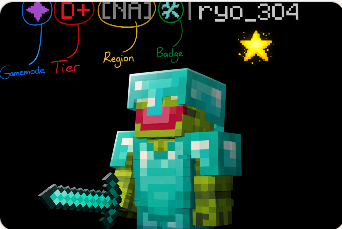
TierTagger is a mod that shows players' tiers in-game. It supports Minecraft 1.8.9 Forge and 1.21.4+ up to 1.21.11.26.1 Fabric. The game modes Tier Tests, MCTiers, PVPTiers, and SubTiers are available in their respective versions.
Information
The default key for the config screen is N, for the nearest player screen R, and for the last hit player screen C. All can be changed in the keybinds settings.
Features
・Tab list tiers — Show tier tags in the player tab list
・Closest player lookup — View nearest player’s tier
・Last hit lookup — View last hit player’s tier
・HUD lookup panel — Top-left panel showing skin, name, region, rank, and all gamemode tiers with peak
・Player search — Search any username across all APIs, showing region, rank, points, and per-mode tiers
with peak
・Config screen — In-game GUI with live nametag preview using your nametag
・Multi-API support — Tier Tests, MCTiers, SubTiers, PVPTiers
・Cross-API fallback — Automatically queries other APIs when data is missing
Configuration
・Tier Source — API to use (Tier Tests, MCTiers, SubTiers, PVPTiers)
・Gamemode — Gamemode to display (loaded dynamically per source)
・Display Mode — Highest Fallback, Highest Always, Selected Only, or Ranking
・Cross-API Fallback — Same Mode or Any Mode
・Icon Type — Classic Unicode or MCTiers PNG icons
・Display Type — Tier tag position on nametags, Prefix or Suffix
・Show Region — Display region after tier
・Show in Tab — Show tier tags in tab list
・MCTiers Format — Use LT5/HT1 vs F/S

评论 0
登录后参与评分
还没有评论,来抢沙发吧
