
Time Stop Clock

功能:
已移除 1.19.x 版本,本模组已完全重写。
从旧配置系统迁移至 Cloth Config API。(V2.0.0+)
物品:
- Time Clock - 能够停止时间、减缓时间(0.5倍)和加速时间(2.0倍)
- Arrow - 可以发射大多数投射物。按住 Shift 可查看可发射的物品
- Staff - 无冷却且无需施法前摇(需要 Iron's Spells 'n Spellbooks,适合在时间停止期间使用)
- Time Box Arrow - 快速创建 TimeBox
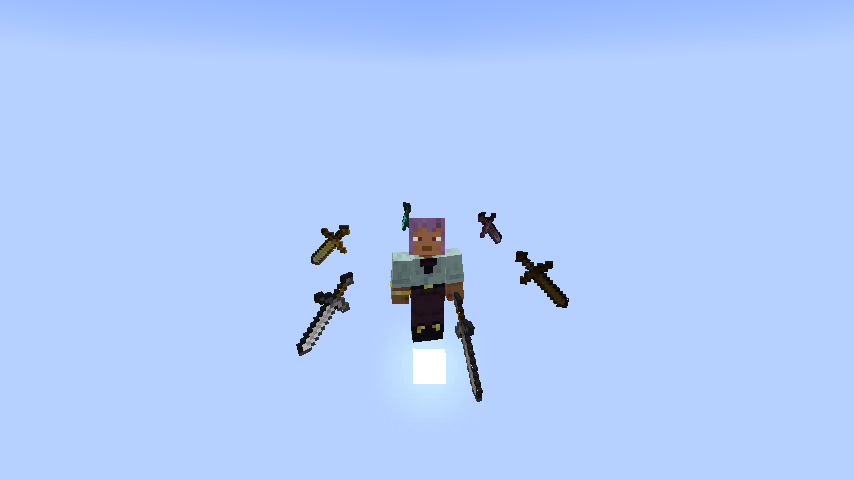
- Rotating Item - 召唤环绕你旋转的物品,并将其作为投射物发射
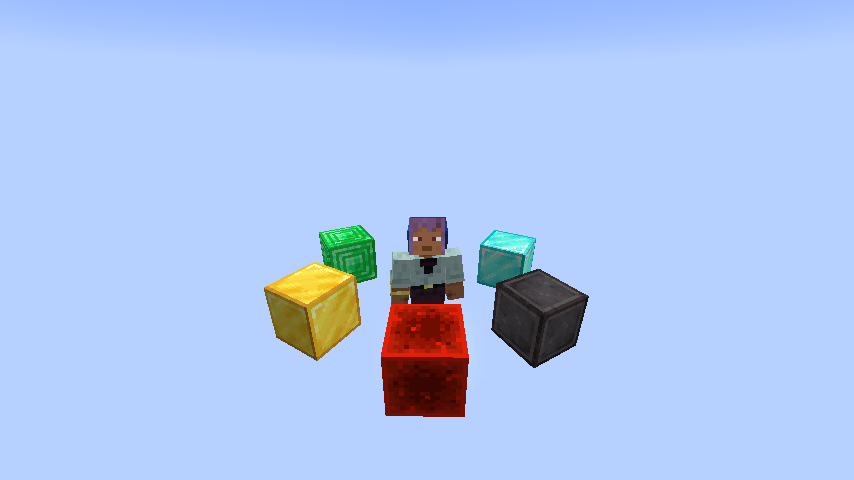
- Rotating Block - 召唤环绕你旋转的方块,并将其作为投射物发射
法术
- Time Freeze - 冻结当前世界的时间 x 秒。默认持续时间为 6 秒。Iron's Spells 'n Spellbooks 的持续时间随等级增加,而 Ars Nouveau 允许自由配置。
- Time Box - 击中目标时生成一个 Time Box。框内的时间处于冻结状态(这包括仅冻结实体、方块和粒子的能力)。击中生物时,会生成一个碰撞箱大小为 ×1.5 的 Time Box;击中方块时,会生成一个 5×5×5 大小的 Time Box。默认持续时间为 6 秒,这是 Ars Nouveau 的专属法术。
Time Box
- 框内的时间处于冻结状态,且只能冻结实体、方块、液体和粒子。由于技术限制,它只能通过命令或法术生成。 Time Box 可以通过配置文件进行反转。反转后,Time Box 外部的时间将处于冻结状态,而框内的时间保持正常。
命令:
- /timeclock tickrate <value> - 设置游戏刻率 /timeclock virtualtickrate <value> — 设置当前世界的虚拟刻率 /timeclock entityVirtualTickrate <target> <value> — 设置目标实体的虚拟刻率
- /timeclock pauseTime <true/false> - 设置是否启用时间停止,可用于强制启用或禁用时间停止
- /timeclock whitelist list - 查看白名单
- /timeclock whitelist list <true/false> - 同上,但选择是否输出到日志
- /timeclock whitelist clear - 移除白名单中的所有实体
- /timeclock whitelist remove <target> - 从白名单中移除目标
- /timeclock whitelist remove uuid <UUID> - 从白名单中移除 UUID。
- /timeclock whitelist add <target> - 将目标添加到白名单。
- /timeclock config reload - 重新加载配置(修改外部配置文件后必需)。v2.0.0+ 已移除。
- /timeclock timebox add <id> <min> <max> <expandAfterCreation> <changeSpeed>
- /timeclock timebox add <id> <min> <max> <expandAfterCreation> <changeSpeed> <color>
- /timeclock timebox add <id> <min> <max> <expandAfterCreation> <changeSpeed> <color> <alpha>
- /timeclock timebox add <id> <min> <max> <expandAfterCreation> <changeSpeed> <color> <alpha> <tick>
- /timeclock timebox add <id> <min> <max> <expandAfterCreation> <changeSpeed> <color> <alpha> <tick> <removeAnimation>
- /timeclock timebox add <id> <min> <max> <expandAfterCreation> <changeSpeed> <color> <alpha> <tick> <removeAnimation> <startCenter>
- /timeclock timebox remove <id>
- /timeclock timebox clear
- /timeclock timebox list <logging>
- /timeclock timebox modify <id>[<active/color/expandAfterCreation/changeSpeed>] <active/color/expandAfterCreation/speed>
- /timeclock timebox modify <id> [<color>] <color> <alpha>
按键绑定
- Left Ctrl + Mouse Wheel - 切换时间时钟模式
- Right Ctrl - 打开工具提示覆盖配置屏幕
- G - 发射轨道物体
配置:
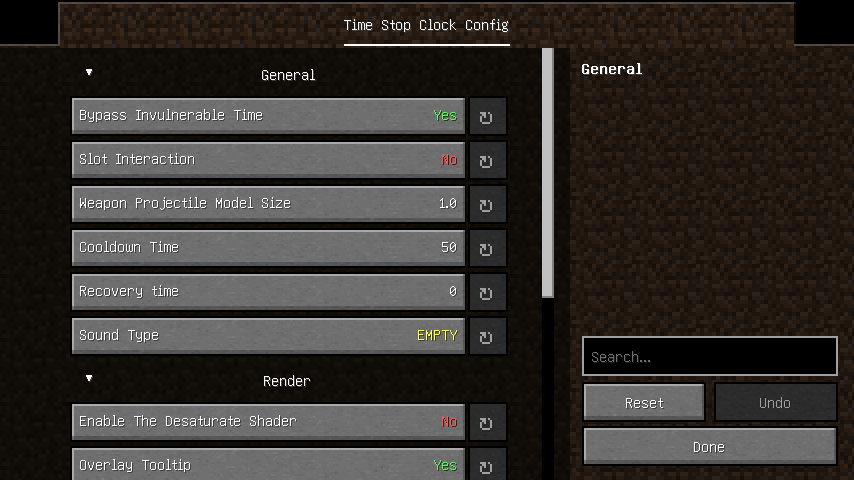
常规:
- bypassInvulnerableTime - 启用去色着色器,将游戏画面转换为黑白效果
- slotInteraction - 是否允许与容器中的槽位进行交互
- model_size - WeaponProjectile(本模组中由箭发射的非原版投射物)的模型大小
- cooldown - 使用时间钟时的冷却时间(以刻为单位)
- soundType - 使用时间钟时播放的声音类型
- ability_tick - 使用操控时间能力后恢复正常状态所需的刻数
- reverse_timebox - 是否反转“时间盒”的功能
- blacklist - “箭”类投射物的黑名单
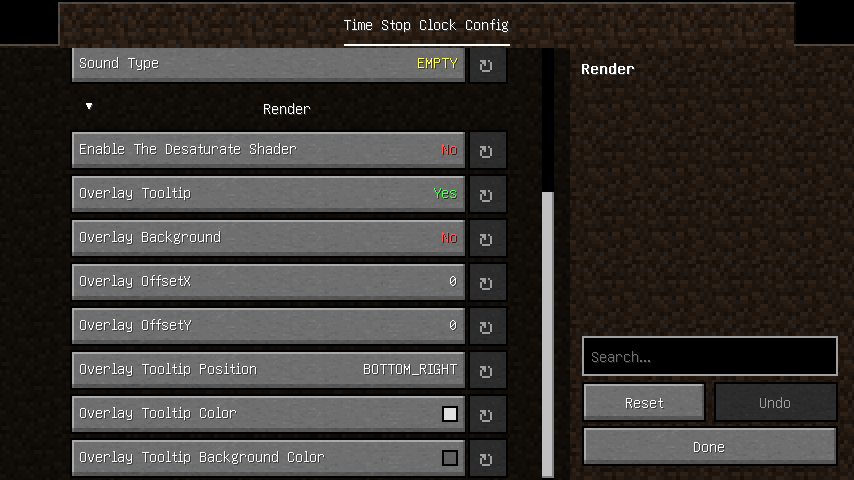
渲染:
- desaturate - 启用去色着色器,将游戏画面转换为黑白效果
- overlay_tooltip - 在屏幕上添加模组的工具提示覆盖层
- overlay_tooltip_position - 确定工具提示覆盖层将在屏幕的哪个角落渲染
- overlay_background - 工具提示覆盖层的背景
- overlay_background_color - 工具提示覆盖层背景的颜色
- overlay_tooltip_offsetX - 工具提示覆盖层的 X 轴偏移量
- overlay_tooltip_offsetY - 工具提示覆盖层的 Y 轴偏移量
- overlay_tooltip_color - 工具提示覆盖层的颜色
- glowing_color - 白名单实体的发光颜色
- timebox_face - 是否渲染时间盒的面
- timebox_line - 是否渲染时间盒的线条
界面:
问题修复:
- Blueprint 冲突崩溃
- 服务器启动崩溃
- Citadel 冲突
- 发光效果不工作。
- 其他维度中的刻率更改未同步到服务器。
- Geckolib 动画在时间停止期间出现卡顿。
- “箭”在生存模式下无限生成弹药。
- Iron's Spells 'n Spellbooks 模组在时间停止期间无法正确施法。(Forge)
- TaCZ 在时间冻结期间无法射击。
- 命令方块无法执行本模组的命令。
- 服务器启动冲突(Forge)。
兼容性:
Citadel - Mixin 冲突(已在 1.1.0 版本中修复)
Time Stop Clock
Features:
Version 1.19.x has been removed, and this mod has been completely rewritten.
Migrate to Cloth Config API from Previous Config System.(V2.0.0+)
Items:
- Time Clock - Ability to time stop, slow down (0.5x) and speed up (2.0x)
- Arrow - Can shoot most projectiles. Hold Shift to view shootable items
- Staff - No cooldown and no casting time (requires Iron's Spells 'n Spellbooks, suitable for use during time stop)
- Time Box Arrow - Quick creation of a TimeBox
- Rotating Item - Summons items that orbit around you, launch them as projectiles
- Rotating Block - Summons blocks that orbit around you, launch them as projectiles
Spells
- Time Freeze - Freezes the time of the current world for x seconds. The default duration is 6 seconds. The duration of Iron's Spells 'n Spellbooks increases with the level, and Ars Nouveau allow for free configuration.
- Time Box - When hitting a target, a Time Box is generated. Time inside the box is in a frozen state (this includes the ability to freeze only entities, blocks, and particles). When hitting a creature, a Time Box with a hitbox size of ×1.5 is generated; when hitting a block, a 5×5×5-sized Time Box is generated. The default duration is 6 seconds, and this is an exclusive spell of Ars Nouveau.
Time Box
- Time inside the box is in a frozen state, and it can only freeze entities, blocks, liquids, and particles. Due to technical limitations, it can only be generated via commands or spells. The Time Box can be reversed through the configuration file. After reversal, time outside the Time Box will be in a frozen state, while time inside the box remains normal.
Commands:
- /timeclock tickrate <value> - Set the game tickrate /timeclock virtualtickrate <value> — Sets the virtual tickrate of the current world /timeclock entityVirtualTickrate <target> <value> — Sets the virtual tickrate of target entities
- /timeclock pauseTime <true/false> - Set whether to enable time stop, can be used to forcibly enable or disable time stop
- /timeclock whitelist list - View the whitelist
- /timeclock whitelist list <true/false> - Same as above, but choose whether to output to the log
- /timeclock whitelist clear - Remove all entities in the whitelist
- /timeclock whitelist remove <target> - Remove the target from the whitelist
- /timeclock whitelist remove uuid <UUID> - Remove the UUID from the whitelist.
- /timeclock whitelist add <target> - Add the target to the whitelist.
- /timeclock config reload - Reload the config (required after making modifications to the external config file).v2.0.0+ Removed.
- /timeclock timebox add <id> <min> <max> <expandAfterCreation> <changeSpeed>
- /timeclock timebox add <id> <min> <max> <expandAfterCreation> <changeSpeed> <color>
- /timeclock timebox add <id> <min> <max> <expandAfterCreation> <changeSpeed> <color> <alpha>
- /timeclock timebox add <id> <min> <max> <expandAfterCreation> <changeSpeed> <color> <alpha> <tick>
- /timeclock timebox add <id> <min> <max> <expandAfterCreation> <changeSpeed> <color> <alpha> <tick> <removeAnimation>
- /timeclock timebox add <id> <min> <max> <expandAfterCreation> <changeSpeed> <color> <alpha> <tick> <removeAnimation> <startCenter>
- /timeclock timebox remove <id>
- /timeclock timebox clear
- /timeclock timebox list <logging>
- /timeclock timebox modify <id>[<active/color/expandAfterCreation/changeSpeed>] <active/color/expandAfterCreation/speed>
- /timeclock timebox modify <id> [<color>] <color> <alpha>
Key Bindings
- Left Ctrl + Mouse Wheel - Toggle time clock mode
- Right Ctrl - Open the tooltip overlay config screen
- G - Launch Orbit Objects
Config:
General:
- bypassInvulnerableTime - Enable the desaturate shader to convert the game graphics into a black and white effect
- slotInteraction - Whether interaction with slots in the container is allowed
- model_size -The model size of WeaponProjectile (non-vanilla projectiles shot by arrow in this mod)
- cooldown - Cooldown tick using timeclock
- soundType - The sound played when using the time clock
- ability_tick - Ticks needed to recover back to normal after using time manipulation
- reverse_timebox - Whether to reverse the feature of the Time Box
- blacklist - Blacklist of "arrow" projectiles
Render:
- desaturate - Enable the desaturate shader to convert the game graphics into a black and white effect
- overlay_tooltip - Add overlay of tooltip for mod on the screen
- overlay_tooltip_position - Determines which corner of the screen the tooltip overlay will be rendered
- overlay_background - The background of the tooltip overlay
- overlay_background_color - The color of the overlay tooltip background
- overlay_tooltip_offsetX - The X-axis offset of the overlay tooltip
- overlay_tooltip_offsetY - The Y-axis offset of the overlay tooltip
- overlay_tooltip_color - The color of the overlay tooltip
- glowing_color - Glowing color of whitelisted entity
- timebox_face - Whether to render the time box faces
- timebox_line - Whether to render the time box lines
Screen:
Issue Fix:
- Blueprint conflict crash
- Server startup crash
- Citadel conflict
- Glowing effect not working.
- Tickrate changes in other dimensions are not syncing to the server.
- Geckolib animation is stuttering during timestop.
- "Arrow" are infinitely generating ammunition in survival mode.
- Iron's Spells 'n Spellbooks mod is failing to cast spells properly during timestop.(forge)
- TaCZ cannot fire during time freeze.
- Command blocks cannot execute the commands of this mod.
- Server startup conflict (Forge).
Compatibility:
Citadel - Conflict with mixin(Fixed in version 1.1.0)
版本游戏版本平台发布时间本站下载
正式版
4.8.0+forge
[Forge 1.20.1] v4.8.0
1.20.1 Forge 1 个月前 ·
0
1.20.1
Forge
1 个月前
0

下载 Time Stop Clock
正式版
4.8.0+fabric
[Fabric 1.20.1] v4.8.0
1.20.1 Fabric 1 个月前 ·
0
1.20.1
Fabric
1 个月前
0
下载 Time Stop Clock
正式版
4.7.0+neoforge
[NeoForge 1.21.1] v4.7.0
1.21.1 NeoForge 3 个月前 ·
0
1.21.1
NeoForge
3 个月前
0
下载 Time Stop Clock
正式版
4.7.0+fabric
[Fabric 1.21.1] v4.7.0
1.21.1 Fabric 3 个月前 ·
0
1.21.1
Fabric
3 个月前
0
下载 Time Stop Clock
正式版
4.6.0+forge
[Forge 1.20.1] v4.6.0
1.20.1 Forge 4 个月前 ·
0
1.20.1
Forge
4 个月前
0
下载 Time Stop Clock
正式版
4.6.0+fabric
[Fabric 1.20.1] v4.6.0
1.20.1 Fabric 4 个月前 ·
0
1.20.1
Fabric
4 个月前
0
下载 Time Stop Clock
正式版
4.5.0-hotfix+forge
[Forge 1.20.1] v4.5.0-hotfix
1.20.1 Forge 5 个月前 ·
0
1.20.1
Forge
5 个月前
0
下载 Time Stop Clock
正式版
4.5.0-hotfix+fabric
[Fabric 1.20.1] v4.5.0-hotfix
1.20.1 Fabric 5 个月前 ·
0
1.20.1
Fabric
5 个月前
0
下载 Time Stop Clock
版本:4.5.0-hotfix+fabric
游戏版本:1.20.1
平台:Fabric
需要联机服务器吗?
稳定流畅、一键部署,几分钟即可和朋友联机开服
最低仅需 8 元/月 即可畅快联机
正式版
4.5.0+forge
[Forge 1.20.1] v4.5.0
1.20.1 ForgeNeoForge 5 个月前 ·
0
1.20.1
Forge
NeoForge
5 个月前
0
下载 Time Stop Clock
版本:4.5.0+forge
游戏版本:1.20.1
平台:Forge、NeoForge
需要联机服务器吗?
稳定流畅、一键部署,几分钟即可和朋友联机开服
最低仅需 8 元/月 即可畅快联机
正式版
4.5.0+fabric
[Fabric 1.20.1] v4.5.0
1.20.1 Fabric 5 个月前 ·
0
1.20.1
Fabric
5 个月前
0
下载 Time Stop Clock
4.8.0+forge
正式版
2026-09-19
版本 [v1.20.1-4.8.0] - 2026-09-19
新功能
时间盒
- 在时间盒箭菜单中将刻度设置为 0,允许生成永久的时间盒
命令
/timeclock entityVirtualTickrate <目标> <值>— 设置目标实体的虚拟刻率
物品
-
旋转物品 - 召唤围绕你旋转的物品,并将其作为投射物发射出去
-
旋转方块 - 召唤围绕你旋转的方块,并将其作为投射物发射出去
-
特殊文本效果 - 通过 special_text_effects 客户端配置进行切换
-
就像这样:

Kubejs 兼容
- 新增布尔方法
isTimeManipulator(Entity entity) - 新增方法
pass()
修复问题
- 时间操控者 - 修复了骑乘时时间停止影响骑手的问题
Forge
- TimeClock - 在 Iron's Spells 'n Spellbooks 的战利品表中生成错误
关于这个资源的讨论、问题反馈与使用心得
还没有讨论,来发第一帖吧
你是这个资源的作者?登录后可认领此资源。
相似资源
 模组

神化Apotheosis
Shadows-of-Fire
所有本应存在的事物
冒险装备
58
 模组

Ghost
Joo5h
为 Minecraft 添加了小幽灵 :D
魔法生物
49
 模组

Spectrum
DaFuqs
一款功能齐全的 Minecraft 模组,关于驾驭色彩的力量
冒险装备
48
 模组

Ribbits
Joo5h
沼泽村落与音乐蛙群!
装饰生物
39
 模组

Ars Additions
Jarva
一个专注于小调整和品质生活添加的 Ars Nouveau 模组扩展。
魔法存储
38
 模组

Blood Magic
WayofTime
一种追求终极力量的奥术技艺
装备魔法
38
评论 0
登录后参与评分
还没有评论,来抢沙发吧