TradeChest 模组
一款适用于 Minecraft Fabric 的模组,添加了带有 9x5 物品栏布局的自动交易箱子。你可以搭建类似自动售货机的商店,顾客放入购买物品后,会自动获得相应的出售物品作为回报。
功能特性
- 自动交易系统:放入购买物品后,出售物品将自动送达领取区域
- 9x5 物品栏布局:设有专门的区域用于放置购买物品、领取区、配置区、所有者收集区和出售物品存储区
- 所有权系统:基于用户名建立所有权,保护你的交易设置
- 禁用普通箱子功能:交易箱仅在正确配置后才能使用
- 物品移动:交易完成后,购买物品会自动移至所有者收集区域
前置要求
- Minecraft 1.20.1
- Fabric Loader 0.15.7+
- Fabric API
- Java 17 或更高版本
安装指南
玩家安装
-
安装 Fabric Loader
-
下载依赖项
- 下载适用于 1.20.1 的 Fabric API
- 将 Fabric API JAR 文件放入
.minecraft/mods 文件夹
-
安装 TradeChest 模组
- 下载最新版本的 TradeChest 模组 JAR 文件
- 将其放入
.minecraft/mods 文件夹
-
启动游戏
- 使用 Fabric 配置文件启动 Minecraft
- Trade Chest 物品将在“功能性方块”创造模式标签页中可用
开发者构建
-
克隆仓库
git clone https://github.com/rodortega/mc-tradechest.git
cd mc-tradechest
-
从源码构建
./gradlew build
-
在开发环境中运行
./gradlew runClient
使用方法
合成配方
使用以下配方合成 Trade Chest:
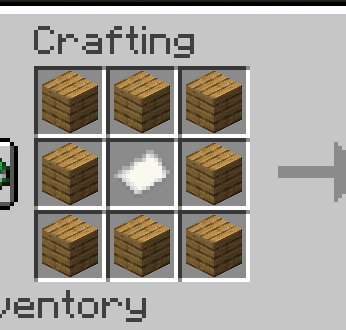
[木板] [木板] [木板]
[木板] [纸张 ] [木板]
[木板] [木板] [木板]
基础设置
-
放置交易箱 - 在未配置所有者之前无法使用
-
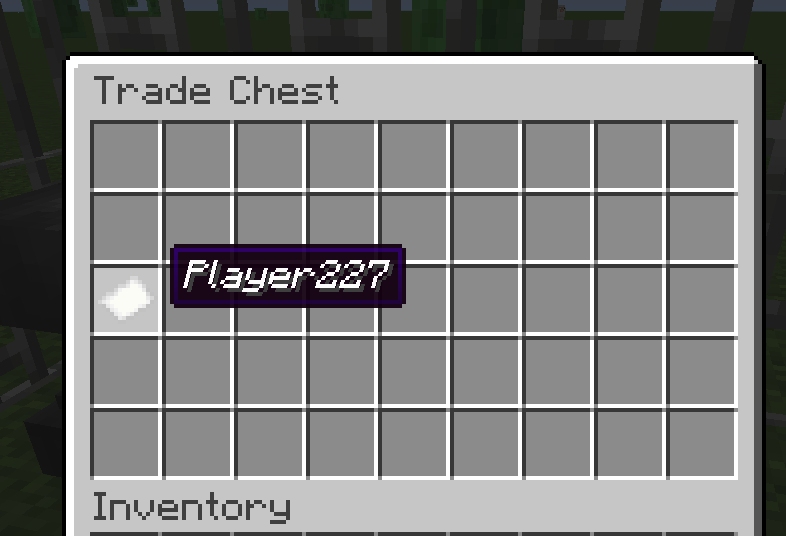
设置所有权(第 18 槽位):
- 使用铁砧将一张纸重命名为你的确切用户名
- 将其放入第 18 槽位(第三行的第一个槽位)
- 你现在拥有该箱子的所有权,可以进行管理
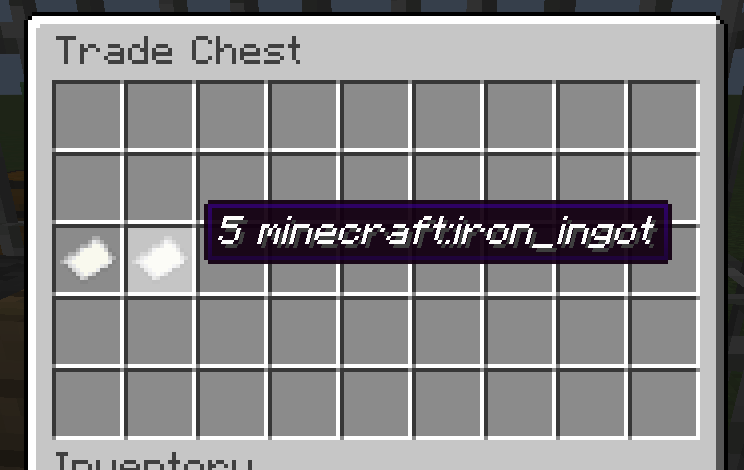
- 配置购买条件(第 19 槽位):
- 重命名一张纸:
10 minecraft:iron_ingot
- 将其放入第 19 槽位
- 这决定了顾客必须提供什么物品
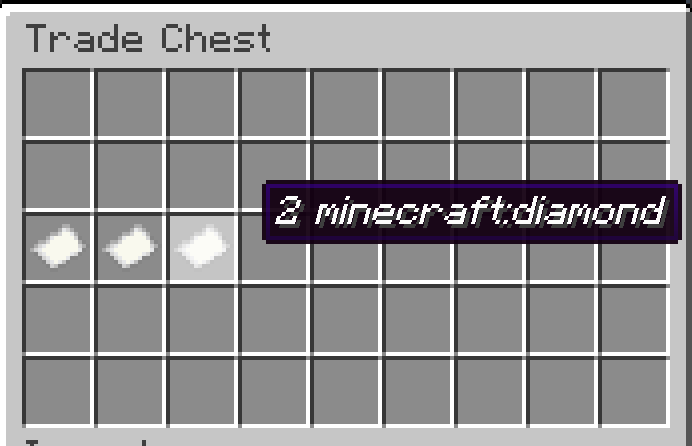
- 配置出售物品(第 20 槽位):
- 重命名一张纸:
5 minecraft:diamond
- 将其放入第 20 槽位
- 这决定了顾客将获得什么物品
- 补充出售物品库存:
- 将钻石放入底行(第 36-44 槽位)
- 只能放置配置好的出售物品类型
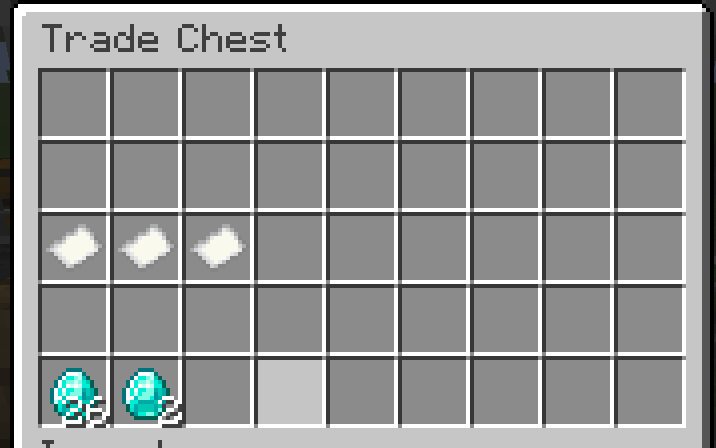
- 准备就绪进行交易:
- 顾客在上行(第 0-8 槽位)放入铁锭
- 钻石会自动出现在领取区(第 9-17 槽位)
- 铁锭会移入你的收集区域(第 27-35 槽位)
物品栏布局 (9x5)
第 1 行:[购买物品输入区 - 顾客在此放入购买物品]           (槽位 0-8)
第 2 行:[领取区 - 交易后的物品会自动出现在这里]           (槽位 9-17)
第 3 行:[所有者] [购买] [出售] [----锁定配置区域----]         (槽位 18-26)
第 4 行:[所有者收集区 - 交易后的购买物品会移到这里]              (槽位 27-35)
第 5 行:[出售物品存储区 - 所有者在此补充出售物品]              (槽位 36-44)
交易工作原理
- 顾客操作:在第 1 行放入 10 个铁锭
- 自动处理:系统检测到完整的交易条件
- 物品移动:
- 5 个钻石从第 5 行移至第 2 行(领取区)
- 10 个铁锭从第 1 行移至第 4 行(所有者收集区)
- 顾客领取:顾客从第 2 行取走钻石
- 多余处理:如果顾客放入了 15 个铁锭,多余的 5 个会留在第 1 行供顾客取回
示例:自动钻石商店
-
设置阶段:
- 重命名纸张:
YourUsername, 10 minecraft:iron_ingot, 5 minecraft:diamond
- 分别将纸张放入第 18、19、20 槽位
- 在底行(第 36-44 槽位)存放 64 个钻石
-
顾客交易:
- 顾客在上行放入 20 个铁锭
- 系统自动处理 2 次交易(20 ÷ 10 = 2)
- 10 个钻石出现在领取区(5 × 2 = 10)
- 20 个铁锭移入所有者收集区
- 顾客从领取区取走 10 个钻石
-
所有者收益:
- 随时可从第 4 行收取 20 个铁锭
- 根据需要从第 5 行补充钻石
- 无需手动干预
权限说明
| 槽位范围 |
区域 |
顾客可操作 |
所有者可操作 |
| 0-8 |
购买物品输入区 |
放入购买物品,取回多余物品 |
完全访问 |
| 9-17 |
领取区 |
取走任何物品 |
完全访问 |
| 18-20 |
配置区 |
无 |
放置/移除纸张 |
| 21-26 |
锁定区域 |
无 |
无 |
| 27-35 |
所有者收集区 |
无 |
完全访问 |
| 36-44 |
出售存储区 |
无 |
补充出售物品 |
纸张格式说明
- 所有者纸张:仅包含你的确切用户名(例如
Steve)
- 购买纸张:
[数量] [物品ID](例如 10 minecraft:iron_ingot)
- 出售纸张:
[数量] [物品ID](例如 5 minecraft:diamond)
故障排除
- 无法使用箱子:首先需要在 18 号槽位放置一张拥有者纸张
- 无法移除拥有者纸张:确保纸张名称与你的游戏内用户名完全一致
- 无法放置购买/出售纸张:你必须是箱子的拥有者(即 18 号槽位放置了你的名字纸张)
- 交易功能无效:请确保在 19-20 号槽位已配置好购买和出售纸张
- 无法在底行放置物品:仅在 36-44 号槽位允许放置配置的出售物品类型
- 物品未自动移动:检查是否已备有出售物品,且拾取区域未满
构建
本模组使用 Fabric 工具链:
# 清理并构建
./gradlew clean build

# 运行客户端进行测试
./gradlew runClient

# 生成源码 jar
./gradlew sourcesJar
开发
项目结构
src/main/java/com/rodmod/tradechest/ - 主模组代码src/main/resources/ - 资源和数据文件build.gradle - 构建配置gradle.properties - 项目属性
关键类
RodMod - 主模组初始化器TradeChestBlock - 方块实现TradeChestBlockEntity - 包含库存逻辑的方块实体TradeChestMenu - GUI 容器菜单TradeChestSlot - 具有放置限制的自定义槽位
许可证
本模组采用 CC0 许可证提供。欢迎学习并在你自己的项目中整合使用。
TradeChest Mod
A Minecraft Fabric mod that adds automatic trading chests with a 9x5 inventory layout. Set up vending machine-style shops where customers place buy items and automatically receive sell items in return.
Features
- Automatic Trading System: Place buy items, get sell items automatically delivered to pickup zone
- 9x5 Inventory Layout: Dedicated areas for buy items, pickup, configuration, owner collection, and sell storage
- Ownership System: Secure your trade setups with username-based ownership
- No Normal Chest Usage: Trade chests can only be used when properly configured
- Item Movement: Buy items automatically move to owner collection area after trades
Requirements
- Minecraft 1.20.1
- Fabric Loader 0.15.7+
- Fabric API
- Java 17 or higher
Installation
For Players
-
Install Fabric Loader
- Download and run the Fabric Installer
- Select Minecraft 1.20.1 and install Fabric
-
Download Dependencies
- Download Fabric API for 1.20.1
- Place the Fabric API JAR in your
.minecraft/mods folder
-
Install TradeChest Mod
- Download the latest TradeChest mod JAR file
- Place it in your
.minecraft/mods folder
-
Launch Game
- Start Minecraft with the Fabric profile
- The Trade Chest item will be available in the Functional Blocks creative tab
For Developers
-
Clone Repository
git clone https://github.com/rodortega/mc-tradechest.git
cd mc-tradechest
-
Build from Source
./gradlew build
-
Run in Development
./gradlew runClient
How to Use
Crafting
Craft a Trade Chest using this recipe:
[Planks] [Planks] [Planks]
[Planks] [Paper ] [Planks]
[Planks] [Planks] [Planks]
Basic Setup
-
Place the Trade Chest - Cannot be used until configured with an owner
-
Set Ownership (Slot 18):
- Rename a paper with your exact username using an anvil
- Place it in slot 18 (first slot of third row)
- You are now the owner and can manage the chest
- Configure Buy Requirements (Slot 19):
- Rename a paper:
10 minecraft:iron_ingot
- Place in slot 19
- This determines what customers must provide
- Configure Sell Items (Slot 20):
- Rename a paper:
5 minecraft:diamond
- Place in slot 20
- This determines what customers receive
- Stock Sell Items:
- Place diamonds in the bottom row (slots 36-44)
- Only the configured sell item type can be placed there
- Ready to Trade:
- Customers place iron ingots in top row (slots 0-8)
- Diamonds automatically appear in pickup zone (slots 9-17)
- Iron ingots move to your collection area (slots 27-35)
Inventory Layout (9x5)
Row 1: [Buy Items Input Area - Customers place buy items here]           (Slots 0-8)
Row 2: [Pickup Zone - Traded items appear here automatically]           (Slots 9-17)
Row 3: [OWNER] [BUY] [SELL] [----LOCKED CONFIGURATION AREA----]         (Slots 18-26)
Row 4: [Owner Collection - Buy items go here after trades]              (Slots 27-35)
Row 5: [Sell Items Storage - Owner stocks sell items here]              (Slots 36-44)
How Trading Works
- Customer Action: Places 10 iron ingots in row 1
- Automatic Processing: System detects complete trade
- Item Movement:
- 5 diamonds move from row 5 to row 2 (pickup zone)
- 10 iron ingots move from row 1 to row 4 (owner collection)
- Customer Pickup: Customer takes diamonds from row 2
- Excess Handling: If customer placed 15 iron, 5 excess remain in row 1 for pickup
Example: Automatic Diamond Shop
-
Setup Phase:
- Rename papers:
YourUsername, 10 minecraft:iron_ingot, 5 minecraft:diamond
- Place papers in slots 18, 19, 20 respectively
- Stock 64 diamonds in bottom row (slots 36-44)
-
Customer Transaction:
- Customer places 20 iron ingots in top row
- System automatically processes 2 trades (20 ÷ 10 = 2)
- 10 diamonds appear in pickup zone (5 × 2 = 10)
- 20 iron ingots move to owner collection area
- Customer takes 10 diamonds from pickup zone
-
Owner Benefits:
- Collect 20 iron ingots from row 4 anytime
- Restock diamonds in row 5 as needed
- No manual intervention required
Permissions
| Slot Range |
Area |
Customers Can |
Owner Can |
| 0-8 |
Buy Items Input |
Place buy items, take excess |
Full access |
| 9-17 |
Pickup Zone |
Take any items |
Full access |
| 18-20 |
Configuration |
None |
Place/remove papers |
| 21-26 |
Locked Area |
None |
None |
| 27-35 |
Owner Collection |
None |
Full access |
| 36-44 |
Sell Storage |
None |
Stock sell items |
Paper Formats
- Owner Paper: Just your exact username (e.g.,
Steve)
- Buy Paper:
[amount] [item_id] (e.g., 10 minecraft:iron_ingot)
- Sell Paper:
[amount] [item_id] (e.g., 5 minecraft:diamond)
Troubleshooting
- Can't use chest at all: You need to place an owner paper in slot 18 first
- Can't remove owner paper: Make sure the paper name exactly matches your in-game username
- Can't place buy/sell papers: You must be the owner (have your name paper in slot 18)
- Trading not working: Ensure both buy and sell papers are configured in slots 19-20
- Can't place items in bottom row: Only the configured sell item type is allowed in slots 36-44
- Items not moving automatically: Check that you have sell items stocked and pickup zone isn't full
Building
This mod uses the Fabric toolchain:
# Clean and build
./gradlew clean build

# Run client for testing
./gradlew runClient

# Generate sources jar
./gradlew sourcesJar
Development
Project Structure
src/main/java/com/rodmod/tradechest/ - Main mod codesrc/main/resources/ - Assets and data filesbuild.gradle - Build configurationgradle.properties - Project properties
Key Classes
RodMod - Main mod initializerTradeChestBlock - Block implementationTradeChestBlockEntity - Block entity with inventory logicTradeChestMenu - Container menu for GUITradeChestSlot - Custom slot with placement restrictions
License
This mod is available under the CC0 license. Feel free to learn from it and incorporate it in your own projects.


 模组

 模组
 模组
 模组

 模组
 模组
评论 0
登录后参与评分
还没有评论,来抢沙发吧