TradeWatch
TradeWatch 是一个客户端的 Fabric 模组,用于查找你真正想要的图书管理员附魔书交易。它不会重新投掷、点击交易、与方块交互、破坏讲台或自动化村民。
要求
需要 Fabric Loader 和 Fabric API。Mod Menu 为可选。
使用 TradeWatch
使用默认的 G 键(可在 Minecraft 控制设置中重新绑定)、/tradewatch 命令,或 Mod Menu 的 Configure 按钮打开配置界面。通过附魔名称(如 eff、mend)或注册表 ID(如 minecraft:efficiency)进行搜索,选择一个附魔,启用其各个等级,并使用 1–64 绿宝石滑块为每个等级单独设置最大价格。
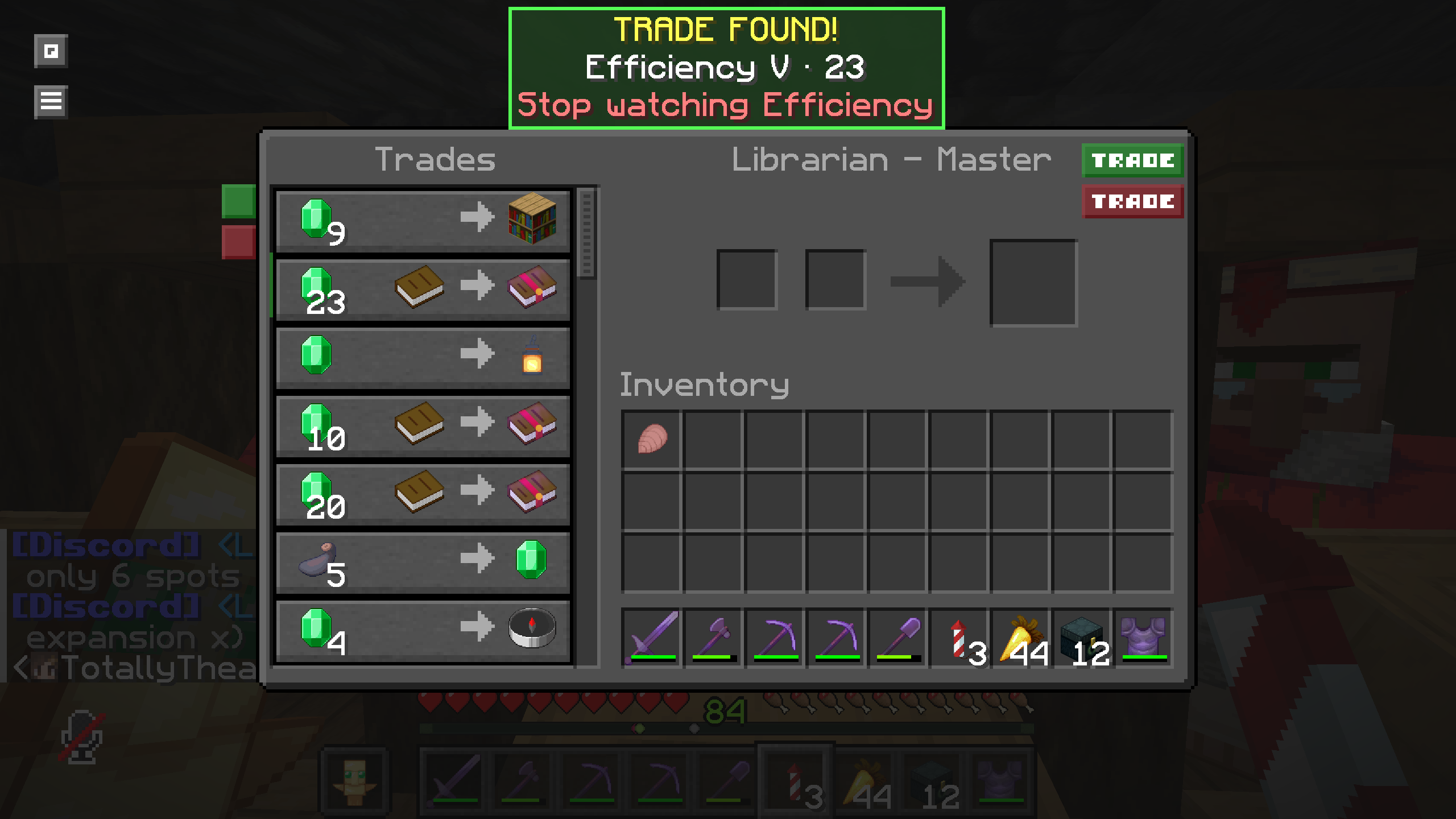
仅检查村民交易界面中的附魔书相关交易;其他结果将被忽略。TradeWatch 会使用交易实际展示的当前绿宝石数量(包含折扣),并忽略所需的“书”作为输入。匹配的行会以绿色高亮显示,每次打开交易界面时播放一次原版提示音,同时提供一个非阻塞式的屏幕中央面板用于停止追踪 <附魔名称> 操作。停止操作将移除该附魔的所有已追踪等级。
心愿单条目使用 Minecraft 注册表标识符,并为每个等级设置独立的价格。例如,效率 IV 的/watch 价格为 15 个绿宝石,而效率 V 为 32 个。无效或不可用的注册表条目会在注册表同步后安全移除。
命令
/tradewatch
/tradewatch add minecraft:efficiency 5 price:32
/tradewatch remove minecraft:efficiency
/tradewatch remove minecraft:efficiency 5
/tradewatch list
/tradewatch clear
/tradewatch clear confirm
add 会验证运行时注册表标识符、支持的等级以及 1–64 的价格。必须使用 price:32 的确切语法。remove <enchantment> 会移除该附魔的所有被监控等级;remove <enchantment> <level> 仅移除指定等级。clear 需要明确的 confirm 字面量。价格按附魔等级单独配置,而非全局统一。
TradeWatch
TradeWatch is a client-side Fabric mod that finds librarian enchanted-book trades you actually want. It never rerolls, clicks trades, interacts with blocks, breaks lecterns, or automates villagers.
Requirements
Fabric Loader and Fabric API are required. Mod Menu is optional.
Using TradeWatch
Open the configuration screen with the default G key (rebindable in Minecraft Controls), /tradewatch, or Mod Menu's Configure button. Search by enchantment name (eff, mend) or registry ID (minecraft:efficiency), select an enchantment, enable its individual levels, and set each level's independent maximum price with a 1–64 emerald slider.
Only enchanted-book offers in the villager merchant screen are checked; other results are ignored. TradeWatch uses the actual current emerald stack shown by the offer, including discounts, and ignores the required Book input. Matching rows are green, a vanilla ping is played once per opened merchant screen, and a non-blocking center-screen panel provides! Stop watching <enchantment> actions. Stopping removes all watched levels for that enchantment.
Wishlist entries use Minecraft registry identifiers and independent prices per level. For example, Efficiency IV can be watched for 15 emeralds while Efficiency V is watched for 32. Invalid or unavailable registry entries are safely removed after registry synchronization.
Commands
/tradewatch
/tradewatch add minecraft:efficiency 5 price:32
/tradewatch remove minecraft:efficiency
/tradewatch remove minecraft:efficiency 5
/tradewatch list
/tradewatch clear
/tradewatch clear confirm
add validates the runtime registry identifier, supported level, and 1–64 price. The exact price:32 syntax is required. remove <enchantment> removes every watched level for that enchantment; remove <enchantment> <level> only removes that level. clear requires the explicit confirm literal. Prices are configured per enchantment level, not globally.

评论 0
登录后参与评分
还没有评论,来抢沙发吧