
这是一个小型模组,添加了一些实用的方块。TubeStuff 这个名字不再只是临时占位符了 :P
该模组不需要 RedPower 或 BuildCraft,但有了它们会更有用。如果你既没有 RedPower 也没有 BuildCraft,那么 Buffer(缓冲器)将没有合成配方。
Buffer(缓冲器)
此方块允许你轻松地在管道和导管之间传输物品。它还能合并堆叠的物品以减少卡顿。
你可以使用管道或导管向其填充物品,也可以像箱子一样手动放入。
如果在缓冲器旁边放置木制管道、金质管道或基础物流管道,每隔几秒(取决于空槽数量——空时为 5 秒,满时为 0.5 秒),它会向管道输出一个堆叠的物品。
如果在缓冲器旁边放置过滤器,且输入面朝向缓冲器,它将输出红石信号以脉冲方式驱动过滤器,其脉冲速率与向管道发送物品的速率相同。
Automatic Crafting Table MkII(自动工作台 MkII)
右键点击此方块时,你会看到四个主要区域。顶部是输入区(9x5)。底部是你的物品栏。左侧是 3x3 的合成区域,右侧是一个单独的输出口。使用方法如下:
- 在合成区域设置配方。输出槽不会出现任何内容,这是正常的。
- 通过在任何侧面连接导管(或管道)将物品放入输入区。调节器在这里可能很有用。每个侧面(以及底部)都有各自对应的输入行。
- 在工作台上方放置一个朝下的过滤器或转置器。对其施加红石信号即可提取制作出的物品。如果原料可用,几乎会立即制作出下一个。
- 如果配方产生容器类物品(例如在水桶用于配方时使用水桶),它们会进入输入区最后一行(红色阴影部分)。可以从底部提取这些容器。注意:如果该行已满,容器类物品将被销毁!
上述截图中未显示的新功能:有一个按钮可以在 1 和 64 之间切换。当设置为 1(默认值)时,除非输出槽为空,否则不会制作任何物品。当设置为 64 时,物品将持续制作直到输出槽满。
还可以使用 RP2 螺丝刀、Buildcraft 兼容的扳手(包括新月锤和万能扳手)、IC2 扳手或石锄旋转它们。
“C”按钮(截图中未显示)用于清除配方。
“OD”按钮(截图中未显示)用于矿石字典支持。输入使用矿石字典的配方后——例如 9 个铜锭——点击 OD 按钮,这些锭将在所有可用的铜锭类型之间闪烁。在此模式下,你可以使用任意 9 个铜锭合成铜块,即使它们不是同一类型的铜锭。如果你编辑配方,闪烁就会停止。
如果你安装了 NEI,可以在 ACT2 GUI 打开时点击配方旁边的“?”按钮来选择该配方。
Black Hole Chest(黑洞箱)
这是一个可以容纳无限物品的箱子。很简单。
请注意,你不能导航到不存在的页面。特别是,除非上一页已满,否则你不能跳转到新的空白页。此外,当区块卸载时,它会压缩其内容,使得末尾之前没有空槽。
由于可能导致过于强大(OP),默认情况下已禁用——请参阅配置文件以启用。即使在配置文件中未启用,也可以通过 /give 命令、创造模式、TMI 或 NEI 生成。
如果这些箱子在“华丽模式”下造成太多卡顿,你可以在客户端配置中强制它们使用快速模式图形(tubestuff.enableBHCAnim=false)。你也可以禁用黑色粒子效果(tubestuff.enableBHCParticles=false)。(注意:如果你看到大量快速移动的白/灰色粒子,那是图形故障,粒子未被裁剪到箱子内部;见下文)
Incinerator(焚化炉)
连接到管道或导管,永久销毁进入其中的任何物品——就像岩浆坑一样,但更容易使用且没有自燃风险。
Duplicator(复制机)
这就像一个始终含有特定物品的箱子。你可以使用木制管道或转置器/过滤器等从箱子中提取无限数量的该物品,每次提取一定数量。
无法合法获得此方块,且在多人游戏(SMP)中只有管理员才能放置,原因显而易见。旨在用于管理员建造的地下城,确保奖励物品永远不会耗尽。
右键点击打开 GUI(同样,单人游戏中除外,你必须拥有管理员权限)并放入你想要生成的物品。GUI 中的物品数量即为单次生成的最大物品数(例如过滤器的一个脉冲)。请记住,木制管道和转置器仍然只会一次生成一个物品。
Retrievulator(回收器)
这个方块是 BrickedKeyboard 建议的“自动化回收机器人”。 世界纹理是临时的。有没有纹理包制作者能给我提供一个更好的?我真的不知道这台机器应该长什么样……
有较大孔的一侧是输入端。它应该接触来自 RedPower 的回收器的输出端。如果它接触任何其他方块或什么都没有,它将不会执行任何操作。 较小孔的一侧是输出端。它应接触任何库存,例如箱子或 ACT2。
你可以使用过滤器代替回收器,但这通常没什么用。
确保你的回收器处于“非滑块”模式!
物品栏分为三个区域:“R”(检索)区、“T”(目标)区,以及右侧那个你无需触碰的孤独槽位(物品在前往输出物品栏的过程中会暂时存放在这里)。
- T 区应包含你希望保留在输出物品栏中的物品。在此示例中,它将保持装满 63 个草方块和 63 个平滑石。
- R 区应至少包含 T 网格中每种物品各一个,并且其布局应与 T 网格匹配。如果上一句令人困惑,图片应该能说明我的意思。
检索器调节器会在 R 网格与检索器之间移动物品,并向检索器施加红石脉冲,以使物品栏保持 stocked(备有指定物品)。如果物品栏中已经包含正确的物品,它会生成一个“检索器干扰器”(retriever jammer),该物品没有其他用途,并将其放置在检索器上以阻止其接受更多物品。
踩踏检索器干扰器会将其摧毁,而不是拾取它。
可以使用 RedPower 螺丝刀旋转检索器调节器。从版本 51.0.0 开始,也可以使用 Buildcraft 扳手、IC2 扳手或石锄进行旋转。从版本 52.2.0 开始,任何兼容 BC 的扳手也都可以使用,例如 TE 月牙锤和 OmniWrench。
如果在一段时间内未能成功检索到任何物品,检索器调节器的脉冲发射速度会变慢。最低速度为每 20 秒一次脉冲。(49.3.0 新增功能)
注意:T 区现在(自 49.2.0 起)使用虚假物品,类似于 Logistics Pipes。你可以设置请求多达 127 个单位的物品,即使是不可堆叠的物品:右键点击添加物品,左键点击减少物品;按住 Shift 可每次添加/减少 10 个物品。如果使用任一按钮点击空槽位,会将该槽位设置为当前手持物品堆的副本。
注意:如果 R 网格和检索器在同一方格中都包含物品,检索器调节器将无法正常工作。如果两者都不包含物品,但 T 网格在该方格中包含物品,检索器调节器也无法正常工作。
方块破坏器
当你放入工具时,它会破坏前方的方块。
它的行为类似于玩家破坏方块,因此需要时间并消耗耐久度。
液体复制器、液体处置器
复制器和焚化炉的液体版本。
对于液体复制器,你应该在槽位中放入液体容器物品——例如装满液体的桶或 IC2 电池。
在线玩家检测器
当放置它的玩家在线时,变为绿色并发出红石信号。对于要求你在离线时关闭机器的服务器非常有用。
存储方块

它们的工作方式类似于原版金属方块。
还有一个木炭存储方块,外观与煤方块完全相同。
有一个配置选项可以一次性禁用所有这些方块,还有另一个选项可以禁用原版存储方块(煤、木炭和红石)。
尼科利特和红石方块必须放置在另一个方块之上,否则会掉落。
自 Minecraft 1.5 起,红石块现在是通电红石块,通过将原版红石块与沙子合成制作而成。
自 Minecraft 1.6 起,煤块现在是煤砖方块,通过将原版煤块与石砖合成制作而成。
(原始描述来自 Minecraft Forums)
存档通知
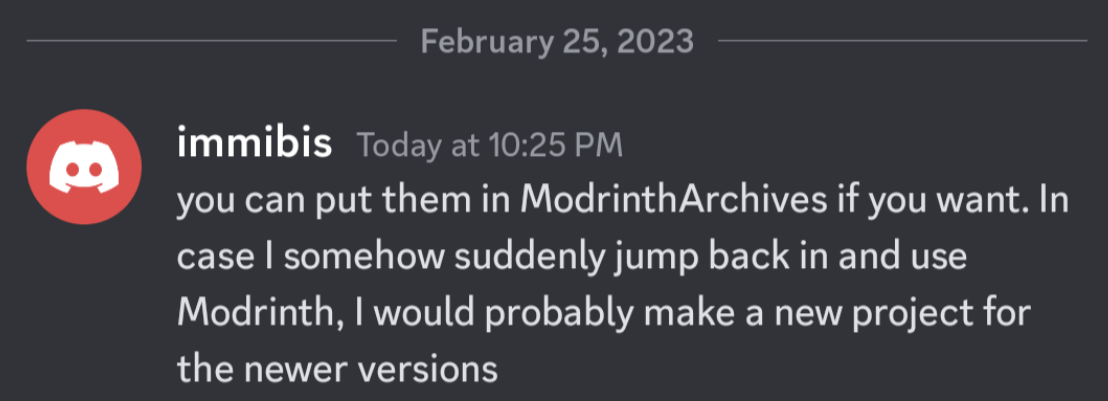
此模组已废弃,上传仅用于存档目的。它最初由 immibis 创建。在原作者许可下,已上传至 Modrinth 的 ModrinthArchives 账户。
This is a smallish mod that adds some useful blocks. The name TubeStuff is no longer temporary :P
The mod doesn't require RedPower or BuildCraft, but it's much more useful with them. Also, there's no recipe for the buffer if you have neither of them.
Buffer
This block allows you to transfer items between pipes and tubes easily. It also combines stacks of items together to reduce lag.
You can fill it with items with pipes or tubes, or even manually, just like a chest.
If you put a wooden pipe, gold pipe, or basic logistics pipe next to the buffer, it will output one stack of items into the pipe every few seconds (depending on the number of empty slots - 5 seconds when empty, 0.5 seconds when full).
If you put a filter next to it, with the input side facing the buffer, it will output a redstone signal to pulse the filter at the same rate it sends items into pipes.
Automatic Crafting Table MkII
When you right click this you will see four main area. At the top, the input (9x5). At the bottom, your inventory. At the left, a 3x3 recipe area, and a single slot at the right which is the output. Here's how to use it:
- Set the recipe in the recipe area. Nothing will appear in the output slot, that's normal.
- Put items into the input area by connecting tubes (or pipes) to any side. Regulators may be useful here. Each side (and the bottom) has its own row of the input area.
- Place a filter or transposer above the crafting table facing down. Apply a redstone signal to this to extract the crafted item. Another will be crafted almost instantly, if the ingredients are available.
- If the recipe produces a container item, such as buckets (when water buckets are used in the recipe), they will go to the last, red-shaded row of the input area. They can be extracted from the bottom. Note that if this is full, container items will be destroyed!
New feature not shown in the above screenshot: There is a button that toggles between 1 and 64. When it's set to 1 (the default), no items will be crafted unless the output slot is empty. When it's set to 64, items will be crafted until the output slot is full.
They can also be rotated with a RP2 screwdriver, Buildcraft-compatible wrench (including Crescent Hammers and OmniWrenches), IC2 wrench or stone hoe.
The "C" button (not shown in the screenshot) clears the recipe.
The "OD" button (not shown in the screenshot) is for ore-dictionary support. After entering a recipe that uses the ore dictionary - for example, 9 copper ingots - click the OD button, and the ingots will start flashing between all the available types of copper ingots. In this mode you can make copper blocks from any 9 copper ingots, even if they aren't all of the same type. If you edit the recipe it will stop flashing.
If you have NEI, you can click the "?" button next to a recipe while the ACT2 GUI is open to select that recipe.
Black Hole Chest
It's a chest that holds infinite items. Simple, really.
Note that you can't navigate to pages that don't exist. In particular, you can't go to a new blank page unless the previous page is full. Also, when it unloads, it will compact its contents so there are no empty slots until the end.
Disabled by default due to potential OPness - see the config to enable. Even if not enabled in the config, it can be spawned by /give, creative mode, TMI or NEI.
If these chests lag too much in fancy mode, you can force them to use the fast mode graphics in the client's config (tubestuff.enableBHCAnim=false). You can also disable the black particles (tubestuff.enableBHCParticles=false). (Note: If you get lots of fast-moving white/grey particles, that's a graphical glitch where they aren't clipped to the inside of the chest; see below)
Incinerator
Connects to pipes or tubes, and permanently destroys any items that enter it - like a lava pit, but easier to use and with no risk of spontaneous combustion.
Duplicator
This acts like a chest that always has a certain item in it. You can pull an infinite amount of this item out of the chest with wooden pipes or transposers/filters/etc, a certain number at a time.
There is no way to legitimately get this block, and only ops can place it in SMP, for obvious reasons. Intended for things like admin-built dungeons where you want to never run out of reward items.
Right click to open the GUI (again, you must be an op except in singleplayer) and put in the item you want to spawn. The number of items in the GUI is the maximum number of items that will be spawned at a time (eg with one pulse of a filter). Remember wooden pipes and transposers will still only spawn one item at a time.
Retrievulator
This block is the "automated retriever robot" that BrickedKeyboard suggested. World texture is temporary. Any texture pack makers want to give me a better one? I really have no idea what this machine should look like...
The side with the bigger hole is the input. It should be touching the output side of a retriever from RedPower. If it's touching any other block, or nothing, it won't do anything. The side with the smaller hole is the output. It should be touching any inventory, such as a chest or ACT2.
You can use a filter instead of a retriever, which usually isn't very useful.
Make sure your retriever is in "non-slider" mode!
The inventory has three areas - the "R" (retriever) area, the "T" (target) area, and that single lonely slot on the right that you won't need to touch (items go here temporarily on their way to the output inventory).
- The T area should contain the items you want to keep in the output inventory. In this example, it will be kept filled with 63 grass blocks and 63 smoothstone.
- The R area should contain at least one of each item in the T grid, and should match its layout. If that last sentence was confusing, the picture should show what I mean. The retrievulator will move items between the R grid and the retriever, and apply redstone pulses to the retreiver, to keep the inventory stocked with the specified items. If the inventory already contains the correct items, it will spawn a "retriever jammer", which has no other uses, and place it the retriever to stop it from accepting any more items.
Walking over a retriever jammer will destroy it instead of picking it up.
Retrievulators can be rotated with either RedPower screwdriver. As of 51.0.0, they can also be rotated with a Buildcraft wrench, IC2 wrench or stone hoe. As of 52.2.0, any BC-compatible wrench will also work, such as TE crescent hammers and OmniWrenches.
The retrievulator will emit pulses more slowly if it hasn't successfully retrieved any items in a while. The minimum speed is 20 seconds per pulse. (new in 49.3.0)
Note: The T area now (as of 49.2.0) uses fake items, similar to Logistics Pipes. You can set it to request up to 127 of an item, even non-stackable items: Right click to add items, and left click to subtract items; hold shift to add/remove 10 items at a time. If you click with either button on an empty slot, you will set that slot to a copy of the stack you're holding.
Note: If the R grid and the retriever both contain an item in the same square, the retrievulator will not function. If neither contain an item, but the T grid does contain an item in that square, the retrievulator also will not function.
Block Breaker
When you put a tool in, this will break the block in front of it.
It acts like a player breaking a block, so it takes time and uses durability.
Liquid Duplicator, Liquid Disposer
Liquid versions of the duplicator and incinerator.
For the liquid duplicator, you should put a liquid container item in the slot - eg a filled bucket or IC2 cell.
Online Player Detector
Turns green and emits a redstone signal when the player who placed it is online. Useful for servers which require you to turn off your machines when you're offline.
Storage Blocks
They work like the vanilla metal blocks.
There is also a charcoal storage block that looks identical to the coal one.
There is a config option to disable all of these at once, and another option to disable the vanilla storage blocks (coal, charcoal and redstone).
Nikolite and redstone blocks must be placed on top of another block or they will fall.
As of Minecraft 1.5, redstone blocks are now powered redstone blocks, made by crafting vanilla redstone blocks with sand.
As of Minecraft 1.6, coal blocks are now coal brick blocks, made by crafting vanilla coal blocks with stone bricks.
(Original description from the Minecraft Forums)
Archival notice
This mod is abandoned and has been uploaded for archival purposes. It was originally created by immibis. It has been uploaded to Modrinth under the ModrinthArchives account with permission from the original author.

下载 TubeStuff
下载 TubeStuff
下载 TubeStuff
下载 TubeStuff
下载 TubeStuff
下载 TubeStuff
下载 TubeStuff
下载 TubeStuff
下载 TubeStuff
下载 TubeStuff
暂无更新日志
关于这个资源的讨论、问题反馈与使用心得
还没有讨论,来发第一帖吧
你是这个资源的作者?登录后可认领此资源。
相似资源
 模组

一个用于收集生物掉落物的多区块模组。
 模组
AE2:一款流行的自动化与存储模组
 模组

基于 GTCEu 1.12.2 的现代 GregTech
 模组

让你能够在世界中的任何位置定位结构。
 模组
高科技机械、强大的能量生成、炫酷的小工具以及更多内容。现已登陆 Modrinth!
 模组

一款轻量级模组,允许服务器管理员对抗透视作弊者。
评论 0
登录后参与评分
还没有评论,来抢沙发吧