
? Tutorial Worlds Legacy Console Edition
在 Java 版中重温 Minecraft Legacy Console Edition 的怀旧时光!
Tutorial Worlds Legacy Console Edition 是由 Team SmartStreamLabs 开发的一款客户端模组,它为 Minecraft 主菜单添加了一个完全集成的 Tutorial Worlds Browser(教程世界浏览器),允许玩家浏览、探索并创建经典 Legacy Console Edition 教程世界的可玩副本。
无论你是想重温 Xbox 360、PlayStation 3、Wii U、Xbox One 或 PlayStation 4 上的标志性教程地图,这款模组都提供了一种简便且精致的方式,让你在现代 Minecraft 中再次体验这些世界。

✨ 特性
? 内置教程世界浏览器
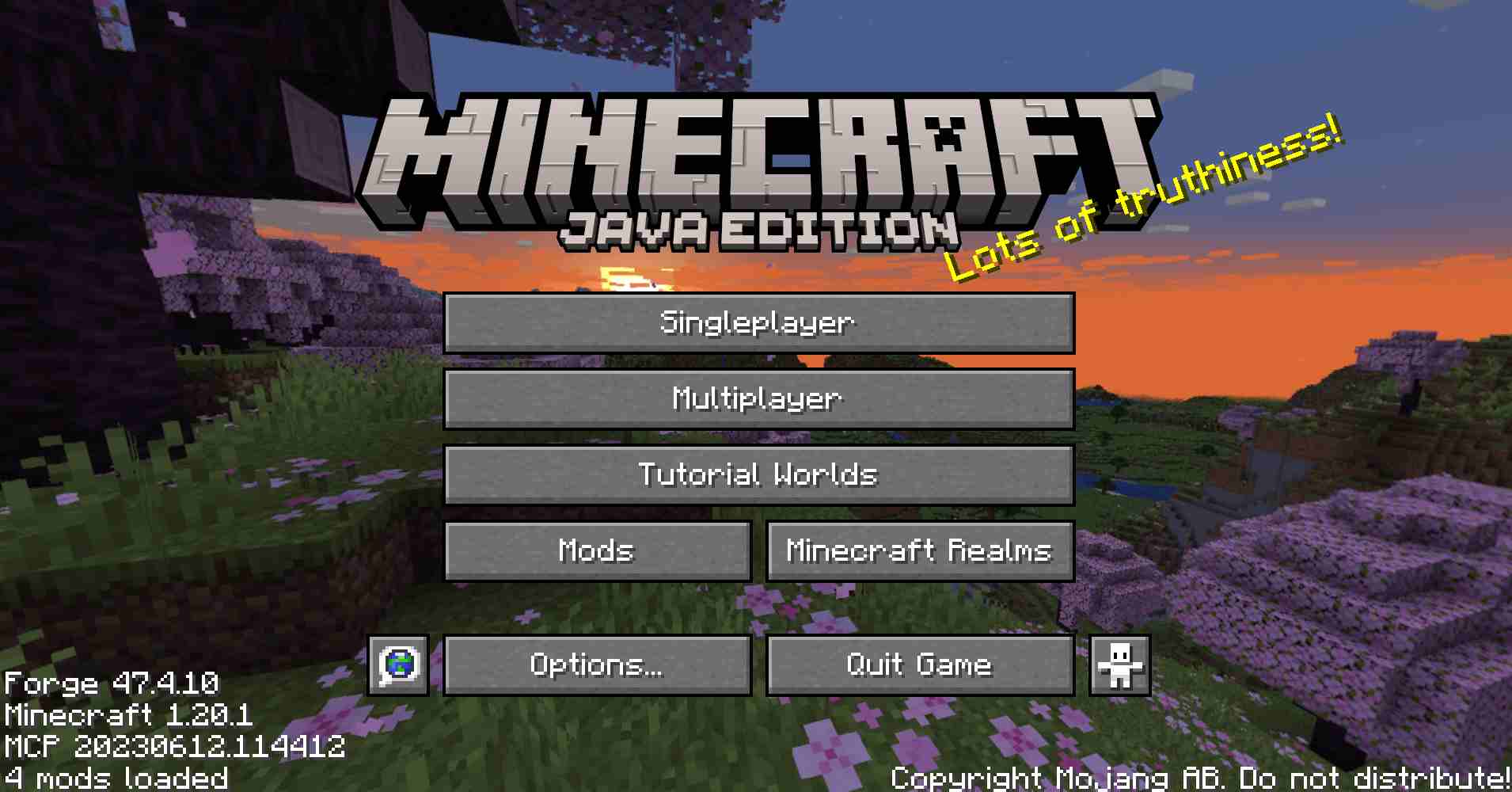
Minecraft 主菜单的多玩家选项下方直接新增了一个 “Tutorial Worlds” 按钮,保持了干净的原版风格布局。
浏览器包含以下内容:
- 大型预览截图
- 世界描述
- Legacy Console Edition 版本信息
- 平台信息
- 发布年份
- 更新编号 (TU)
- 世界大小信息
- 每个教程世界的其他元数据
界面灵感源自原始的 Legacy Console Edition 世界选择屏幕,带来真实的怀旧体验。
? 收录的教程世界
该模组目前包含多个经典的教程世界,包括:
- Pre-TU1
- TU1
- TU3
- TU5
- TU7
- TU9
- TU12
- TU14
- TU19
- TU31
- TU46
- TU69
每个世界都拥有自己的预览图片和详细信息。
⚠️ 首次使用免责声明屏幕
在首次访问 Tutorial Worlds Browser 之前,玩家会看到一个免责声明,说明所有权和项目信息。
玩家必须接受免责声明才能继续。
? 一键创建世界
创建教程世界非常简单:
- 打开 Tutorial Worlds Browser。
- 选择一个教程世界。
- 点击 Create World(创建世界)。
模组会自动执行以下操作:
- 解压选定的世界存档
- 创建唯一的保存文件夹
- 防止覆盖现有世界
- 将世界放入你的 Minecraft 存档文件夹
- 自动启动新创建的世界
?️ 安全的世界处理
Tutorial Worlds Legacy Console Edition 包含多重安全系统:
- 从不修改原始世界存档
- 从不覆盖现有世界
- 安全处理缺失文件
- 记录加载和复制错误
- 支持来自
.minecraft/tutorial_worlds/的开发存档 - 包含对旧版教程世界格式的兼容性和迁移逻辑
迁移支持包括:
- 旧版世界数据更新
- 旧版维度文件夹修复
- 旧物品堆栈转换
- 区块准备
- 实体数据准备
- 兴趣点数据准备
这有助于在较新的 Minecraft 版本中更可靠地加载旧教程世界。
? 仅限客户端
此模组完全是客户端的。
✔ 无需安装服务器 ✔ 无多人游戏功能 ✔ 无新方块或物品 ✔ 无游戏玩法更改 ✔ 无命令或进度系统
该模组的唯一目的是为 Legacy Console Edition 教程世界提供一个精致的浏览器,并允许玩家创建可玩的单人副本。
❤️ 为怀旧与保护而制作
Tutorial Worlds Legacy Console Edition 旨在帮助保护和庆祝那些向数百万玩家介绍 Minecraft 的经典教程世界。
无论你是重温童年回忆,还是第一次探索这些地图,这款模组都能让你在现代 Java Edition 中轻松便捷地体验这一切。
免责声明
本项目是一个非官方的粉丝自制模组。
Minecraft®、Mojang®、Microsoft® 以及原始的 Legacy Console Edition 教程世界地图均为 Mojang Studios 和 Microsoft 的财产。
本模组不与 Mojang Studios 或 Microsoft 关联、背书、赞助或由其批准。
由 Team SmartStreamLabs 创建的模组代码已释放至公共领域。
所附带的教程世界地图及其相关资产仍归 Mojang Studios 和 Microsoft 所有。
? Tutorial Worlds Legacy Console Edition
Relive the nostalgia of Minecraft Legacy Console Edition directly inside Java Edition!
Tutorial Worlds Legacy Console Edition is a client-side Minecraft mod by Team SmartStreamLabs that adds a fully integrated Tutorial Worlds Browser to the Minecraft main menu, allowing players to browse, explore, and create playable copies of classic Legacy Console Edition tutorial worlds.
Whether you want to revisit the iconic tutorial maps from Xbox 360, PlayStation 3, Wii U, Xbox One, or PlayStation 4, this mod provides an easy and polished way to experience these worlds again in modern Minecraft.
✨ Features
? Built-In Tutorial Worlds Browser
A new "Tutorial Worlds" button is added directly to the Minecraft main menu beneath Multiplayer, maintaining a clean vanilla-style layout.
The browser includes:
- Large preview screenshots
- World descriptions
- Legacy Console Edition version information
- Platform information
- Release year
- Update number (TU)
- World size information
- Additional metadata for each tutorial world
The interface is inspired by the original Legacy Console Edition world selection screens for an authentic nostalgic experience.
? Included Tutorial Worlds
The mod currently includes multiple classic tutorial worlds, including:
- Pre-TU1
- TU1
- TU3
- TU5
- TU7
- TU9
- TU12
- TU14
- TU19
- TU31
- TU46
- TU69
Each world contains its own preview image and detailed information.
⚠️ First-Time Disclaimer Screen
Before accessing the Tutorial Worlds Browser for the first time, players are presented with a disclaimer explaining ownership and project information.
Players must accept the disclaimer before continuing.
? One-Click World Creation
Creating a tutorial world is simple:
- Open the Tutorial Worlds Browser.
- Select a tutorial world.
- Click Create World.
The mod automatically:
- Extracts the selected world archive
- Creates a unique save folder
- Prevents overwriting existing worlds
- Places the world into your Minecraft saves folder
- Launches the newly created world automatically
?️ Safe World Handling
Tutorial Worlds Legacy Console Edition includes multiple safety systems:
- Never modifies the original world archives
- Never overwrites existing worlds
- Handles missing files safely
- Logs loading and copy errors
- Supports development archives from
.minecraft/tutorial_worlds/ - Includes compatibility and migration logic for older tutorial world formats
Migration support includes:
- Legacy world data updates
- Legacy dimension folder fixes
- Old item stack conversion
- Chunk preparation
- Entity data preparation
- Point-of-interest data preparation
This helps older tutorial worlds load more reliably in modern Minecraft versions.
? Client-Side Only
This mod is completely client-side.
✔ No server installation required ✔ No multiplayer features ✔ No new blocks or items ✔ No gameplay changes ✔ No commands or progression systems
The sole purpose of this mod is to provide a polished browser for Legacy Console Edition tutorial worlds and allow players to create playable singleplayer copies.
❤️ Made for Nostalgia & Preservation
Tutorial Worlds Legacy Console Edition was created to help preserve and celebrate the iconic tutorial worlds that introduced millions of players to Minecraft.
Whether you're revisiting childhood memories or exploring these maps for the first time, this mod makes the experience simple and accessible within modern Java Edition.
Disclaimer
This project is an unofficial fan-made mod.
Minecraft®, Mojang®, Microsoft®, and the original Legacy Console Edition tutorial world maps are the property of Mojang Studios and Microsoft.
This mod is not affiliated with, endorsed by, sponsored by, or approved by Mojang Studios or Microsoft.
The mod code created by Team SmartStreamLabs is released into the Public Domain.
The included tutorial world maps and their associated assets remain the property of Mojang Studios and Microsoft.

下载 Tutorial Worlds Legacy Console Edition
下载 Tutorial Worlds Legacy Console Edition
需要联机服务器吗?
稳定流畅、一键部署,几分钟即可和朋友联机开服
最低仅需 8 元/月 即可畅快联机
下载 Tutorial Worlds Legacy Console Edition
需要联机服务器吗?
稳定流畅、一键部署,几分钟即可和朋友联机开服
最低仅需 8 元/月 即可畅快联机
下载 Tutorial Worlds Legacy Console Edition
需要联机服务器吗?
稳定流畅、一键部署,几分钟即可和朋友联机开服
最低仅需 8 元/月 即可畅快联机
下载 Tutorial Worlds Legacy Console Edition
需要联机服务器吗?
稳定流畅、一键部署,几分钟即可和朋友联机开服
最低仅需 8 元/月 即可畅快联机
下载 Tutorial Worlds Legacy Console Edition
需要联机服务器吗?
稳定流畅、一键部署,几分钟即可和朋友联机开服
最低仅需 8 元/月 即可畅快联机
下载 Tutorial Worlds Legacy Console Edition
需要联机服务器吗?
稳定流畅、一键部署,几分钟即可和朋友联机开服
最低仅需 8 元/月 即可畅快联机
下载 Tutorial Worlds Legacy Console Edition
下载 Tutorial Worlds Legacy Console Edition
下载 Tutorial Worlds Legacy Console Edition
? The Graveyard(非官方移植版)1.0.0 已发布!
Tutorial Worlds Legacy Console Edition 现已支持 26.2 NeoForge 和 26.2 Fabric。
? CurseForge: ? Modrinth:
感谢您的支持!❤️
免责声明: 本作品并非 Minecraft 官方产品,未经 Mojang 或 Microsoft 批准或与它们无关。
关于这个资源的讨论、问题反馈与使用心得
还没有讨论,来发第一帖吧
你是这个资源的作者?登录后可认领此资源。
相似资源
 模组

显示你正在注视的方块的信息。(适用于 Minecraft 1.16+ 的 Hwyla/Waila 分支)
 模组
在游戏画面角落显示附近世界地形、玩家、生物和实体的地图。可创建路径点,帮助你找到标记过的位置。
 模组

查看物品与配方
 模组
使用 JavaScript 编辑配方、添加自定义物品、编写世界事件!
 模组
AE2:一款流行的自动化与存储模组
 模组
那是什么?一个 Waila/Hwyla 的分支。
评论 0
登录后参与评分
还没有评论,来抢沙发吧