地下信标
允许信标在没有直通天空的路径时也能激活并保持激活状态。
再也不用为了在地下使用信标而挖洞了。
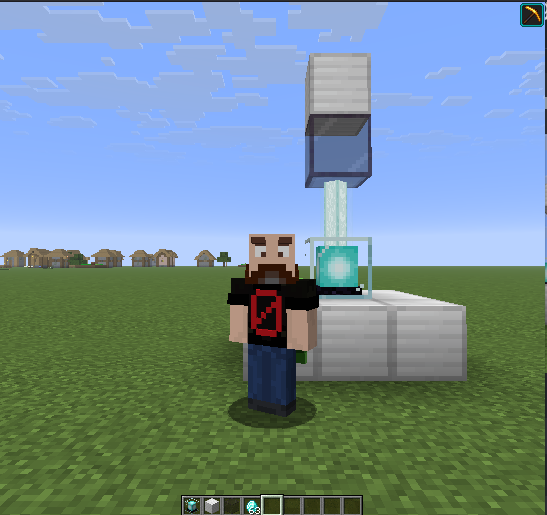
创建地下信标
要在无法接触天空的地下或室内使用信标,玩家必须在其上方放置一个地下信标方块。模组默认配置的是_着色玻璃(Tinted Glass)_方块(详见地下信标方块)。
该方块可以直接放置在信标的顶部,或者更高处,只要两者之间没有其他方块阻挡即可。
例外情况是那些不会导致信标失效的方块(例如染色玻璃,用于改变光束颜色)。
如果移除地下信标方块,信标将恢复其正常行为,并在没有直通天空的路径时失效。
地下信标的光束渲染
当信标被转换为地下信标时,模组会更改其在玩家眼中的光束渲染方式。
光束仅渲染至着色玻璃方块处,而不是像原版那样一直渲染到最大高度(2048)。
环境兼容性
Underground Beacon 模组可以安装在单人游戏或服务器中(客户端可选安装)。
单人游戏
- 通过使用着色玻璃方块,可以在没有直通天空的路径的情况下激活信标。
- 光束将会可见。
服务器(客户端可选)
- 通过使用着色玻璃方块,可以在没有直通天空的路径的情况下激活信标。
此效果不需要客户端安装该模组。
对于客户端安装了该模组的玩家:
对于客户端未安装该模组的玩家:
仅在客户端(不在服务器上)
当模组仅存在于客户端而未安装在服务器上时,使用着色玻璃方块将无法激活效果。信标仍然需要直通天空的路径,因为效果始终由服务器管理。
但渲染更改仍会生效。
这意味着光束将变得可见,并会按照信标已激活的状态进行渲染。
地下信标方块
着色玻璃方块是默认的地下信标方块,但你可以通过数据包添加更多方块或更改默认设置。
任何列入 underground_beacon 标签下的方块都是该模组的有效方块。
你可以通过数据包替换默认方块或添加更多方块。
创建数据包以添加或替换地下信标方块
以下是创建数据包以添加或更改模组所用方块的逐步指南。
注意事项:
如果你想移除着色玻璃方块并使用其他方块代替,请在第 7 步中将 "replace": false 更改为
"replace": true。
这里 你可以找到所有 Minecraft 方块的列表,以便查找它们的完整标识符(minecraft:block_name)。
也可以使用模组添加的方块。
警告
不建议添加那些不阻挡信标的方块(如染色玻璃),因为模组会改变它们的行为。
以下示例添加了两个除了默认方块外玩家可以使用的 Minecraft 方块:萤石和海晶灯。
步骤 1. 首先在计算机上创建一个文件夹,命名为你想要的名字(例如 my_pack)。
步骤 2. 在你的包文件夹(my_pack)内,创建一个名为 pack.mcmeta 的(文本)文件。
步骤 3. 仍在该文件夹内,添加以下文件夹结构:
\data\underground_beacon\tags\block
步骤 4. 在最后一个文件夹(block)中,创建一个名为 underground_beacon.json 的(文本)文件。
步骤 5. 你的最终文件夹结构,加上内部创建的两个文件,看起来应该是这样的:
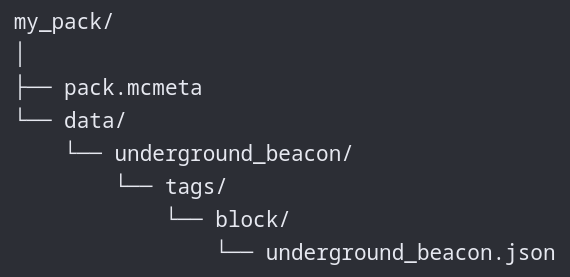
步骤 6. 在 pack.mcmeta 文件中,添加以下内容:
    {
      "pack": {
        "description": "Add (or replace) Underground Beacon Blocks",
        "min_format": 107.1,
        "max_format": 107.1
      }
    }
步骤 7. 在 underground_beacon.json 文件中,添加以下内容:
    {
        "replace": false,
        "values": [
            "minecraft:glowstone",
            "minecraft:sea_lantern"
        ]
    }
步骤 8. 压缩根文件夹,并将刚刚创建的 my_pack.zip 文件放入你的世界的数据包文件夹中。
注意事项:
- 当数据包与模组一起用于服务器时,客户端不需要该数据包。
- 在连接到没有该数据包或定义了不同方块集的服务器的客户端上使用数据包,会导致环境兼容性部分讨论的效果。
Complementary Shaders Community Server

本模组是为 Complementary SMP 服务器制作的,该服务器由 Complementary Shaders Discord 社区运营。
加入 Complementary Shaders Discord 社区,并在我们的服务器上玩 Minecraft。 :)
不兼容项
目前已知没有不兼容项。
但是,任何更改信标行为的模组都可能存在不兼容问题。
如果你在使用 Underground Beacon 与其他模组配合时遇到问题,请提交 Issue 或在 Discord 上留言(链接在侧边栏)。
依赖项
许可证
本项目对其源代码和视觉/音频/设计资产使用了不同的许可证。
源代码采用 MIT 许可证。
视觉、音频和其他资产保留所有权利。
The Underground Beacon
Allows a beacon to be (and stay) active even if there is no clear path to the sky.
No more digging holes to make a beacon work underground.
Creating an Underground Beacon
To use a beacon underground/indoors without access to the sky, the player must place an Underground Beacon Block above it. The mod configures the Tinted Glass block by default (see Underground Beacon Blocks).
This block can be placed directly on top of the Beacon or higher, as long as there are no other blocks between them.
The exceptions are blocks that do not deactivate the beacon (e.g., stained glass blocks, used to change the beam color).
If the Underground Beacon Block is removed, the Beacon reverts to its normal behavior and will be deactivated if there is no clear path to the sky.
Beacon Beam on Underground Beacons
When a beacon is turned into an underground beacon, the mod changes how its beam is rendered for the players.
The beam renders only up to the tinted glass block, instead of all the way up to the max height (2048 in Vanilla).
Environment
The Underground Beacon mod can be installed in single-player or server (optional on client).
Single-Player
- Can be activated without a clear path to the sky by using a tinted glass block.
- The beam will be visible.
Server (Client is optional)
- Can be activated without a clear path to the sky by using a tinted glass block.
The effect does not require the mod on the client.
For players with the mod on their client:
- The beam will be visible.
For players without the mod on their client:
- The beam will not be visible.
Client (not in the Server)
When the mod is present on a client but not on the server, using the tinted glass block will not activate the effect. The beacon still needs a clear path to the sky, as the effect is always managed by the server.
But the rendering changes will be applied.
This means the beam will become visible and will be rendered as if the beacon was activated.
Underground Beacon Blocks
The Tinted Glass Block is the default Underground Beacon block, but you can add more blocks or change the default using a Data Pack.
Any block listed under the tag underground_beacon is a valid block for the mod.
You can replace the default block or add more blocks using a data pack.
Creating a Data Pack to Add or Replace the Underground Beacon blocks
Below is the step-by-step to create a data pack to add or change the blocks used by the mod.
Notes:
If you want to remove the Tinted Glass block and use other blocks instead, change "replace": false to
"replace": true on step 7.
Here you will find a list with all Minecraft blocks so you can find their full identifiers (minecraft:block_name).
It is also possible to use modded blocks.
WARNING
It's NOT recommended to add blocks that do not block the beacon, like stained glass, as the mod will change their behavior.
The following example adds two Minecraft blocks that can be used by the player besides the default one: Glowstone and Sea Lanterns.
Step 1. Start by creating a folder on your computer with the name you want for your data pack (e.g., my_pack).
Step 2. Inside your pack folder (my_pack), create a (text) file with the name pack.mcmeta.
Step 3. Still inside this folder, add the following folder structure:
\data\underground_beacon\tags\block
Step 4. Inside the last folder (block), create a (text) file with the name underground_beacon.json.
Step 5. Your final folder structure, with the two files we created inside, will look like this:
Step 6. In the pack.mcmeta file, add the following:
    {
      "pack": {
        "description": "Add (or replace) Underground Beacon Blocks",
        "min_format": 107.1,
        "max_format": 107.1
      }
    }
Step 7. In the underground_beacon.json file, add the following:
    {
        "replace": false,
        "values": [
            "minecraft:glowstone",
            "minecraft:sea_lantern"
        ]
    }
Step 8. Zip the root folder and drop the my_pack.zip file you just created into your world datapack folder.
Notes:
- When the data pack is used on a server with the mod, the client doesn't need the data pack.
- Using a data pack on a client connected to a server without it or with a different set of blocks defined will cause the effects discussed in the Environment section.
Complementary Shaders Community Server
This mod was made for the Complementary SMP, a server run by the Complementary Shaders Discord Community.
Join the community in the Complementary Shaders Discord and play Minecraft on our server. :)
Incompatibilities
Currently, no incompatibilities are known.
But any mod that changes the Beacon behavior may be incompatible.
If you encounter any problems when using Underground Beacon with other mods, open an issue or leave me a message on my Discord (links on the side bar).
Dependencies
License
This project uses different licenses for its source code and visual/audio/design assets.
The source code is available under the MIT license.
Visual, audio, and other assets are all rights reserved.


 模组

 模组

 模组
 模组

 模组
 模组

评论 0
登录后参与评分
还没有评论,来抢沙发吧