
Universal Config
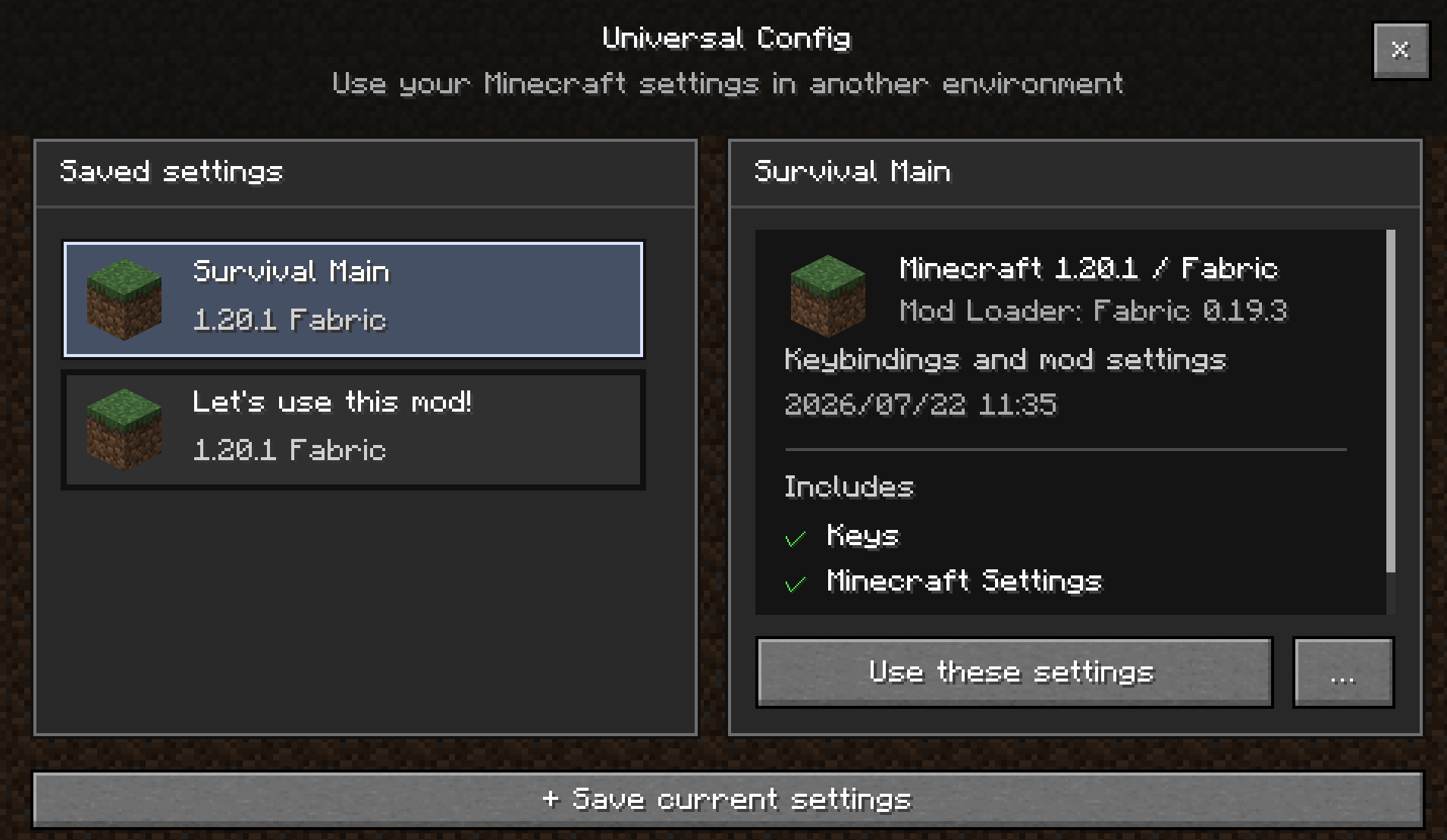
Universal Config 是一款客户端模组,允许你将 Minecraft 设置、键位绑定和模组配置文件保存为可复用的配置档(profiles),并在不同实例和 Minecraft 版本之间共享。
你不再需要在每次创建新实例时重新配置键位和模组设置。
功能
- 创建并保存多个配置档
- 将当前设置保存为配置档
- 存储键位和其他
options.txt设置 - 存储来自
config文件夹的模组配置文件 - 通过游戏内界面浏览已保存的配置档
- 在应用前查看配置档内容
- 复制、导出和删除配置档
- 设置默认配置档
- 从备份恢复之前的设置
安全的配置档应用
Universal Config 不会简单地覆盖整个 options.txt 文件。
相反,保存的设置会逐个合并到当前配置中,从而确保仅存在于当前实例中的设置保持不变。
键位也会单独处理以提高兼容性。
不包含的内容
Universal Config 并非用于复制整个 Minecraft 实例。
以下数据不会包含在配置档中:
- 模组
- 世界存档
- 日志
- 崩溃报告
- 资源包
- 光影包
- 截图
Universal Config 专门设计用于共享和复用 Minecraft 配置。
版本兼容性
配置档可以在不同的 Minecraft 版本和实例之间使用。
但是,由于这取决于所使用的模组及其配置格式,因此无法保证完全兼容。
如果未安装所需的模组,或者模组更新更改了其配置格式,某些设置可能无法正常工作。
对更多 Minecraft 版本和加载器的支持将持续扩展。敬请期待!
使用方法
从 Minecraft 主菜单打开 Universal Config。
在配置档界面,你可以:
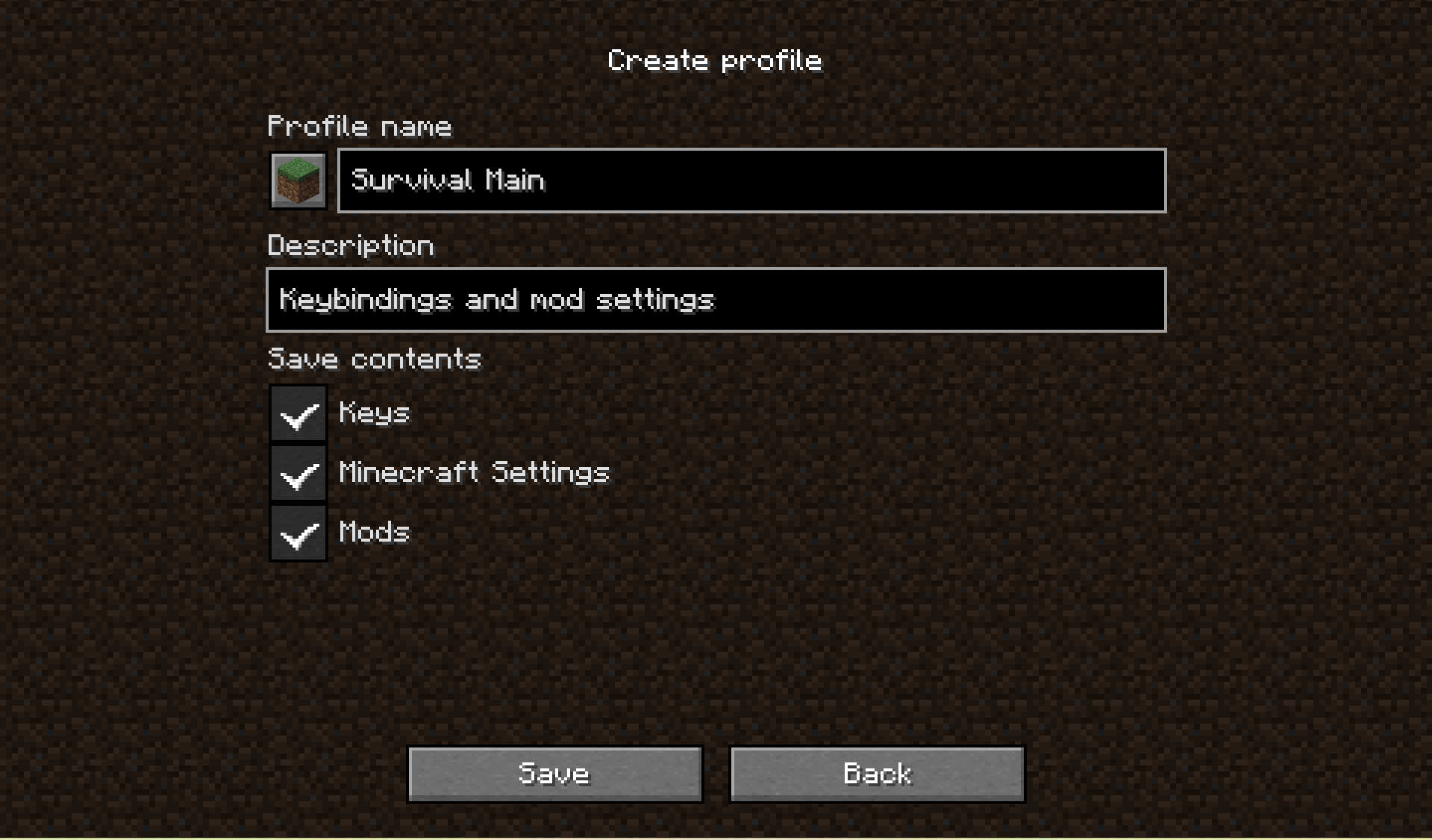
- 将当前设置保存为新配置档
- 浏览现有配置档
- 选择从其他实例保存的配置档
当选择配置档时,你可以在应用前查看以下信息:
- 创建该配置档时使用的 Minecraft 版本
- 模组加载器
- 配置档是否包含键位、Minecraft 客户端设置和/或模组配置文件
- 兼容性警告
确认后,所选配置档将在下次启动 Minecraft 时应用。
系统会提前备份你的当前配置,并在 Minecraft 加载之前将配置档合并到你的设置中。
默认配置档
当某个配置档被设置为默认配置档时,它将在首次启动 Minecraft 时自动应用。
这使得新实例能够在无需手动应用配置档的情况下,以你偏好的配置开始运行。
配置档管理
配置档可以:
- 创建
- 复制
- 在文件夹中打开
- 删除
- 设置为默认配置档
配置档以便携式的 .ucp 格式存储,可以移动到其他电脑或与其它玩家共享。
配置档存储
默认情况下,共享配置档存储在以下位置:
Windows
%APPDATA%\.universal-config\
macOS / Linux
~/.universal-config/
你可以从 Universal Config 界面更改配置档存储位置,但建议大多数用户使用默认位置。
Universal Config
Universal Config is a client-side mod that lets you save your Minecraft settings, keybinds, and mod configuration files as reusable profiles and share them across different instances and Minecraft versions.
You no longer need to reconfigure your keybinds and mod settings every time you create a new instance.
Features
- Create and save multiple profiles
- Save your current settings as a profile
- Store keybinds and other
options.txtsettings - Store mod configuration files from the
configfolder - Browse saved profiles from an in-game interface
- Review profile contents before applying them
- Duplicate, export, and delete profiles
- Set a default profile
- Restore previous settings from a backup
Safe Profile Application
Universal Config does not simply overwrite your entire options.txt file.
Instead, saved settings are merged into your current configuration individually, allowing settings that only exist in the current instance to remain untouched.
Keybinds are also handled separately for better compatibility.
What Is Not Included
Universal Config is not designed to copy an entire Minecraft instance.
The following data is not included in profiles:
- Mods
- Worlds
- Logs
- Crash reports
- Resource packs
- Shader packs
- Screenshots
Universal Config is specifically designed for sharing and reusing Minecraft configurations.
Version Compatibility
Profiles can be used across different Minecraft versions and instances.
However, full compatibility cannot always be guaranteed, as it depends on the mods being used and their configuration formats.
Some settings may not work correctly if the required mod is not installed or if a mod update has changed its configuration format.
Support for additional Minecraft versions and mod loaders will continue to expand over time. Stay tuned!
How to Use
Open Universal Config from the Minecraft title screen.
From the profile screen, you can:
- Save your current settings as a new profile
- Browse existing profiles
- Select a profile saved from another instance
When you select a profile, you can review the following information before applying it:
- The Minecraft version the profile was created with
- Mod loader
- Whether the profile contains keybinds, Minecraft client settings, and/or mod configuration files
- Compatibility warnings
Once confirmed, the selected profile is scheduled to be applied the next time Minecraft starts.
Your current configuration is backed up beforehand, and the profile is merged into your settings before Minecraft loads them.
Default Profile
When a profile is set as the default profile, it will be automatically applied the first time Minecraft is launched.
This allows new instances to start with your preferred configuration without manually applying a profile.
Profile Management
Profiles can be:
- Created
- Duplicated
- Opened in their folder
- Deleted
- Set as the default profile
Profiles are stored in the portable .ucp format and can be moved to another PC or shared with other players.
Profile Storage
By default, shared profiles are stored in the following locations:
Windows
%APPDATA%\.universal-config\
macOS / Linux
~/.universal-config/
You can change the profile storage location from the Universal Config screen, but using the default location is recommended for most users.

下载 Universal Config
需要联机服务器吗?
稳定流畅、一键部署,几分钟即可和朋友联机开服
最低仅需 8 元/月 即可畅快联机
下载 Universal Config
需要联机服务器吗?
稳定流畅、一键部署,几分钟即可和朋友联机开服
最低仅需 8 元/月 即可畅快联机
下载 Universal Config
需要联机服务器吗?
稳定流畅、一键部署,几分钟即可和朋友联机开服
最低仅需 8 元/月 即可畅快联机
下载 Universal Config
需要联机服务器吗?
稳定流畅、一键部署,几分钟即可和朋友联机开服
最低仅需 8 元/月 即可畅快联机
下载 Universal Config
需要联机服务器吗?
稳定流畅、一键部署,几分钟即可和朋友联机开服
最低仅需 8 元/月 即可畅快联机
下载 Universal Config
需要联机服务器吗?
稳定流畅、一键部署,几分钟即可和朋友联机开服
最低仅需 8 元/月 即可畅快联机
下载 Universal Config
需要联机服务器吗?
稳定流畅、一键部署,几分钟即可和朋友联机开服
最低仅需 8 元/月 即可畅快联机
下载 Universal Config
需要联机服务器吗?
稳定流畅、一键部署,几分钟即可和朋友联机开服
最低仅需 8 元/月 即可畅快联机
下载 Universal Config
需要联机服务器吗?
稳定流畅、一键部署,几分钟即可和朋友联机开服
最低仅需 8 元/月 即可畅快联机
下载 Universal Config
需要联机服务器吗?
稳定流畅、一键部署,几分钟即可和朋友联机开服
最低仅需 8 元/月 即可畅快联机
暂无更新日志
关于这个资源的讨论、问题反馈与使用心得
还没有讨论,来发第一帖吧
你是这个资源的作者?登录后可认领此资源。
相似资源
 模组

显示你正在注视的方块的信息。(适用于 Minecraft 1.16+ 的 Hwyla/Waila 分支)
 模组
使用 JavaScript 编辑配方、添加自定义物品、编写世界事件!
 模组

查看物品与配方
 模组
在游戏画面角落显示附近世界地形、玩家、生物和实体的地图。可创建路径点,帮助你找到标记过的位置。
 模组
AE2:一款流行的自动化与存储模组
 模组
那是什么?一个 Waila/Hwyla 的分支。
评论 0
登录后参与评分
还没有评论,来抢沙发吧