

撤回你说的话。
直接从 Minecraft 聊天界面删除、编辑和回复消息。
删除它。修正它。回复它。
发得太快了?打错了字?在繁忙的聊天中找不到想回复的消息了?
Unsay 将熟悉的消息控制功能引入 Minecraft,无需使用命令或打开单独的菜单。打开聊天窗口,在目标消息上按住 Shift 键,然后选择你需要执行的操作。
- 删除 对所有人可见的消息。
- 编辑 拼写错误,无需在下方发布更正内容。
- 回复 消息,并显示原始发送者和简短预览以供上下文参考。
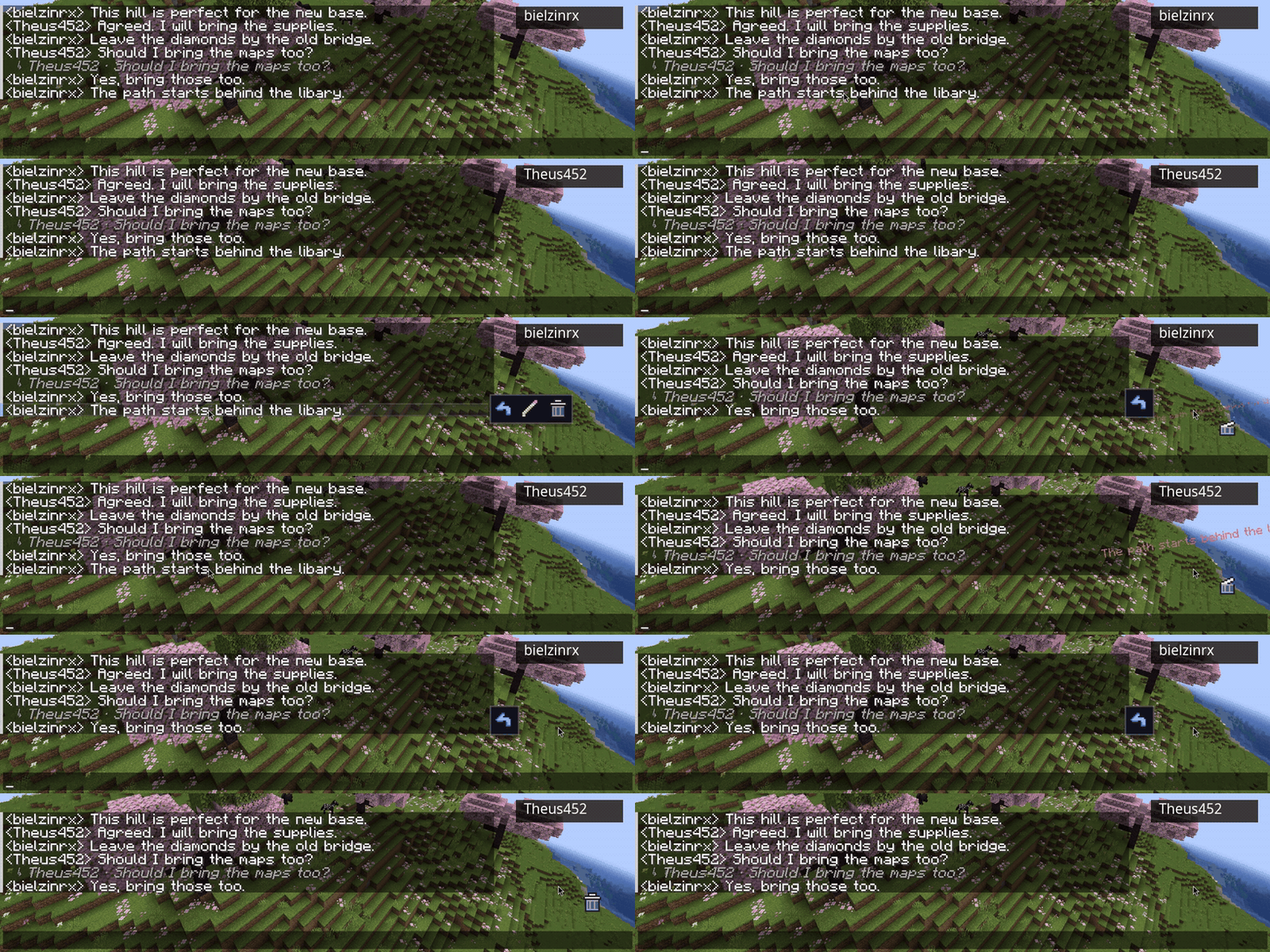
操作保留在常规聊天屏幕内,因此体验既即时又熟悉。
当聊天变得繁忙时,拥有更多控制权
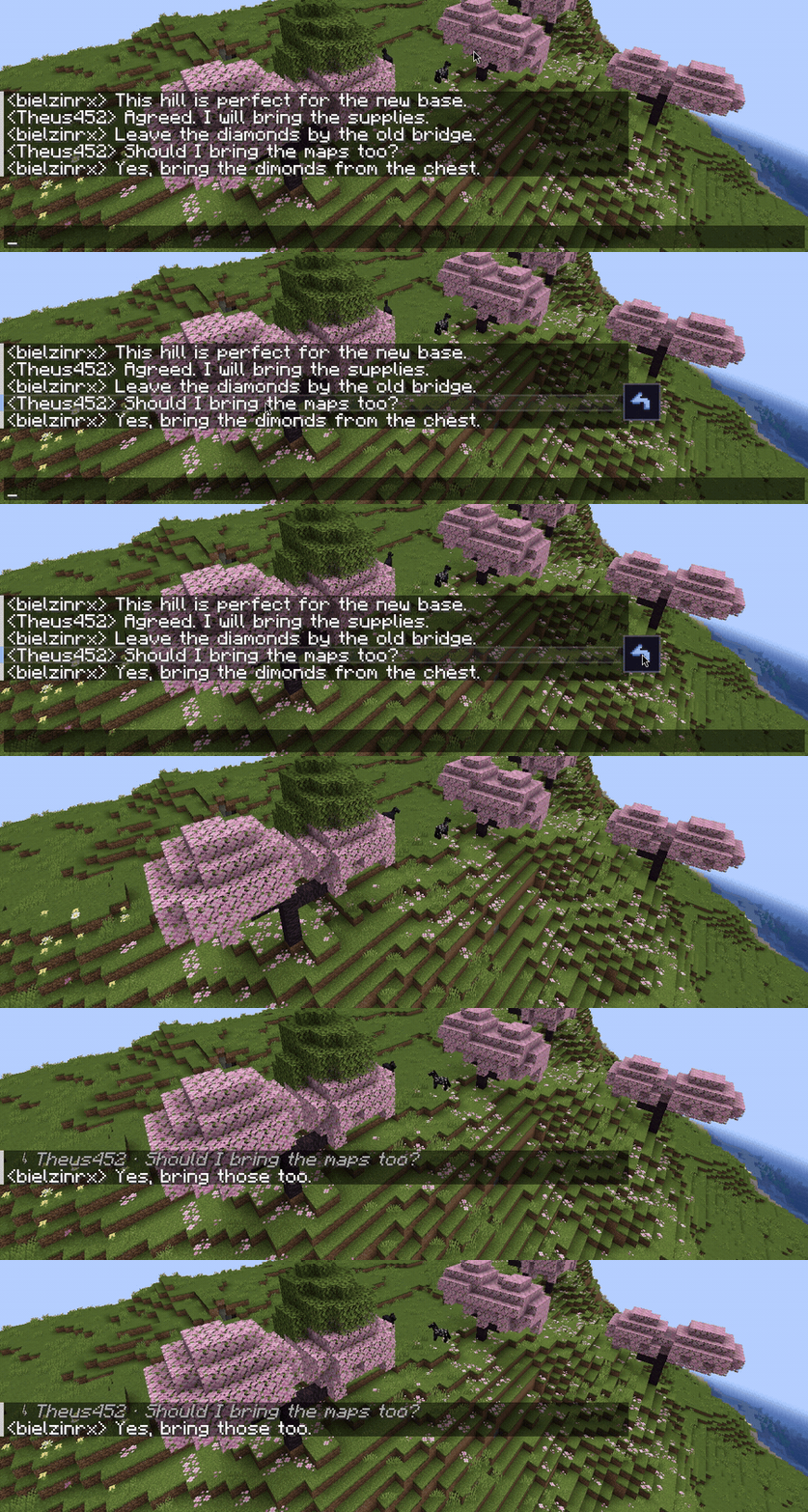
Unsay 还提供了快速管理最近或多条消息的工具。
- 使用快捷键删除你最新或最早的消息。
- 选择单条消息或已加载的聊天历史记录。
- 批量删除选中的多条消息。
- 在选择或取消选择时保留当前的草稿内容。
- 自定义快捷键、确认行为、限制设置和动画效果。
专为多人游戏打造
编辑和删除操作由服务器验证并与连接的玩家同步,确保所有人都保持在同一对话中。
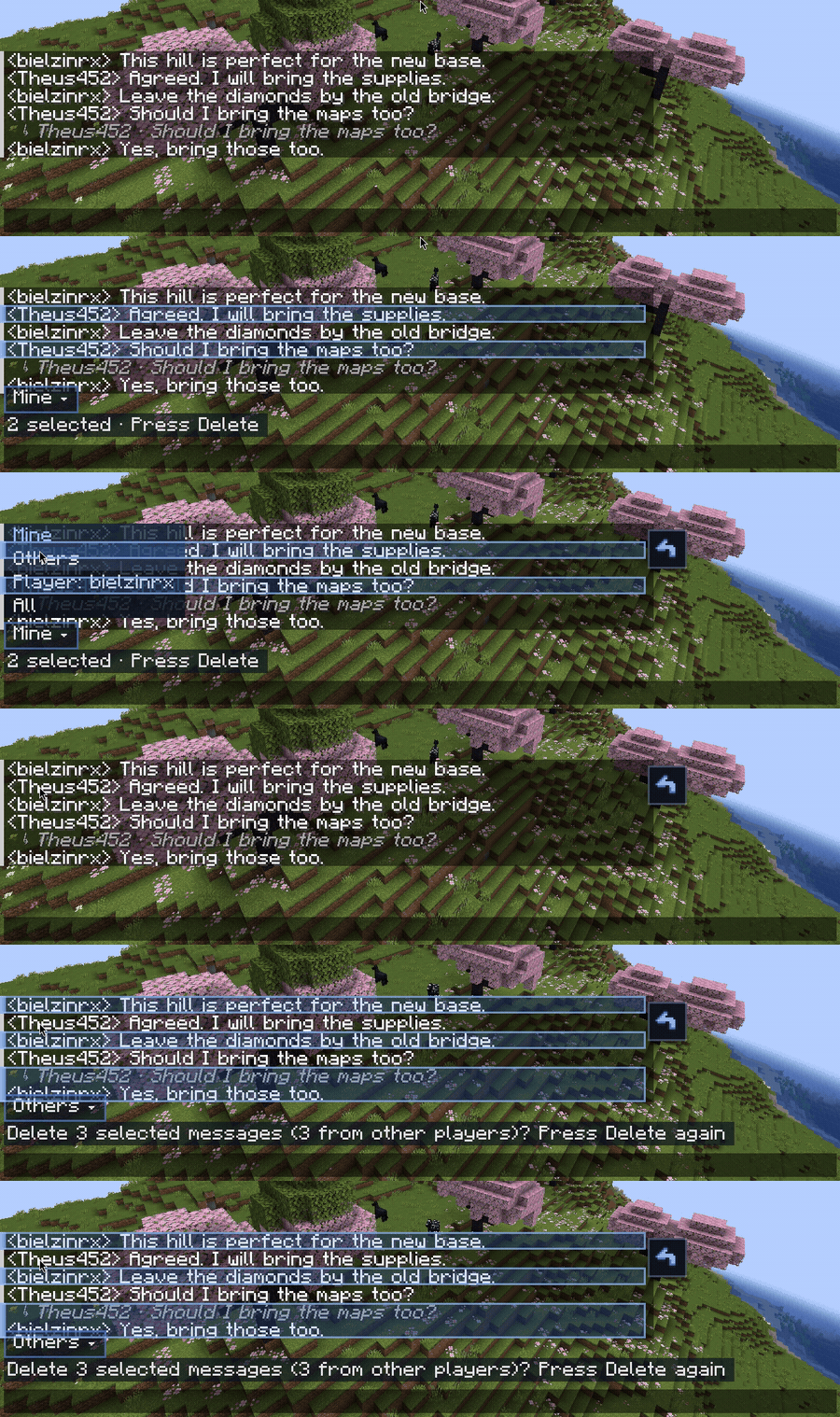
服务器管理员拥有基于权限的管理控制功能,包含四种过滤选项:
- Mine(我的): 仅管理员自己的消息。
- Others(其他): 其他玩家的消息。
- Player(特定玩家): 通过 UUID 标识的单个特定玩家。
- All(全部): 管理员有权管理的每条消息。
管理员默认处于 Mine(我的) 模式。删除其他玩家的额外需要一次确认。
基本控制
| 操作 | 默认控制方式 |
|---|---|
| 显示消息操作 | 按住 Shift |
| 选中或取消选中消息 | Ctrl + Click |
| 选中已加载的消息 | Ctrl + Shift + A |
| 删除选中的消息 | Delete |
| 取消选择 | Esc |
| 删除你最新的消息 | Shift + Delete 或 Shift + Backspace |
| 删除你最旧的消息 | Ctrl + Shift + Delete 或 Ctrl + Shift + Backspace |
| 浏览最近的以进行编辑的消息 | Shift + Up Arrow |
查看 完整控制指南 以获取所有快捷键和配置选项。
安装
必须在服务器和每个参与客户端上安装 Unsay。
| Minecraft | Fabric | Forge |
|---|---|---|
| 1.20.1 | Unsay + 对应版本的 Fabric API | Unsay |
| 1.19.2 | Unsay + 对应版本的 Fabric API | Unsay |
- 从 版本页面 下载与你的 Minecraft 版本和加载器匹配的文件。
- 在使用 Fabric 构建时,请安装 Fabric API。
- 将所需的 JAR 文件放入服务器和客户端的
mods文件夹中。 - 重启游戏和服务器。
两端需使用相同的 Minecraft 版本、加载器和 Unsay 发布版本。请勿混用 Fabric 和 Forge 的文件。需要 Java 17 或更高版本。
Unsay 也可以通过 Minecraft 的内置服务器在单人游戏中运行。
支持
Unsay 目前处于测试阶段。欢迎提交错误报告和建议。
Take back what you said.
Delete, edit, and reply to messages directly from Minecraft chat.
Delete it. Fix it. Reply to it.
Sent something too soon? Made a typo? Lost the message you wanted to answer in a busy chat?
Unsay brings familiar message controls into Minecraft without commands or separate menus. Open chat, hold Shift over a tracked message, and choose the action you need.
- Delete a message for everyone.
- Edit a typo without posting a correction underneath it.
- Reply with the original sender and a short preview for context.
Actions stay inside the regular chat screen, so the experience feels immediate and familiar.
More control when chat gets busy
Unsay also includes tools for quickly managing recent or multiple messages.
- Delete your newest or oldest message with a shortcut.
- Select individual messages or the loaded chat history.
- Delete a selection together.
- Keep your current draft when selecting or canceling.
- Customize shortcuts, confirmation behavior, limits, and animations.
Built for multiplayer
Edits and deletions are validated by the server and synchronized with connected players, keeping everyone in the same conversation.
Server operators receive permission-aware moderation controls with four filters:
- Mine: only the operator's messages.
- Others: messages from other players.
- Player: one specific player, identified by UUID.
- All: every message the operator can moderate.
Operators always begin in Mine. Deleting another player's message requires an additional confirmation.
Essential controls
| Action | Default control |
|---|---|
| Show message actions | Hold Shift |
| Select or deselect a message | Ctrl + Click |
| Select loaded messages | Ctrl + Shift + A |
| Delete selected messages | Delete |
| Cancel a selection | Esc |
| Delete your newest message | Shift + Delete or Shift + Backspace |
| Delete your oldest message | Ctrl + Shift + Delete or Ctrl + Shift + Backspace |
| Browse recent messages for editing | Shift + Up Arrow |
See the complete controls guide for every shortcut and configuration option.
Installation
Unsay must be installed on the server and every participating client.
| Minecraft | Fabric | Forge |
|---|---|---|
| 1.20.1 | Unsay + matching Fabric API | Unsay |
| 1.19.2 | Unsay + matching Fabric API | Unsay |
- Download the file matching your Minecraft version and loader from the Versions page.
- Install Fabric API when using the Fabric build.
- Place the required JARs inside the
modsfolder on the server and clients. - Restart the game and server.
Use the same Minecraft version, loader, and Unsay release on both sides. Do not mix Fabric and Forge files. Java 17 or newer is required.
Unsay also works in singleplayer through Minecraft's integrated server.
Support
Unsay is currently in beta. Bug reports and suggestions are always welcome.

下载 Unsay
下载 Unsay
下载 Unsay
下载 Unsay
下载 Unsay
下载 Unsay
下载 Unsay
下载 Unsay
下载 Unsay
下载 Unsay
Unsay 0.1.6b Beta
- 新增针对 Mine(我的)、Others(他人)、individual players(单个玩家)和 All(全部)的审核过滤。
- 删除其他玩家的聊天消息前增加确认提示。
- 修复了远程幽灵消息以及删除后的同步问题。
- 改进了批量删除、重复消息匹配以及滚动后的选择功能。
- 修复了最新和最旧快捷删除快捷键的问题。
- 在选择或取消时保留已输入的聊天内容。
- 更新了模组图标及聊天内操作纹理。
- 适用于 Fabric 和 Forge 平台的 Minecraft 1.19.2 与 1.20.1。
Unsay 必须安装在服务器端以及所有参与客户端上。
关于这个资源的讨论、问题反馈与使用心得
还没有讨论,来发第一帖吧
你是这个资源的作者?登录后可认领此资源。
相似资源
 模组

显示你正在注视的方块的信息。(适用于 Minecraft 1.16+ 的 Hwyla/Waila 分支)
 模组
使用 JavaScript 编辑配方、添加自定义物品、编写世界事件!
 模组

查看物品与配方
 模组
在游戏画面角落显示附近世界地形、玩家、生物和实体的地图。可创建路径点,帮助你找到标记过的位置。
 模组
AE2:一款流行的自动化与存储模组
 模组
那是什么?一个 Waila/Hwyla 的分支。
评论 0
登录后参与评分
还没有评论,来抢沙发吧