
模组功能
这个模组只做一件事——它增大或增加 Minecraft 物品在库存(玩家、箱子、发射器等)中每个槽位的最大堆叠数量。你是否曾为只能将 64 个铁砧堆叠在一个槽位,却只能堆叠 16 个鸡蛋而感到沮丧?或者觉得将 64 个栅栏和门堆叠在一起没问题,但告示牌却只能堆叠 16 个很离谱?现在别再为此烦恼了!把你的鸡蛋堆到天上去(好吧,最多 64 个高)!需要携带相当于一个双箱的熔岩桶?只需将这些空桶堆叠到 64 个,然后前往最近的熔岩湖——64 个熔岩桶,1 个槽位,搞定!
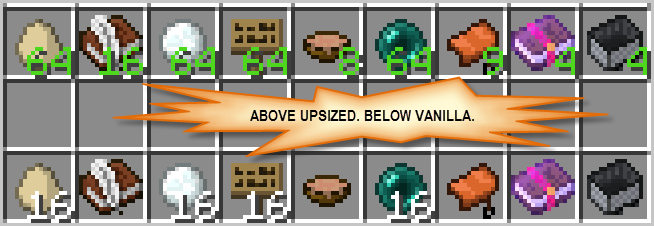
开箱即用,Upsizer 模组会增大那些原本就可以堆叠的物品(如告示牌、鸡蛋、空桶等)的堆叠上限。不过,你也可以增大那些默认每个槽位仅限单个物品的堆叠上限(但在操作前,请先阅读下方的“警告”部分)。增大堆叠不仅限于原版 Minecraft 物品,你还可以通过扩展模组的配置文件来增大其他模组中的物品堆叠上限。
MC 1.19.4 模组要求
- Minecraft 1.19.4
- Forge(与 1.19.4 匹配的最新构建版本)
- 服务端和客户端均可使用 [已进行 Beta 测试]
MC 1.18.2 模组要求
- Minecraft 1.18.2
- Forge(推荐与 1.18.2 匹配的构建版本)
- 客户端和服务端均可使用
MC 1.16.2/.3/.4/.5 模组要求
- Minecraft 1.16.2, 1.16.3, 1.16.4, 1.16.5
- Forge(推荐使用与 1.16.x 匹配的构建版本)
- 客户端和服务端均可使用
MC 1.15.2 模组要求
- Minecraft 1.15.2
- Forge(推荐构建版本)
- 客户端和服务端均可使用
MC 1.14.4 模组要求
- Minecraft 1.14.4
- Forge(推荐构建版本)
- 客户端和服务端均可使用
MC 1.12/.1/.2 模组要求
- Minecraft 1.12, 1.12.1, 1.12.2
- Forge(推荐与你所使用的 MC 版本对应的版本)
- 客户端和服务端均可使用
更多版本(旧版)
MC 1.11.2 模组要求
- Minecraft 1.11.2
- Forge(至少 forge-1.11.2-13.20.0.2255)
- 客户端和服务端均可使用
MC 1.11 模组要求
- Minecraft 1.11
- Forge(至少 1.11-13.19.1.2188)
- 客户端和服务端均可使用
MC 1.8.9 模组要求
- Minecraft 1.8.9
- Forge(至少 1.8.9-11.15.1.1722)
- 客户端和服务端均可使用
MC 1.8 模组要求
- Minecraft 1.8
- Forge(至少 1.8-11.14.3.1450)
- 仅客户端使用
接下来是警告...
在决定增大哪些物品的堆叠上限时,请记住以下三类物品:
- 可安全增大的物品(无害) - 这些物品本身支持每个槽位多个堆叠,但出于“公平”或“平衡”游戏玩法等考虑而施加了一些限制。例如:告示牌、旗帜、鸡蛋、末影珍珠、桶。增大这些物品的堆叠上限通常不会引发任何问题,除非安装了另一个强制要求原版堆叠大小的模组(这虽然不太可能,但世事难料)。
- 可损坏物品 - 这些物品可以承受伤害,并且可能因为每种耐久度实际上被视为一种新类型的物品而被限制为每槽位一个。增大这类物品的堆叠上限对于 存储 多个全新或未受损的物品最为有效。你仍然应该 使用 每个库存槽位只放一个这样的物品。事实上,在合成新物品时,确保你的库存中没有损坏的版本,否则 Minecraft 可能会将新物品合并到已有损坏物品的同一个槽位中。如果你打算使用标准的附魔机制,你不应该增大可损坏物品的堆叠上限,因为这会使它们被标记为不可附魔(如果你使用的是模组附魔机制或附魔台,增大堆叠上限可能会有也可能不会有影响)。例如:工具、武器、盾牌和盔甲。
- 容器类及其他特殊用途物品 - 这些物品可能因其使用方式而受到限制。增大这些物品的堆叠上限也是一种增加未使用物品存储空间的方法,因为 Minecraft 经常硬编码为假设一次只使用一个未堆叠的物品。例如:蛋糕、马铠、装满液体的桶、装满药水的水瓶以及附魔书。
所以,正式地,“警告”来了:当你增大通常每个库存槽位仅限单个物品的堆叠上限时,在使用这些堆叠物品作为单个物品之前要小心注意(这包括直接使用该物品或通过合成/熔炼间接使用)。或者更好的做法是,为了避免任何麻烦,干脆不要那样做。将物品以堆叠形式存储;使用前务必先将其拆分为单个物品。
药水水瓶 [mc-1.8.x 警告]
除非你计划不将它们用于酿造,否则不要增大装满药水的水瓶(即水瓶)的堆叠上限。Minecraft 要求药水物品的最大堆叠大小为 1;任何其他数值都会被拒绝,你无法将该物品放入酿造台的库存槽位中。
带有漏斗的物品过滤器、计时器和分类器
如果你已经为想要增加堆叠上限的物品构建了使用漏斗的标准物品分类器或过滤器,你可能需要调整你的漏斗过滤器。如果你在漏斗计时器中使用了经过堆叠上限增加的物品,则肯定需要对其进行调整。特别是,你需要确保在过滤器或计时器漏斗中使用的填充物数量根据新的最大堆叠上限进行了相应调整。通常情况下,像鸡蛋和末影珍珠这样的物品堆叠上限为 16,因此你会在漏斗过滤器中使用大约 12 个填充物;如果增加了鸡蛋或末影珍珠的最大堆叠上限,你就需要相应增加填充物的数量(具体的变化幅度,如果有变化的话,取决于你过滤器的设计以及你所选择的最大堆叠上限)。
配置
你可以通过更改配置文件来控制 Upsizer 模组是否处理特定物品或某类物品(工具、武器):wabbity_upsizer.cfg [1.11-1.12.2] 或 wabbity_upsizer.toml [1.14.4-1.18.2] 或 upsizer-server.toml [1.19.4+]。请注意,默认情况下,该模组会如上文所述更改“无害”类别中的物品以及一些测试后表现良好的其他物品(例如附魔书、药水、矿车等)。所有其他物品都需要你添加或修改相应的配置选项。要增加某物品的堆叠上限,你需要告诉 Upsizer 模组同时检查该物品 并 设置其新的最大堆叠上限。 请参阅链接的配置文件以获取如何操作的示例。如有任何疑问,请在评论区留言。
从 mc-1.19.4 开始,Upsizer 的配置绑定到特定的世界存档。对于单人游戏而言,这意味着每个世界都将拥有其独立的配置(你可以设置一个默认配置以便复制到新世界)。重要的是——加入多人服务器时,你的客户端将采用服务器的配置,因此不会使用本地配置。
What The Mod Does
This mod does one thing-- it up-sizes or increases the max stack size per slot of various Minecraft items in inventories (player, chests, dispensers, etc.). Ever get frustrated that you can stack 64 anvils into a slot but only 16 eggs? Or that it's OK to stack 64 fences and gates, but only 16 signs? Well be frustrated no more! Stack your eggs to the sky (well, 64 high)! Need to carry a double-chest's worth of lava buckets? Just stack those empties to 64 and head to the nearest lava lake-- 64 lava buckets, 1 slot, done!
Out of the box, upsizer mod will up-size items that are already stackable like signs, eggs, empty buckets, etc. However, you can also up-size items that are limited to just one item per slot by default (but first, read "the warning" below). Up-sizing is not limited to vanilla Minecraft items, you can also extend the mod's configuration to up-size items from other mods.
MC 1.19.4 Mod Requirements
- Minecraft 1.19.4
- Forge (latest build to match 1.19.4)
- Server and Client use [beta tested]
MC 1.18.2 Mod Requirements
- Minecraft 1.18.2
- Forge (recommended build to match 1.18.2)
- Client and Server use
MC 1.16.2/.3/.4/.5 Mod Requirements
- Minecraft 1.16.2,1.16.3,1.16.4,1.6.5
- Forge (recommended build to match 1.16.x using)
- Client and Server use
MC 1.15.2 Mod Requirements
- Minecraft 1.15.2
- Forge (recommended build)
- Client and Server use
MC 1.14.4 Mod Requirements
- Minecraft 1.14.4
- Forge (recommended build)
- Client and Server use
MC 1.12/.1/.2 Mod Requirements
- Minecraft 1.12,1.12.1,1.12.2
- Forge (recommended version for the MC you're using)
- Client and Server use
More versions (OLDIES)
MC 1.11.2 Mod Requirements
- Minecraft 1.11.2
- Forge (at least forge-1.11.2-13.20.0.2255)
- Client and Server use
MC 1.11 Mod Requirements
- Minecraft 1.11
- Forge (at least 1.11-13.19.1.2188)
- Client and Server use
MC 1.8.9 Mod Requirements
- Minecraft 1.8.9
- Forge (at least 1.8.9-11.15.1.1722)
- Client and Server use
MC 1.8 Mod Requirements
- Minecraft 1.8
- Forge (at least 1.8-11.14.3.1450)
- Client-side use
And Now, The Warning...
When deciding what you should up-size keep the following three categories of items in mind:
- Upsize-ready (Harmless) Items - these are items that already support multiples per slot but have some imposed limit in the interest of "fair" or "balanced" game-play or some such thing. Examples include: signs, banners, eggs, ender pearls, buckets. Up-sizing these should not trigger any issues unless there is another mod installed that requires the vanilla stack size (which would be odd but you never know).
- Damageable Items - these are items that can take damage and are probably limited to one-per-slot as each damage level is effectively a new type of item. Up-sizing these sort of items is most effective for storing multiple new or undamaged items. You should still only use these items with one per inventory slot. In fact, when crafting new items don't even have a damaged version in your inventory as Minecraft might merge the new items into the same slot as the damaged one(s). If you intend to use standard enchanting mechanics, you should NOT upsize damageable items as that flags them as not enchantable (if you're using modded mechanics or enchanting table, upsizing may or may not be possible.) Examples include: tools, weapons, shields, and armor.
- Contained/er and other special use Items - these items may be limited because of how they are used. Up-sizing these items is also just a way to increase your storage of unused items as Minecraft is often hard-wired to assume use of a single unstacked item at a time. Examples include: cakes, horse armor, filled buckets, filled potion bottles, and enchanted books.
So here it is officially, "the warning": when you up-size items that are usually limited to a single item per inventory slot, pay attention before using the stacked items as a single item (this goes for using the item directly or indirectly via crafting or smelting). Or better yet, save yourself any pain and just don't do that. Store the items stacked; always unstack to a single item before using.
Potion Bottles [mc-1.8.x warning]
Do NOT up-size filled potion bottles (aka water bottles) unless you don't plan to use them for brewing. Minecraft requires that the potion items have a max stack size of 1; anything else is rejected and you cannot put that item into the brewing stand's inventory slots.
Item Filters, Timers, and Sorters With Hoppers
If you have built standard item sorters or filters with hoppers for some of the items you want to up-size, you might need to adjust your hopper filters. If you're using an upsized item in a hopper timer, you will definitely need to adjust it. In particular, you will need to make sure the number of filler items you use in the filter or timer hopper is adjusted for the new max stack size. Normally, items like eggs and ender-pearls stack to 16 and so you'd use perhaps 12 filler items in your hopper filter; if you increase the max stack size for eggs or ender-pearls, you will need to adjust the number of filler items up (the exact change, if any, would depend on you filter's design and the max stack size you've chosen).
Configuration
You can control whether upsizer mod will touch a particular item or particular class of item (tools, weapons) by changing its configuration file (wabbity_upsizer.cfg [1.11-1.12.2] or wabbity_upsizer.toml [1.14.4-1.18.2] or upsizer-server.toml [1.19.4+]). Note that out-of-the-box, the mod will change items in the "Harmless" category as described above and a few others that seem to work fine when tested (eg enchanted books, potions, minecarts, etc.). All other items require that you add or change the proper configuration option. To up-size something, you need to tell upsizer mod to BOTH check for that item AND what the new max stack size should be. Read the linked config file for an example of how to do this. Post in the Comments section if you have any questions.
Starting with mc-1.19.4, the upsizer configs are bound to a particular world save. For single player this means each world will have its own distinct configuration (you can setup a default config to copy to new worlds). Importantly-- when joining a multi-player server, your client will adopt the configuration from the server so no local configuration is used.

下载 Upsizer Mod [FORGE]
需要联机服务器吗?
稳定流畅、一键部署,几分钟即可和朋友联机开服
最低仅需 8 元/月 即可畅快联机
下载 Upsizer Mod [FORGE]
需要联机服务器吗?
稳定流畅、一键部署,几分钟即可和朋友联机开服
最低仅需 8 元/月 即可畅快联机
下载 Upsizer Mod [FORGE]
需要联机服务器吗?
稳定流畅、一键部署,几分钟即可和朋友联机开服
最低仅需 8 元/月 即可畅快联机
下载 Upsizer Mod [FORGE]
需要联机服务器吗?
稳定流畅、一键部署,几分钟即可和朋友联机开服
最低仅需 8 元/月 即可畅快联机
下载 Upsizer Mod [FORGE]
需要联机服务器吗?
稳定流畅、一键部署,几分钟即可和朋友联机开服
最低仅需 8 元/月 即可畅快联机
下载 Upsizer Mod [FORGE]
需要联机服务器吗?
稳定流畅、一键部署,几分钟即可和朋友联机开服
最低仅需 8 元/月 即可畅快联机
下载 Upsizer Mod [FORGE]
需要联机服务器吗?
稳定流畅、一键部署,几分钟即可和朋友联机开服
最低仅需 8 元/月 即可畅快联机
下载 Upsizer Mod [FORGE]
需要联机服务器吗?
稳定流畅、一键部署,几分钟即可和朋友联机开服
最低仅需 8 元/月 即可畅快联机
下载 Upsizer Mod [FORGE]
需要联机服务器吗?
稳定流畅、一键部署,几分钟即可和朋友联机开服
最低仅需 8 元/月 即可畅快联机
下载 Upsizer Mod [FORGE]
需要联机服务器吗?
稳定流畅、一键部署,几分钟即可和朋友联机开服
最低仅需 8 元/月 即可畅快联机
mc1.19.4-8.0 [2024年1月30日]
最终 1.19.x 相关版本;仅进行版本号更新。
关于这个资源的讨论、问题反馈与使用心得
还没有讨论,来发第一帖吧
你是这个资源的作者?登录后可认领此资源。
相似资源
 模组
AE2:一款流行的自动化与存储模组
 模组

基于 GTCEu 1.12.2 的现代 GregTech
 模组
自动附魔,搭配 Create
 模组

一个专注于小调整和品质生活添加的 Ars Nouveau 模组扩展。
 模组

精美的物品标签,非常适合用于你的物品存储
 模组
通过为鼠标按键添加多种功能来增强物品栏管理。
评论 0
登录后参与评分
还没有评论,来抢沙发吧